DVLS 2026.2.16.0 | Reauthenticate frequently

Hello,
DVLS 2026.2.16.0
RDM 2026.2.19.0
i use dvls with 3 different rdm client on the same account and i need to reauthenticate "frequently".
It's not every rdm startup, but i feel more like on a duration basis. Maybe every 12h hours or something like this.
is use external web browser for authenticate.
I look in the dvls web option, but didn't find revelent settings.
Is there a setting i can adjust on dvls side or rdm?
Thanks
All Comments (12)
Hello mog54,
Thank you for the detail, and in particular for saying it is not every startup but on a duration. That is what points at the right setting.
Yes, there is one, and it is on the DVLS side. Before changing anything, read what it is set to now:
1. In the DVLS web interface, open Administration > Server settings > Advanced.
2. Note the current Refresh token lifetime. In your version it is three boxes: days, hours and minutes.
3. When you do change it, restart DVLS from the Devolutions Server Console (Stop Server, then Start Server). The value is only read when the server starts.
https://docs.devolutions.net/server/web-interface/administration/configuration/server-settings/general/advanced/
That is the DVLS setting that governs how long a client can go before signing in again, and it applies to every client, Remote Desktop Manager included, not only the web interface. The default is 30 days and the lowest DVLS accepts is 60 minutes, so an instance still on the default would not ask you twice a day. If yours has been lowered, that on its own would explain a fixed interval.
One field on that same page is not the one you want. "Automatically log out idle users after" applies to the web interface and to the Password Manager browser extension, and has no effect on Remote Desktop Manager.
There is a second place on the DVLS side worth checking: Administration > System settings > RDM and Password Manager clients > RDM tab > Security > Disconnect workspace. If any of On minimize, On Windows lock, Go offline, On idle (which carries its own minutes value), On standby or On close is ticked, RDM signs out on that event and you are asked to sign in again afterwards. On idle is the one that can look like a duration.
One more thing decides which of these matters for you. If your DVLS signs users in against Entra ID, Okta or PingOne, then on every token refresh DVLS also renews that provider's token and signs the session off if that renewal fails, so for those accounts the interval can be set by the provider rather than by DVLS. If your users are DVLS or Active Directory accounts, that part does not apply.
You mentioned you sign in through an external web browser. That is the surface the sign-in is shown on; what decides how often it is asked for is the lifetime above, or the provider if your users are on one of those three.
On the RDM side, RDM uses the refresh token DVLS issues to it, so the interval is set on the server rather than in the client.
Three things would tell us which of these you are running into: the current Refresh token lifetime, whether anything under Disconnect workspace is ticked, and which of those sign-in methods your users have.
Kind regards,
Michel
Michel Audi
Hello,
Thanks you for the answer.
i got Administration > Server settings > Advanced.and the setting for the token lifetime is the default value (30 days)
i set the "Automatically log out idle users after" to 0 just to try
i check Administration > System settings > RDM and Password Manager clients > RDM tab > Security > Disconnect workspace and every box are not ticked
i'm using local user account only
thanks
Hello,
After few days of testing. the behavior is still the same.
I'm using a self signed certificate. can it be a part of the issue ?
Thanks
Hello,
I noticed that when i need to re authenticate i got this message on one of my RDM. i click close, and try to go online again and the authentification process start.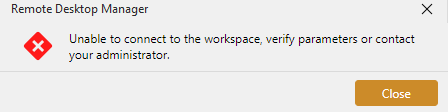
Thanks
f2c9244b-686f-4fea-8b10-f1422b1e2139.png
Hello mog54,
Thank you for the screenshot. It tells us more than the description could, and it narrows things usefully.
That message is Remote Desktop Manager's own, and it is not the sign-in failing. RDM shows it only when the workspace was already offline and it is trying to go back online: that attempt is refused before any sign-in happens, which is why closing it and going online again works. So what the screenshot tells us is that the workspace had dropped offline some time earlier. That drop is the thing to chase. Being asked to sign in again is what follows it, not what causes it.
Two values would tell us where to look, and I would like to see them before anything is changed.
- In RDM, open the properties of your Devolutions Server workspace, go to the Advanced tab, and tell me what Ping online method is set to.
https://docs.devolutions.net/rdm/getting-started/workspaces/workspace-types/native-workspaces/devolutions-server/#advanced
2.In the DVLS web interface, open Administration > Server settings > Security, and tell me whether Force token public IP validation is ticked.
The first decides whether RDM tests the workspace before going online, and that test is strict: it allows two seconds and accepts only a plain OK response. The second is a server setting that refuses a session which is otherwise still valid, when your public IP address changes. Please do not change either one yet. The first is also what RDM uses to decide whether to stay online through a brief error, so switching it off is not automatically an improvement.
There is one change worth making now, and it is easy to undo. On that same Advanced tab, Connection timeout is 15 seconds by default. Set it to 60. That is how long the client waits for the server to answer before it gives up, and a call that gives up is one of the things that can put the workspace offline in the first place. It will not change the check above, which has its own fixed two seconds.
If that does not settle it, the next place to look is your RDM log. Whatever puts the workspace offline is written there first, so the log should name it. I would rather you did not post a log on a public forum, so at that point I will open a support case for you and we can continue by email, where you can send the RDM log and, if we need it, one from the server as well.
On the certificate, leave it as it is for now. Trusting it could stop the message appearing and take the evidence with it. Once you have sent those two values, open your DVLS address in Edge or Chrome on each of the three machines and tell me whether it loads without a warning.
Kind regards,
Michel
Michel Audi
Hello,
1) The "Ping online method" is Web request
2) The "Force token public IP validation" is not ticked
Maybe the way i want to use the RDM & DVLS is wrong
For one of my RDM client, i want to use RDM in offline mode almost all the time, and i need to connect to a VPN to synchronize with DVLS
For other RDM client, to be connected almost all of the time.
And for this use case, i wish to not need to re authenticate at every connection to DVLS.
Is this possible?
Thanks
Hi,
Your use case is fine.
Your settings rule out the usual causes of timed sign-ins. The token lifetime is at its default, nothing is set to disconnect the workspace, and you use local accounts. What stands out is that the workspace is already offline when the message appears, since you have to go online again before the sign-in starts. I suspect it's going offline in the background, and the sign-in follows from that.
With Ping online method on Web request, RDM checks the server before treating the workspace as online. If that check fails, for example while the VPN is down or still connecting, or after the machine wakes from sleep, the workspace can drop offline.
To test this, could you set Ping online method to None on one client (workspace properties > Advanced) and tell us whether the prompts stop there?
Best regards,
Marc-Antoine Dubois
Hello,
I change it few days ago to none and the behavior is the same.
I'm working on updating DVLS server to the latest version.
Also, i got an "issue" when login. after entering creds and validating. The login process takes between 10 and 15 second before success.
Is it "normal" authentication time?
Thanks
Hi,
Sounds good.
10-15 seconds is on the higher-end, I'd say. It mainly depends on the quantity of entries, if you have 500 entries, I'd say it's unexpected, but if you have above 7000, I'd be less surprised.
The only way to know for sure is with the DPS_Main logs, you can enable them by following these steps: https://docs.devolutions.net/server/knowledge-base/how-to-articles/enable-the-devolutions-server-log-files
Feel free to send them to me in a DM and I'll have a look.
Best regards,
Marc-Antoine Dubois
Hello,
I upgraded DVLS to the latest version. The authentication behavior seems still to happen.
For the login time, i didn't check it after upgrade. The vault is about to reach 1300 entries.
Thanks
Hello,
My guess is the connection to the DVLS server at the startup of RDM is causing the issue.
I launched an RDM on a PC that I haven't used for 13 days. It can always reach the DVLS server (no external VPN needed), and I didn't need to re-authenticate.
In between, the DVLS has been started, stopped, and upgraded. It's a situation where it could legitimately ask to re-authenticate.
Thanks
Hi,
Thanks for the extra test. I've sent you a private message listing the logs that would help us see what triggers the re-authentication. We'll update this thread with the relevant findings so others running into the same behavior can benefit.
Best regards,
Marc-Antoine Dubois