
patrickpower
Copy Username and Password" button not working after update to 2026.3.5.0
Hello,
Thank you for reporting the issue. I was unable to reproduce it on my end, so I would like to gather a little more information.
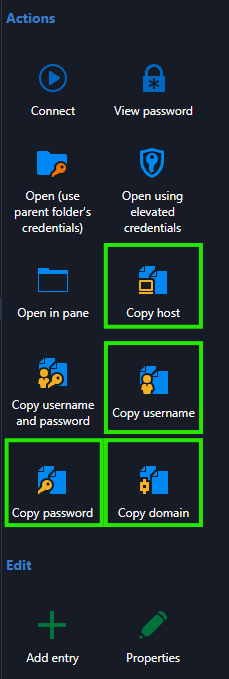
Do the separate Copy Username and Copy Password actions work correctly when the combined Copy Username and Password action does not?
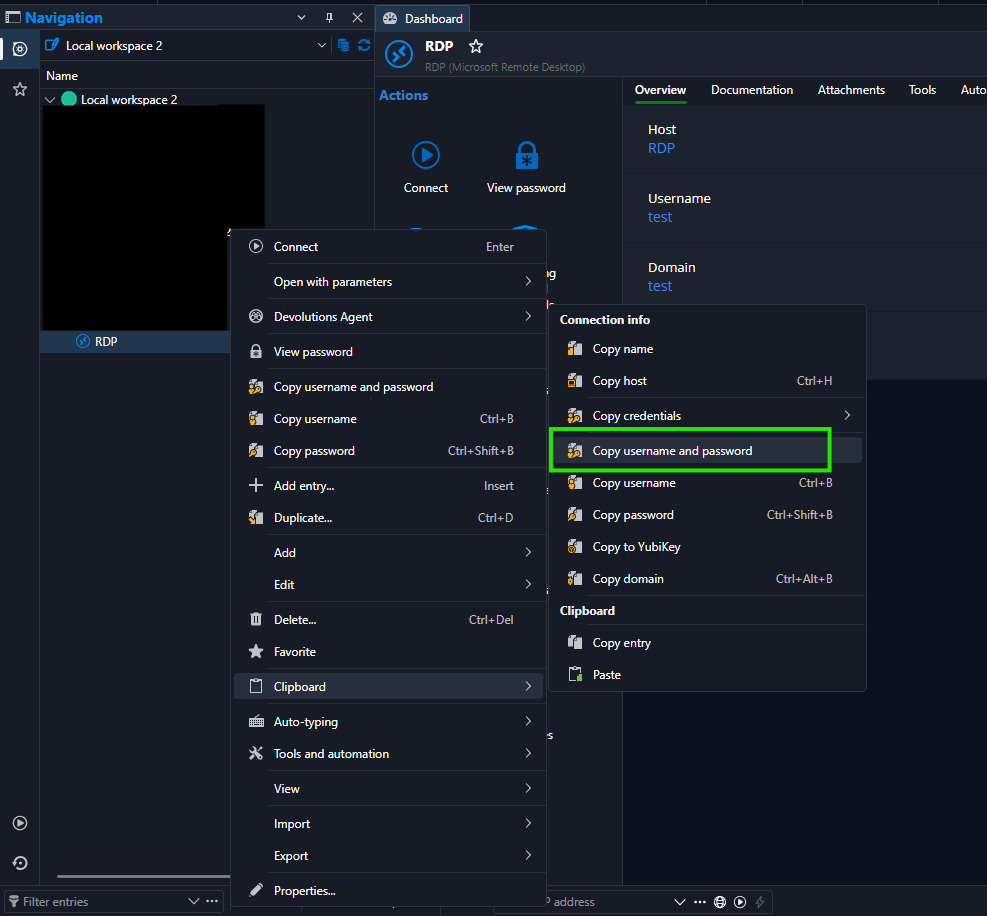
When the issue occurs, does Copy Username and Password work when launched from the session’s context/menu options rather than the toolbar/button?
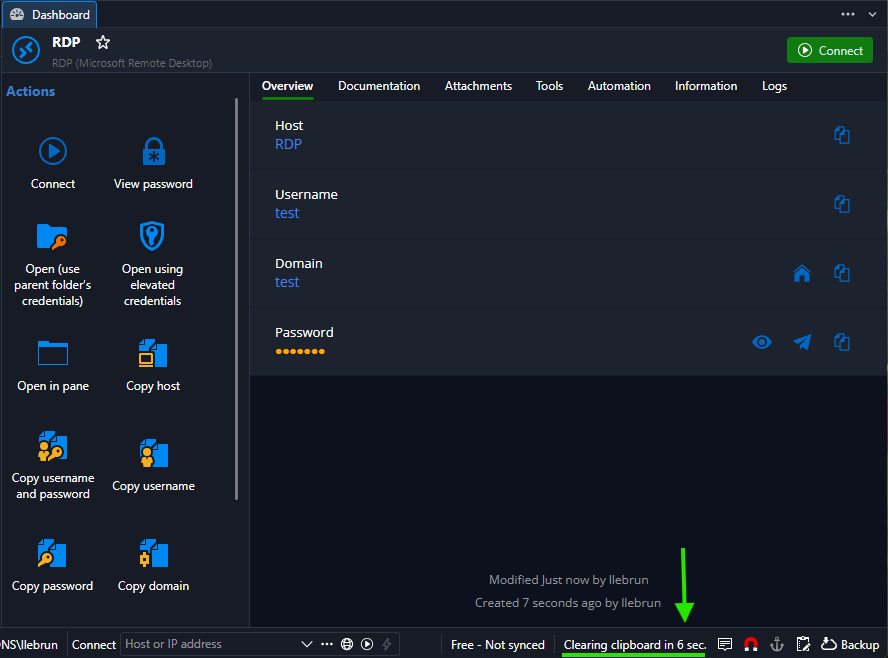
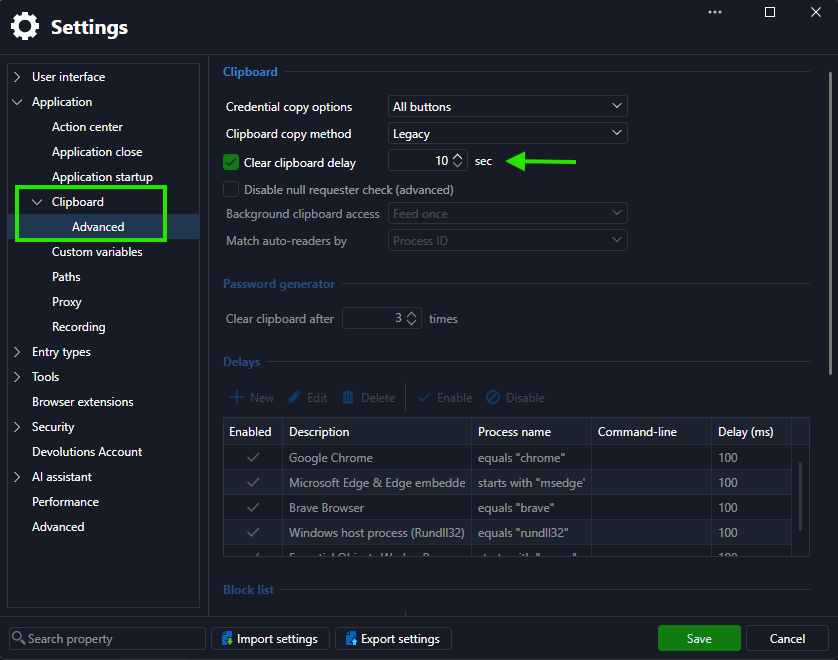
Could you also verify the configured clipboard-clearing delay? RDM can clear copied credentials from the clipboard after a configurable interval to avoid leaving sensitive information there. Is it possible that the copied content is cleared before pasting it?
Since the behavior differs between users and can temporarily resolve after resetting the local RDM folder, these details will help us narrow down the cause.
Best Regards,
Léon Le Brun
@Léon Le Brun
Remote Desktop Manager 2026.3.17.0 64-bit (PreJIT)
Runtime: .NET 10.0.14
Platform: Microsoft Windows 10.0.26100
Workspace: Local Data Source
Allocated memory: 554 MB
When I right click and Select "copy username" i see the popup that says username copied and if I paste in notepad it properly pastes
When I right click and Select "copy password" i see nothing happen, no popup, no timer, and if I paste in notepad, nothing happens
When I right click and Select "copy username & password " i see the popup that says username copied(no password mentioned) and if I paste in notepad it properly pastes username only
Multiple instance broadcast shortcut not working
Pretty sure I had it on Default in 2026.2 but when it was not working in 2026.3 I also tried Global which also did not work.
You were releasing new updates for 2026.3 fairly rapidly and I finally decided to report this issue while on 2026.2(pre-.16).
I have since updated to .16. I just went back in to follow your steps with a fresh launch and noticed both were already on Default:
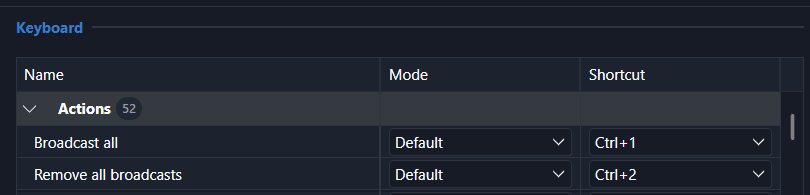
So I opened 3 instances. connected multiple in each. toggle on/off shortcuts worked for all 3 instances (independent from each other based on active as I would expect). Thanks
Multiple instance broadcast shortcut not working
Thank you for the detailed steps. This comes from how Windows handles global keyboard shortcuts.
When a shortcut is set to Global mode, RDM registers it with Windows as a system-wide hotkey. Windows lets only one application own a given key combination at a time. The first RDM instance you open claims it. When the 2nd and 3rd instances try to register the same combination, Windows refuses. From then on, Windows sends that key combination to the first instance only, even when another instance has focus. So pressing the shortcut in instance 2 actually toggles broadcast in instance 1’s sessions.
A few ways to work around it:
Use a different shortcut in each instance. For example, Ctrl+Alt+B in the first and Ctrl+Alt+N in the second. This only works if each instance uses its own configuration.
(not tested) Switch the broadcast shortcuts away from Global mode (File > Settings > User interface > Keyboard). Each instance then handles the shortcut itself while its window is active. Check that it still fires with focus inside your sessions.
Keep toggling broadcast from the menu in the other instances, as you do today.
Best regards,
@Stéfane Lavergne
This used to work in 2026.2. no longer works in 2026.3
I have switched from Global to Default. Same result. works in first instance but not additional instances
"When not in session" appears to use Windows defaults (CTRL+1 goes to tab1 and CTRL+2 goes to tab2 etc)
Multiple instance broadcast shortcut not working
Open RDM instance and open sessions. set broadcast on/off shortcut keyboard.
shortcut works.
Open a 2nd instance of RDM and open sessions. keyboard shortcuts do not work in this instance.
Open a 3rd instance of RDM and open sessions. keyboard shortcuts do not work in this instance either.
Keyboard shortcuts continue to work in the 1st/original instance only.
Workaround is manually turn on/off broadcast in each sessions within additional instances.
Copy Username and Password" button not working after update to 2026.3.5.0
Used to work in 2026.2 but has not worked for me in 2026.3. May have missed the magical 2026.3.10 fix but as others reported broken in 2026.3.13
multiple session autofocus prompt
confirmed resolved in 2026.3.12.0
tile vertical has a sizing of its own
Hello,
Thank you for being so patient!
If possible, could you update your RDM to the latest version (2026.3.12.0) and see if the problem persists? This version should resolve your issue.
Latest Version: Download RDM
If the problem persists after the update, please let us know so we can inform our development team.
Best regards,
@Maxim Robert
confirmed
tile vertical has a sizing of its own
Hello,
Thank you for the follow-up.
You are correct, the issue where focus is not automatically placed on the open multiple-entry prompt is still present in version 2026.3.10.0.
I have requested that the internal case be reopened so the team can investigate and work on this issue again.
I look forward to your reply.
Best regards,
@Jacob Lafrenière
https://forum.devolutions.net/topics/56559/multiple-session-autofocus-prompt
losing shell focus when triggering typing macros
confirmed resolved:
Remote Desktop Manager 2026.3.10.0 64-bit (PreJIT)
Runtime: .NET 10.0.12
Platform: Microsoft Windows 10.0.26100
Workspace: Local Data Source
Allocated memory: 477 MB
multiple session autofocus prompt
I CTRL+ select 3 ssh connection from nav menu. I get prompted to confirm i want to open 3.
This prompt does not get auto focus so I cant press enter to confirm, i have to use mouse.
Remote Desktop Manager 2026.3.10.0 64-bit (PreJIT)
Runtime: .NET 10.0.12
Platform: Microsoft Windows 10.0.26100
Workspace: Local Data Source
Allocated memory: 446 MB
tile vertical has a sizing of its own
yes appears to be resolved. the additional issue still is not. I will make a new post for it
"I CTRL+select 3 ssh connection from nav menu. I get prompted to confirm i want to open 3.(btw, this does not get auto focus so I cant press enter to confirm, i have to use mouse)"
tile vertical has a sizing of its own
Hello,
Thank you for reaching out regarding this matter.
Could you please share screenshots of the issue? This will help me better understand what you are experiencing and assist you further.
I look forward to your reply.
Best regards,
@Jacob Lafrenière
I set view as vertical, and then I CTRL+select 3 ssh connection from nav menu. I get prompted to confirm i want to open 3.(btw, this does not get auto focus so I cant press enter to confirm, i have to use mouse... new issue)
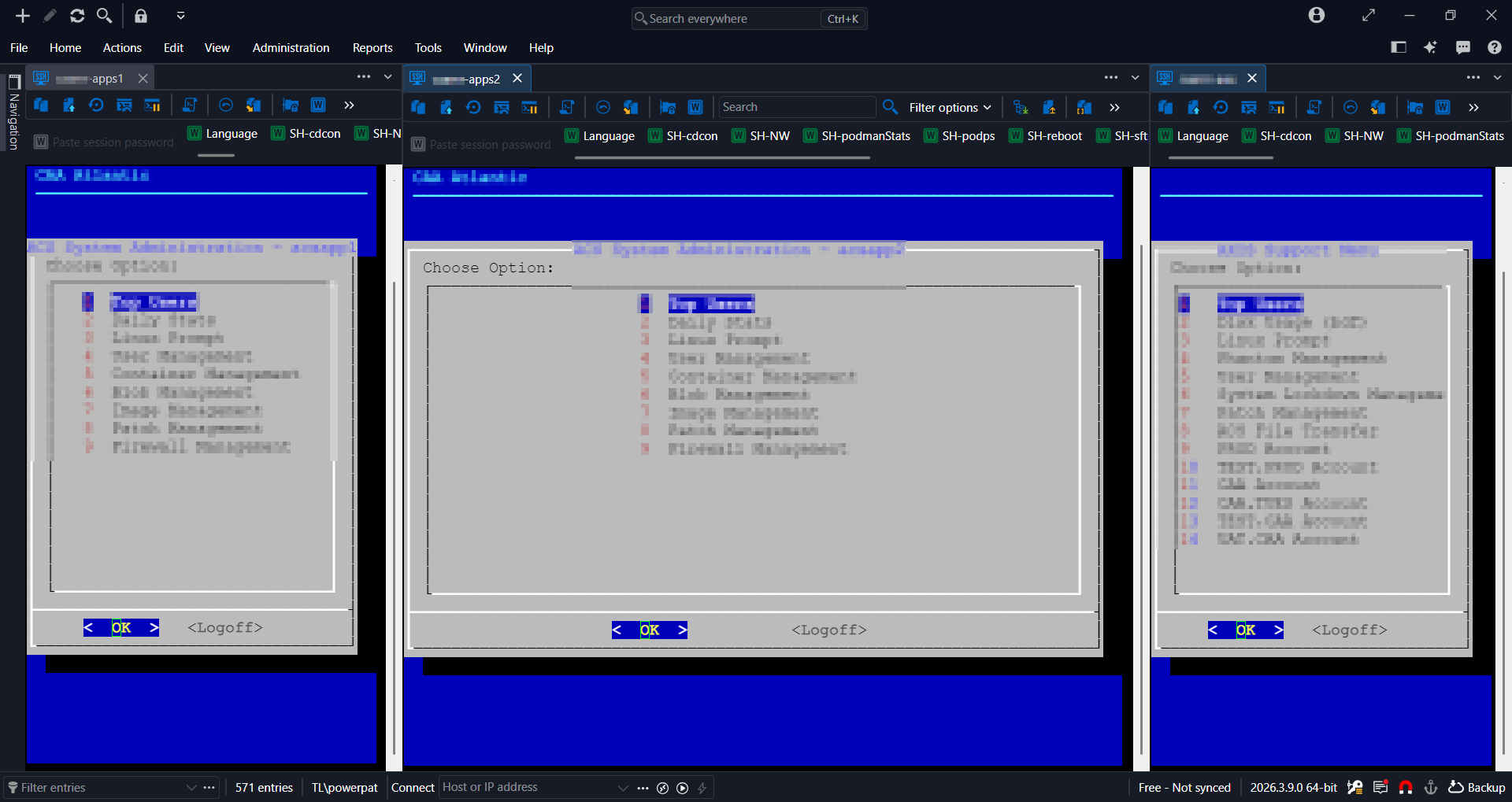
Then all 3 servers launch and connect and this is how they display instead of 3 equal windows:
****** 1= 1/4 ****************** 2= 1/2 ***************** 3= 1/4******
Can no longer expand the Navigation pane by clicking anywhere on the bar
same. also on latest version the navigation pane opens under a connected SSH session(have not tested other sessions):
Remote Desktop Manager 2026.3.9.0 64-bit (PreJIT)
Runtime: .NET 10.0.12
Platform: Microsoft Windows 10.0.26100
Workspace: Local Data Source
Allocated memory: 278 MB
tile vertical has a sizing of its own
before when you tiled vertically it would be equal sized windows depending on amount of space vs how many connection windows open.
now over last couple versions it will sometime make the middle one about 1/2 the screen. left one about a quarter and right one a quarter. toggling cascade and back to vertical corrects it
Remote Desktop Manager 2026.3.8.0 64-bit (PreJIT)
Runtime: .NET 10.0.12
Platform: Microsoft Windows 10.0.26100
Workspace: Local Data Source
Allocated memory: 593 MB
losing shell focus when triggering typing macros
when in ssh shell, and trigger a typing macro it triggers and runs the typing but then I lose focus of the shell, so If I press enter to submit what the macro typed, it types it again.
This didn't happen last week, but has after the past couple updates.
Remote Desktop Manager 2026.3.8.0 64-bit (PreJIT)
Runtime: .NET 10.0.12
Platform: Microsoft Windows 10.0.26100
Workspace: Local Data Source
Allocated memory: 593 MB
2026.3.8 - RDP sessions randomly going blank when switching tabs.
same issue, have to hold mouse to highlight whats otherwise not showing
ssh linux session terminal is off screen
Hello,
Thank you for the screenshots. We are trying to reproduce the issue internally at the moment.
I have a couple of questions to help pinpoint the issue:
Does this happen with every SSH session?
Does this happen instantly when you open the session, or does the issue appear during your work in the SSH?
What is your display scaling?
Do you use the SFTP feature with your SSH entry?
Best regards,
@Antoine Mauger
Does this happen with every SSH session? No, have not found a pattern yet. only noticed when you sent previous post so i went to the check and had an existing session open and noticed it.
Does this happen instantly when you open the session, or does the issue appear during your work in the SSH? It did not happen on a sessions I opened but it was happening on a session that was already open. have not found a pattern yet or if its time based or switching screens.
What is your display scaling? Primary laptop monitor is 15" 1920x1080 125% | 2nd monitor is 27" 1920x1080 125%
Do you use the SFTP feature with your SSH entry? no
ssh linux session terminal is off screen
Hello,
can you check if the issue is still happening with 2026.3.8.0? A couple of fixes related to the display of SSH was made since 2026.3.5.0.
Best regards,
@Antoine Mauger
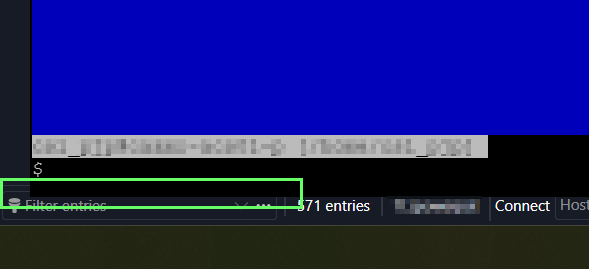
its now in front which for use that is better. but it now overlaps over the status bar:
ssh linux session terminal is off screen
When (using windows RDM 2026.3.5) to connect to a Linux ssh vm the shell prompt is behind the status bar at the bottom:
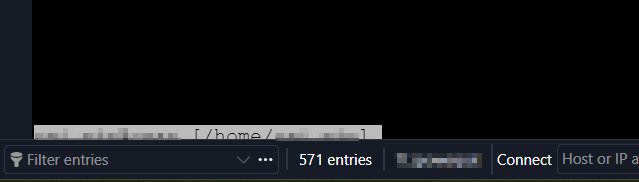
This seems to only be when in Settings, Main Header is set to toolbar or menu bar. not ribbon (why are ribbon button so massive now, way too much wasted space now).
workaround for toolbar or menu bar, set height from default 500 to 400
EDIT: workaround was a false possitive. 400 isnt an available option and it reverts to 500 and only sometimes fixed the issue
new PIN CODE option preventing login
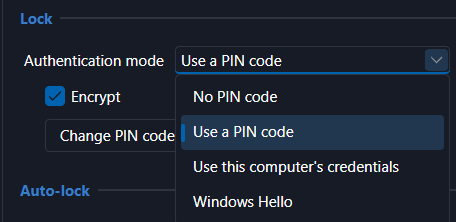
It would also appear the setting was set to PIN and local password option is gone (even though the cfg file said LocalPassword):
new PIN CODE option preventing login
Hello,
Could you please try entering your password as the PIN code? We have just renamed the application password to PIN code to align with Windows, but it's exactly the same and it's not just numbers. Sorry for the confusion.
Regards
@David Hervieux
that works except my windows uses a password, not a pin
new PIN CODE option preventing login
UPDATE: for anyone else in the boat... my localpassword still works even though its prompting for pin.
cosmetic bug
new PIN CODE option preventing login
I have been using RDM for years now and it has always been set to password in which I get prompted at launch.
Yesterday included I used and was prompted for password and was successful.
Today Launching I get prompted for a PIN CODE. I did not set a pin code nor did I even go into setting to change authentication method yesterday or today. I restarted laptop and same.
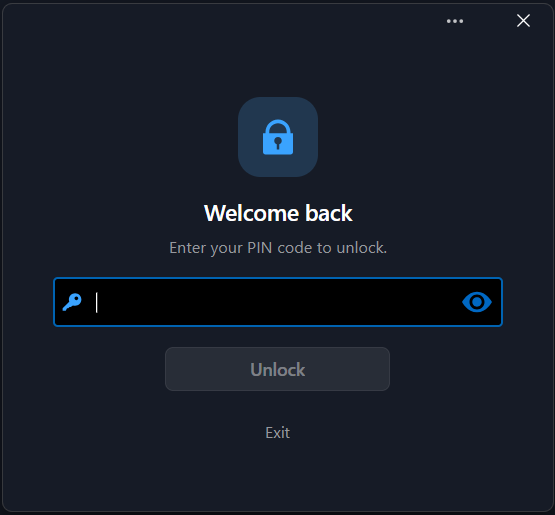
I do see a devolution agent update and remote desktop manager was installed yesterday (that I did not update, i have it set to prompt):


Current version of RDM showing on splash screen at launch (before pin code prompt):
How can I switch it back to password from the back end?
EDIT: checked %LocalAppData%\Devolutions\RemoteDesktopManager.cfg and it says:
<ApplicationPasswordMode>LocalPassword</ApplicationPasswordMode>
Enter the private key password prompt
Hello everyone,
A quick update on this issue. After working with one of the affected clients in a support session, we were able to reproduce the behavior on my end.
I have submitted a bug report to our development team and will update this thread once we have more information on a fix.
Thanks for your patience.
@Carl Marien
any updates on this one?
I now have multiple keys added.
the original one is still prompting on first launch, I enter password and it goes away.
If I open a 2nd instance of RDM, all 3 keys now prompt for password (probably because the first instance loaded them into key manager).
If I open a 3rd instance, again, all 3 keys prompt for password on launch(right after app password).
Rapid Switching of Tabs on Own
I have been plagued with this for a bit now and starting to get annoying.
If i open one or 2 ssh sessions there isnt an issue.
If i open sessions 1 at a time its usually not an issue.
But if I CtRL select 4 sessions in left navigation and open all at once. confirm yes on popup I almost always have this issue.
It rapidly cycles through the 4 sessions. so as I am trying to type it appears as a lag because it takes some of the typed letters and get them typed but then pauses as it cycles through the other 3 sessions before returning and inputting the next few characters (from buffer).