Multiple instance broadcast shortcut not working

Open RDM instance and open sessions. set broadcast on/off shortcut keyboard.
shortcut works.
Open a 2nd instance of RDM and open sessions. keyboard shortcuts do not work in this instance.
Open a 3rd instance of RDM and open sessions. keyboard shortcuts do not work in this instance either.
Keyboard shortcuts continue to work in the 1st/original instance only.
Workaround is manually turn on/off broadcast in each sessions within additional instances.
All Comments (5)
Thank you for the detailed steps. This comes from how Windows handles global keyboard shortcuts.
When a shortcut is set to Global mode, RDM registers it with Windows as a system-wide hotkey. Windows lets only one application own a given key combination at a time. The first RDM instance you open claims it. When the 2nd and 3rd instances try to register the same combination, Windows refuses. From then on, Windows sends that key combination to the first instance only, even when another instance has focus. So pressing the shortcut in instance 2 actually toggles broadcast in instance 1’s sessions.
A few ways to work around it:
Use a different shortcut in each instance. For example, Ctrl+Alt+B in the first and Ctrl+Alt+N in the second. This only works if each instance uses its own configuration.
(not tested) Switch the broadcast shortcuts away from Global mode (File > Settings > User interface > Keyboard). Each instance then handles the shortcut itself while its window is active. Check that it still fires with focus inside your sessions.
Keep toggling broadcast from the menu in the other instances, as you do today.
Best regards,
Stéfane Lavergne
Thank you for the detailed steps. This comes from how Windows handles global keyboard shortcuts.
When a shortcut is set to Global mode, RDM registers it with Windows as a system-wide hotkey. Windows lets only one application own a given key combination at a time. The first RDM instance you open claims it. When the 2nd and 3rd instances try to register the same combination, Windows refuses. From then on, Windows sends that key combination to the first instance only, even when another instance has focus. So pressing the shortcut in instance 2 actually toggles broadcast in instance 1’s sessions.
A few ways to work around it:
Use a different shortcut in each instance. For example, Ctrl+Alt+B in the first and Ctrl+Alt+N in the second. This only works if each instance uses its own configuration.
(not tested) Switch the broadcast shortcuts away from Global mode (File > Settings > User interface > Keyboard). Each instance then handles the shortcut itself while its window is active. Check that it still fires with focus inside your sessions.
Keep toggling broadcast from the menu in the other instances, as you do today.
Best regards,
This used to work in 2026.2. no longer works in 2026.3
I have switched from Global to Default. Same result. works in first instance but not additional instances
"When not in session" appears to use Windows defaults (CTRL+1 goes to tab1 and CTRL+2 goes to tab2 etc)
Odd, I will need to ask QA to investigate and reproduce the issue on my end. I don't understand how or why this could have worked before.
I will get back to you once I find something.
Best regards,
Stéfane Lavergne
Hello Patrick,
Thanks for the details. Our QA team tested 2026.2.20 and 2026.3.16. In Global hotkey mode, the shortcut only works in the first instance on both versions. Windows lets only one application own a global key combination, so the other instances can’t register it. In Default mode, it worked in every instance on both versions, so something in your setup must be different.
Could you check these:
Close all RDM instances after you switch the shortcut to Default. The first instance keeps the global hotkey until it closes.
Make sure the broadcast shortcut mode is Default, not “When not in session”. That mode is skipped while the focus is inside a session.
In each instance, check the keyboard grab icon in the status bar. It must be on, or Default shortcuts are ignored.
If it still fails, please send your exact version (Help > About), the session type, and a short screen recording.
Best regards,
Stéfane Lavergne
Pretty sure I had it on Default in 2026.2 but when it was not working in 2026.3 I also tried Global which also did not work.
You were releasing new updates for 2026.3 fairly rapidly and I finally decided to report this issue while on 2026.2(pre-.16).
I have since updated to .16. I just went back in to follow your steps with a fresh launch and noticed both were already on Default:
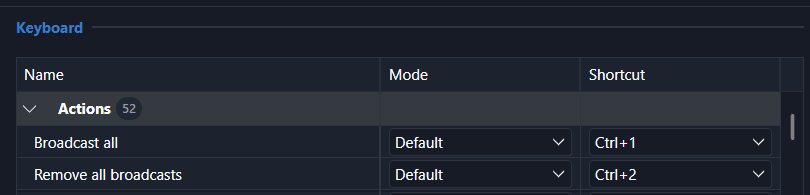
So I opened 3 instances. connected multiple in each. toggle on/off shortcuts worked for all 3 instances (independent from each other based on active as I would expect). Thanks