Can no longer expand the Navigation pane by clicking anywhere on the bar
Can no longer expand the Navigation pane by clicking anywhere on the bar

Hi,
I just updated to the 3.x version on one of my machines and noticed this issue. With the 2.x version, and the navigation pane shrunk/hidden/closed to the left side of the screen, I was able to click anywhere on the vertical bar to pop it out. This seems to have been reverted in the 3.x version so that I now have to click directly on the word "Navigation" to expand it. Could this be put back to how it was on the 2.x version?
When moving quickly, it's a lot easier to click anywhere on the bar then to click directly on the word up in the corner.
Thanks
26d43680-12ea-4ed9-85ca-0efbb670cb18.png
All Comments (7)
same. also on latest version the navigation pane opens under a connected SSH session(have not tested other sessions):
Remote Desktop Manager 2026.3.9.0 64-bit (PreJIT)
Runtime: .NET 10.0.12
Platform: Microsoft Windows 10.0.26100
Workspace: Local Data Source
Allocated memory: 278 MB
Hi,
Thank you for reporting this issue.
This bug has already been identified, and our team is currently working on a fix. As soon as it is fixed and the release is available, we will let you know.
Thank you for your patience.
Best regards,
Alexis Geller Peiro
Hello,
We should have a fix for this in the upcoming 2026.3.10.0.
Best Regards,
Michaël Beaudin
Hello,
Thank you for being so patient!
If possible, could you update your RDM to the latest version (2026.3.10.0) and see if the problem persists? This version should resolve your issue.
Latest Version: Download RDM
If the problem persists after the update, please let us know so we can inform our development team.
Best regards,
Maxim Robert
Hi. It does function properly now. However, there is no longer a dividing line between the Nav bar and what's next to, and they are the exact same color,so it's harder to know how far over I need to be with my mouse before I click.
New: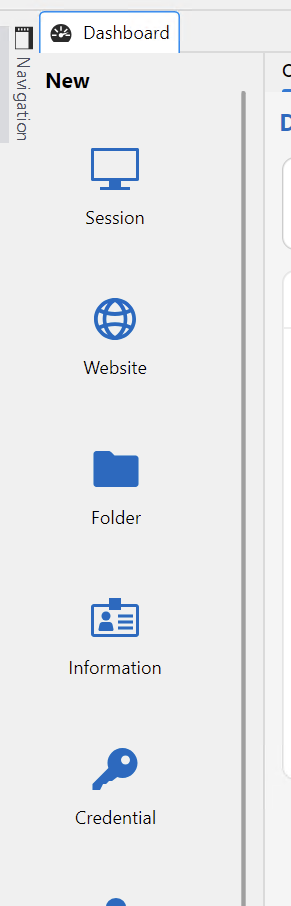
Old: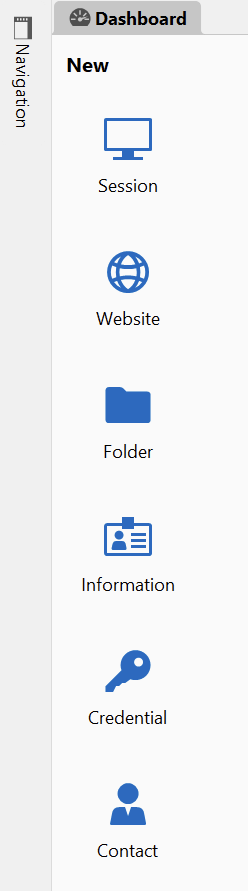
49f0376d-7e77-4c41-b53c-ea7b0de95294.png
abef7479-3208-491e-a8e1-10efbf64a69c.png
Hello,
We'll create a new ticket for this and let you know when its fixed.
Best Regards,
Michaël Beaudin
Hello,
I've fixed the clarity issue with a collapsed navigation pane. This will take effect with the upcoming 2026.3.11 version.
Regards,
Jafran Majeau