ssh linux session terminal is off screen

When (using windows RDM 2026.3.5) to connect to a Linux ssh vm the shell prompt is behind the status bar at the bottom:
This seems to only be when in Settings, Main Header is set to toolbar or menu bar. not ribbon (why are ribbon button so massive now, way too much wasted space now).workaround for toolbar or menu bar, set height from default 500 to 400
EDIT: workaround was a false possitive. 400 isnt an available option and it reverts to 500 and only sometimes fixed the issue
26687b49-5264-4dca-93b5-42edd1dafb3b.png
All Comments (5)
Same here, this release brings multiple issues in basic functions ..
Hello,
can you check if the issue is still happening with 2026.3.8.0? A couple of fixes related to the display of SSH was made since 2026.3.5.0.
Best regards,
Antoine Mauger
Hello,
can you check if the issue is still happening with 2026.3.8.0? A couple of fixes related to the display of SSH was made since 2026.3.5.0.
Best regards,
@Antoine Mauger
its now in front which for use that is better. but it now overlaps over the status bar: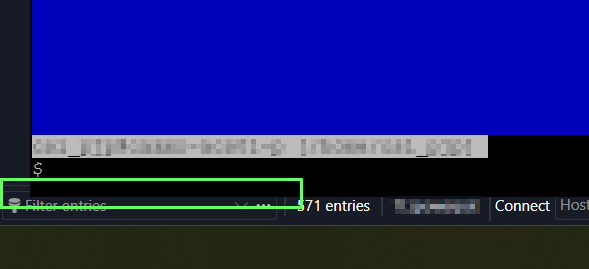
a7d981c5-4819-4e67-8841-83ba05322efb.png
Hello,
Thank you for the screenshots. We are trying to reproduce the issue internally at the moment.
I have a couple of questions to help pinpoint the issue:
- Does this happen with every SSH session?
- Does this happen instantly when you open the session, or does the issue appear during your work in the SSH?
- What is your display scaling?
- Do you use the SFTP feature with your SSH entry?
Best regards,
Antoine Mauger
Hello,
Thank you for the screenshots. We are trying to reproduce the issue internally at the moment.
I have a couple of questions to help pinpoint the issue:
- Does this happen with every SSH session?
- Does this happen instantly when you open the session, or does the issue appear during your work in the SSH?
- What is your display scaling?
- Do you use the SFTP feature with your SSH entry?
Best regards,
- Does this happen with every SSH session? No, have not found a pattern yet. only noticed when you sent previous post so i went to the check and had an existing session open and noticed it.
- Does this happen instantly when you open the session, or does the issue appear during your work in the SSH? It did not happen on a sessions I opened but it was happening on a session that was already open. have not found a pattern yet or if its time based or switching screens.
- What is your display scaling? Primary laptop monitor is 15" 1920x1080 125% | 2nd monitor is 27" 1920x1080 125%
- Do you use the SFTP feature with your SSH entry? no