RDMTinkerer
2026.3.8.0 Sucks
@David Hervieux Okay David, are you going to apply the same rules here? Or is this okay because he thinks you do a good job?
@rdearman
Should I stand barely while receiving insults in my face?
You're really having a problem. Go discharge somewhere.
2026.3.8.0 Sucks
I think you should see your doctor and get some pills. You're gonna get heart attack, dude.
Offline mode when using Cloud does not trigger properly when network connection fails
I just wanted to raise your awareness of the issue. Take your time to redesign/improve that.
The ultimate goal is to have a rock solid stable RDM which is able to work reliably with cached copies of the hubs/vaults without Internet access, with only LAN access, giving uninterrupted and reliable access to cached entries.
Just remember that entries store
credentials/passwords
SSH keys
documentation
addresses/ports of the devices/servers/IoT etc.
If any of this is unavailable during an internet outage or network reconfiguration, it immediately makes it very hard to fix things.
Thanks!
Offline mode when using Cloud does not trigger properly when network connection fails
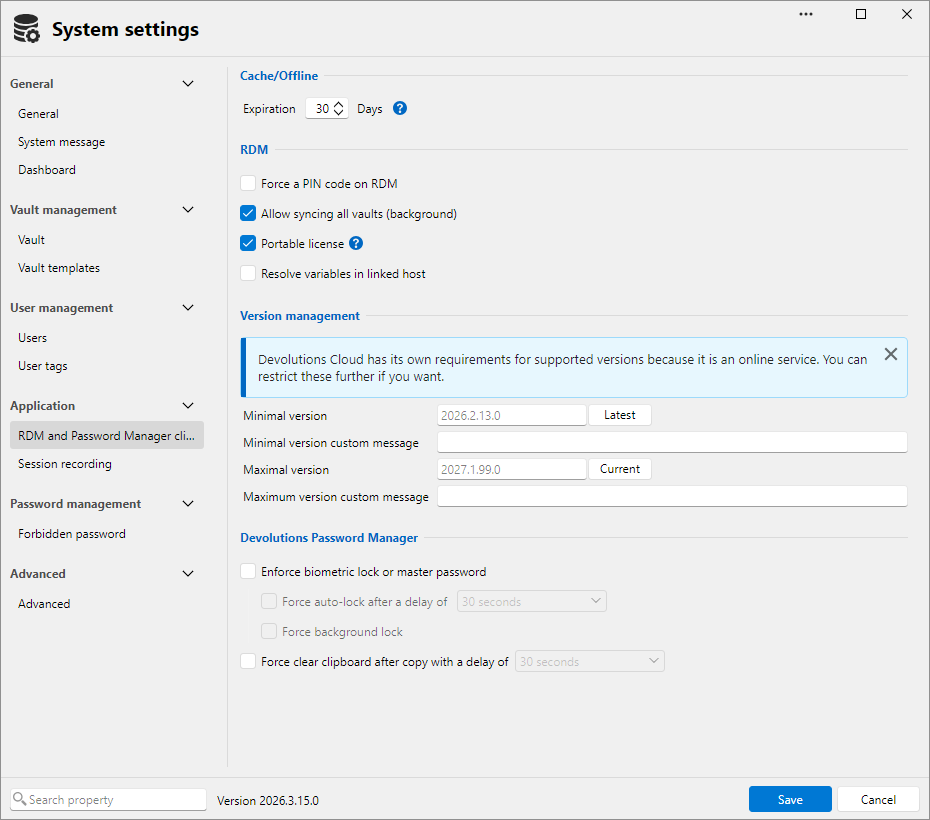
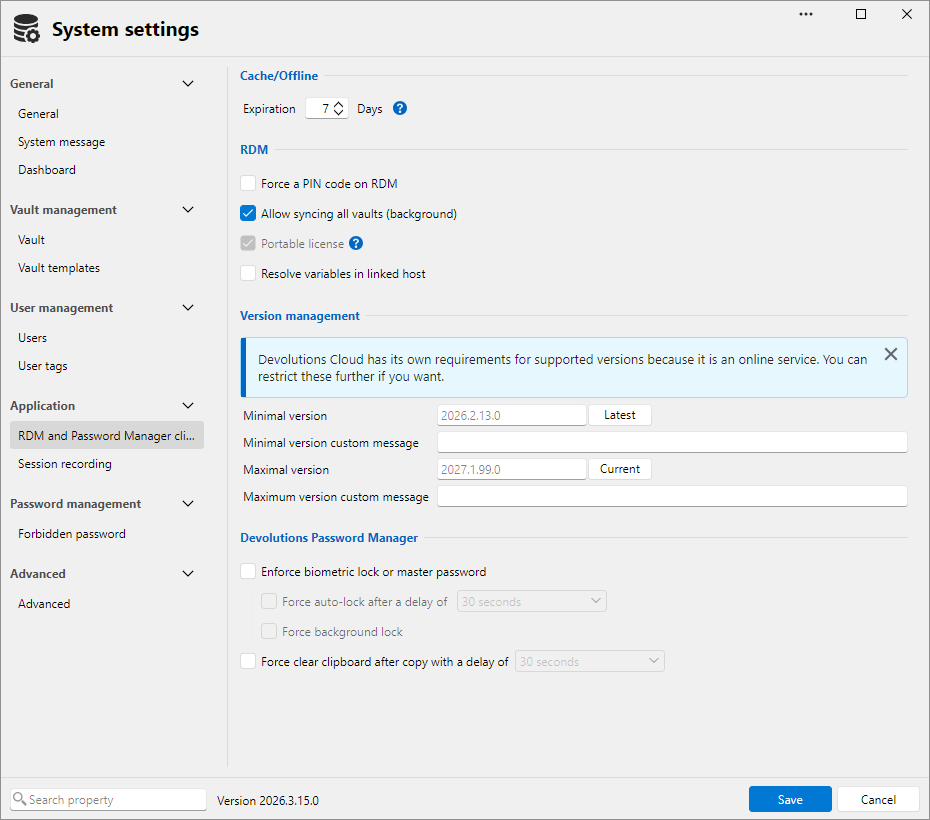
Thanks for your elaborate response and advices on changing settings. Most settings were set according to your screenshots (disregarding the number of days to expiration).
I could certainly show these things live if you want, I do have a VM where I set up RDM in the same way I use every day, so I can simulate network disconnection easily without losing e.g. Meet/Zoom/Teams call.
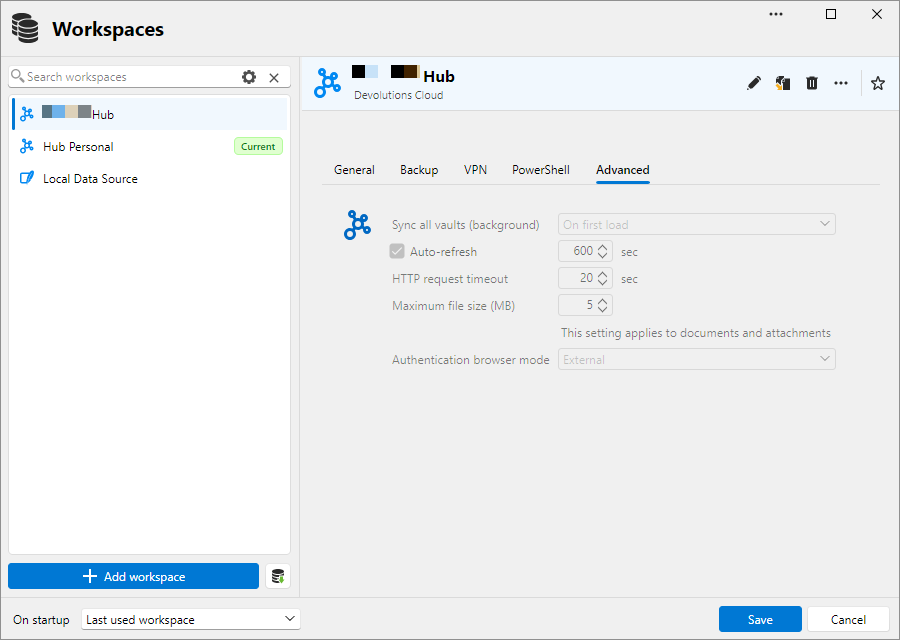
Unfortunately changing settings doesn't change much. You can check it by disconnecting your wifi and then going to the workspace selector in the Navigation bar. RDM will hang for some 30 seconds, because it wants to reach the server, and is doing that pretty much in UI thread (or those are the symptoms). After those 30 seconds it shows the dialog suggesting to go offline. If you cancel that dialog (because I don't really care much about in which mode RDM wants to be in, especially when working under stress, when fixing an outage), then you no longer see your entries.
Do fiddle with that. Not the usual way that you used to, but with more random clicking, multiple workspaces, disabling/enabling the network (just to simulate lost connection to the server - or the DNS, not the entire network).
Or let me know if you want to see my issues live.
Offline mode when using Cloud does not trigger properly when network connection fails
BTW I don't have any open tickets as of now. Just tried to raise awareness a few times, a few changes have been made, but the fundamental philosophy of caching and synchronizing data did not yet change that much, unfortunately.
Offline mode when using Cloud does not trigger properly when network connection fails
The issue is right here as we're speaking. I don't rule out entirely that I'm doing something wrong, but have no idea what.
Consider the following scenario: one workspace is a paid team hub, the second is the free personal hub, and the third is a local SQLite-based data source. Assume you had it for several days, and you switched between them a few times at least.
Now open RDM. After it's open just disconnect your computer's network (by switching off Wi-Fi or unplugging Ethernet cable).
Now try to switch to another hub. It will not work. The best you can get is the "loading sessions from workspace" message and the spinner, and hanging RDM, and it may load entries one time, or not even that.
Then try to switch to another hub or local data source. The only thing that'll work reliably is switching to the local data source. Then try to switch from local data source back to hubs, and maybe switch between vaults in a hub, while network connection is unavailable. You'll see it doesn't work.
Now you can reconnect to the network and stop the experiment.
Note that the solution where I consciously have to predict that my internet may go down and switch to offline mode, and then remember to bring it back manually to online mode, is not a user-friendly, acceptable solution. RDM must by default be able to work when internet connectivity is intermittent. I am okay (of course) with it disconnecting my sessions, when I break the configuration of the nearby switch during my work, but it should preserve and cache my entries, so that I can connect to other devices.
Thanks.
RDP v2026.3.15.0 - keyboard shortcuts for tab navigion (previous, next) sometimes are not functional
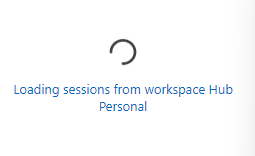
No no, it's the opposite. It does work for me when in SSH session, but stops working on the Dashboard tab.
RDP v2026.3.15.0 - keyboard shortcuts for tab navigion (previous, next) sometimes are not functional
I'm not sure if this is the same issue that I have. My issue is: when I open several SSH sessions, I am able to switch between them using CTRL+TAB, or CTRL+SHIFT+TAB. This is what I expect.
But when I press CTRL+TAB when the rightmost session is active (or CTRL+SHIFT+TAB when the leftmost session is active), it switches to the Dashboard, and then it is stuck at Dashboard - those above keys don't work anymore. I'd like to be able to just switch away from the Dashboard to the session next to it by pressing CTRL+TAB, and it should be the default behavior.
This is currently 3.15, but I think it was the same in 3.16.
Thanks in advance.
Annoyance: documentation editor always starts with "tutorial" and in WYSIWYG mode
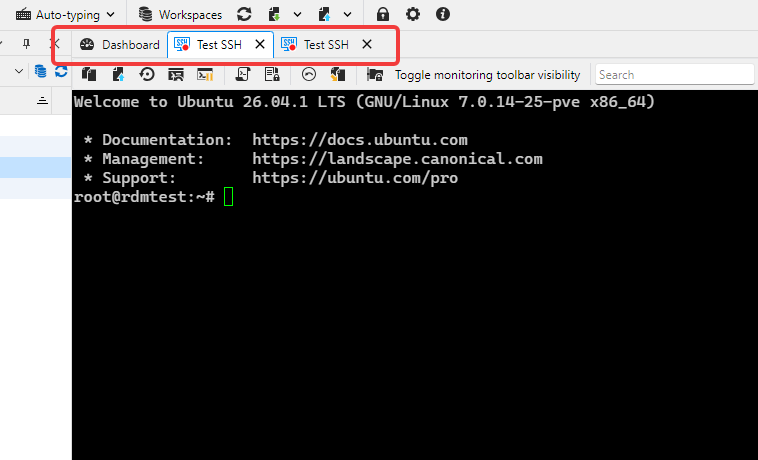
When I add a new documentation page for an entry, it's always "Tutorial" by default, even if I change it to Empty and click "Add". I'd prefer if it remembered the last template.
It also always launch it in WYSIWYG mode, despite me selecting Markdown documentation type. I'd prefer it use Markdown editor always, or remember the previously selected editor. That info may be outdated, but I had to downgrade from 3.16 to 3.15 due to a bug related to keyboard, so cannot verify in 3.16.
Thanks!
Contact entries are not accessible in Offline Mode with SQL Server – RDM 2026.3.15 / 2026.3.16
Let me chime in. Having a local cache of entries is absolutely crucial especially for personnel who work with networking devices and can break internet connectivity as part of normal work, resulting in inability to reach Devolutions Cloud. Myself I don't use SQL Server sources, but I do use paid and free Devolution Cloud offerings which also exhibits some issues.
RDM must have a local cache of entries which is available whenever I switch to different hub or different vault, when it has been opened previously, without the internet connectivity, or connectivity to that remote source (as in case of OP), even if it's not up to date. RDM then should attempt background sync after connectivity is restored.
Right now I'm not 100% certain if I'll have my RDM entries available when working in a basement server room, where even the mobile internet may not be available, so my workaround is - every now and then I manually export hub entries into my own local data source. But you must admit it defeats the purpose of efficient work, it hinders team work and entry security (I have a local copy of the entire vault) and creates many other usability problems.
In addition to that, working with Devolution Cloud is still very slow: opening a data source, opening entry properties, saving things is still not as efficient as it should be. I don't know how it works under the hood, you just need to be aware that users have thousands of entries, possibly with docs and other attachments, so it's not practical to sync it all at the opening of the data source/vault.
Devolutions team, you must prioritize making working offline reliable and efficient. That's the most important aspect overall after my 2 years with remote/centralized data sources in RDM. The rest is most often just an annoyance. Not having entries when I need them is a disaster.
Please consider making substantial improvements to that. Thank you!
Regression: cannot type diacritic characters in documentation editor
Hi, it worked fine yesterday in 3.15, today after upgrading to 3.16 it stopped working.
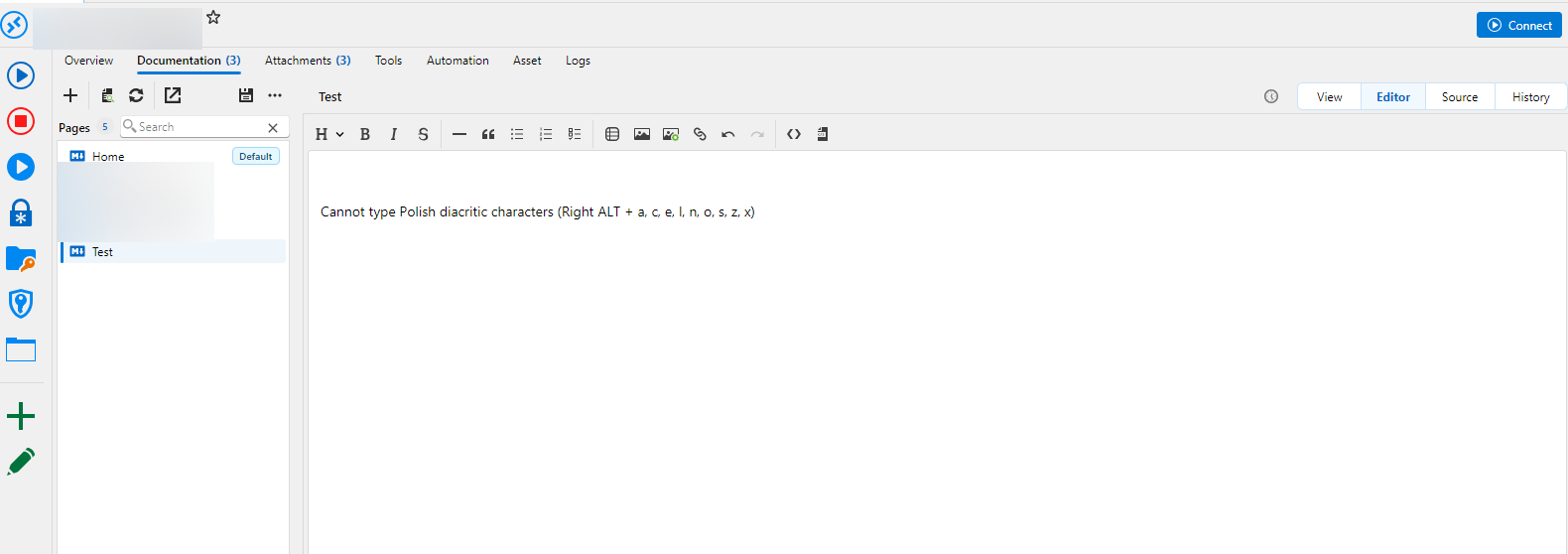
I cannot enter Polish diacritic characters anymore in documentation editor. Yesterday I was able to. Pressing Right-Alt + letter (one of: a, c, e, l, n, o, s, z, x) to type (ą, ć, ę, ł, ń, ó, ś, ż, ź) or Right-Alt + Shift + Letter (for a capital letter) activates menu, and I found no way of turning that off in settings.
Please fix it.
For urgent cases like this is for me you should also provide a "Downgrade" or "Rollback upgrade" option in Help menu so that I can easily reinstall previous version.
"Staircase" effect in SSH session when apt progress bar is shown + font rendering issues
How can I send you the recording securely?
As for the font, I'm using Clear Type, because it's the best for my display. It seems not a lot of fonts renders properly.
"Staircase" effect in SSH session when apt progress bar is shown + font rendering issues
This is RDM 2026.3.15. I think in 2026.2 it was okay, and then it broke, I just noticed it now.
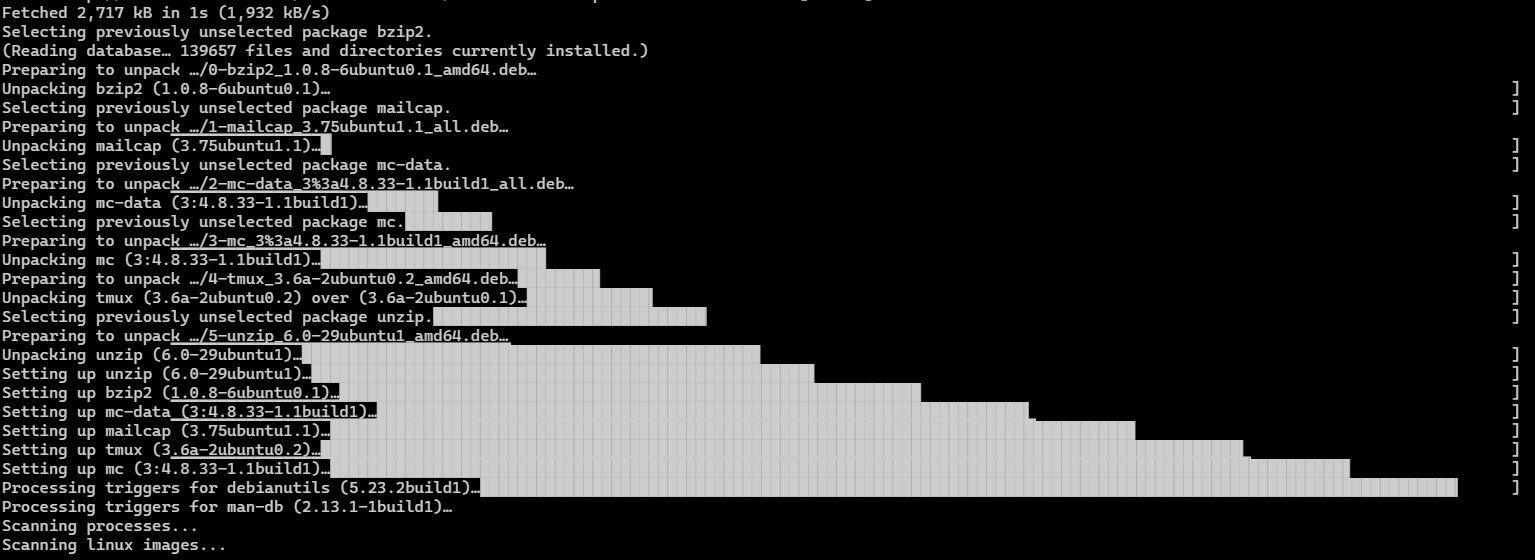
Get a fresh Ubuntu 26.04.1, log in into a SSH session using RDM, and then invoke `sudo apt install mc -y` so that it installs more than 1 package. You'll see the effect as in the screenshot below. There are 2 issues
The main one: RDM incorrectly handles drawing the progress bar. `echo $TERM` returns "xterm-256color" and I didn't set any specific terminal settings in RDM.
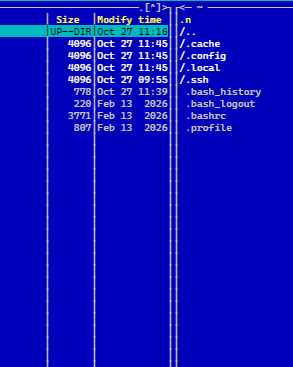
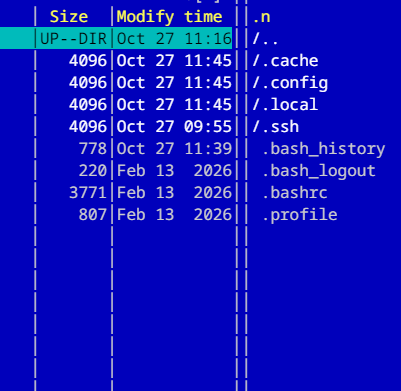
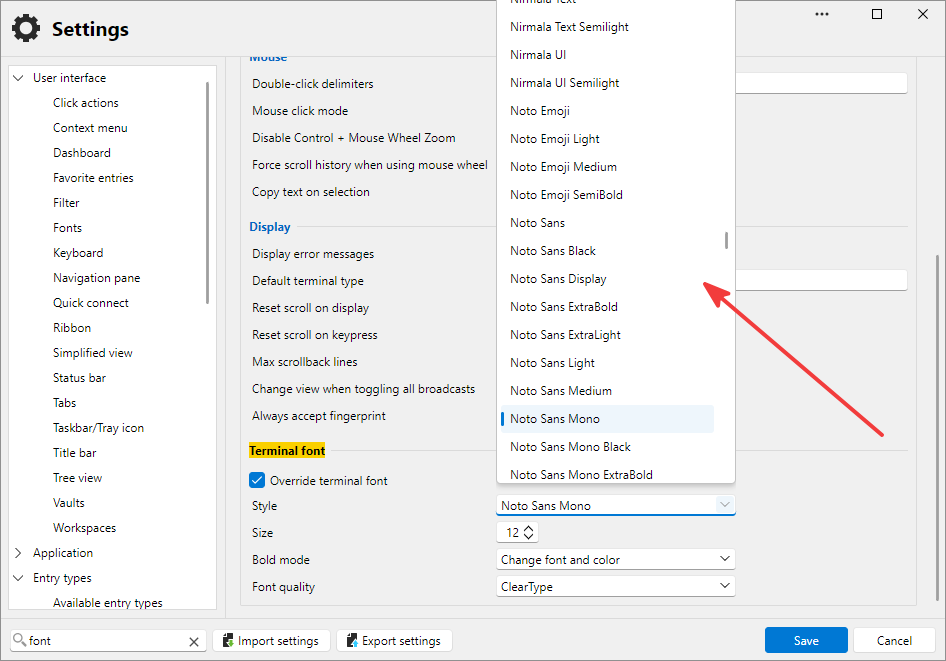
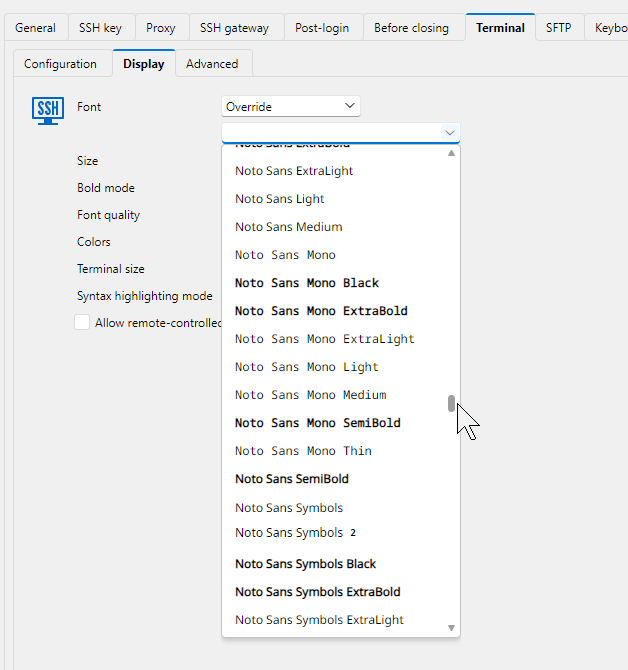
You can also see that it doesn't draw those "boxes" properly, there's spacing that should not be there. Another manifestation of this issue is for example when using Midnight Commander. Look at the blue screenshot below, the vertical lines. They look like two lines are "glued" together, there's additional dots that shouldn't be there. This is Cascadia Code PL font, and the second screenshot shows Noto Mono - in which there are extra spaces.
I think those issues may be correlated, this is why I'm reporting them both here.
While we're at it, could you please in global settings use the same font selector combo that you use in SSH session settings, so that the font name is printed with itself?
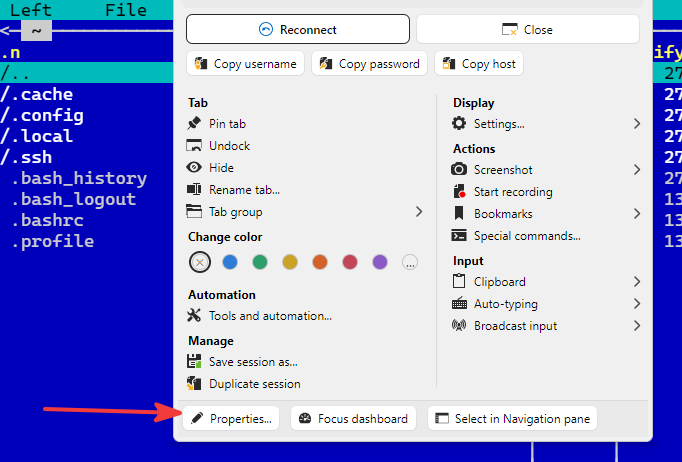
And another one: when I go to a live (open) session properties by right clicking on its tab, selecting Properties, and then try to change the font of the live session, it doesn't get changed. I expect it that when I change the font in the Display page, and click Save, that live session where I've done that will get redrawn using the new font.
Thanks in advance.
How secure are passwords and keys generated by RDM?
Thank you for a solid material response!
How secure are passwords and keys generated by RDM?
I wanted to ask this question a few times already. What finally prompted me to do so is the recent development of reverse engineering AI-powered tools, and especially this fresh research: https://www.anthropic.com/research/ecdsa-curve-origins
In short: In under half an hour, Claude discovered the origins of the NIST P-192, P-224, P-256, P-384, and P-521 elliptic curve seeds. It didn't break EC cryptography (they say it actually increases confidence in the curves), but it shows how easily these days the output of a weak, time-seeded PRNG can be recognized and its internal state recovered.
That is exactly what happened in the past, behind several real incidents, like the Debian OpenSSL bug that produced predictable SSH keys (CVE-2008-0166, https://github.com/g0tmi1k/debian-ssh), the "Milk Sad" wallet thefts (CVE-2023-39910) - Libbitcoin Explorer seeded a Mersenne Twister with 32-bit system time, and countless other cases of using insecure PRNG and/or srand(time(NULL)).
Therefore my questions are:
Does RDM use cryptographically secure random number generator for password/keys generation?
Does the generator have sufficient amount of entropy?
Is the generation secure on every platform RDM is available (Windows, macOS, Linux)?
I'm not suggesting it's insecure, just being a bit paranoid, and I'd simply like to be confident that RDM takes every necessary precaution to make generated data as random as possible, and secure.
Thank you.
2026.3.8.0 Sucks
I am a paying user of RDM for a few years already. It has replaced many tools from my toolbelt, and added a lot of value!
I reported I think around 100 bugs through this forum and via private conversations, so they journey wasn't without some hiccups.
But the best thing is - RDM team fixed **all** issues I reported, and what's more - they implemented **all** my feature requests!
I am a big fan of Devolutions precisely for that very reason. I wish other companies listened to their customers that carefully.
There are still things they need to polish, but the software is great overall. A single interface to many session types, auto-typing for web, credentials (a.k.a. password manager but connected to session entries), documentation, history, custom session tools (e.g., Mikrotik), custom fields, macros, scripting, the amount of features is staggering.
Therefore I'm sorry @rdearman but I don't agree with you. This software is large for a reason. A bit slow UI, but that's being worked on.
It's a central tool for very sophisticated IT infrastructures.
A bit of patience goes a long way.
Keep the good work, RDM team! 11 out of 10!
RDM on Windows <-> Linux feature parity
Thank you, it was really great to talk to you. Fingers crossed for new stuff coming to RDM!
RDM on Windows <-> Linux feature parity
Hello!
Thank you! I'd be happy to meet! I've picked a slot and I'm hoping for a great discussion.
RDM on Windows <-> Linux feature parity
Dear RDM team,
I'm reviving the topic on RDM for Linux feature parity when compared to RDM for Windows.
RDM has become the only tool that prevents me from migrating off Windows to Linux, which I'm planning for quite some time already.
I appreciate that you released native RDM for Linux, but its features are... incomplete.
Because of that I tried running RDM for Windows in a Windows virtual machine on Linux, but the virtualization/hardware emulation so that Windows runs great on Linux is... less than ideal. It's slow, and RDM, being quite a big app is even slower. And... having Remote Desktop within a VM screen, inside my primary display is also not going to be working well, no matter what.
I would like you to somehow rearchitect your development process so that most or all features added to RDM on Windows also end up in RDM on Linux. That would provide Linux community with the best remote management tool that ever existed on Linux so far, with the greatest features and versatility.
As for my priorities it would be remote management entries, such as RDP, SSH, Web, maybe Mikrotik Winbox (they now have Winbox 4 multi platform); credentials entries, and handling Hub. I don't care about VPN entries that much. But to be able to launch the above entries with doubleclick, having credentials entered, just like in RDM on Windows, is a must have. Great SSH agent, password generator and other shared tools would be nice, too.
There's business justification to that as well. I think fully-featured RDM on Linux would attract many Linux-only users (of which majority are technically skilled, working in IT industry), and certainly some of them can become paying customers.
Please think about that. Thanks in advance!
RDM requires re-authentication to Devolutions Cloud even 2 times a day
Thank you. As for the authentication, it asks me to reauth every day on average. I do not know how will it behave if I have to work offline for extended period of time, like I had numerous times already.
Thanks!
RDM requires re-authentication to Devolutions Cloud even 2 times a day
Thanks. I acknowledge the points you raised. In that case I ask you to implement simpler flows for users, for example: when adding a new passkey, place a checkbox (option) "require password as a second factor for this passkey" (or "do not require password as a second factor for this passkey") so that I am not expected to know/remember the default you imposed globally, or to worry that it will ask me for a password next time. I use dozens, if not hundreds of different services from various vendors, and I cannot remember every quirk of every service. It needs to be simple yet powerful.
As for the authentication change from Embedded to External, it today asked me to re-authenticate just once, via browser, but I did not have to enter or provide anything, it perhaps just used an existing cookie. Still, I'd like to be able to decide if I want to be nagged by this every so often.
Thank you,

RDM requires re-authentication to Devolutions Cloud even 2 times a day
Thank you for your response. I switched to the authentication browser mode from Embedded to External. I have no idea what that changes in terms of security, we'll see if it alleviates my issue. (By the way my view of that window is different than yours, perhaps you have a newer beta version with more features.)
Let me share a few lines of feedback from a customer perspective.
The security as implemented in Devolutions portal and RDM becomes strange and hard to manage. On one hand, you've implemented all the modern security features (passkeys and hardware security keys) for which big thank you, but on the other hand the defaults are unreasonable.
The passkeys (including Windows Hello) were meant by their inventors as a secure, unphishable replacement for passwords, read that correctly: replacement, not addition. Yet your defaults are to not trust them alone. You require this obsolete, weak factor, password. This is so strange. When I log in freshly to my Google or Microsoft account, it just needs the passkey, and believe me, I have secret and valuable stuff protected by that "mere" passkey, for example quite a big cloud services with databases, user data, key vaults etc. Of course I do recognize the value of RDM entries, and the need to protect them. I just think the protection is over-engineered in RDM by default without added security.
A few minutes ago I added a passkey, and the default setting is that it additionally requires a password (see the screenshot below). Please revisit that default, because it's confusing, and does not correspond to security best practices.
The "Store encryption key" setting - I have no idea what encryption key it is going to store. But it's also not trusted by default, both for Windows Hello and for hardware security key. Why?
I love your software, I'm the paying customer, and I want to continue using it. I have just one ask: don't try to be "more secure" than security best practices established in industry. It doesn't increase security, it just increases user frustration and amount of issues and errors.

RDM requires re-authentication to Devolutions Cloud even 2 times a day
Recently working with RDM when using Devolutions Hub became very annoying.
I use Devolutions Hub Business - to share entries with the team. My Devolutions account is protected with a Yubikey security key. (JFYI - to log in to the Devolutions account I need only to provide the key, enter its pin, and touch the gold part of the key. The login page does not ask me to enter password, which is logical, given the passkey).
On the other hand, in RDM entries expire after few hours, and it requires me to re-authenticate. But this time - the security key is not enough! I also need to provide Devolutions password! So it seems you assume my laptop is less trusted than a publicly available website, because to log in to the Devolutions website you don't require password. On yet another hand, you assume the Yubikey on my own machine is not secure enough that you need me to provide the password. My password is - of course - generated, so I don't remember it, every time I need to enter it, I have to launch my password manager, which is not running all the time for added security.
Also, when I work offline, on networks with no access to the Internet - how can I reauthenticate? And the main question is - why?
I would like you to:
Remove the need to authenticate to RDM using password when I have Yubikey paired. Yubikey is unbreakable when a basic computer hygiene is followed.
Remove the need to re-authenticate from RDM every few hours. Or make it configurable. I can agree to re-authenticate every month, maybe. If other people want to provide their password every hour, so be it, but don't force me to waste time on this added chore, which doesn't add any security, really.
Think about offline users with no access to the internet (either imposed by the customer or incidental), who need to use entries from the shared hub (or even personal hub). I need to be able to use my entries if I have them on my computer (after last successful sync) for as long as I want. If it's a week or a month with no Internet access, they must still work. Moreover, I need to be able to add new entries while offline.
Thank you in advance.

SSH terminal rendering bug (Broken BCE support)
Hi team,
[RDM 2025.3.25 on Windows 11]
I found a rendering issue in the RDM's SSH terminal emulator regarding handling of background colors, specifically during screen scrolling operations in applications like Vim.
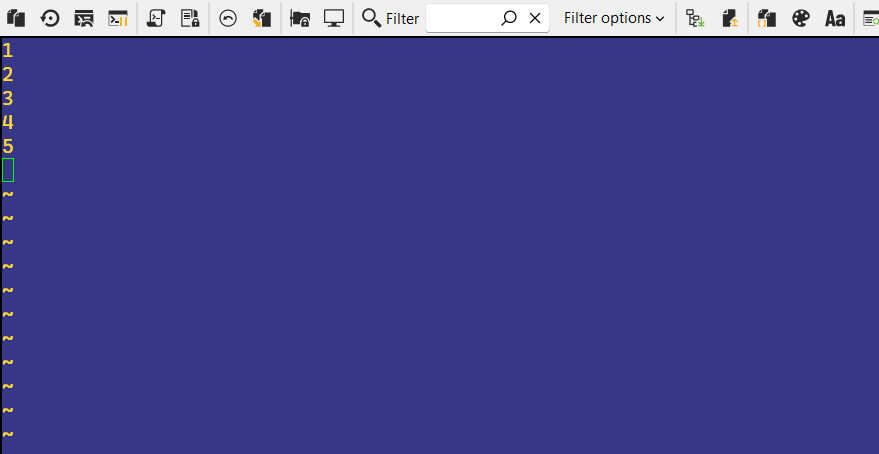
When an application in terminal uses a non-default background color (e.g., a blue theme in Vim) and performs a scroll operation (Page Down / Page Up), the newly exposed areas of the screen are filled with the black background instead of the active theme color.
Steps to Reproduce:
Open an SSH session in RDM (checked with Ubuntu Linux 24.04 and FreeBSD 15)
Open Vim using
vim -u NONE(without user config loaded, so that it's not "my fault")Load the blue theme so that background is not black (enter this command including colon):
:colorscheme blue<Enter>Press "i" for insert mode, then enter some lines of text, such as 1<Enter>, 2<Enter> etc.
Press Page Down to scroll down.
Press Page Up to return to the first screen. Observe the issue.
Expected behaviour:
Background is blue in all lines.
Actual behaviour:
Background is black in the part of the screen where text is entered.
Additional info:
The terminal emulator in RDM advertises support for Background Color Erase (BCE) (mandatory in xterm emulation used in RDM), but fails to respect the active background color when new lines are generated during scrolling. The fact that it advertises BCE can be confirmed with infocmp|grep bce during an SSH session.
I can workaround this issue by using Vim's setting :set t_ut= which tells Vim to stop relying on the terminal's clearing/scrolling capabilities and instead repaint background using space characters. This confirms that RDM has the bug. It claims support for BCE (Background Color Erase), but it doesn't correctly implement it for screen refresh/scroll.
Please fix it, because applications other than Vim may be unable to workaround this issue. With Vim I can live with this temporary workaround, but I'd like RDM to work properly.
Thank you in advance!
P.S. To exit Vim, use <Esc> then :q!😉
Screenshot of the issue
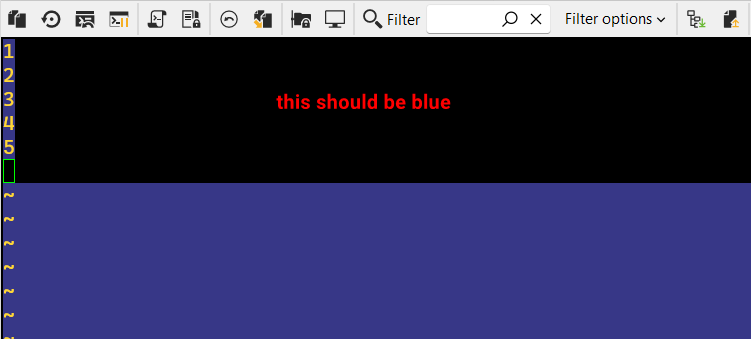
After turning off t_ut option.
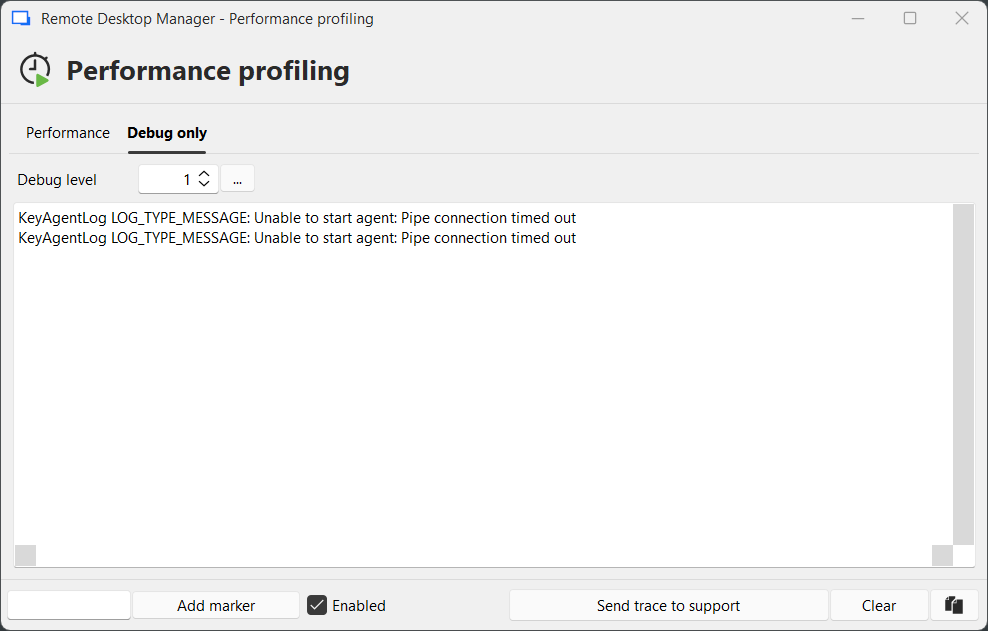
SSH key agent doesn't work in OpenSSH mode
Thank you, I did it and got the same result. I think this message is red herring. In my case the issue was that the Windows service "ssh-agent" was not running and I think RDM was unable to start it, because it would require administrator permissions (elevation) and I'm running RDM without elevation. I changed the service to "Automatic (delayed start)" and started it and then I was able to click "Start Agent" in RDM/SSH key agent and it loaded a key.
You may want to handle this scenario properly in RDM (i.e. start the service using elevation if necessary, and then automatically refresh the keys grid).
Thank you!