
doslager
Double SSH Jump host
Just to close the loop on this, i was able to successfully figure out how to use the SSH Gateway feature.
Server A (target) is what you configure in the object. And any IPs/names/etc need to be from the perspective of the last jump host (SSH Gateway).
SSH Gateways are processed in order of their order in the list. In your screenshot above, first, connects to serverB (jump1) and then ServerC (jump2) and then SSH jump host function will initiate from ServerC to ServerA (target)
A few things i noticed:
If you pick custom, you can only have a single custom jump server. I didnt dig too deep into what type of object the "custom" SSH gateway should be.
If you need multiple jump hosts, you need to manually enter them on each SSH session
You can bulk edit multiple SSH sessions and add SSH Gateways to all sessions at the same time
You can use password credentials for each SSH Gateway entry to have a single object to update if/when the password changes
It would be really nice if this could be inherited from the parent folder, or grandparent folder. Sometimes i'm on site and have direct access to all the SSH sessions, sometimes i'm remote and have to configure a jump (or 2) and would be nice to have a single place to do it rather than bulk editing multiple sessions. But bulk edit works and it's not much effort to bulk edit.
And this was a bit strange.... I configured 4 jump servers (B, C, D, E) and it worked, but it would not save the credential object for the 4th jump server. Ironically the 2nd and 4th were the same server since i didnt have enough SSH hosts in my lab to jump through. I technically went to B and then C and then back to B and then back to C and finally on to ServerA (Target). Not sure if that's a bug or intended behavior. And no one in their right mind would do that. :) I'll try to set up mulitple individual hosts and see how it works.
Thank you!
Double SSH Jump host
Ok. Thank you @Michel Lambert for the update. I'll try this again.
I would be ideal if there was a way to inherit the jump servers from a parent folder. Then you can turn it on/off for a bunch of devices at the same time.
Also, the in example, shouldnt Server A be the one i want to land my SSH session on? And B and C are the jump servers?
Me --> ServerB (as a jump) --> Server C (as a 2nd jump) --> ServerA (intended target where i land my shell session)
I'll have to experiment with it to see.
Thank you!
Double SSH Jump host
Any update on this? I'm in desparate need of a double SSH jump host today to connect to 12 devices on the other side of a single SSH host.
I see the feature is somewhat updated on latest version on Mac, but it doesnt seem to work or is unclear how to configure SSH jump host. And i dont see where i can put multiple hosts.
This also should be configurable at a folder/parent level and be able to be inherited. I prefer not to have to tweak multiple sessions with the same settings.
I'm currently using a "SSH Link" for VPN and it works great, but i cant figure out how to chain them to make it jump through Server A and then Server B to hit the target.
Post Login commands for Terminal on MacOS doesnt seem to work
<bump>
Any one have any idea how to send CTRL-C shortly after connecting to an SSH session. This is using RDM on MacOS.
Thanks!
Post Login commands for Terminal on MacOS doesnt seem to work
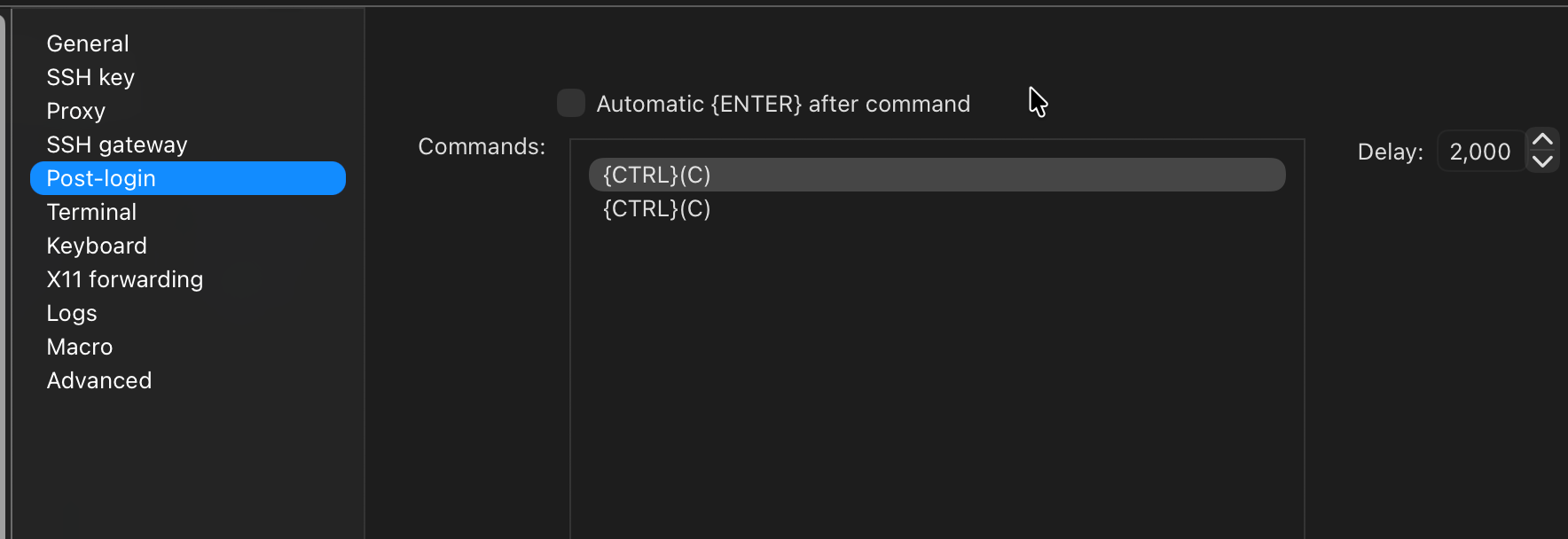
I changed it to {CTRL}(C) and it still doesnt seem to work. It def types the characters on the screen, but it doesnt seem to have any effect.
I've tried uppercase C and lowercase c.
This using the latest version of RDM for Mac
Post Login commands for Terminal on MacOS doesnt seem to work
Perfect. Thank you. I will try this later today.
Post Login commands for Terminal on MacOS doesnt seem to work
I have an automated process that creates a JSON for my hosts and i import into RDM and it works great. This for a new build/standup for a customer. It's a new customer every week and then i just delete it and re-create for the next customer and then re-import into a new database. I'm trying to login to Linux systems via SSH. I use the broadcast feature to then send multiple setup commands to each host to build them all in parallell.
However, it seems that the Post-Login page of the SSH session is not working.
First, i'm trying to send 2x CTRL-C to break the login process and return me to a command prompt. It sends the text {CTRL}C but not the actual control character. I might be doing it wrong. What is the string to add in Post-Login to be able to send a CTRL-C? (or actually send 2 CTRL-C with a 1 second delay after initial SSH is established, and then another 1 second delay until the 2nd CTRL-C.)
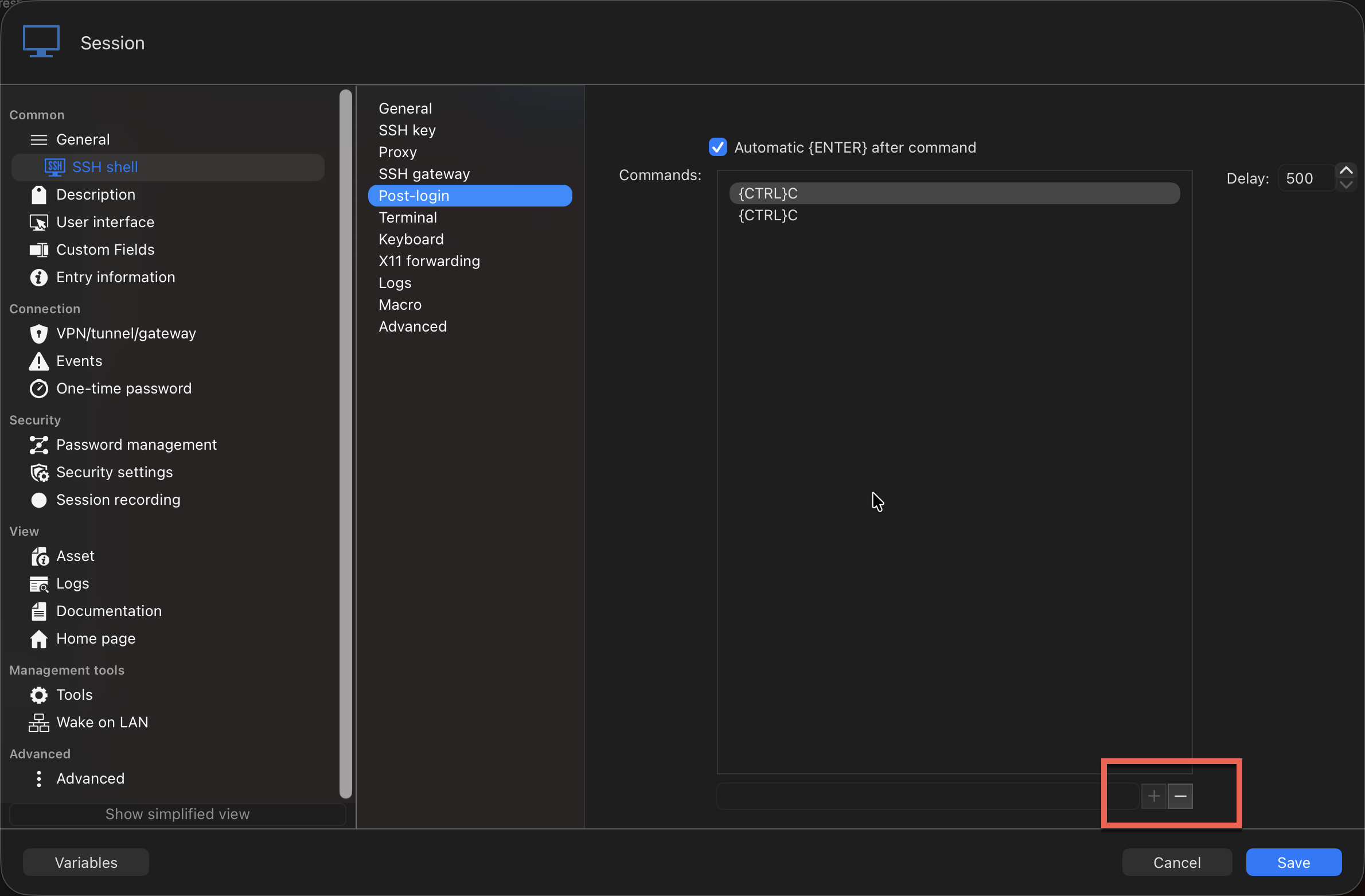
Second, when i try to edit what i have, i cannot add new commands. The + button is is greyed out. I can edit the existing commands added via JSON, and i can edit the delay. But i cant seem to add new commands.
Here is the JSON i create to import. It will create the SSH session and link to a linked credential.
 {
 "ConnectionType": "SSHShell",
 "OpenEmbedded": true,
 "CredentialConnectionID": "xxxxxxxxxxxxxxxxxxxxx",
 "Group": "xxx\\xxx\\xxx\\xxx",
 "TabGroupMode": "Inherited",
 "ColorMode": "Inherited",
 "Name": "xxxxxxxxxx",
 "Terminal": {
 "UseServerWindowTitle": false,
 "Font": "Menlo",
 "DisconnectAction": "KeepOpen",
 "PrivateKeyPromptForPassPhrase": false,
 "EnableLogging": true,
 "ColorMode": 1,
 "LogOverwriteMode": "Append",
 "AlwaysAcceptFingerprintDefaultBoolean": true,
 "Username": "xxxx",
 "Host": "xxxxx",
 "MaxScrollbackLines": 9999,
 "ColorANSIBlue": "#0086FD",
 "ColorDefaultForeground": "#F0F8FF",
 "FontMac": "SF Mono",
 "AlwaysAcceptFingerprint": true,
 "FontSize": 13,
 "ColorDefaultBackground": "#270603",
 "FontMode": "Override",
 "LogMode": "AllPrintableOutput",
 "AfterConnectTerminalMacros": [
 {
 "Macro": "{CTRL}C"
 },
 {
 "Macro": "{CTRL}C"
 }
 ]
 },
 "VPN": {
 "Mode": 5
 }
 },
(Sorry, when i pasted the JSON it removed all the indenting for some reason)
Here is the GUI and the + button is greyed out.
Automated download of RDM zip version for portable
This took me about 30 seconds to get my answer.
$RDMJSON = (Invoke-WebRequest -UseBasicParsing https://devolutions.net/productinfo.json).content | ConvertFrom-Json
$RDMURL  = ($RDMJSON.RDMWindows.Current.Files | where {$_.type -eq "zip"}).url
$RDMHash = ($RDMJSON.RDMWindows.Current.Files | where {$_.type -eq "zip"}).hash
Automated download of RDM zip version for portable
OMG! YES! Exactly what i was looking for! Thank you so much!
Automated download of RDM zip version for portable
Hello, i'm trying to create a (somewhat) simple script to download/fetch the latest version of RDM zip file to create a portable version on an as needed basis. I have automated the .NET portion and the folder structure. But finding the latest version of the .zip for portable installs from your site is challenging.
I was previously able to parse the URL and filename and SHA256 hash as well from your website.
https://devolutions.net/remote-desktop-manager/download/thank-you/
Youve recently changed the download page and now the page is much different.
Can you create a simple JSON page much like Microsoft (GitHub?) does where i can pull the filename, Download URL and hash? Or do you currently already have that without having to Invoke-Webrequest the webpage and regex the content?
Thanks!
Example for DotNet
https://dotnetcli.blob.core.windows.net/dotnet/release-metadata/10.0/releases.json
PS. I understand if you dont want users automating downloads and bypassing your HTML pages, but this would be a nice nitch feature.
Import document/database variables via JSON
Hi @doslager,
Pretty good timing, I am going to release a version for RDM Mac containing this feature this week.
Best regards,
@Jesse Galarneau
Perfect timing! Thanks for the quick response. I'll be watching the updates page this week. Thanks!
I tried to reverse engineer it by exporting a variable in the Windows side but when i looked at the JSON i couldnt find it. I'm using the latest version on Windows, too.
Import document/database variables via JSON
Hi @Léon Le Brun Any update on this for the Mac version? Thank you!
Mac: Columns are fixed width in Session View
THANK YOU!
Thank you for coming back and updating the thread, too!
Thanks!
Move Database file to new folder location (Mac)
Ahhhh! Very interesting. That makes sense. It's annoying, but it makes sense. :)
Thank you for looking deeper into that. I really appreciate the support here. You all are always right on top of responses. Thank you!
Move Database file to new folder location (Mac)
Thank you!
Move Database file to new folder location (Mac)
Sooooooo.... I just tried this with a _copy_ of the database, in case it did overwite it.
It worked just fine and reconnected. It did exactly what i wanted it to do.
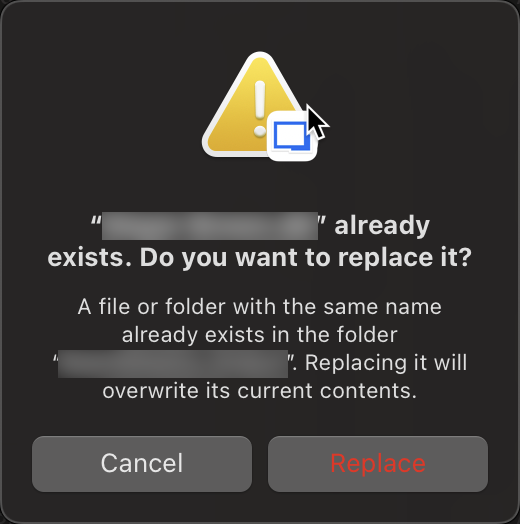
The error message that is screenshot above is wrong and VERY misleading. Please fix this.
It should be smart enough to see that the file exists, and that there is valid RDM data in there and tell you that it's going to reconnect to this database.
Move Database file to new folder location (Mac)
I am trying to reconnect to a SQL Lite DB that was moved to a new folder path. I want to reconnect and use the database again. I do NOT want to overwrite it. I do NOT want to create a new database. I want to re-connect to an existing database. But when the database file moves to a different path, the database cant be found anymore by RDM and it throws an error.
How do i reconnect to an existing db file?
Move Database file to new folder location (Mac)
Hi Samuel. Thanks for the super quick reply.
When i do that, it prompts to overwrite the file. I didnt try doing it with a test DB to see if it really does overwrite the file. If it wont actually overwrite, then the error message is misleading. If it does overwrite than that is not at all what i want.
Move Database file to new folder location (Mac)
Hello,
Maybe i'm missing something...but.... If i move the SQL Lite database file to another folder in my Mac, how do i re-connect to the *.db file. I'm just using simple SQL Lite database. I have multiple databases i flip between for different customers. Each customer has a folder in my Documents folder. If i change the customer folder name or move the customer folder on my Mac to another folder, when i open RDM, it cant find the database. I cant find where to re-point the database to the file. If I navigate to the file and select it, it prompts to overwrite the file, which is obviously not what i want. But since i cant seem to re-connect to the database file in the new location, it's more or less lost.
Thanks!
Mac: Columns are fixed width in Session View
Thank you!
Mac: Columns are fixed width in Session View
When i click on Open Sessions in the tool bar, or in the bar at the bottom of the navigation pane, the sessions are all listed. However, the column width is not changeable. It's a fixed width, and it's too narrow to be useful (at least for me).
Can you make it so the columns are not fixed width? And even be able to remove the mode and/or start time column to maximize the screen? I personally dont need those columns and would like to remove them.
RDM on MacOS. Latest version. Version 2025.3.6.9
Thank you!

Double SSH Jump host
Hello,
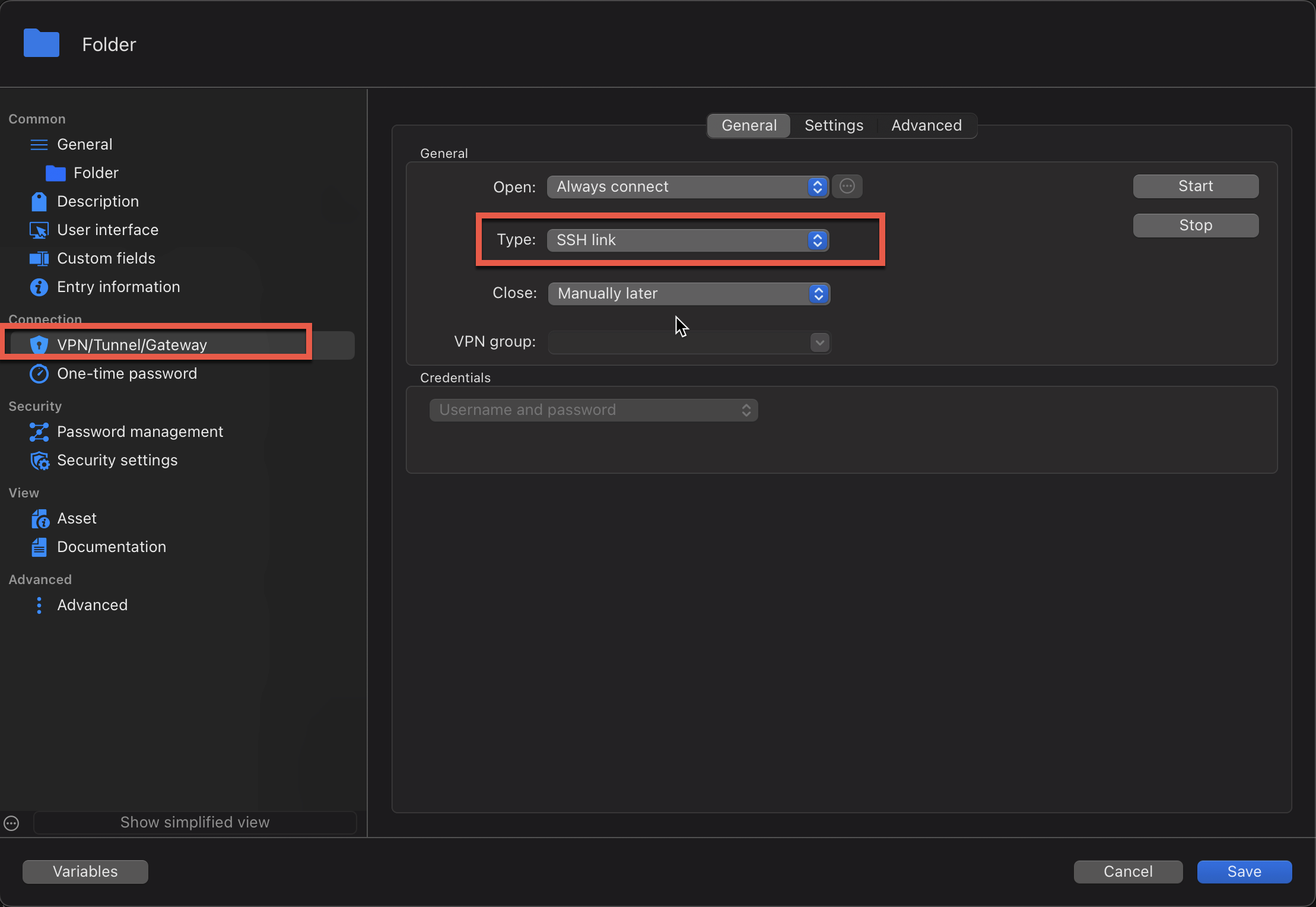
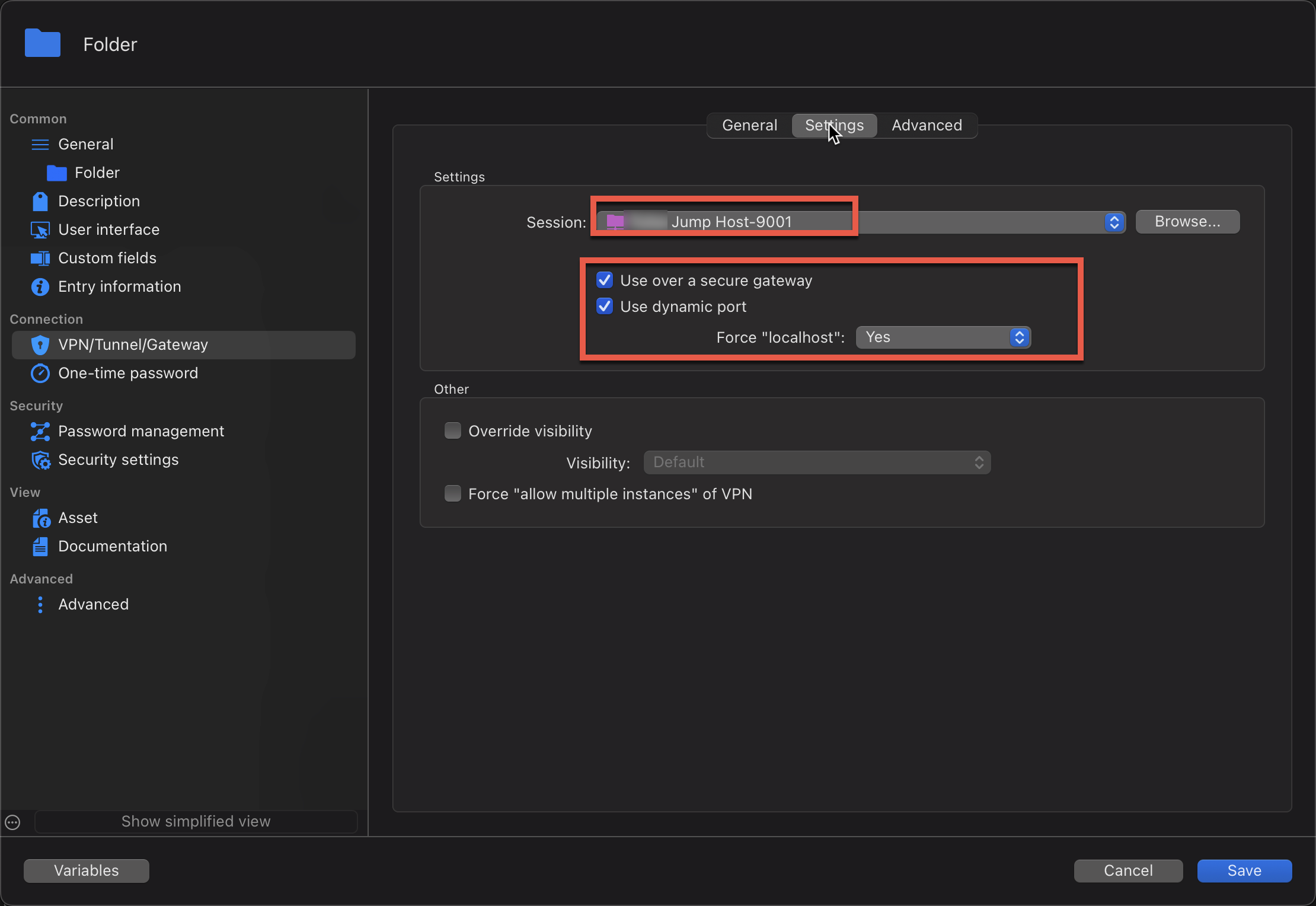
I'm currently using the latest MacOS version of RDM and I am using SSH jump hosts (as a VPN). I am able to connect to a remote host which is not directly reachable via a SSH session. This works great. (also, i frequently use the Windows version of RDM, so hopefully this possible solution is cross platform)
But i'm now trying to figure out if it's possible to use multiple jump hosts.
SSH to JumpA and then SSH to JumpB and then SSH to targetC. This is all possible with the SSH protocol. But i'm not sure how to implement it in RDM. TargetC in my case is only available via JumpB (IPv6LL). I would use IPv4 to JumpA and then IPv4 to JumpB from JumpA and then IPv6LL from JumpB to TargetC.
Here is the CLI equivalent:
ssh -J user1@host1:port1,user2@host2:port2 user3@host3
This is taken from: https://wiki.gentoo.org/wiki/SSH_jump_host
I can do it via the CLI. But you get prompted for password for each host. Looking to create multiple saved entries and have RDM pass the password silently to the jumps and target. Again, all this works great using the SSH Link as my one layer of Jump Host. I apply it at the folder level and all the objects inherit the VPN config. I can set it for no VPN if i'm onsite, or set it for VPN if i'm remote.
NOTE: i could not get the above CLI to work for IPv4 and IPv6LL combo. I was able to get it to work if it was IPv4 from JumpB to the TargetC.
Import document/database variables via JSON
Hello,
Starting with our next major Windows version, 2025.3.0, it will be possible to import and export custom variables in JSON format. This functionality will be available at all levels where custom variables are supported: File > Settings, Vault Settings, and System Settings.
Our macOS development team plans to implement this feature in the near future as well.
Regards,
Léon Le Brun
@Léon Le Brun
That's great news!! Thank you for remembering this and coming back to update the thread. Thank you!
Import document/database variables via JSON
Thank you! Now that i understand it's a different section of the application, that makes sense. It would be nice to have the variables imported directly into the vault with the JSON but i see how that could be a challenge.
I dont/havent use the Powershell module. I'll look at that. I am just generating a huge JSON and exporting it to a text file from my script and then importing that to the vault.
I'm also going to try to use some global variables instead. That may work for me instead of creating per vault. I'm only working on one customer at a time, so i can modify the value to the variable as necessary. They are mostly to help direct IPv6LL traffic via a particular interface (or "zone index" in IPv6 terms) but also for VPN and specifying SSH jump host setting.
Import document/database variables via JSON
Ahhhh...now I understand.
I guess two imports is better than manually creating them.
Right now I have only one variable. It can change from time to time or user to user. But it has to be set up for every vault created. But I was looking to incorporate additional variables for more flexibility. Change the value in one place and it updates all the sessions.
Thanks for revisiting this topic! I appreciate your help!