Move Database file to new folder location (Mac)

Hello,
Maybe i'm missing something...but.... If i move the SQL Lite database file to another folder in my Mac, how do i re-connect to the *.db file. I'm just using simple SQL Lite database. I have multiple databases i flip between for different customers. Each customer has a folder in my Documents folder. If i change the customer folder name or move the customer folder on my Mac to another folder, when i open RDM, it cant find the database. I cant find where to re-point the database to the file. If I navigate to the file and select it, it prompts to overwrite the file, which is obviously not what i want. But since i cant seem to re-connect to the database file in the new location, it's more or less lost.
Thanks!
Recommended Answer
Hello,
Thank you for bringing this to our attention. I looked into the warning message, and I agree that it can be misleading in this context. However, this prompt is generated directly by macOS our application does not control its wording or when it appears.
macOS shows this message whenever a user selects a file path that could overwrite an existing file, even if no overwrite will actually occur in our case. The only way to prevent macOS from showing this warning would be to restrict the file selection to existing .db files only, which would remove the ability to create a new file when needed. This would negatively impact the intended workflow.
The underlying behavior in our application is correct, and the warning can safely be ignored. We understand the message is not ideal, but unfortunately it is outside our control.
Thank you for your understanding, and we’re sorry for any confusion it may have caused.
Best regards,
Maxim Buisson
All Comments (11)
Hello,
Thank you for reaching out to us regarding this,
You would need to update the database path in your RDM data source Properties. You can do so by going under "File" -> "Data sources", selecting your SQLite data source, and pressing the "..." button to edit, and then changing the "Database" field to the updated path.
Let me know if this helps,
Best regards,
Samuel Dery
Hi Samuel. Thanks for the super quick reply.
When i do that, it prompts to overwrite the file. I didnt try doing it with a test DB to see if it really does overwrite the file. If it wont actually overwrite, then the error message is misleading. If it does overwrite than that is not at all what i want. 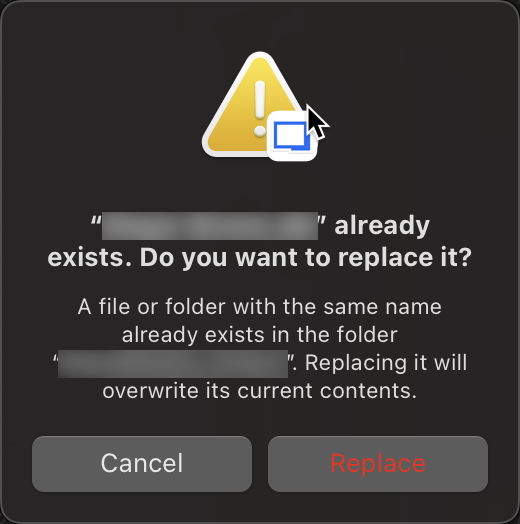
66c9468d-785a-44fb-b600-c9e8c311e184.png
Hello,
Thank you for your reply,
Are you modifying your existing data source configuration or creating a new one?
Let me know,
Best regards,
Samuel Dery
I am trying to reconnect to a SQL Lite DB that was moved to a new folder path. I want to reconnect and use the database again. I do NOT want to overwrite it. I do NOT want to create a new database. I want to re-connect to an existing database. But when the database file moves to a different path, the database cant be found anymore by RDM and it throws an error.
How do i reconnect to an existing db file?
Sooooooo.... I just tried this with a _copy_ of the database, in case it did overwite it.
It worked just fine and reconnected. It did exactly what i wanted it to do.
The error message that is screenshot above is wrong and VERY misleading. Please fix this.
It should be smart enough to see that the file exists, and that there is valid RDM data in there and tell you that it's going to reconnect to this database.
Hello,
Thank you for your reply,
I'm glad to hear this worked for you,
I have been able to reproduce the behavior and have opened a case regarding this with our development team,
Best regards,
Samuel Dery
Thank you!
Hello,
Thank you for your reply
No problem, we will keep you updated with any news we have regarding this,
Best regards,
Samuel Dery
Hello,
Thank you for bringing this to our attention. I looked into the warning message, and I agree that it can be misleading in this context. However, this prompt is generated directly by macOS our application does not control its wording or when it appears.
macOS shows this message whenever a user selects a file path that could overwrite an existing file, even if no overwrite will actually occur in our case. The only way to prevent macOS from showing this warning would be to restrict the file selection to existing .db files only, which would remove the ability to create a new file when needed. This would negatively impact the intended workflow.
The underlying behavior in our application is correct, and the warning can safely be ignored. We understand the message is not ideal, but unfortunately it is outside our control.
Thank you for your understanding, and we’re sorry for any confusion it may have caused.
Best regards,
Maxim Buisson
Ahhhh! Very interesting. That makes sense. It's annoying, but it makes sense. :)
Thank you for looking deeper into that. I really appreciate the support here. You all are always right on top of responses. Thank you!
Hello,
Thank you for your reply and for the feedback!
Feel free to open a new thread if you encounter other issues,
Best regards,
Samuel Dery