Double SSH Jump host

Hello,
I'm currently using the latest MacOS version of RDM and I am using SSH jump hosts (as a VPN). I am able to connect to a remote host which is not directly reachable via a SSH session. This works great. (also, i frequently use the Windows version of RDM, so hopefully this possible solution is cross platform)
But i'm now trying to figure out if it's possible to use multiple jump hosts.
SSH to JumpA and then SSH to JumpB and then SSH to targetC. This is all possible with the SSH protocol. But i'm not sure how to implement it in RDM. TargetC in my case is only available via JumpB (IPv6LL). I would use IPv4 to JumpA and then IPv4 to JumpB from JumpA and then IPv6LL from JumpB to TargetC.
Here is the CLI equivalent:
ssh -J user1@host1:port1,user2@host2:port2 user3@host3
This is taken from: https://wiki.gentoo.org/wiki/SSH_jump_host
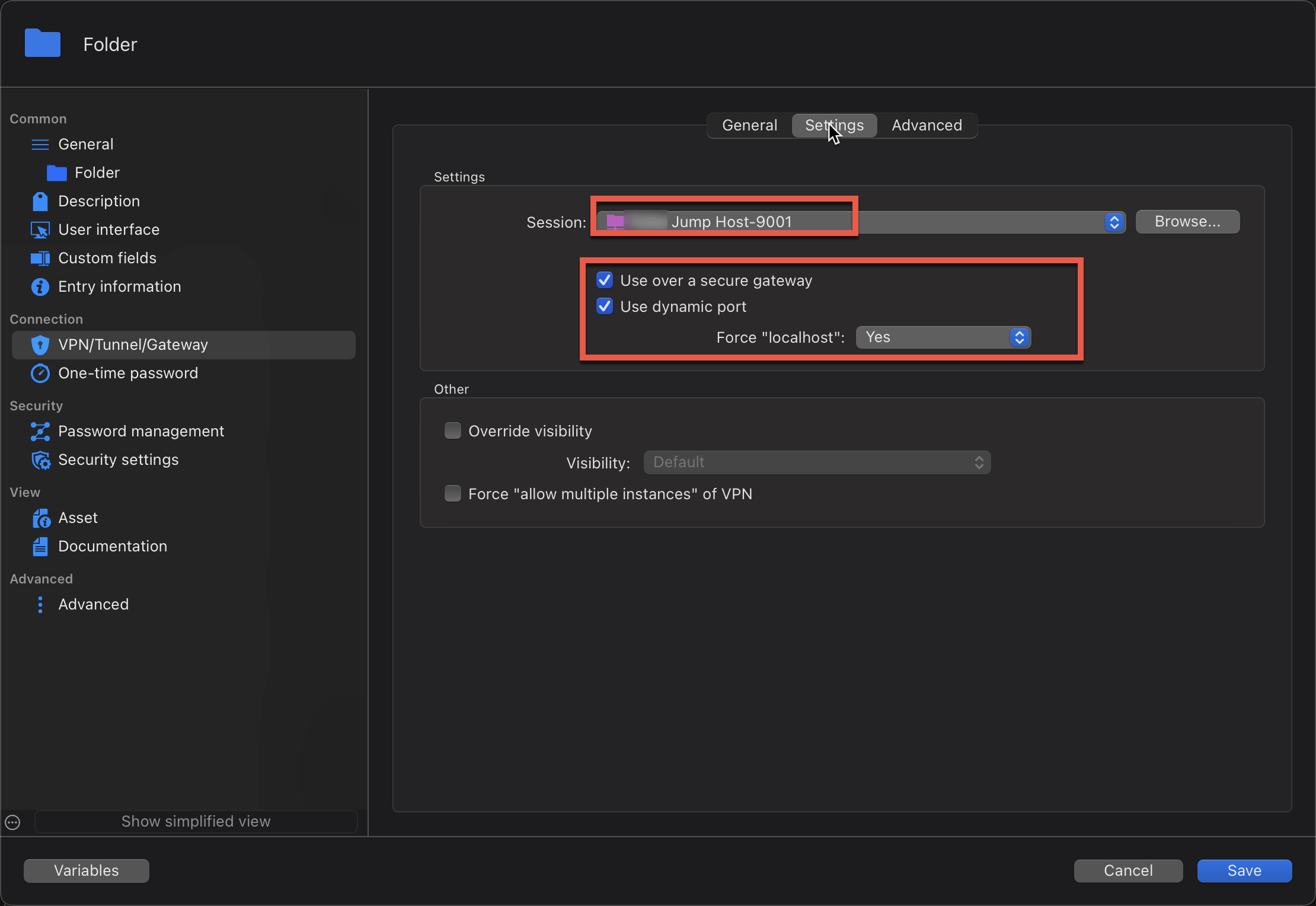
I can do it via the CLI. But you get prompted for password for each host. Looking to create multiple saved entries and have RDM pass the password silently to the jumps and target. Again, all this works great using the SSH Link as my one layer of Jump Host. I apply it at the folder level and all the objects inherit the VPN config. I can set it for no VPN if i'm onsite, or set it for VPN if i'm remote.
NOTE: i could not get the above CLI to work for IPv4 and IPv6LL combo. I was able to get it to work if it was IPv4 from JumpB to the TargetC. 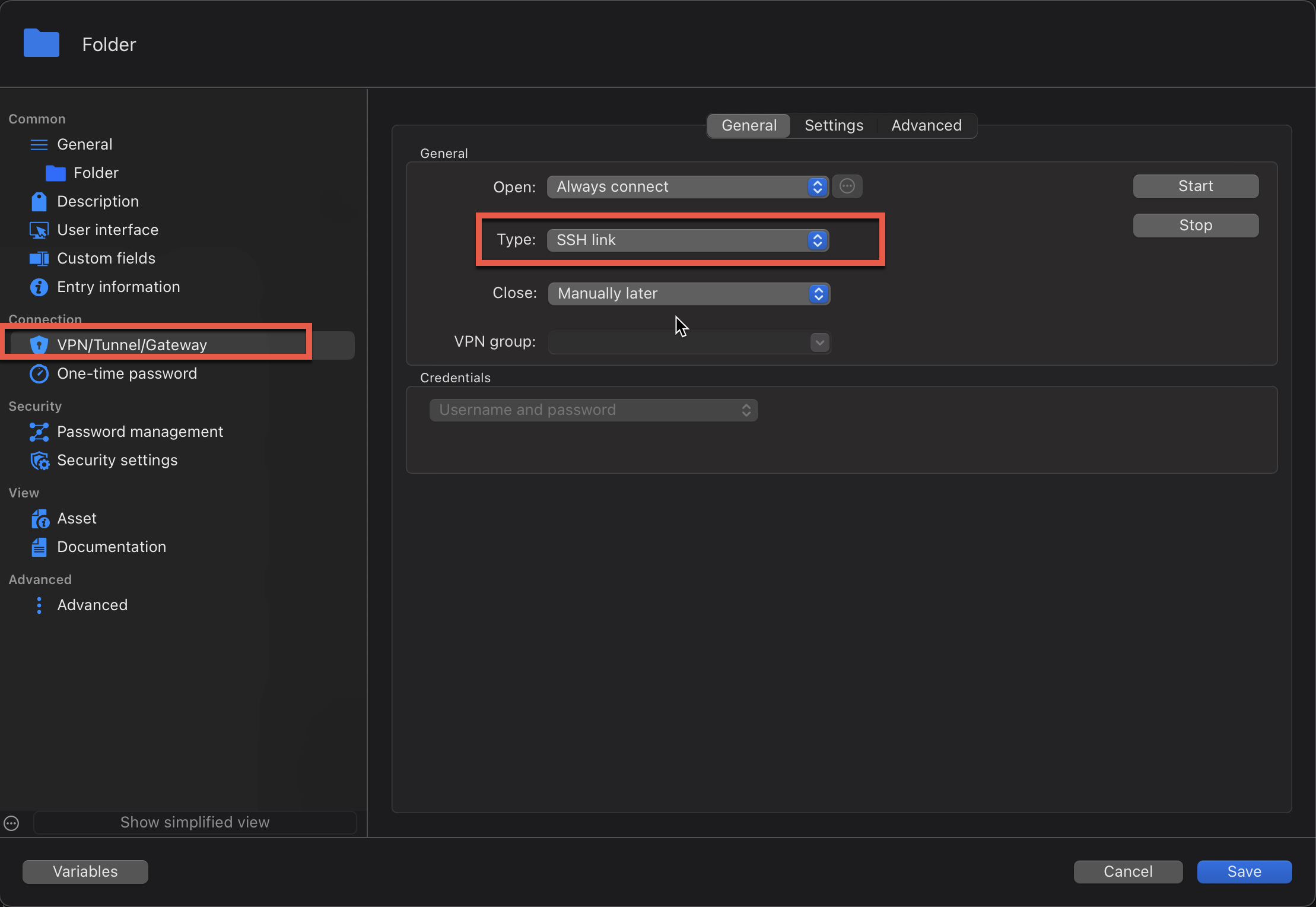
2b01a68f-b4dd-49a7-93d5-8d76c56386c9.png
938e18bc-b10b-4d24-9325-352eac84874f.png
All Comments (5)
Hello,
Thank you for your patience.
It is indeed possible to use multiple SSH jump hosts in a connection. You should be able to chain hosts by using the '+' feature to add terminals.
However, this functionality appears to be broken at the moment. A bug report has been opened, and I will keep you informed of any updates on our end.
Best regards,
Carl Marien
Screenshot 2025-10-28 at 3.38.49 PM.png
Any update on this? I'm in desparate need of a double SSH jump host today to connect to 12 devices on the other side of a single SSH host.
I see the feature is somewhat updated on latest version on Mac, but it doesnt seem to work or is unclear how to configure SSH jump host. And i dont see where i can put multiple hosts.
This also should be configurable at a folder/parent level and be able to be inherited. I prefer not to have to tweak multiple sessions with the same settings.
I'm currently using a "SSH Link" for VPN and it works great, but i cant figure out how to chain them to make it jump through Server A and then Server B to hit the target.
Hello,
We just did a quick test on our side, and the feature seems to be working for us.
In your specific case, your main SSH shell should be Shell A.
To give a quick rundown of how it works:
After that, go to the SSH gateway and add Shell B and Shell C as follows (top to bottom in the order you want them to connect):
The terminal should first connect to Shell A, then Shell B, and finally Shell C.
While it is not possible to configure SSH gateways at the folder level, it is possible to create templates on the local machine that can be used to configure your entries faster.
Use the Entry Templates option in the administration bar.
If there are any issues, don't hesitate to contact us.
Best regards.
Michel Lambert
Screenshot 2026-09-23 at 8.22.58 AM.png
Screenshot 2026-09-23 at 8.20.18 AM.png
Ok. Thank you @Michel Lambert for the update. I'll try this again.
I would be ideal if there was a way to inherit the jump servers from a parent folder. Then you can turn it on/off for a bunch of devices at the same time.
Also, the in example, shouldnt Server A be the one i want to land my SSH session on? And B and C are the jump servers?
Me --> ServerB (as a jump) --> Server C (as a 2nd jump) --> ServerA (intended target where i land my shell session)
I'll have to experiment with it to see.
Thank you!
Just to close the loop on this, i was able to successfully figure out how to use the SSH Gateway feature.
Server A (target) is what you configure in the object. And any IPs/names/etc need to be from the perspective of the last jump host (SSH Gateway).
SSH Gateways are processed in order of their order in the list. In your screenshot above, first, connects to serverB (jump1) and then ServerC (jump2) and then SSH jump host function will initiate from ServerC to ServerA (target)
A few things i noticed:
- If you pick custom, you can only have a single custom jump server. I didnt dig too deep into what type of object the "custom" SSH gateway should be.
- If you need multiple jump hosts, you need to manually enter them on each SSH session
- You can bulk edit multiple SSH sessions and add SSH Gateways to all sessions at the same time
- You can use password credentials for each SSH Gateway entry to have a single object to update if/when the password changes
- It would be really nice if this could be inherited from the parent folder, or grandparent folder. Sometimes i'm on site and have direct access to all the SSH sessions, sometimes i'm remote and have to configure a jump (or 2) and would be nice to have a single place to do it rather than bulk editing multiple sessions. But bulk edit works and it's not much effort to bulk edit.
And this was a bit strange.... I configured 4 jump servers (B, C, D, E) and it worked, but it would not save the credential object for the 4th jump server. Ironically the 2nd and 4th were the same server since i didnt have enough SSH hosts in my lab to jump through. I technically went to B and then C and then back to B and then back to C and finally on to ServerA (Target). Not sure if that's a bug or intended behavior. And no one in their right mind would do that. :) I'll try to set up mulitple individual hosts and see how it works.
Thank you!