Post Login commands for Terminal on MacOS doesnt seem to work
Post Login commands for Terminal on MacOS doesnt seem to work

I have an automated process that creates a JSON for my hosts and i import into RDM and it works great. This for a new build/standup for a customer. It's a new customer every week and then i just delete it and re-create for the next customer and then re-import into a new database. I'm trying to login to Linux systems via SSH. I use the broadcast feature to then send multiple setup commands to each host to build them all in parallell.
However, it seems that the Post-Login page of the SSH session is not working.
First, i'm trying to send 2x CTRL-C to break the login process and return me to a command prompt. It sends the text {CTRL}C but not the actual control character. I might be doing it wrong. What is the string to add in Post-Login to be able to send a CTRL-C? (or actually send 2 CTRL-C with a 1 second delay after initial SSH is established, and then another 1 second delay until the 2nd CTRL-C.)
Second, when i try to edit what i have, i cannot add new commands. The + button is is greyed out. I can edit the existing commands added via JSON, and i can edit the delay. But i cant seem to add new commands.
Here is the JSON i create to import. It will create the SSH session and link to a linked credential.
 {
 "ConnectionType": "SSHShell",
 "OpenEmbedded": true,
 "CredentialConnectionID": "xxxxxxxxxxxxxxxxxxxxx",
 "Group": "xxx\\xxx\\xxx\\xxx",
 "TabGroupMode": "Inherited",
 "ColorMode": "Inherited",
 "Name": "xxxxxxxxxx",
 "Terminal": {
 "UseServerWindowTitle": false,
 "Font": "Menlo",
 "DisconnectAction": "KeepOpen",
 "PrivateKeyPromptForPassPhrase": false,
 "EnableLogging": true,
 "ColorMode": 1,
 "LogOverwriteMode": "Append",
 "AlwaysAcceptFingerprintDefaultBoolean": true,
 "Username": "xxxx",
 "Host": "xxxxx",
 "MaxScrollbackLines": 9999,
 "ColorANSIBlue": "#0086FD",
 "ColorDefaultForeground": "#F0F8FF",
 "FontMac": "SF Mono",
 "AlwaysAcceptFingerprint": true,
 "FontSize": 13,
 "ColorDefaultBackground": "#270603",
 "FontMode": "Override",
 "LogMode": "AllPrintableOutput",
 "AfterConnectTerminalMacros": [
 {
 "Macro": "{CTRL}C"
 },
 {
 "Macro": "{CTRL}C"
 }
 ]
 },
 "VPN": {
 "Mode": 5
 }
 },
(Sorry, when i pasted the JSON it removed all the indenting for some reason)
Here is the GUI and the + button is greyed out. 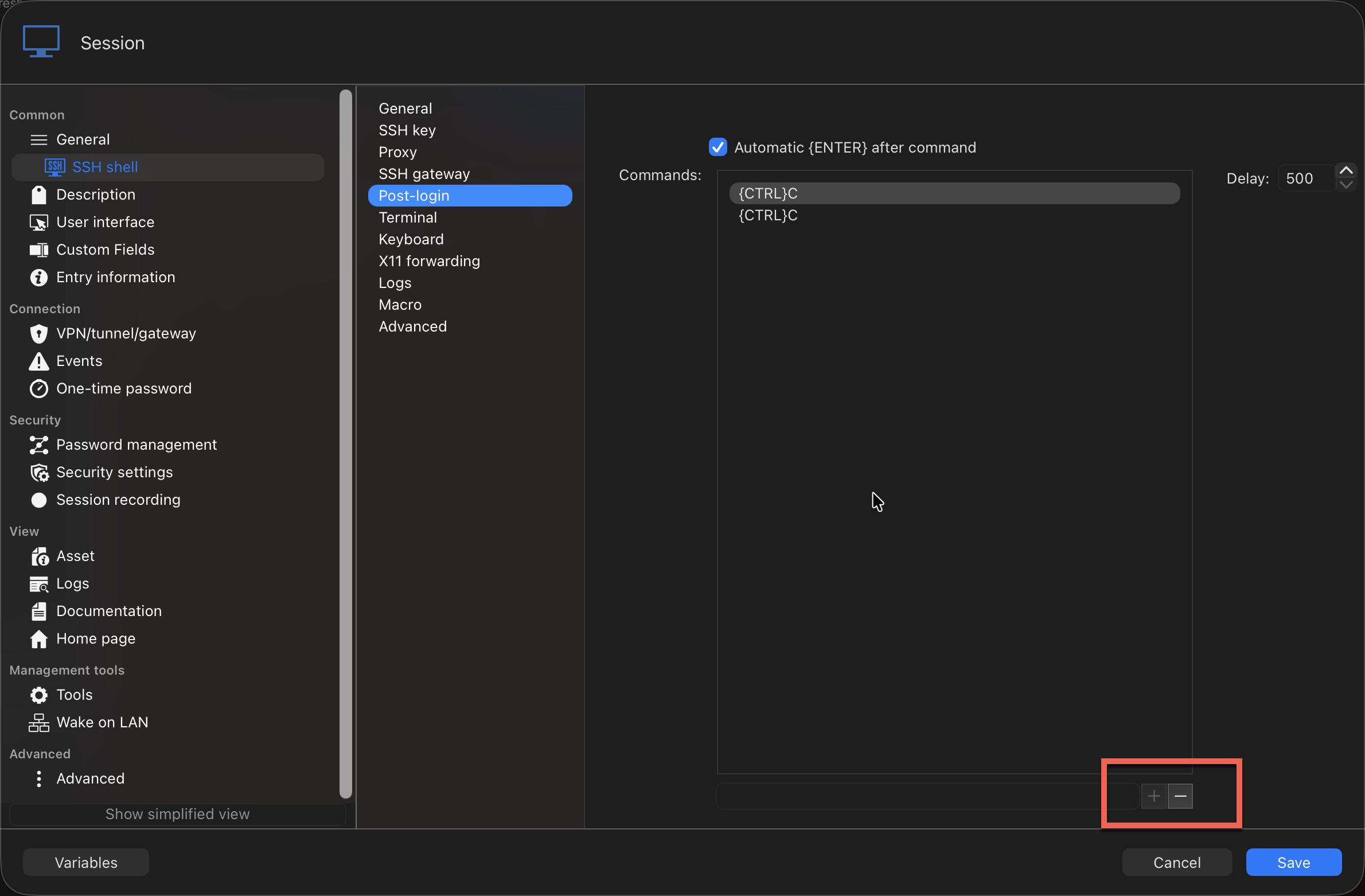
f1df6a89-403d-4b86-94df-f63697f3b76c.png
All Comments (6)
Hello,
Thank you for reaching out!
Two quick fixes:
Ctrl+C sending as literal text. In Post‑login, {CTRL} on its own is only a modifier — to actually hold Ctrl while pressing C, wrap the target key in parentheses. Change your two entries from {CTRL}C to {CTRL}(C). I'd also turn off "Automatic {ENTER} after command" for those rows and set the delay to 1000 ms so the two Ctrl+C's are spaced ~1 second apart.
The greyed‑out + button. Expected behaviour — the small box left of + / − is the "new row" input, and + only enables once you type into it. Type the command in that box, then click +.
Let us know if that works!
Thank you again!
Best regards,
Perfect. Thank you. I will try this later today.
I changed it to {CTRL}(C) and it still doesnt seem to work. It def types the characters on the screen, but it doesnt seem to have any effect.
I've tried uppercase C and lowercase c.
This using the latest version of RDM for Mac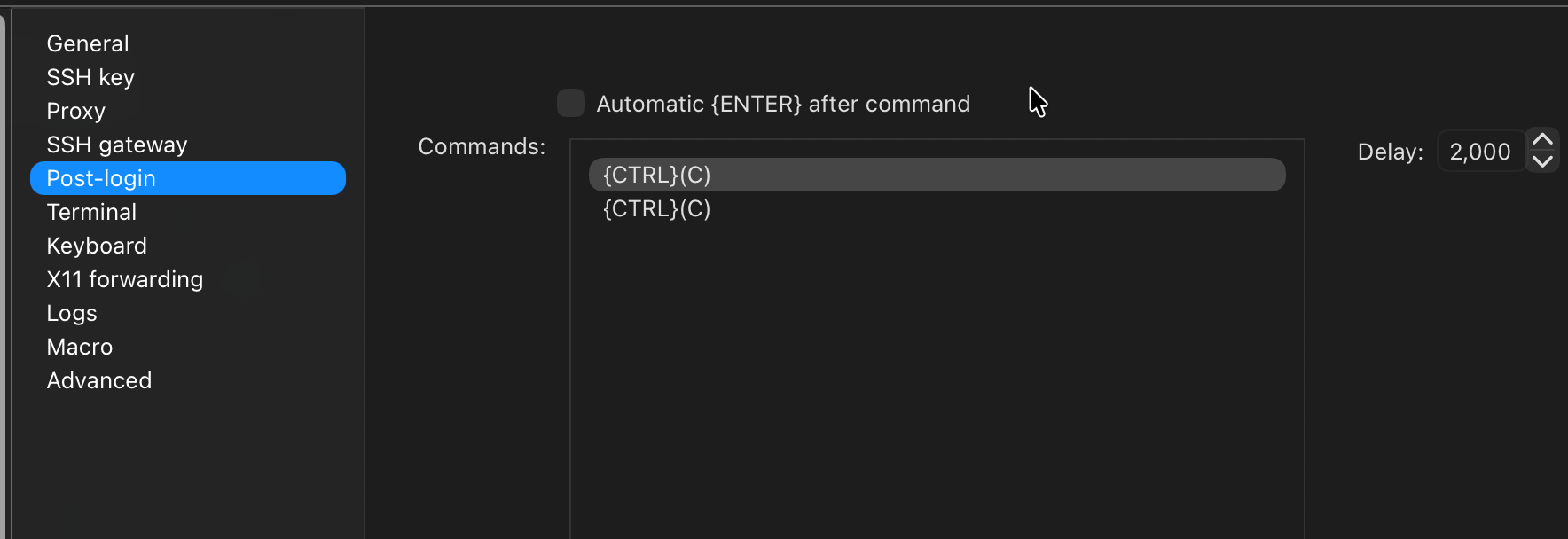
663bdc15-2a86-479f-9629-27ec02affd4b.png
b090d4af-0ad8-4c38-b33e-18a07f263661.png
<bump>
Any one have any idea how to send CTRL-C shortly after connecting to an SSH session. This is using RDM on MacOS.
Thanks!
Hello,
Thank you for the feedback!
We are currently investigating this internally. I will report back once I have an update.
Thank you for your patience!
Best regards,
Hello David,
Thank you for your patience.
Could you please send us a brief video or further screenshots that highlight the issue? I have sent you a link via direct message where you can upload them.
Thank you in advance!
Best regards,