
s03
Import file config.ovpn
In the previous version, I could directly import the configuration file with a .ovpn extension into the execution command for connecting to an OpenVPN. The import command automatically filled in all the fields (certificate, IP address, etc.). Only the username and password needed to be added. Is that correct?
Issues with Offline Functionality in RDM Version 2024.1.25.0
Good morning,
the offline mode works correctly with version RDM 2024.1.27
Best regards,
Issues with Offline Functionality in RDM Version 2024.1.25.0
Thank you.
Issues with Offline Functionality in RDM Version 2024.1.25.0
Good morning, the portable RDM version 2024.1.23 works. Thank you.
Issues with Offline Functionality in RDM Version 2024.1.25.0
The database I use is Microsoft SQL Server Standard Version 2017.
Best regards, Stefano
Issues with Offline Functionality in RDM Version 2024.1.25.0
Good evening, I have installed the RDM version 2024.1.25.0 64-bit on a new notebook and I am experiencing problems with the program when I am offline. If I work online, I do not have any problems. Normally, I set the datasource on the database to 'Automatically go offline on offline prompt' and on the 'Advanced' tab, the 'Caching mode' parameter to 'File'. Even if I request to go offline, it seems that the system still tries to connect to the database. In any case, after some time it goes offline, and if I try to open, for example, an OpenVpn or a website with the 'Open' option, the system does not respond. To function, I must go online. I have tried uninstalling and reinstalling, but it does not work. I have tried to clear the cache from the Datasource option, but no luck. I have also tried to set the parameter in Settings 'Startup online state' to 'Set as offline automatically' but I have the same anomaly. In practice, the RDM system does not work offline.
"How can I resolve this? Thank you.
Devolutions Online Database trial
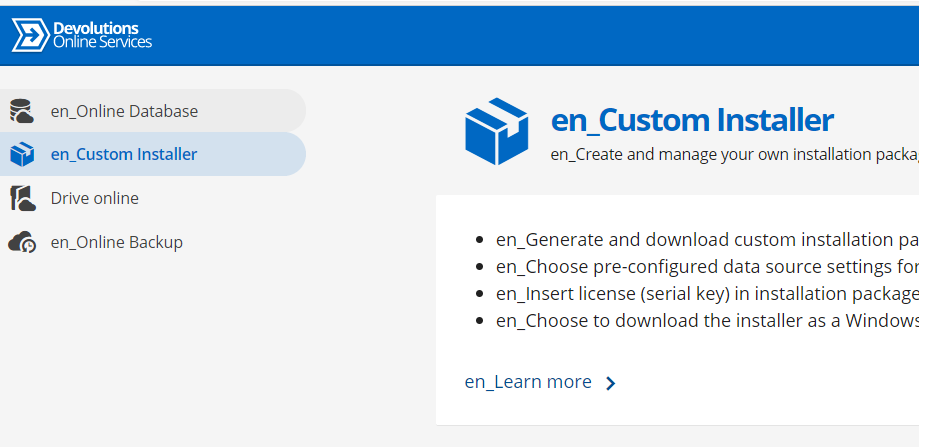
Hi,
I followed the instructions to enable the online database service for a trial period. The "en_Online database" option is not accessible.
The screenshot is attached.
thank you
Devolutions Online Database
Good morning,
our company uses remote desktop manager with microsoft sql
database on its network server.
I would like to move only the database to your servers. This
way I would have the freedom to access RDM from our notebooks without having a
VPN connection with the company server.
I think the solution on your site is "Devolutions
Online Database". What guarantees are there if we move the database
online? Is it possible to have a trial period to carry out functional tests? Is
it possible to have a quote?
Thanks
"X" red.
Hi,
often a red "X" appears in the RDP opening.
Attached is the screeshot.
Thanks
Website Users
In this case it is the user who must set the account and the RDM admin on his RDM client has no visibility / access to these credentials. I need to centralize these credentials and make them available / editable to the RDM admin.
Thanks
Website Users
RDM is used by several operators. Each operator must access a website with their own assigned account.
RDM through the plugin proposes to the operators to choose their own account.
There is the possibility to automatically fill in the login form with the data eg based on user RDM or Windows or ??
Thanks
View password
Thank you
View password
Hello, I updated RDM from 14.3.0 to 2019.1.20.0. Compared to the previous version, users set to "read only" no longer have the ability to view passwords with the appropriate icon (attached user settings, groups and roles). How do you set it up now? Thank you
Automatic credential filling
Hi, did you get the url?
Thank you
Automatic credential filling
I've tried but it doesn't work. How can I solve it? The portal is online and is a CRM.
Thank you
Automatic credential filling
If I open a site with the chrome browser the user and password are not automatically filled. Why?
Thank you
RDM Offline Mode
Hi,
i no longer receive information, are other data useful?
Thank you
RDM Offline Mode
Sent, thank you
RDM Offline Mode
Default - MCDF v.2.0
RDM Offline Mode
Good morning,
I need to access the RDM program directly in offline mode.
I set the procedure as per manual, after entering the password RDM still tries to connect to the database and reports an error.
Thank you
Openvpn credentials in upper case instead of lower case
Actually I had the CAPSLOCK enabled
Thank you
Openvpn credentials in upper case instead of lower case
Hi,
sometimes the automatic insertion of the vpn credentials does not respect the upper / lower case
Thank you
Expired VPN client
Hi,
Add-manager program (remote desktop manager version 13.0.6.0)
AT & T Global Network Client Add-on Your version is 3.0.36.0 expired 24/01/2018
I uninstall Add-on and install it.
I have the same message:
AT & T Global Network Client Add-on Your version is 3.0.36.0 expired 24/01/2018
Best regards
Stefano
Offline
Thanks a bunch
Offline
Hi, offline mode where are you set? There is no release 13.
Thank you