Remote Desktop Manager: Missing Connection Options

Good morning,
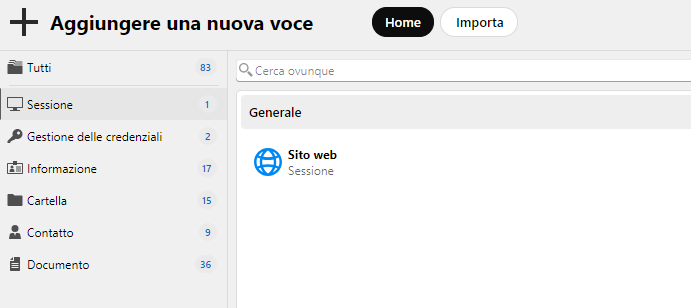
In the current version of Remote Desktop Manager, I cannot see all the connection options that are normally available, such as Remote Desktop (RDP).
If I remember correctly, these options were available before the license update.
What I find unusual is that all connection options are correctly displayed in the vault named "SecureVault", while some of them are missing in the vault named "BusinessVault".
Please note that my user account has administrator privileges.
Could you please explain what might be causing this difference and how I can restore the missing options?
Thank you for your support.
All Comments (1)
Hello Stefano,
Thank you for contacting Devolutions support.
The difference comes from the vault content type, not from your licence or your permissions. In Devolutions Cloud, each shared vault has a content type that limits which entry types can be created in it. BusinessVault uses the Business content type, which only allows Website as a session type, plus Username and password and OTP credentials, Information, Contact, Document and Folder entries. This matches your screenshot exactly. SecureVault uses the Default content type, where every entry type is available.
To get Remote Desktop (RDP) and the other session types back in BusinessVault:
1. In Devolutions Cloud, go to Administration – Vaults.
2. Edit BusinessVault.
3. Change the content type to Default and save.
4. In Remote Desktop Manager, refresh the workspace (F5) and open Add New Entry again.
Changing the content type does not affect the existing entries: they stay in the vault and can still be used and edited as before.
More details: https://docs.devolutions.net/cloud/web-interface/ui-customization/vault-content-types/
Best regards,
Alexis Geller Peiro