
kritzinger
Jump Host option missing from Batch Edit
Hello Samuel,
is there a specific reason why this setting is not available in Batch Edit in the same way as in the regular edit dialog?
Without prior knowledge or explicit instructions, this setting is extremely hard to discover. Even the name of the option does not clearly indicate that the jump host can be configured there.
After searching for quite a while, I honestly started to assume that this option simply did not exist and was already about to open a separate forum thread to ask for help.
Include and Exclude Characters from Password policies are not Inherited tor Entries
i can confirm that the problem is only related to Inherited State.
Actually, I do not need the feature to define password policies on individual entries.
I only need the global password policy to work correctly.
Include and Exclude Characters from Password policies are not Inherited tor Entries
RDM Version 2025.3.28.0
Datasource: Devolutions Server 2025.3.12.0
Steps to Reproduce:
Create password policy and configure "Include the following characters" and "Exclude the following characters

Select this Policy as Default policy in System settings.
Create new Entry and use Generate to create a new Password
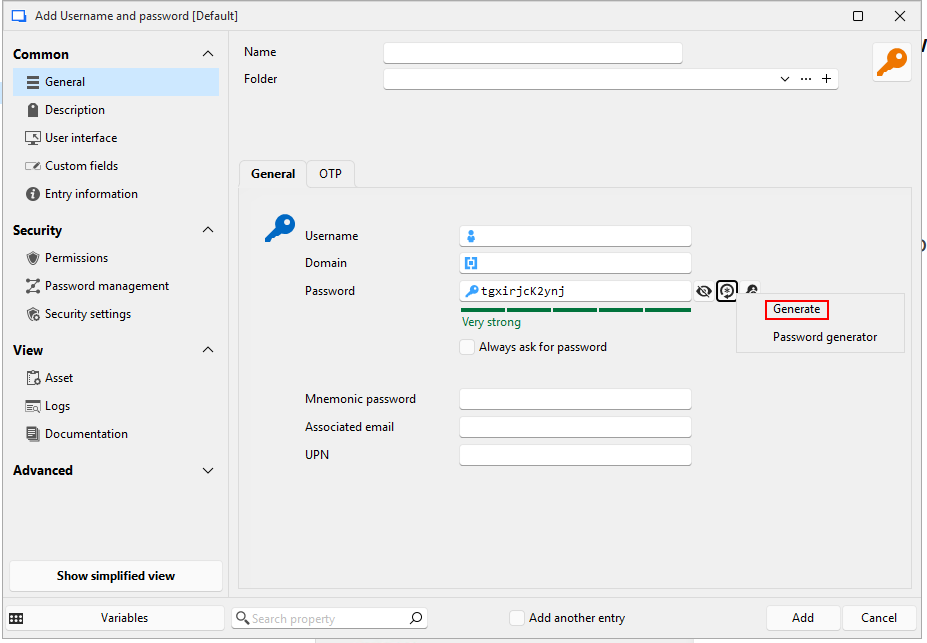
Expected Behavior:
Password should match all criteria defined in the Policy.
Actual Behavior:
Only the criteria available in the Password policy setting within the entry are taken into account.

Allow users to choose between two MFA methods (YubiKey or Authenticator App)
We have recently started rolling out YubiKeys for multifactor authentication in Devolutions Server. They provide strong security and work very well.
At the same time, we would like to give users the ability to choose between two MFA methods at login:
YubiKey as the preferred hardware-based method
Smartphone authenticator app (TOTP) as an alternative
The idea is not to have a weaker "fallback" option like email or SMS, but to configure two secure MFA methods in parallel, so that users can select the one that is available to them at the moment of login.
Benefits:
Prevents lockouts if one method (e.g. the YubiKey) is not at hand.
Reduces IT support workload, since fewer manual resets are required.
Maintains strong MFA standards by limiting the choice to secure methods only (YubiKey and TOTP).
This flexibility would make the transition to hardware tokens smoother while still ensuring that users always have a secure authentication method available.
Devolution Login via Embedded Edge WebView2
Hello,
We are using an on-premises Devolutions Server.
I suggest considering this change for all (devolutions) products that use web-based authentication.
Button for open Website in Deafult Browser
Hello,
I see where this is going.
It’s not exactly the same, but I get your point.
Given the available options, it doesn’t really make sense to overload the UI with yet another button.
Thank you for showing me the available options.
To be honest, I completely overlooked the ones under "Open with parameters".
Merging Password Lists can result in Data Loss
Hello @Patrick Ouimet ,
It is reproducible with one entry each list.
You only need to input minimum information - just do be able to save the list.
Just give yourself a try. It is very easy to reproduce.
Devolution Login via Embedded Edge WebView2
Our internal security policy requires a second factor to be entered every time we log in to RDM.
That’s why we see the login window daily — sometimes even multiple times a day.
It would be very convenient if the login window didn’t open in the default browser.
It would also be much more secure if no third-party plugins or browser password managers were active in the login window.
I believe that using an Edge WebView2 window could bring the login into a secured environment with little effort.
Button for open Website in Deafult Browser
We’ve been using the login account entry for years.
I’d like to switch to using the website entry instead.
The catch is: users are used to opening account entries in the browser using the “Open URL” button.
I want to let the user decide whether they want to open the entry in a tab or in their own browser.
The simplest solution would be to offer an “Open in Browser” button for website entries in addition to “Open Session”.
That way, users can choose each time whether to open the session in a tab or in their browser.
Merging Password Lists can result in Data Loss
RDM Version: 2025.2.20.0 64
Datasource: DVLS 2025.2.2.0
Steps to reproduce:
Create Password List "List1"
Create Password List "List2"
Select List1 and List2
Edit (special actions) > Move to existing password list
Select List1 as target
Actual behavior:
List1 and List2 disapear
List1 and List2 can be found in Deleted entries
List1 contains Entries from List1 and List2; Entries from List1 are duplicated
Expected behavior:
Error Message without Changes
or List1 and List2 are not available for target
or List1 appears merged without duplicates
Unwanted replacement of a slash
Hello James,
in fact, i had several entries with the same name. One of them was misspelled.
When checking in the DPS web ui last time, i could not see this problem at first glance.
So ther is no problem and forward slash is not getting replaced.
Kind Regards,
Thomas
Unwanted replacement of a slash
Hello James,
i dont remember if i created the entry with the browser plugin or manually using rdm.
I use Devolutions Web Login directly connected to DPS.
In need to store the Password for this Page:
Unfortunately I cannot provide a login, as this would require a license fee.
Regards,
Thomas
Unwanted replacement of a slash
Hello,
i am using DPS 2020.3.12.0 and Chrome Extention Devolutions Web Login 2021.1.5.0.
We use a web portal where the username looks like this: <Tenant>/<Username>
Login only works with a forward slash, but the browser plugin always replaces the forward slash with a backslash and the login fails.
Regards,
Thomas
Delegate permission to create template
To me, it honestly sounds like someone hadn't thought about it.
As a user, I don't mind where the templates are saved in the data source. If I set an permission, it should just work.
Since i can program myself i understand the background.
However, if the program does not behave as the user expects when it comes to such simple things, then you can expect far greater problems in the future.
Delegate permission to create template
The Type for alle User is User. The user also can Edit all other Entries. He also can edit existing Templates.
Slowly but surely, this topic is becoming a waste of time.
Keep template name on use
Hello,
I thought this problem has already been fixed.
Yes, please keep me informed when a public fix is available.
Regards
Delegate permission to create template
Hello,
this are my settings:


Users still can't add a Templates.
Is that intended to be that complicated to delegate "add" permission for Templates?
Keep template name on use
Hello,
I have no idea how you come up with these suggested solutions.
For me they did not work.
Isn't it possible to make a permanent fix instead of trying workarounds?
Regards
Delegate permission to create template
Hello,
i can't reproduce your solution with RDM 2020.3.14.0.
I have set Add-Permission to Everyone:

But i still can't add Templates as user.:

Regards
Keep template name on use
Hello,
the problem also persists in the portable version, as I expected.
I don't quite understand why you're bothering me to find the problem.
Can't reproduce your problem on your side?
Regards
Delegate permission to create template
Hello,
i have set System Permission > Templates > Templates to Everyone.

As user i can edit existing Templates. But i am not able to create new Templates.
Regards
Keep template name on use
Hello,
i have upgraded to RDM 2020.3.14.0 and DPS 2020.3.8.0.
For me the problem still persists. Can you reproduce it?
Regards
Keep template name on use
Hello,
do you mean DPS 2020.3.8.0 and RDM 2020.3.12.0?
becaus i cant finde any hint of this fix in the release notes.
do i need to update both for this fix to work?
Regards
Allow the default entry settings to be applied to all users
As suggested by Christine Breault, I am bringing this topic up to a feature request.

Previous Topic: https://forum.devolutions.net/topics/34257/default-template-settings
Allow Users to move Entries from one Vault to another
In my case it would be ok if there is no permission check on the target vault.
Maybe you can add a security setting "Allow users to move entries without security check to this Vault" to each vault.
Administrators can allow this behavior separately for each vault.