Default Template Settings

Hello together,
I did some resarch, but did not found a hint.
Question: I have changed some settings in the Default Templante for RDP (e.g. do not forward local Harddrives to the remote session)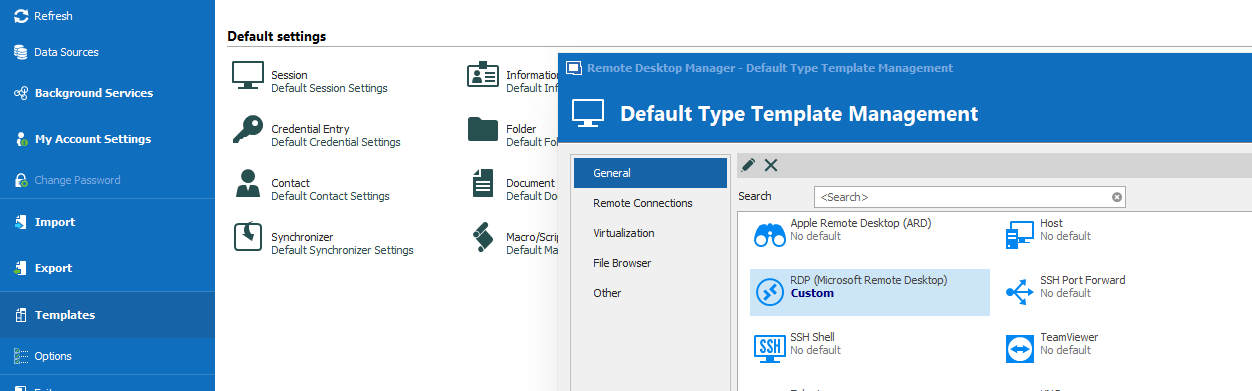
When I create a new RDP-session then these defaults are correctly in the definition.
But when another user is adding a new RDP-session, then he do not get the new defaults. (He started the RDM new after the changes to the default template were done)
Do I miss something ?
I expected, when the default template is changed, everyone who uses this template get the changed settings.
Thanks for your assistance.
Best regards
Joerg
2020-08-20_153817.png
2020-08-20_152658.png
All Comments (10)
Hello,
The Default Settings are a local setting, therefore the other users of the database won't be affected by the changes you do on your side.
You would need to create a Database template for RDP :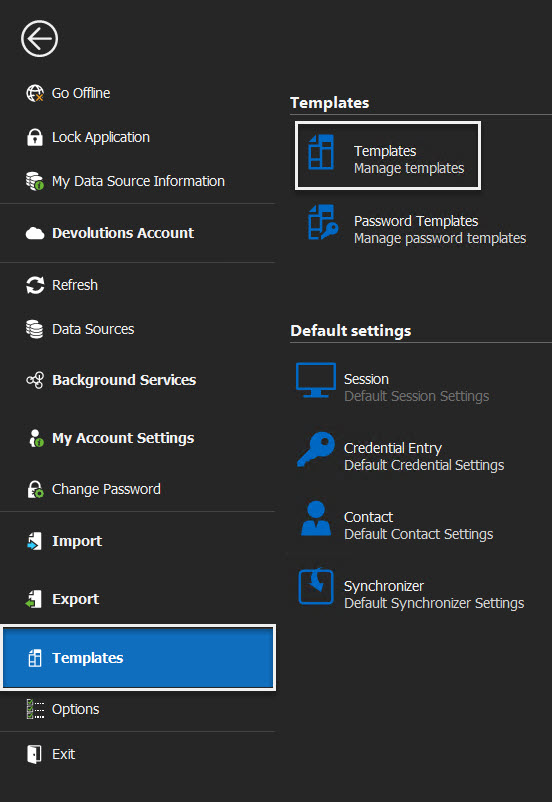
Best Regards,
Etienne Lord
template.jpg
Hello Etienne,
thank you for this information.
Best regards
Joerg
Hello,
when crating Templates Users still can decide not to use theme.
In addition to default settings for RDP Connections i want to have new Folders always with the setting "Credentials: Inherited".
Regards
Hello,
Thank you for contacting us on that matter. For forcing user to only use your templates go into Administration - System Settings - Vault and set the Add entry mode to Template list only.
And for your Folders template, you can select and save the inherited options in the Credentials field, so that when you select this template it will be already configured.
Best regards,
Christine Breault
When i enable "Template list only" Users are not able to create any other Entry type.
They get the following error message:
Regards
Hello,
Thank you for your quick reply! This behavior is "as designed". Enabling this option will prevent your users from creating an entry without using a template. This is also the reason why you are receiving this error message.
Best regards,
Christine Breault
What does this mean for your suggestion using this option as a "Default Setting" behavior?
Hello,
Let me retry to explain. Since you are choosing to force a user to use the templates every time with the Template list only option. If no template exist (you did not create one for this specific entry) than the user cannot create this entry type and will get the error message you are showing.
Best regards,
Christine Breault
I‘m sorry, you missed the point.
I wanted to predefined settings of two entry types for all users. I did not want to restrict the users to these two templates only.
A default setting for one entry type should not affect other entry types.
Hi,
I have reread the entire post, being you did not create the first part, and found where the confusion may arise from.
The Templates default settings shown here only affect locally, in the RDM application. 
Since you mentioned you wanted this to apply to all users, I gave you the way to change the settings in your database in the System settings, thus affecting all your users.
There is no option, at this time, of forcing only a certain type of entry to use a specific template and not forcing the others, apart from setting it locally. But then this could be overridden by the user. Maybe a feature request would be a good idea in this case!
Best regards,
Christine Breault