
jpcharest
S3: Please check the provided AWS Credentials
Hello,
I have not been able to reproduce the last issue, but after some research, I think it be caused by using the default region endpoint.
I can see in one of your screenshot that the bucket's region is southeast-2. Could you try setting the region endpoint to Asia Pacific (Sydney)?
Let me know if this helps.
Best regards,
Wayk Den
Hello,
This issue can occur when the date/time of the server is not correctly set.
Could you try adjusting the date/time on the server? Then clear your cookies in your browser and retry to connect.
Best regards,
Command Line Options to Launch RDP Session in Remote Desktop Manager
Hello again,
I did some tests with PRTG Desktop and it is possible to send the ID of an RDP template along with the value of %host.
Here is the procedure to follow:
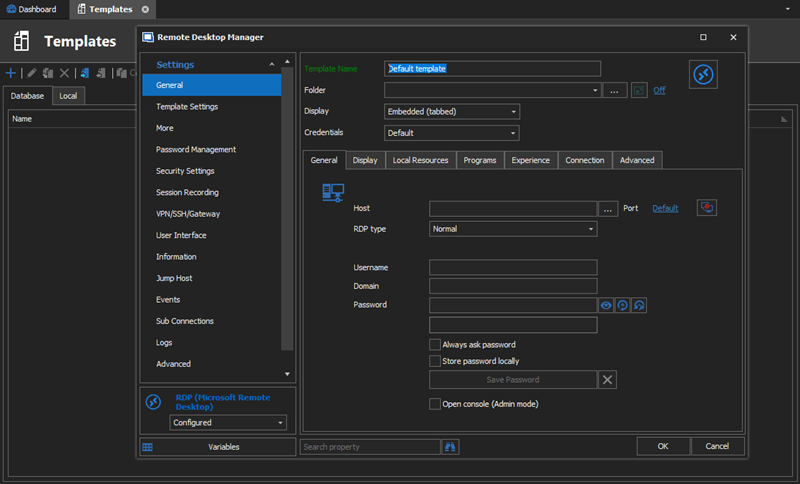
In RDM, navigate to File - Templates.

Create a local template for RDP.
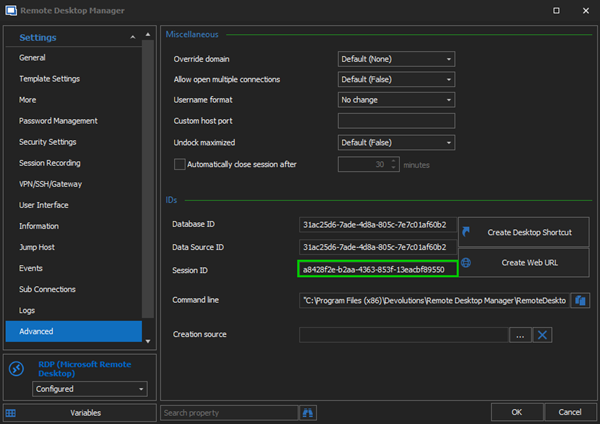
In the Advanced section of the template, copy the Session ID.
In the Edit Device Tool in PRTG Desktop, add the /Template:Session_ID_of_template parameter, and the /Host:%host parameter.
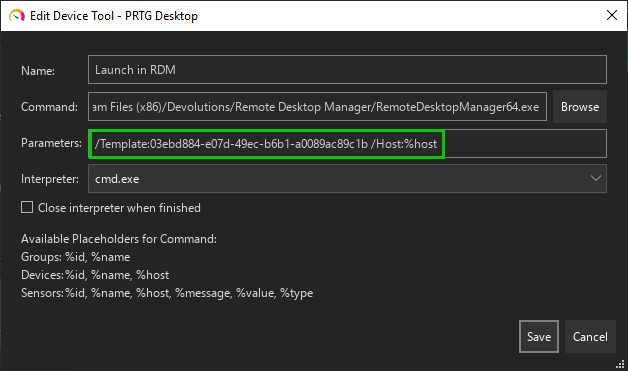
With this setup, the session is launched embedded in RDM via the Quick Connect feature using the RDP template previously created.

Best regards,
Command Line Options to Launch RDP Session in Remote Desktop Manager
Hello,
Command line arguments allow to open sessions in RDM. You can specify a session ID, a template, or even a file such as a *.rdp.
For example :
RemoteDesktopManager.exe /DataSource:178c2fda-dab4-4f41-98df-6e3205c0a011 /Session:474bcbcf-d507-435b-8c0a-a9e868781910To retrieve these information about entries:
In RDM Edit the properties of the target entry, and navigate to the Advanced section.
Click Create a desktop shortcut, and specify a name. A shortcut is created on the Desktop.
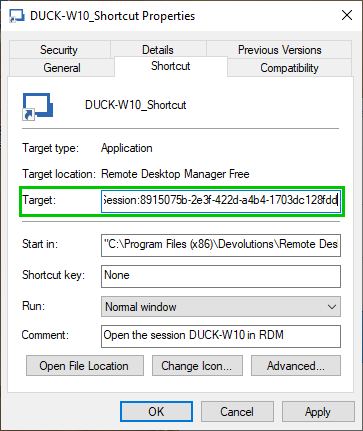
Edit the desktop shortcut properties, and copy the Target field content. This is the command used to launch the session.
Best regards,
Browser Protocol Extension Bug?
Hello,
Thank you for reporting the issue, this is indeed a bug. The filter argument should work with spaces. I've opened a ticket with our engineering department.
Best regards,
Allow credential access from shortcuts
The credential entry can be stored anywhere in the same vault. The credential repository is simply a list of all the available credential entries stored in the vault.
I'm glad if this solution helps you!
Best regards,
Allow credential access from shortcuts
Hello,
Unfortunately, a shortcut cannot inherit the credentials from the original entry's folder.
As a workaround, you could have a credential entry in the same folder as the original session, then link the credential entry to the session with the credentials repository.


This way, the shortcut will keep the original credentials instead of having them inherited from its current location.
It is the only way I can think of to keep the original credentials for a shortcut.
Best regards,
Allow credential access from shortcuts
Hello,
Thank you for your feature request.
I had a discussion with our engineering department, and unfortunately, it is not possible to edit shortcuts independently of the original entry.
Since the shortcut in only a "link" to another entry, editing its credentials will also edit the credentials of the original entry.
As a workaround, since the shortcut is place in another folder, it is possible to set the credentials on the folder containing the shortcut.


Then set the Credendials option of the entry to Inherited.

That way, credentials will be retrieved from the shortcut's respective parent folder.
Best regards,
some little UI effects
Hello,
Thank you for the export.
Unfortunately, I still cannot reproduce any of the issues.
If you want to test them, other type of SSH sessions are deprecated and hidden from the application, but you can find them by enabling the "Show Deprecated Entries" option when creating a new entry. However, we recommend using our implementation of SSH Shell since it's easier for us to troubleshoot.
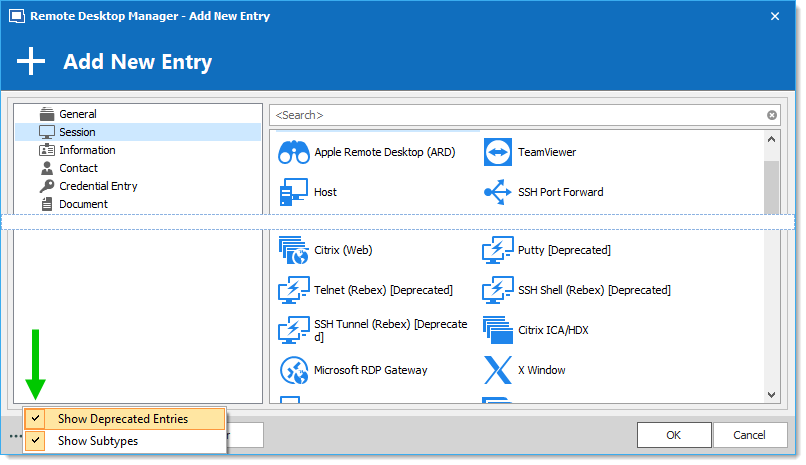
I can suggest testing two more options to try solving your issue with the undocked display mode:
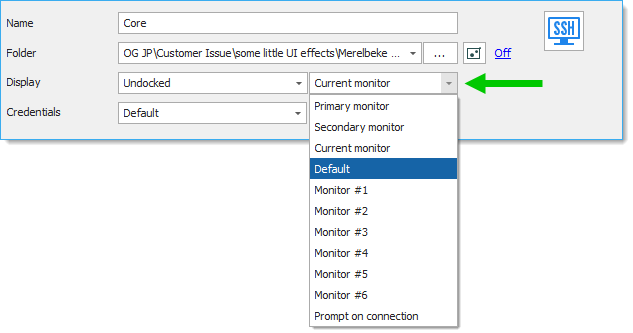
1. In the entry you exported, I noticed that the Display mode is set to select the current monitor when connecting. Does the issue still occur if you set this option to Default?
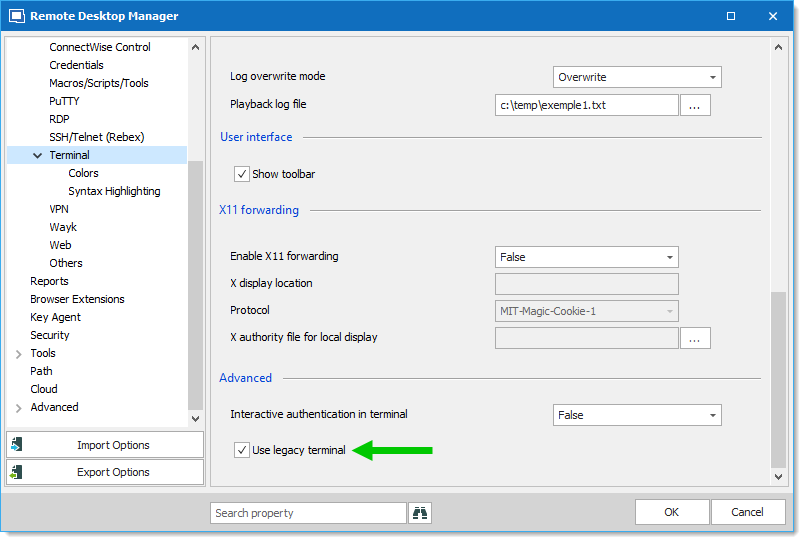
2. Using the legacy implementation of the SSH Shell session might resolve the issue. Navigate to File - Options - Types - Terminal and enable the Use legacy terminal option.
Best regards,
some little UI effects
Hello,
You can verify which type of session you use by looking at the bottom-left corner of the properties of an entry.
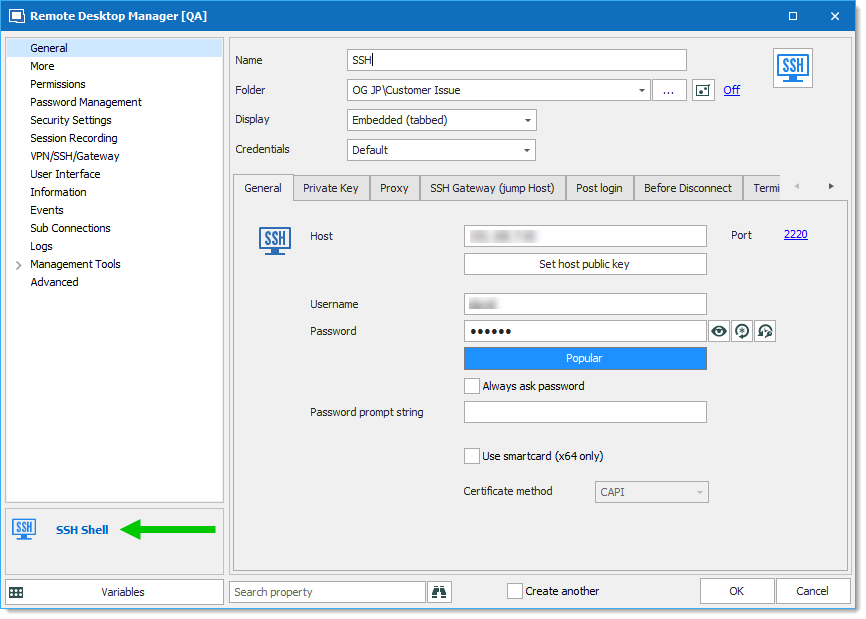
Since you mentioned to have only the Embedded and Undocked options, I suppose you are using an SSH Shell session.
This is our new implementation of the SSH Shell protocol.
The issue might be caused by the Undocked display mode. Did it ever happened with other types of sessions?
Would it be possible for you to export the entry and attach it to this forum thread? To do so, Right-click the entry - Export - Export Selection (RDM)...
DO NOT include any credentials.
Best regards,
some little UI effects
Hello,
For the first issue, what type of SSH session are you using? SSH Shell, Putty, Rebex? Is the Display mode set to External?
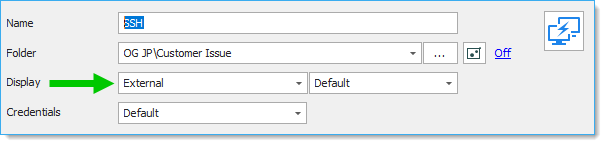
For the second issue, I can't seem to be able to reproduce it on my Parallels machine. However, UI issues are not uncommon with Parallels.
Best regards,
Shortcut or web URL not working, newest RDM
Hello,
Indeed, this did no fix the command line and the shortcut. I will do more tests and inform our engineering department and I will update this forum thread as soon as a fixed version becomes available.
Best regards,
Shortcut or web URL not working, newest RDM
Hello,
Justed wanted to let you know that a new version of Remote Desktop Manager Free has been released and the protocol handler has been fixed.
Best regards,
Shortcut or web URL not working, newest RDM
Hello,
Thank you for the feedback. I have been able to reproduce your issue and our engineering department has been notified. I will keep you informed when a fix is available.
Best regards,
Why is the Latest Version Not Available? links to wrong topic
Thank you for reporting this issue.
Our online help underwent considerable modifications recently. Many topics had their links changed, but this link has not been changed in the application.
This will be fixed as soon as possible.
Best regards,
RDM GUI - Top Pane
Hello,
You can hide the ribbon commands by double-clicking on a tab title or with the arrow icon in the bottom-right corner of the ribbon.
This will keep the Quick Connect visible.

Best regards,
Old version not finding new version
Hello,
I think that I have been able to reproduce your issue. It seems to come from the way that the custom installer has been created. Here is the explanation:
When the application prompts for the update, you have the choice to "Skip the version". If this option has been chosen in the version from which the custom installer come from, it has been saved in the installer configuration.
When you install the customized version, there is a conflict between the two configurations (the one from the custom installer and the local one). Since the update check is done before this conflict happens, it will be prompted if the local configuration allowed it before installing the customized version.
When your colleague's machine has been re-imaged, the local configuration has been lost and the custom one took its place without any conflict when installed.
I would suggest to update the custom installer you are using. Then the update check should be displayed with installer configuration.
Best regards,
Not able to type server names in navigation pane
Hi Doug,
I think I can reproduce your issue but only when I have a session opened. It seems to be caused when the Dashboard takes the focus.
Does it work well when you don't have any session opened?
As a work around, I would like to suggest you to disable the "Auto focus dashboard" option in "File >> Options >> User Interface >> Dashboard"
Best regards,
Unable to override username format
Hi,
The domain\username can be supplied directly in the username field.
Do you have any specific reason why you want to override the format?
Maybe we could add a domain field in the session properties.
Best regards,
Unable to rearrange tabs (drag)
Hello,
I wanted to let you know that the issue has a work around with Surface devices. When using the Surface Pen, entries can be dragged in the navigation pane even when the issue occurs.
Best regards,
Copy/Paste sessions loses folder associations
Hello Zachary,
I wanted to let you know that your issue has been fixed and is no longer present in the latest version of Remote Desktop Manager: 11.7.1.0.
You may visit our download page to get this new release.
Best regards,
Copy/Paste sessions loses folder associations
Hello Zachary,
I have been able to reproduce your issue and a bug ticket has been open. It will be fixed as soon as possible.
Best regards,
Error in display tabs
The bug has been assigned to developer.
Unfortunately, I can't know when it will be fixed but we will notify you on the forum when it is done.
Best regards,
Error in display tabs
Hi,
I have been able to reproduce your issue and a bug ticket has been open.
Best regards,
Incorrect RDP Session launching
Hello,
Unfortunately, I'm unable to reproduce your issue yet. Could you send me a private message with a screenshot of your RDM window (including the tree view). Maybe I'm missing something so I will try to have the same configuration as you.
Best regards,