S3: Please check the provided AWS Credentials
Hi,
Busy working with a trial of Enterprise and I am trying to connect to S3 using IAM Access key credentials stored in Secret Server.
When I pass the credentials from the Secret Server IAM secret I get the below error message.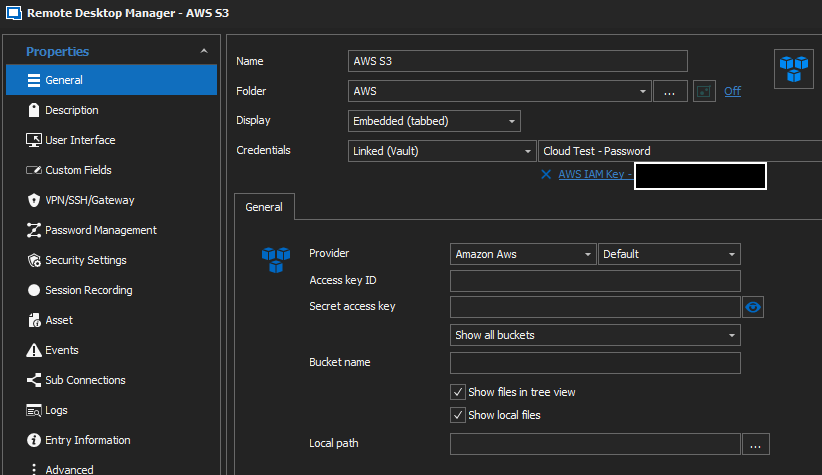
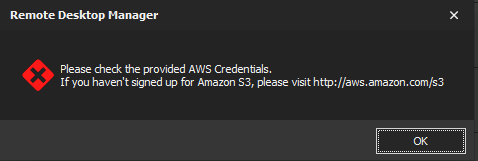
What am I missing?
The secret is stored in Secret Server using the "Amazon IAM Key" template.
If I manually enter the credentials, it works as expected.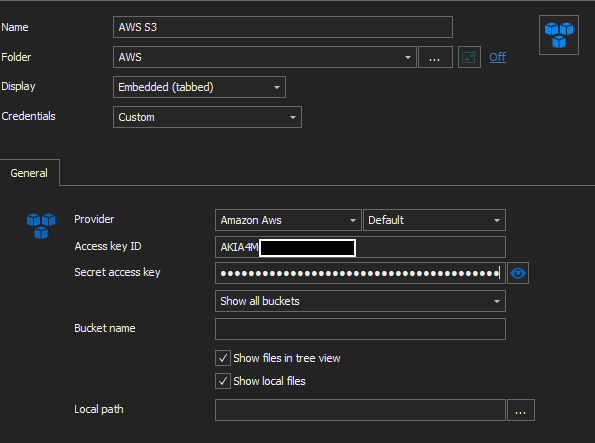
3.png
2.png
1.png
All Comments (30)
This is the log from the S3 connection, so it would appear that RDM is possibly passing on the incorrect information:
Amazon.S3.AmazonS3Exception: The AWS Access Key Id you provided does not exist in our records. ---> Amazon.Runtime.Internal.HttpErrorResponseException: The remote server returned an error: (403) Forbidden. ---> System.Net.WebException: The remote server returned an error: (403) Forbidden.
   at System.Net.HttpWebRequest.GetResponse()
   at Amazon.Runtime.Internal.HttpRequest.GetResponse()
   --- End of inner exception stack trace ---
   at Amazon.Runtime.Internal.HttpRequest.GetResponse()
   at Amazon.Runtime.Internal.HttpHandler`1.InvokeSync(IExecutionContext executionContext)
   at Amazon.Runtime.Internal.RedirectHandler.InvokeSync(IExecutionContext executionContext)
   at Amazon.Runtime.Internal.Unmarshaller.InvokeSync(IExecutionContext executionContext)
   at Amazon.S3.Internal.AmazonS3ResponseHandler.InvokeSync(IExecutionContext executionContext)
   at Amazon.Runtime.Internal.ErrorHandler.InvokeSync(IExecutionContext executionContext)
   --- End of inner exception stack trace ---
   at Amazon.Runtime.Internal.HttpErrorResponseExceptionHandler.HandleException(IExecutionContext executionContext, HttpErrorResponseException exception)
   at Amazon.Runtime.Internal.ErrorHandler.ProcessException(IExecutionContext executionContext, Exception exception)
   at Amazon.Runtime.Internal.ErrorHandler.InvokeSync(IExecutionContext executionContext)
   at Amazon.Runtime.Internal.CallbackHandler.InvokeSync(IExecutionContext executionContext)
   at Amazon.Runtime.Internal.EndpointDiscoveryHandler.InvokeSync(IExecutionContext executionContext)
   at Amazon.Runtime.Internal.RetryHandler.InvokeSync(IExecutionContext executionContext)
   at Amazon.Runtime.Internal.CallbackHandler.InvokeSync(IExecutionContext executionContext)
   at Amazon.Runtime.Internal.CallbackHandler.InvokeSync(IExecutionContext executionContext)
   at Amazon.S3.Internal.AmazonS3ExceptionHandler.InvokeSync(IExecutionContext executionContext)
   at Amazon.Runtime.Internal.ErrorCallbackHandler.InvokeSync(IExecutionContext executionContext)
   at Amazon.Runtime.Internal.MetricsHandler.InvokeSync(IExecutionContext executionContext)
   at Amazon.Runtime.Internal.RuntimePipeline.InvokeSync(IExecutionContext executionContext)
   at Amazon.Runtime.AmazonServiceClient.Invoke[TResponse](AmazonWebServiceRequest request, InvokeOptionsBase options)
   at Devolutions.RemoteDesktopManager.Frames.Embedded.FreEmbeddedS3.c3549d78018a93b2027dfe122072806fe()
Hello,
Thanks for reaching out to Support!
If you right click -> View Password on the Secret Server Entry, are the credentials fetched and resolved properly?
Thanks for keeping us posted.
Best regards,
Alex Belisle
Morning Alex,
Yes I can view the credential, but unfortunately it looks like RDM is pulling the wrong fields in the Secret Server secret: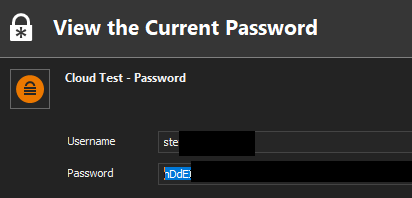
The TSSC template has four fields:
Is there a way to somehow remap while fields are extracted from the secret?
4.png
Hello!
Good, we're getting somewhere!
Yes it's possible to map the fields as desired, right click your Secret Server entry -> Property -> Advanced...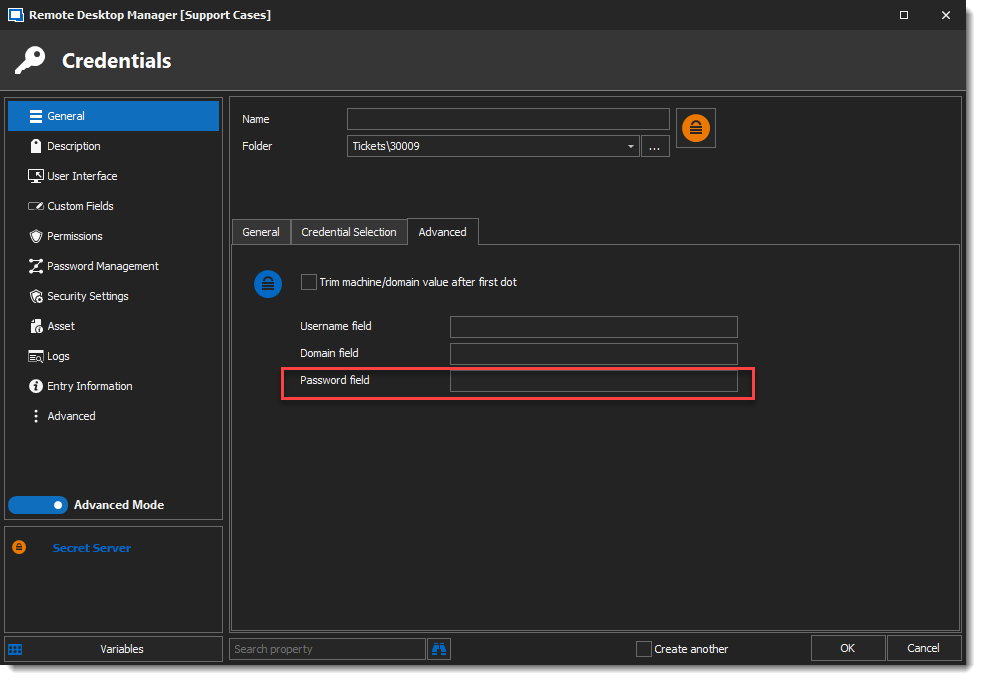
I hope this helps!
Best regards,
Alex Belisle
2021-03-09_16-26-34.png
Hi Alex,
That's promising. However, I'm being a little dim and can't work out what needs to go into the "User Name" field to populate the field with the information in the Secret Server template.
If I add "Access Key" or "access-key", it still return the Secret Server "Username" field

Hello,
Thanks for your response.
That's quite a bummer, after a quick chat with a colleague, he confirmed that there might be an issue with the Username (we have to double check, but it looks like it's hard-coded this way...)
Of course it's not an intended behavior.
Furthermore, we're at a crossroad regarding the integration with Secret Server and it will be changed quite much sometime this year.
All of that said, A ticket has been opened for the engineering team to fix the behavior you're experiencing, I'm afraid I cannot do much for now, sorry for the inconvenience.
Best regards,
Alex Belisle
Morning Alex,
I have managed to get it to work. I queried the API and got the exact name that was returned, it happened to be "AccessKey". I can now pass the correct credentials to S3.
With regards to the future plans for Secret Server, does that mean you'll be integrating better with Secret Server or support will be removed?
Alex,
Just to add to this, I can connect to S3 without any issues, but when drilling down into an S3 bucket I get the following error:
This seems to happen when I browse down 2 or 3 folders.
Hello,
I am glad that the Username field could be parsed properly, thanks for the feedback!
For the error, could you take a look in the Application Logs and paste the error here? (technically there is no sensitive data, but double check)
Also, we'd like to see what's causing the error from the Profiler.
Please get to the profiler, set the level to 1 in the Debug tab, reproduce the error and please sent the trace.
Thanks for your cooperation!
Best regards,
Alex Belisle
Hi Alex,
Please see attached.
RemoteDesktopManager6412-03-2021.log
message.txt
Hi Alex,
This is the message I get in the "Debug" tab in "Performance Profiling":
An Error, number PermanentRedirect, occurred when listing objects with the message 'The bucket you are attempting to access must be addressed using the specified endpoint. Please send all future requests to this endpoint.
Hello,
Thanks a lot for the details, I'll try to reproduce the issue, and I'll get back to you soon.
Let keep in touch!
Best regards,
Alex Belisle
Hello,
Quick update, for now I still cannot reproduce this issue, I can drill down as "deep" as I want (as I have access to)...
I'll talk with the QA department to try to reproduce the issue, sorry I cannot be of more help at the moment.
Best regards,
Alex Belisle

Hello,
I have not been able to reproduce the last issue, but after some research, I think it be caused by using the default region endpoint.
I can see in one of your screenshot that the bucket's region is southeast-2. Could you try setting the region endpoint to Asia Pacific (Sydney)?
Let me know if this helps.
Best regards,
Jean-Philippe Charest
Morning Jean-Philippe,
After further testing, it appears to be the buckets in "ap-southeast-2" which are affected, these unfortunately are about 90% of our buckets.
I can confirm that I can browse buckets in other regions, such as "eu-central-1" and "us-west-2" without any issue.
When changing the region from "default" to "Asia Pacific (Sydney)", it makes no difference.

21 - Connection States: Refresh : 0 ms
An Error, number PermanentRedirect, occurred when listing objects with the message 'The bucket you are attempting to access must be addressed using the specified endpoint. Please send all future requests to this endpoint.
An Error, number PermanentRedirect, occurred when listing objects with the message 'The bucket you are attempting to access must be addressed using the specified endpoint. Please send all future requests to this endpoint.
22 - Connection States: Refresh : 0 ms
I've also reduced the scope to a single "ap-southeast-2" bucket and the result is the same.
I also sometimes get this message popping up and only a few buckets display (Looks like the list stops when it hits a bucket in the "eu-central-1" region)
Amazon.S3.AmazonS3Exception: The authorization header is malformed; the region 'eu-central-1' is wrong; expecting 'ap-southeast-2' ---> Amazon.Runtime.Internal.HttpErrorResponseException: The remote server returned an error: (400) Bad Request. ---> System.Net.WebException: The remote server returned an error: (400) Bad Request.
   at System.Net.HttpWebRequest.GetResponse()
   at Amazon.Runtime.Internal.HttpRequest.GetResponse()
   --- End of inner exception stack trace ---
   at Amazon.Runtime.Internal.HttpRequest.GetResponse()
   at Amazon.Runtime.Internal.HttpHandler`1.InvokeSync(IExecutionContext executionContext)
   at Amazon.Runtime.Internal.RedirectHandler.InvokeSync(IExecutionContext executionContext)
   at Amazon.Runtime.Internal.Unmarshaller.InvokeSync(IExecutionContext executionContext)
   at Amazon.S3.Internal.AmazonS3ResponseHandler.InvokeSync(IExecutionContext executionContext)
   at Amazon.Runtime.Internal.ErrorHandler.InvokeSync(IExecutionContext executionContext)
   --- End of inner exception stack trace ---
   at Amazon.Runtime.Internal.HttpErrorResponseExceptionHandler.HandleException(IExecutionContext executionContext, HttpErrorResponseException exception)
   at Amazon.Runtime.Internal.ErrorHandler.ProcessException(IExecutionContext executionContext, Exception exception)
   at Amazon.Runtime.Internal.ErrorHandler.InvokeSync(IExecutionContext executionContext)
   at Amazon.Runtime.Internal.CallbackHandler.InvokeSync(IExecutionContext executionContext)
   at Amazon.Runtime.Internal.EndpointDiscoveryHandler.InvokeSync(IExecutionContext executionContext)
   at Amazon.Runtime.Internal.RetryHandler.InvokeSync(IExecutionContext executionContext)
   at Amazon.Runtime.Internal.CallbackHandler.InvokeSync(IExecutionContext executionContext)
   at Amazon.Runtime.Internal.CallbackHandler.InvokeSync(IExecutionContext executionContext)
   at Amazon.S3.Internal.AmazonS3ExceptionHandler.InvokeSync(IExecutionContext executionContext)
   at Amazon.Runtime.Internal.ErrorCallbackHandler.InvokeSync(IExecutionContext executionContext)
   at Amazon.Runtime.Internal.MetricsHandler.InvokeSync(IExecutionContext executionContext)
   at Amazon.Runtime.Internal.RuntimePipeline.InvokeSync(IExecutionContext executionContext)
   at Amazon.Runtime.AmazonServiceClient.Invoke[TResponse](AmazonWebServiceRequest request, InvokeOptionsBase options)
   at Devolutions.RemoteDesktopManager.Frames.Embedded.FreEmbeddedS3.c3549d78018a93b2027dfe122072806fe()
Hello,
I will update the Amazon lib that we use. You will be able to try it in the next version. You can also try the beta version if you want.
https://forum.devolutions.net/topics/33177/remote-desktop-manager-20201-beta
Regards
David Hervieux
Hi David,
I'll give it a try, the link appears to be to a Beta from 2020, is that correct?
If this does work, do you have an estimated release date as I can't ask all our users to run the Beta?
Hello,
Sorry about that. I pasted the wrong beta link:
https://forum.devolutions.net/topics/35215/remote-desktop-manager-20211-beta
We were supposed to release it this week but we polishing the other platforms. We hope (finger crossed) to release it next week,
Regards
David Hervieux
David,
That appears to be worse, I can't even login to Thycotic Secret Server, as soon as I login, it crashes:
NullReferenceException - Object reference not set to an instance of an object.

   at Devolutions.RemoteDesktopManager.Forms.FrmSelectSecretServerEntry.c90ccde7c2c9064b2c379708ac3d20618()
   at Devolutions.RemoteDesktopManager.Controls.EnhancedTreeList.OnAfterSelect(FocusedNodeChangedEventArgs e)
   at DevExpress.XtraTreeList.TreeList.InternalSetFocusedRowIndex(Int32 newFocusedRowIndex)
   at DevExpress.XtraTreeList.TreeList.SetFocusedNode(TreeListNode node)
   at DevExpress.XtraTreeList.TreeList.set_FocusedNode(TreeListNode value)
   at Devolutions.RemoteDesktopManager.Forms.FrmSelectSecretServerEntry.c45177a2e5fde1ac076b52c5c966ed136()
   at Devolutions.RemoteDesktopManager.Forms.FrmSelectSecretServerEntry.c198a915a5e9f90207f891591f6b524d8()
   at System.Windows.Forms.Form.OnShown(EventArgs e)
   at DevExpress.XtraEditors.XtraForm.OnShown(EventArgs e)
   at Devolutions.RemoteDesktopManager.Forms.FrmBase.OnShown(EventArgs e)
   at Devolutions.RemoteDesktopManager.Forms.FrmSelectTreeListEntry.OnShown(EventArgs e)
   at System.Windows.Forms.Control.InvokeMarshaledCallbackHelper(Object obj)
   at System.Threading.ExecutionContext.RunInternal(ExecutionContext executionContext, ContextCallback callback, Object state, Boolean preserveSyncCtx)
   at System.Threading.ExecutionContext.Run(ExecutionContext executionContext, ContextCallback callback, Object state, Boolean preserveSyncCtx)
   at System.Threading.ExecutionContext.Run(ExecutionContext executionContext, ContextCallback callback, Object state)
   at System.Windows.Forms.Control.InvokeMarshaledCallback(ThreadMethodEntry tme)
   at System.Windows.Forms.Control.InvokeMarshaledCallbacks()
And then I'm left with a ghosted screen
I have received your error report and fowarded it to our team.
Regards
David Hervieux
Thanks, I have to revert back to the current released Enterprise version as the Beta is unusable.
Hello Steven,
I was able to reproduce your issue and made a fix that will be available in our next beta version (2021.1.15.0).
Regards,
Hubert Mireault
The new version is now available if you want to gave it a try.
Regards
David Hervieux
Morning,
I can now successfully connect to Thycotic Secret Server, so that's been fixed.
However, the S3 issue hasn't been resolved. I'm still unable to browse buckets in the Sydney region, but can browse buckets in the other regions I've tested.
I keep getting errors as below:
Main thread (UI)
----------------------------------------
09:27:36.697357	Silent: Amazon.S3.AmazonS3Exception: The authorization header is malformed; the region 'eu-central-1' is wrong; expecting 'ap-southeast-2' ---> Amazon.Runtime.Internal.HttpErrorResponseException: The remote server returned an error: (400) Bad Request. ---> System.Net.WebException: The remote server returned an error: (400) Bad Request.
   at System.Net.HttpWebRequest.GetResponse()
   at Amazon.Runtime.Internal.HttpRequest.GetResponse()
   --- End of inner exception stack trace ---
   at Amazon.Runtime.Internal.HttpRequest.GetResponse()
   at Amazon.Runtime.Internal.HttpHandler`1.InvokeSync(IExecutionContext executionContext)
   at Amazon.Runtime.Internal.RedirectHandler.InvokeSync(IExecutionContext executionContext)
   at Amazon.Runtime.Internal.Unmarshaller.InvokeSync(IExecutionContext executionContext)
   at Amazon.S3.Internal.AmazonS3ResponseHandler.InvokeSync(IExecutionContext executionContext)
   at Amazon.Runtime.Internal.ErrorHandler.InvokeSync(IExecutionContext executionContext)
   --- End of inner exception stack trace ---
   at Amazon.Runtime.Internal.HttpErrorResponseExceptionHandler.HandleExceptionStream(IRequestContext requestContext, IWebResponseData httpErrorResponse, HttpErrorResponseException exception, Stream responseStream)
   at Amazon.Runtime.Internal.HttpErrorResponseExceptionHandler.HandleException(IExecutionContext executionContext, HttpErrorResponseException exception)
   at Amazon.Runtime.Internal.ErrorHandler.ProcessException(IExecutionContext executionContext, Exception exception)
   at Amazon.Runtime.Internal.ErrorHandler.InvokeSync(IExecutionContext executionContext)
   at Amazon.Runtime.Internal.CallbackHandler.InvokeSync(IExecutionContext executionContext)
   at Amazon.Runtime.Internal.EndpointDiscoveryHandler.InvokeSync(IExecutionContext executionContext)
   at Amazon.Runtime.Internal.RetryHandler.InvokeSync(IExecutionContext executionContext)
   at Amazon.Runtime.Internal.CallbackHandler.InvokeSync(IExecutionContext executionContext)
   at Amazon.Runtime.Internal.CallbackHandler.InvokeSync(IExecutionContext executionContext)
   at Amazon.S3.Internal.AmazonS3ExceptionHandler.InvokeSync(IExecutionContext executionContext)
   at Amazon.Runtime.Internal.ErrorCallbackHandler.InvokeSync(IExecutionContext executionContext)
   at Amazon.Runtime.Internal.MetricsHandler.InvokeSync(IExecutionContext executionContext)
   at Amazon.Runtime.Internal.RuntimePipeline.InvokeSync(IExecutionContext executionContext)
   at Amazon.Runtime.AmazonServiceClient.Invoke[TResponse](AmazonWebServiceRequest request, InvokeOptionsBase options)
   at Devolutions.RemoteDesktopManager.Frames.Embedded.FreEmbeddedS3.c80d2774c059edec6e17e45dfd9e0ae48()
09:27:53.866002	FrmConnection.LoadConnectionInControls...
09:27:53.870989	    FrmConnection.LoadGroups : 0 ms
09:27:53.873984	    FrmConnection.freConnectionMorePanel : 0 ms
09:27:53.941802	    FrmConnection.freConnectionVPNPanel : 64 ms
09:27:53.950780	    FrmConnection.freConnectionAdvancedPanel : 0 ms
09:27:53.953771	    FrmConnection.freConnectionUserInterfacePanel : 0 ms
09:27:53.957758	    FrmConnection.freConnectionDocumentationPanel : 0 ms
09:27:53.959753	    FrmConnection.freConnectionSecurityGeneralPanel : 0 ms
09:27:53.962745	    FrmConnection.FreConnectionRecordingPanel : 0 ms
09:27:53.980696	    FrmConnection.CreateConnectionSettingsFrame : 15 ms
09:27:53.984687	    FrmConnection.LoadCredentialSessions : 0 ms
09:27:53.986680	    FrmConnection.LoadPersonalCredentialSessions...
09:27:53.990670	        PrivateConnectionManager.Refresh : 0 ms
09:27:53.993662	    FrmConnection.LoadPersonalCredentialSessions : 5 ms
09:27:53.996680	    FrmConnection.LoadCredentialsToControls : 0 ms
09:27:53.999647	    FrmConnection.LoadHostSessions : 0 ms
09:27:54.002638	    FrmConnection.LoadHostToControls : 0 ms
09:27:54.111350	    FrmConnection.Panels.LoadConnectionInControls...
09:27:54.115340	        LoadConnectionList : 0 ms
09:27:54.148252	    FrmConnection.Panels.LoadConnectionInControls : 142 ms
09:27:54.152242	FrmConnection.LoadConnectionInControls : 365 ms
09:27:54.175180	--> INSERT INTO ConnectionLog (
            [ID]
           ,[Username]
           ,[MachineName]
           ,[Message]
           ,[MessageType]
           ,[ConnectionName]
           ,[ConnectionTypeName]
           ,[ConnectionID]
           ,[ConnectionUserName]
           ,[StartDateTime]
           ,[EndDateTime]
           ,[StartDateTimeUTC]
           ,[EndDateTimeUTC]
           ,[GroupName]
           ,[Comment]
           ,[LoggedUserName]
           ,[Prompt]
           ,[TicketNumber]
           ,[SecurityGroup]
           ,[Cost]
           ,[Data]
           ,[UserInfoID]
           ,[SupportClose]
           ,[CloseMode]
           ,[OpenMode]
           ,[HostName]
           ,[Application]
           ,[Version]
           ,[IsEmbedded]
)
 VALUES (?,?,?,?,?,?,?,?,?,?,?,?,?,?,?,?,?,?,?,?,?,?,?,?,?,?,?,?,?) : 11 ms
09:30:39.254797	--> INSERT INTO ConnectionLog (
            [ID]
           ,[Username]
           ,[MachineName]
           ,[Message]
           ,[MessageType]
           ,[ConnectionName]
           ,[ConnectionTypeName]
           ,[ConnectionID]
           ,[ConnectionUserName]
           ,[StartDateTime]
           ,[EndDateTime]
           ,[StartDateTimeUTC]
           ,[EndDateTimeUTC]
           ,[GroupName]
           ,[Comment]
           ,[LoggedUserName]
           ,[Prompt]
           ,[TicketNumber]
           ,[SecurityGroup]
           ,[Cost]
           ,[Data]
           ,[UserInfoID]
           ,[SupportClose]
           ,[CloseMode]
           ,[OpenMode]
           ,[HostName]
           ,[Application]
           ,[Version]
           ,[IsEmbedded]
)
 VALUES (?,?,?,?,?,?,?,?,?,?,?,?,?,?,?,?,?,?,?,?,?,?,?,?,?,?,?,?,?) : 12 ms
09:30:39.481732	Database.SaveConnection...
09:30:39.486719	    --> select count(*) from Connections where id=? : 0 ms
09:30:39.494698	    --> update Connections set Data = ?, SecurityGroup = ?, Name = ? , ConnectionType = ?, ConnectionSubType = ?, GroupName = ?, MetaData = ?, ModifiedDate = ?, ModifiedUsername = ?, ModifiedLoggedUserName = ?, UnsafePassword = ? where ID = ?; : 2 ms
09:30:39.506328	Database.SaveConnection : 25 ms
09:30:39.525226	--> INSERT INTO ConnectionLog (
            [ID]
           ,[Username]
           ,[MachineName]
           ,[Message]
           ,[MessageType]
           ,[ConnectionName]
           ,[ConnectionTypeName]
           ,[ConnectionID]
           ,[ConnectionUserName]
           ,[StartDateTime]
           ,[EndDateTime]
           ,[StartDateTimeUTC]
           ,[EndDateTimeUTC]
           ,[GroupName]
           ,[Comment]
           ,[LoggedUserName]
           ,[Prompt]
           ,[TicketNumber]
           ,[SecurityGroup]
           ,[Cost]
           ,[Data]
           ,[UserInfoID]
           ,[SupportClose]
           ,[CloseMode]
           ,[OpenMode]
           ,[HostName]
           ,[Application]
           ,[Version]
           ,[IsEmbedded]
)
 VALUES (?,?,?,?,?,?,?,?,?,?,?,?,?,?,?,?,?,?,?,?,?,?,?,?,?,?,?,?,?) : 10 ms
09:30:39.536223	LoadConnections [UI - SQLite : Local Data Source] - 64-bit...
09:30:39.541232	    Engine.Clear - ClearInternalList - ClearTemplates - ClearRoot : 0 ms
09:30:39.545173	    reload: False hasSecurityChanged: True hasChanged: True
09:30:39.549201	    HasOfflineChanges : 0 ms
09:30:39.553153	    Engine.Clear - ClearInternalList - ClearTemplates - ClearRoot : 0 ms
09:30:39.553153	    Offline Mode : Disabled
09:30:39.553153	    Caching Type : IntelligentCaching
09:30:39.558181	    LoadConnectionsFromDataSource...
09:30:39.562164	        LoadDataSourceSettingsFromDataSource...
09:30:39.569148	            GetDataSourceSettings : 2 ms
09:30:39.577090	        LoadDataSourceSettingsFromDataSource : 10 ms
09:30:39.586067	        --> SELECT 1 FROM sqlite_master limit 1; : 2 ms
09:30:39.595043	        GetConnections...
09:30:39.601026	            Database.GetConnections...
09:30:39.611000	                --> [SQL]...
09:30:39.626955	                    Reading connections from database : 11 ms
09:30:39.630945	                --> select c.ID, c.Data, c.SecurityGroup , c.AttachmentCount, c.AttachmentPrivateCount from Connections c; : 25 ms
09:30:39.635930	                DecryptData : 0 ms - Count : 397
09:30:39.725693	                DeserializeData : 85 ms - Count : 397
09:30:39.725693	                Fetched 397 sessions
09:30:39.731676	            Database.GetConnections : 131 ms
09:30:39.736689	        GetConnections : 141 ms
09:30:39.741674	        DoSetConnections...
09:30:39.746672	            Engine.Clear - ClearInternalList - ClearTemplates - ClearRoot : 0 ms
09:30:39.753616	        DoSetConnections : 12 ms
09:30:39.758603	    LoadConnectionsFromDataSource : 200 ms
09:30:39.761595	    Engine.Clear : 0 ms
09:30:39.771569	LoadConnections [UI - SQLite : Local Data Source] - 64-bit : 233 ms
09:30:39.781578	MigrateDataSource: version 1.7 : 4 ms
09:30:39.785616	Connection States: Refresh : 0 ms
09:30:39.793595	TreeView.LoadConnectionList...
09:30:39.797535	    GetGroupInfos : 0 ms
09:30:39.802487	    BeginUpdate...
09:30:39.805411	*** WARNING [Load Connections Detailed] Enabled ***
09:30:42.749176	        LoadConnectionInTreeNode : 2930 ms
09:30:42.761145	        PreCreateGroups : 0 ms - Count : 1
09:30:42.771156	    BeginUpdate : 2962 ms
09:30:42.781123	TreeView.LoadConnectionList : 2985 ms
09:30:42.902105	--> UPDATE ConnectionLog SET
  [EndDateTime] = ?,
  [EndDateTimeUTC] = ?,
  [ManualEndDateTime] = ?,
  [ManualClosedBy] = ?,
  [CloseMode] = ?,
  [ClosePrompt] = ?,
  [ActiveTime] = ?
WHERE [ID] = ? : 19 ms
09:30:43.114697	SelectionChanged : 32 ms
09:30:44.543467	--> INSERT INTO ConnectionLog (
            [ID]
           ,[Username]
           ,[MachineName]
           ,[Message]
           ,[MessageType]
           ,[ConnectionName]
           ,[ConnectionTypeName]
           ,[ConnectionID]
           ,[ConnectionUserName]
           ,[StartDateTime]
           ,[EndDateTime]
           ,[StartDateTimeUTC]
           ,[EndDateTimeUTC]
           ,[GroupName]
           ,[Comment]
           ,[LoggedUserName]
           ,[Prompt]
           ,[TicketNumber]
           ,[SecurityGroup]
           ,[Cost]
           ,[Data]
           ,[UserInfoID]
           ,[SupportClose]
           ,[CloseMode]
           ,[OpenMode]
           ,[HostName]
           ,[Application]
           ,[Version]
           ,[IsEmbedded]
)
 VALUES (?,?,?,?,?,?,?,?,?,?,?,?,?,?,?,?,?,?,?,?,?,?,?,?,?,?,?,?,?) : 11 ms
09:30:48.845251	--> INSERT INTO ConnectionLog (
            [ID]
           ,[Username]
           ,[MachineName]
           ,[Message]
           ,[MessageType]
           ,[ConnectionName]
           ,[ConnectionTypeName]
           ,[ConnectionID]
           ,[ConnectionUserName]
           ,[StartDateTime]
           ,[EndDateTime]
           ,[StartDateTimeUTC]
           ,[EndDateTimeUTC]
           ,[GroupName]
           ,[Comment]
           ,[LoggedUserName]
           ,[Prompt]
           ,[TicketNumber]
           ,[SecurityGroup]
           ,[Cost]
           ,[Data]
           ,[UserInfoID]
           ,[SupportClose]
           ,[CloseMode]
           ,[OpenMode]
           ,[HostName]
           ,[Application]
           ,[Version]
           ,[IsEmbedded]
)
 VALUES (?,?,?,?,?,?,?,?,?,?,?,?,?,?,?,?,?,?,?,?,?,?,?,?,?,?,?,?,?) : 11 ms

Thread : 18
----------------------------------------
18 - 09:27:58.165488	Connection States: Refresh : 0 ms

Thread : 22
----------------------------------------
22 - 09:28:58.274396	Connection States: Refresh : 0 ms
22 - 09:31:04.342706	Connection States: Refresh : 0 ms

Thread : 43
----------------------------------------
43 - 09:26:58.165760	Connection States: Refresh : 0 ms
43 - 09:29:58.290782	Connection States: Refresh : 0 ms

Thread : 48
----------------------------------------
48 - 09:32:05.402840	Connection States: Refresh : 0 ms
and
22 - Connection States: Refresh : 0 ms
An Error, number PermanentRedirect, occurred when listing objects with the message 'The bucket you are attempting to access must be addressed using the specified endpoint. Please send all future requests to this endpoint.
I've set the S3 Browser connection to "Default" and "Asia Pacific (Sydney) and have targeted a single bucket, but it makes no difference.


I've been testing with other products, such as CyberDuck, and I can browse all S3 buckets and extract/download data as you would expect:
RDM seems to build the directory structure correctly and you can browse into directories, until you click into a directory that contains files, it then throw the above errors.
Hello,
Thanks for your patience, I have sort of good news!
We could reproduce the error message, not exactly the way you're describing, but the error message is exactly the same.
I opened a ticket for the engineering (RDMW-7342 - Internal Use only)
Thanks again for your valuable cooperation.
Best regards,
Alex Belisle
Hi Alex,
Thanks for the update, will this be released into the BETA version?
Hello,
For now I cannot say accurately when this will be available, or either will be BETA or not...
Have a great one!
Alex Belisle
Hello,
We've completed a potential fix for the malformed header issue. The fix should be available starting from the version 2021.1.27.1 of RDM.
Regards,
Michaël Beaudin
Good morning,
Unfortunately it doesn't seem to be fixed, I've upgraded to 2021.1.29.0 64-bit and I'm still having the same issue when browsing S3 buckets in the AP-Southeast-2 regions.
All other regions that I've tested seem to be working OK
Hello,
Before investigating further, would it be possible to test again using the provider "Default" instead of the "Asia Pacific (Sydney)" which has been mentioned earlier in this post?
If you reproduce the issue on both provider types, would it be possible to send us the logs you are getting in the Application Logs for both cases so I can see if we are still working with the same error we used to have? (please include the full error logs like you did in the past so I can see all the methods being used).
Regards,
Michaël Beaudin