Command Line Options to Launch RDP Session in Remote Desktop Manager
Command Line Options to Launch RDP Session in Remote Desktop Manager

Hi all, if this has been previously posted please feel free to direct me to the appropriate thread. I'm looking for command line options so that 3rd party applications (PRTG Network Monitor, PDQ Inventory) can be configured. For example, I currently have Remote Desktop (MS) configured with the following parameters:
c:\windows\system32\mstsc.exe /v:%host /admin
This opens a remote desktop session in the Microsoft tool. I'd like to accomplish the same using Remote Desktop Manager - that is, configure a command that will open a session in RDM. I haven't found any documentation on this yet, as stated please feel free to redirect me to existing resources.
Thanks!
All Comments (3)
Hello,
Command line arguments allow to open sessions in RDM. You can specify a session ID, a template, or even a file such as a *.rdp.
For example :
RemoteDesktopManager.exe /DataSource:178c2fda-dab4-4f41-98df-6e3205c0a011 /Session:474bcbcf-d507-435b-8c0a-a9e868781910
To retrieve these information about entries:
- In RDM Edit the properties of the target entry, and navigate to the Advanced section.
- Click Create a desktop shortcut, and specify a name. A shortcut is created on the Desktop.
- Edit the desktop shortcut properties, and copy the Target field content. This is the command used to launch the session.
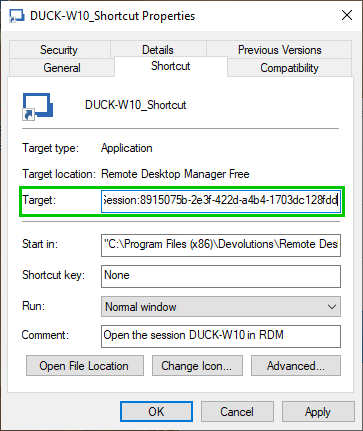
Best regards,
Jean-Philippe Charest
shortcut_properties.png
Thank you for your reply. Unfortunately this technique does not work when passing parameters from a third-party application. I attempted this command string in PRTG network monitor and the session failed to open:
RemoteDesktopManager.exe /DataSource:{hostname or IPv4}
I can configure the third-party application to propagate/send the host name or IP address, but it is unaware of Remote Desktop Manager's 'target' or 'session' values, and so cannot pass them and the session fails to open. Is there another means of passing a parameter or set of values to the EXE?
Hello again,
I did some tests with PRTG Desktop and it is possible to send the ID of an RDP template along with the value of %host.
Here is the procedure to follow:
- In RDM, navigate to File - Templates.

- Create a local template for RDP.
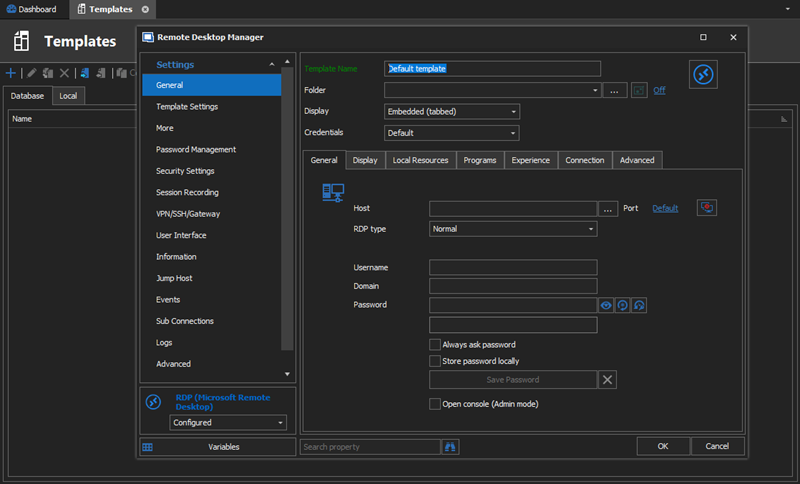
- In the Advanced section of the template, copy the Session ID.
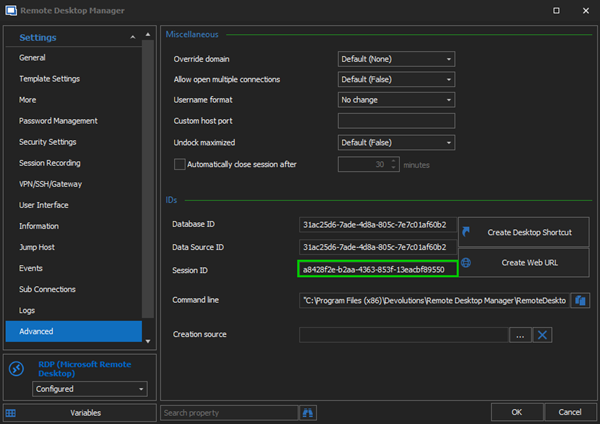
- In the Edit Device Tool in PRTG Desktop, add the /Template:Session_ID_of_template parameter, and the /Host:%host parameter.
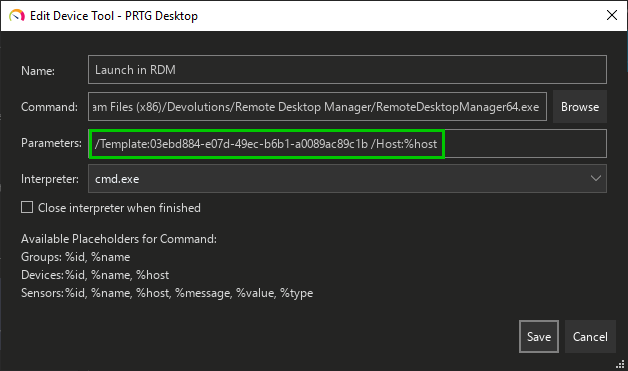
- With this setup, the session is launched embedded in RDM via the Quick Connect feature using the RDP template previously created.

Best regards,
Jean-Philippe Charest
Session.png
Edit_Device_Tool.png
Advanced_Section.png
RDP_Template.png
File_Templates.png