
konig99
Remember Trusted Devices and Apply Risk-Based Device Authorization
Hi,
thanks for the implementation. Is this now a solutions that the device sign-in page is different or that it is only appearing once?
Regards
Jump Host - Devolutions Agent not available
Our workaround is to logoff the user and using the Agent is an once in session-time opportunity. If you reconnect to the same RDP session then you can not use the Agent connection once more.
Also the Agent status is shown as red x.
I hope Richard is working on that problem.
Jump Host - Devolutions Agent not available
Hi Richard,
we are experiencing the same issue since updating to RDM 2026.3 and the new Devolutions Agent.
In our environment, the issue seems to occur especially after an RDP session to the jump host has been closed using the X button instead of logging off from Windows.
The Windows session therefore remains active/disconnected on the jump host. When trying to establish another connection through the jump host afterwards, RDM reports that the “Devolutions Agent is not available on the jump host.”
This behavior only started after the 2026.3 update.
Maybe this detail helps with reproducing and narrowing down the issue.
Regards
Sebastian
Remember Trusted Devices and Apply Risk-Based Device Authorization
Hi,
i send you a DM with the log file.
Regards
Remember Trusted Devices and Apply Risk-Based Device Authorization
Hi,
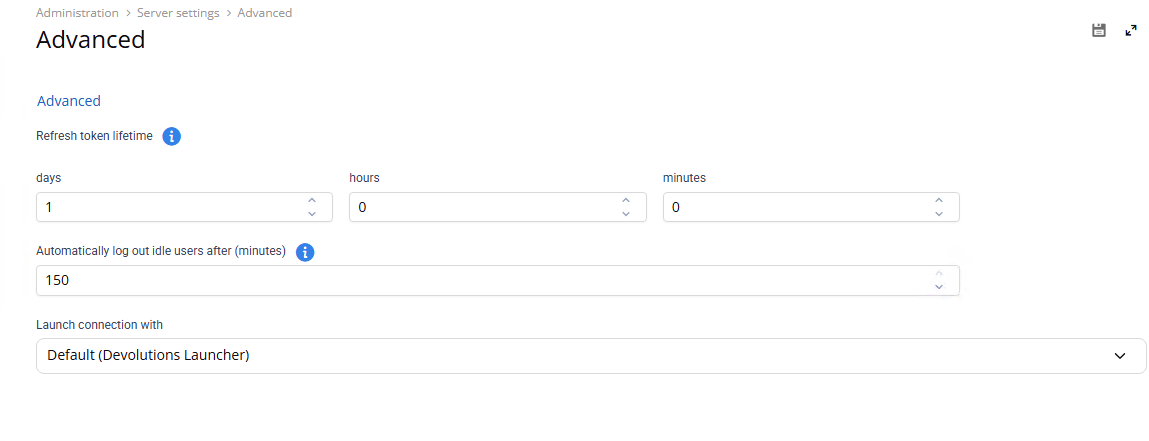
thanks for the information. Our current settings under Administration → Server settings → Advanced are:
Refresh token lifetime: 1 day, 0 hours, 0 minutes
Automatically log out idle users after: 150 minutes
The device authorization prompt doesn't only appear after a longer period of inactivity. We can also reproduce it by closing RDM and starting it again shortly afterwards.
After clicking "Yes, it's me", authentication succeeds normally. However, after restarting RDM, we are prompted to authorize the device again.
One additional observation that might be relevant: so far, we are only seeing this behavior on Windows machines. We have not been able to reproduce the issue on macOS.
Cheers,
Sebastian
Remember Trusted Devices and Apply Risk-Based Device Authorization
Hi,
we're seeing a similar issue after upgrading the server to version 2026.3.8.0 & the Client to 2026.3.13.0.
When starting Remote Desktop Manager, we're prompted with the new device registration dialog:
"A new device is waiting to be signed in to your account."
After selecting "Yes, it's me", the login works normally. However, the device does not seem to remain trusted/registered. After closing and reopening RDM, the exact same device registration prompt appears again.
We expected this confirmation to be required only once per device, unless the device registration is explicitly revoked or something relevant on the device changes.
Is this a known issue, or is there an additional setting required on the RDM/DVLS side to persist the trusted device registration?
Or is there a option to disable the device registration until you fix the issues?
Thanks!
Certificate issue with RDM 2025.3 beta
Hi,
i updated today from 2025.2 to 2025.3 and had the same issue.
I had to add the access uri in lowercase in Devolutions Server Console and the Redirect URI on the Entra ID site.
After that everything worked for me. If you add the lowercase urls to the existing configuration, then you don't have to change it in the clients configuration.
Certificate issue with RDM 2025.3 beta
Hello,
any update on that topic?
Vault permission - add to root
Hi,
here is the screenshot. I send you the non blurred picture via DM.

Vault permission - add to root
Hej,
The update is not helping. I can add to root with an Admin but not with normal user.
Vault permission - add to root
We just discovered new things. So can do it in the web version but not on the client.
Vault permission - add to root
Hi,
we are using
RDM Version 2024.3.28.0.
Server Version 2024.3.11.0
We are using Devolutions Server as Datasource.
Regards
Sebastian
Vault permission - add to root
Hello,
Yesterday i created a new vault in RDM. This vault is filled with projects for serveral customers.
All our customers in the non project vaults get a folder from admins, so they don't need those permission.
For this new project vault i wanted to add the group, which can access the vault the permission to "add to root".
So in my opinion i would add them within the vault the permission "add to root".
But that does not work! It only works if I give them the permission in "system settings".
Then they can add to root, but they also can add to root in other vaults, which they don't have the permission in the vault settings.
Is this a bug or do i have some troubles with my settings.
Regaards
Sebastian
RDM 2024.3.17.0 Private Vault "View Password" does not work
Hi,
Anything new on that case?
Regards
Sebastian
RDM 2024.3.17.0 Private Vault "View Password" does not work
Hi,
Yes, we are using DVLS Version 2024.3.6.0. For Client 2024.3.15.0 and the newer once. I also tried it with the old 2024.3 clients, but always the same problem.
Nothing change after the sync of the users.
RDM 2024.3.17.0 Private Vault "View Password" does not work
Hi,
i don't have this button because we are using Entra-ID only for our User Sync.
Regards
Sebastian
RDM 2024.3.17.0 Private Vault "View Password" does not work
Hi,
i can confirm that on our side too.
Regards
Sebastian
Änderung der Repository Nutzung
Hallo,
Ja! Das würde ich gerne machen können. Wir haben bei ein paar Kunden einen Jumpserver und auf diesem haben wir RDM installiert.
Dort sollte nur das Kunden Repo drauf sein und nichts von einem anderen Kunden.
LG
Sebastian
Ctrl+B copy username & password bug
Hallo,
Thanks it's working for me.
Regards
Ctrl+B copy username & password bug
Hello,
the feature to copy the credentials to clipboard is somehow strange. I can copy my from a VPN entry, but not from a Cisco ASDM entry. Can you please check this!
I'm now on 10.0.1.0
Regards
AnyConnect AddOn with credentials
Hi iversenjan,
remove the other VPNAddOn.dll from the folder. Also if it has an other name RDM is somehow recognice it.
Regards
Sebastian
AnyConnect AddOn with credentials
Hi,
sorry for the late reply! Didn't had that much time.
The latest plugin VPN3.0.1.3 is also working for me! :-)
Thanks a lot!
Regards
AnyConnect AddOn with credentials
Hi,
The killing thing is also not working for me!
Thanks for the rest. The untrusted feature is working great. :-)
edited by konig99 on 6/26/2014
AnyConnect AddOn with credentials
Hi,
thx for the really quick respones!
But this update is not working for me!
If I start the VPN connection. It's assume to connect and open the cli. But as first variable RDM puts in the username and the password, but not the "y" for yes.
So the right order would be "y" then username and then the password.
Can you please correct this?
Regards
Sebastian
AnyConnect AddOn with credentials
Hi,
I'm trying to connect to a Cisco anyconnect VPN, but there is a problem that they only have a self-signed certificate from there Cisco Firewall.
And the script is now asking me if i really want to connect to this vpn, because it is untrusted.
So can you please add an "y" for yes and an {ENTER} to your script. So that i can again connect to an anyconnect vpn.
I tested the y and {Enter} combination in the CLI!

Best regards