Remember Trusted Devices and Apply Risk-Based Device Authorization
Remember Trusted Devices and Apply Risk-Based Device Authorization
5 votes

Hello,
Since the introduction of the new device authorization mechanism in Devolutions Server 2026.2.19.0, users must confirm "Yes, it's me" for every login when using Windows SSO or an external identity provider.
While we fully understand and support the security improvements introduced to address the vulnerability described in DEVO-2026-0035, the current implementation can create unnecessary friction for users who regularly access the system from the same trusted workstation.
We would like to request an enhancement that allows trusted devices to be remembered and uses a risk-based authorization model.
Proposed Behavior
After a successful device authorization, the device could be marked as trusted for a configurable period or until specific conditions change.
The authorization prompt would only be displayed when:
The login originates from a new device.
The login originates from a significantly different geographic location.
The login pattern is considered unusual or high risk.
The trusted device status has expired or been revoked by an administrator.
For previously approved and regularly used devices, users would not be prompted to confirm every login.
Benefits
Maintains the security improvements introduced by the current implementation.
Improves user experience by reducing repetitive confirmation prompts.
Aligns with the approach used by many modern identity providers and MFA solutions that support trusted devices and risk-based authentication.
Reduces support requests and user confusion regarding repeated authorization prompts.
Environment
Product: Devolutions Server
Version: 2026.2.19.0
Authentication: Windows SSO / Microsoft Entra ID
Client: Remote Desktop Manager
Thank you for considering this enhancement. We believe it would provide a good balance between security and usability while preserving the protection introduced by the recent security changes.
Best regards,
Christian
All Comments (11)
Hi @Christian Egli,
Unfortunately, a remember device setting will re-introduce DEVO-2026-0035, as a possible attack vector. However, this type of vulnerability is unique to the device authorization OAuth flow. I will check with the team to look into authorization code flow which is secured by PKCE and prevents attacks like DEVO-2026-0035 without the additional step at login.
I will update this thread once I can provide more information.
Cheers,
Luc Fauvel
Hi,
we're seeing a similar issue after upgrading the server to version 2026.3.8.0 & the Client to 2026.3.13.0.
When starting Remote Desktop Manager, we're prompted with the new device registration dialog:
"A new device is waiting to be signed in to your account."
After selecting "Yes, it's me", the login works normally. However, the device does not seem to remain trusted/registered. After closing and reopening RDM, the exact same device registration prompt appears again.
We expected this confirmation to be required only once per device, unless the device registration is explicitly revoked or something relevant on the device changes.
Is this a known issue, or is there an additional setting required on the RDM/DVLS side to persist the trusted device registration?
Or is there a option to disable the device registration until you fix the issues?
Thanks!
Hi @konig99,
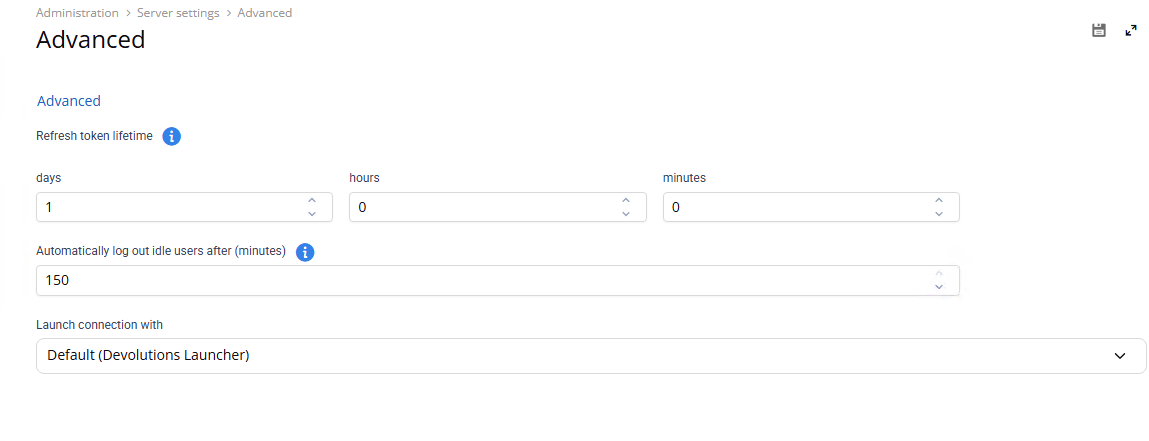
Hmm, this shouldn't happen unless you have strict inactivity timeouts and refresh token lifetimes that invalidate tokens rapidly. This prompt only displays when re-authenticating with DVLS, which should not happen on boot as we preserve tokens locally. Do you mind sharing these settings in Administration -> Server settings -> Advanced?
Cheers,
Luc Fauvel
Hi,
thanks for the information. Our current settings under Administration → Server settings → Advanced are:
Refresh token lifetime: 1 day, 0 hours, 0 minutes
Automatically log out idle users after: 150 minutes
The device authorization prompt doesn't only appear after a longer period of inactivity. We can also reproduce it by closing RDM and starting it again shortly afterwards.
After clicking "Yes, it's me", authentication succeeds normally. However, after restarting RDM, we are prompted to authorize the device again.
One additional observation that might be relevant: so far, we are only seeing this behavior on Windows machines. We have not been able to reproduce the issue on macOS.
Cheers,
Sebastian
That seems more like a bug then, I'll report this to the development team. If the tokens are valid, you should not be prompted with device authorization prompt.
Cheers,
Luc Fauvel
Hi @konig99,
Thank you for the details. Can you verify something for me to make sure I am tracking the correct issue?
When RDM starts, it first tries to restore your session with the saved refresh token. You only get the device prompt if that fails, and a debug log will show us why it fails.
Go to File > Settings > Advanced > Debug level (browse button), check Debug and Api, then restart RDM.
Sign in, close RDM, and reopen it within a few minutes so the prompt comes back.
In the log, look at what happens right after the restart:
Session can't be restored (Error=…): RDM had a token, but the server refused it. Please send us the error text.
No refresh token provided… with no Try to restore session line before it: RDM didn’t have a saved token.
You can DM the logs if you prefer; I will sort out what happened.
Thank you,
Benoît Sansregret
Hi,
i send you a DM with the log file.
Regards
We're currently seeing the same issue with the token, users get asked multiple times a time...
Hi @ithelpdesk1
Quick update on the device authorization prompt that appears every time RDM starts.
From @konig99 ’s logs, the likely cause is the “Always ask for username” option on the Devolutions Server data source (data source settings > General). When it’s enabled, RDM doesn’t keep the sign-in token between sessions, so every start triggers a new sign-in. That sign-in now requires the “Yes, it’s me” confirmation.
If you’re seeing this, could you check whether that option is enabled? If you don’t need it, try entering your username, unchecking the option, then signing in once and restarting RDM. Please let us know whether that helps.
We’re still confirming this and looking into a solution.
Cheers,
Benoît Sansregret
Oh im sorry, we're getting the issue while using Devolutions Password Manger via browser / add in / desktop installation.
Hello,
As a small suggestion, the dialog shows "a new device is waiting to be signed in from your account"
From a user perspective this suggests that the platform has information about my devices which it doesn't.
A suggestion might be to change the text to reflect this.