RDM 2024.3.17.0 Private Vault "View Password" does not work

Hi there
I just updated to the most recent dvls Server and RDM 2024.3.17.0. Since updating, I can't copy username / password / OTP within the context menu, but only in the private vault.
I can open the properties of the entry and copy the password from there as a workaround.
Thanks for your support.
Best regards, John
All Comments (12)
Hi,
I have the
same problem. But I only have this problem on the installation, where I took
the new configuration coming from the custom installer. (Use new
configuration (lose mine))
I have one
installation, where I kept the configuration from an old 2024.1 installation,
and this client does NOT have this problem.
Regards
Sebastian
Hi Sebastian
I confirm the behavior you described, we have the same
Hello John & Sebastian,
Do you get this behavior with every entry type? I've tried it with OTP, Username / Password, Website, and RDP entries, but it's working as expected.
Regards,
Min
Hi,
i can view OTP, but no copy.
I can't copy or view normal credentials.
I didn't had any other type of entries in my personal vault. I created one RDP and i can view and copy the credentials from this type of entry.
Regards
Sebastian
Hi there
Don't ask my why, but it works as it should when I add my UPN in the Datasource
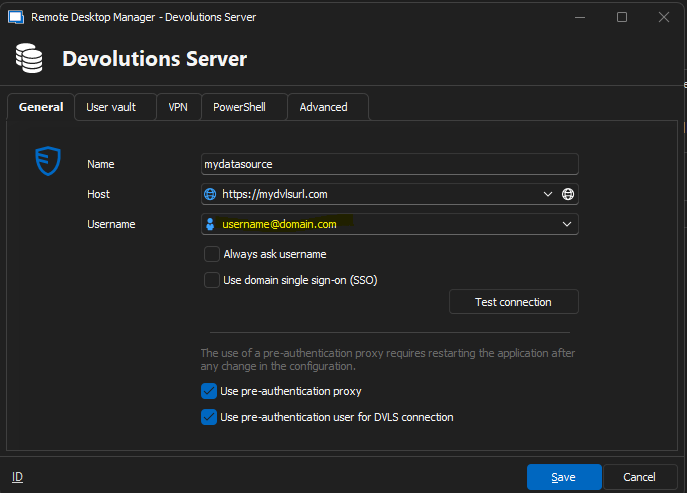
Best regards, John
Hi,
i can confirm that on our side too.
Regards
Sebastian