
Jonathan Lafontaine
CyberArk/Idira SIA integration with SSMS
Hi,
The feature has been implemented and will be available in the 2027.1 release.
Regards
Adoption of Delinea Platform authentication flow
@nciucci
If you don't want to upgrade and are fine with a manual workaround, there's a way in your version.
When you get to this window,
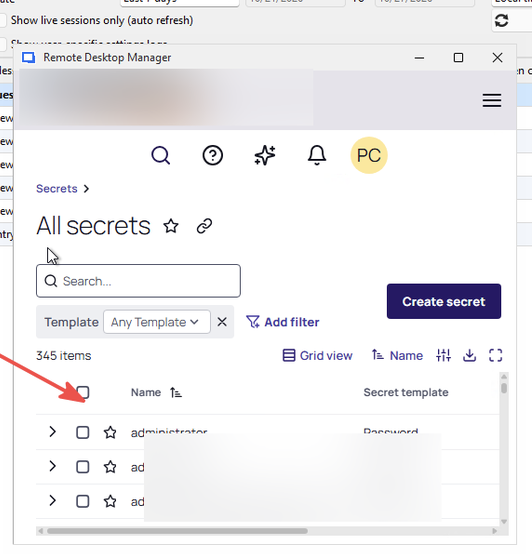
right click in the window and manually refresh the page.
The window should close and the account selection list should pop up.
Adoption of Delinea Platform authentication flow
@nciucci
It should be safe to use the RDM 2026.3 portable version with your DVLS instance to test this.
Adoption of Delinea Platform authentication flow
Since we generally recommend matching versions between RDM and DVLS, before I answer, let me do some testing to make sure this is safe, and I'll get back to you as soon as possible.
Adoption of Delinea Platform authentication flow
Hi Niko,
Yes, you are facing the same issue.
In older versions of RDM, the SSO login process would fail to detect the session token and the embedded browser would remain open.
In a normal workflow, the embedded browser closes and RDM can then proceed with account retrieval.
I just checked, and RDM 2026.3.15 or newer should have the fix that allows the SSO flow to identify the token and correctly finish the login process.
Regards
Devolutions Gateway support for "Proxmox (Beta)"-session
Hi Markus,
Thank you for the updated information.
Since it works well through a web session, I'll see what I can come up with to have the Proxmox session working as well.
Regards
Remote Dsktop Manager support for additional Realms with Proxmox
Hi Markus,
Thank you for the feedback. Glad to know it works well for you.
Pre-fill the "reason requested by CyberArk
Good news,
I was able to squeeze this feature into the 2027.1 release, which should land in December.
Adoption of Delinea Platform authentication flow
Hi Thomas,
Thank you for clarifying the issue.
Now that I better understand what is going on, I'll be able to investigate. I'll assume everyone participating in this discussion has the same issue.
I'll open a ticket as a bug. We advertise Delinea support. Unless Delinea prevents us, it shouldn't matter how your users are created; it should work in RDM.
Regards,
Adoption of Delinea Platform authentication flow
Hi,
Thank you for the detailed request. Before we go further, I want to make sure I understand the problem. From what you describe, your Platform-native users get the Delinea Platform login page inside RDM. Is your main concern that you don't want that login page? Or do users sign in successfully, but RDM then fails to browse, search, or retrieve secrets?
If it's the login flow itself, that's expected. Users created directly in the Delinea Platform have to sign in through the Platform's own login page, which is where your identity provider and MFA are handled. Delinea doesn't let an application like RDM sign these users in with just a username and password, the way Secret Server allows for its own accounts.
If you really need to avoid the login page, the only other option would be Delinea Platform service users. These are accounts that Delinea provides for integrations, and they can sign in without the embedded browser. RDM doesn't currently support that option, but it's something we could look at. Each user could have their own service user, saved in their RDM My Account Settings, so nobody shares an account and the Secret Server audit log still shows who did what.
Keep in mind that a service user isn't the person's own Platform account, though. Each person would need an extra account for your admins to create and maintain. Its permissions would need to be kept in sync with the person's own. It doesn't go through MFA or your identity provider's sign-in rules. And it has to be disabled separately when someone leaves.
Regards
RDM 2026.2.12 - Delinea Secret Server MFA prompt
Hi,
I'm investigating your issue and it would help to know more about your setup.
I assume you get the focus issue when first using a Secret Server credential entry with an authentication method set to 'SSO'.
Is that right?
Regards
Pre-fill the "reason requested by CyberArk
Ça fait plaisir!
This forum thread is linked in the ticket.
Once development is complete, I'll let you know here which specific version will have the feature.
Pre-fill the "reason requested by CyberArk
It shouldn't be too complicated.
No promises but I'll try to squeeze this for 2027.1.
It cannot be in 2026.3.x as this will require backend changes and we only release those with a major version.
Pre-fill the "reason requested by CyberArk
I think I've got something that would cover all bases.
We would keep the combo box with "default", "prefill and prompt" and "prefill and don't prompt". Selecting either prefill option would reveal a button.
That button would query CyberArk, show the prerequisite window and let you customize each item. We would save that state and reuse it when actually connecting.
Here's a mockup.
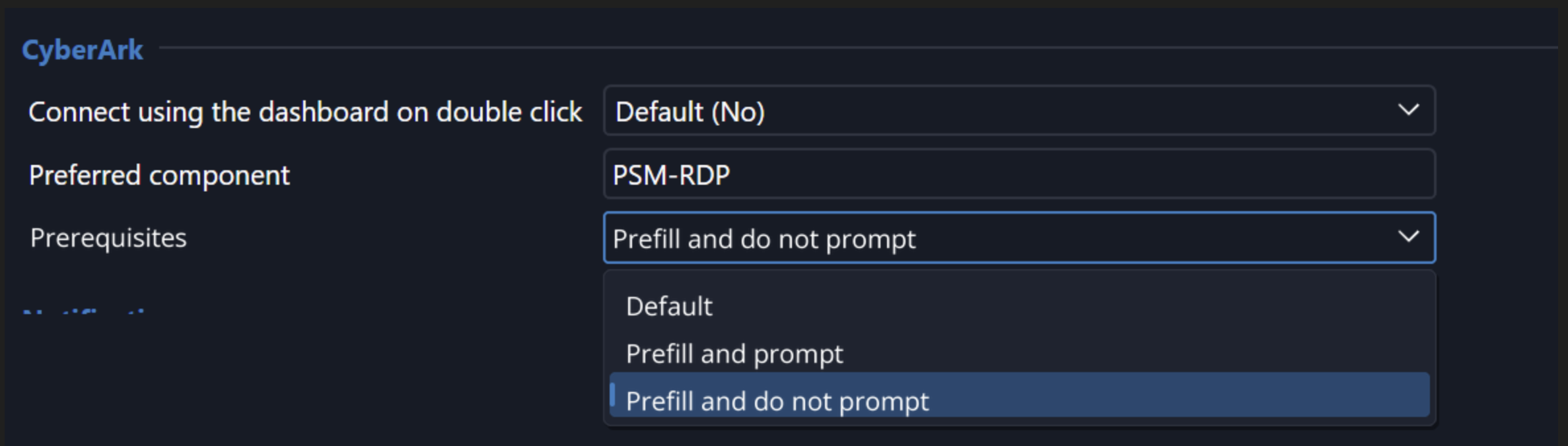
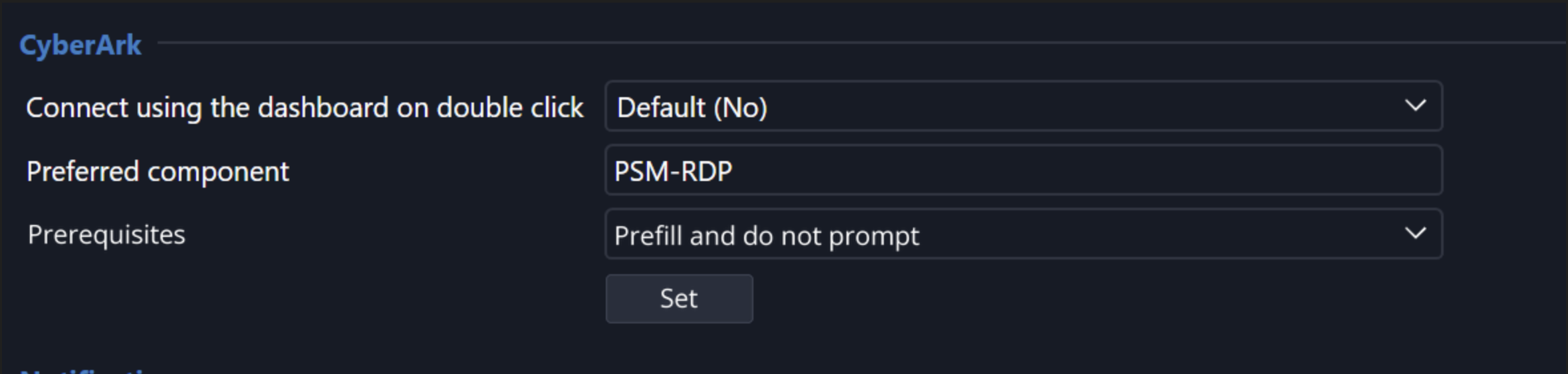
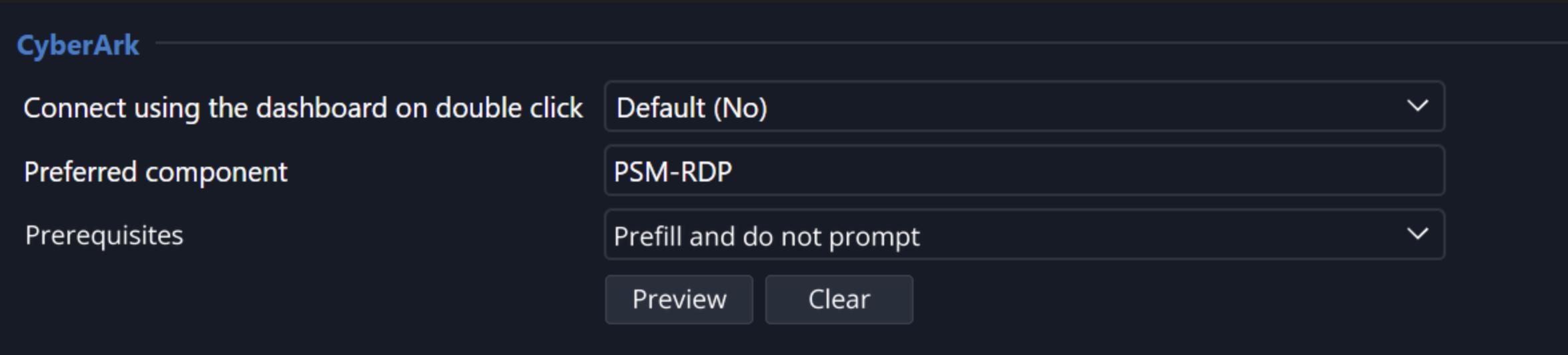
How does that sound?
Pre-fill the "reason requested by CyberArk
The prerequisites window is dynamic and supports custom items. Supporting all possible mandatory settings, the way we planned for the reason field, wouldn't be possible.
Back to the drawing board.
Pre-fill the "reason requested by CyberArk
Hi Sebastien,
Here's what we came up with. Let me know if this would solve your issue.
In an entry's advanced settings, in the CyberArk section, we would add a new combo box that controls how the reason is handled.
One of the available options would be "prefill and don't prompt." Selecting a "prefill" option would display a textbox and let you enter a reason.
Of course, if other prerequisites are mandatory, we will show the dialog.
Here's a mockup.
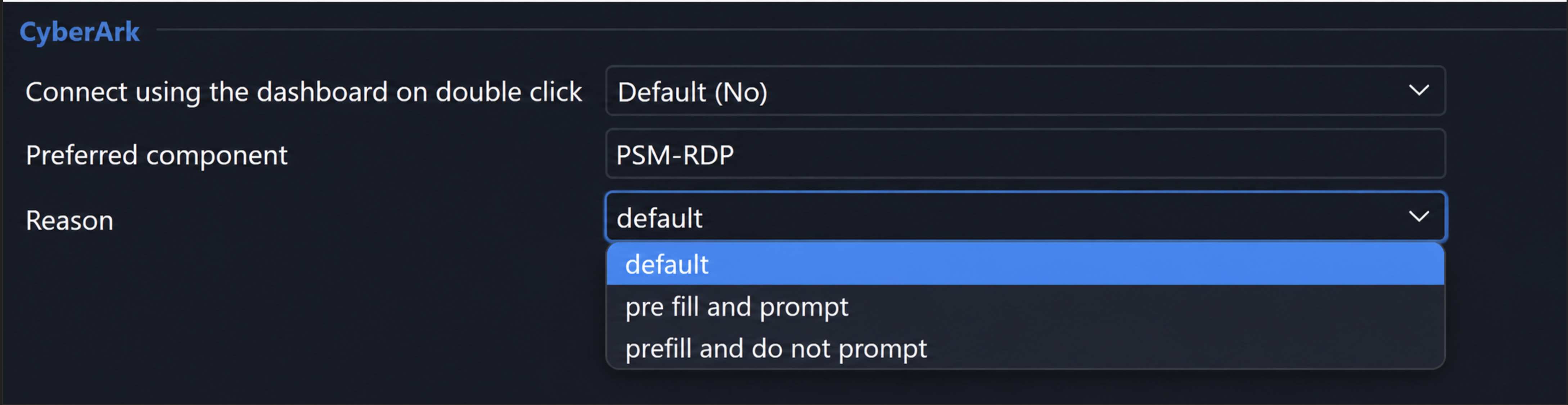
How does that sound?
Pre-fill the "reason requested by CyberArk
Thank you for the clarifications, that helps.
So whatever we do, it needs to be configurable per entry or I won't be of any use.
I'll see what can be done.
Pre-fill the "reason requested by CyberArk
Hi,
Thank you for reaching out.
When RDM is set to require a comment before opening a session, there's a button that copies the last comment.
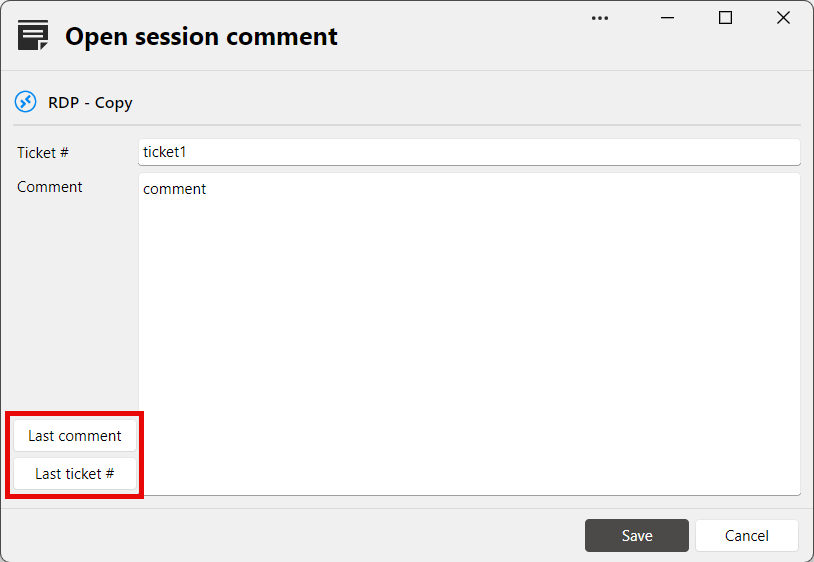
I know this isn't a "double click and be done with it" solution but it's faster than writing the comment each time and gives you the option to enter one manually if needed.
Would something like that be good enough for the CyberArk window?
Regards,
Idra (CyberArk) connection to Devolution issue
Hi,
I’ve been looking into your issue, and a debug log would help narrow down the possible cause.
To generate one, open the Performance Profiling window from the Help menu, select the Debug tab, and set the level to 196611.
Then, try logging in with an account for which the correct password is not being retrieved, and post the resulting log output.
Alternatively, you can send the log directly to me so it won’t be shared publicly.
Thank you.
Regards,
2026.3.5 - SAML Authentication failed against Cyberark
Good news.
I've identified the problem, and a fix will be available with the RDM release 2026.3.9.
I can't provide any official ETA, but it shouldn't take too long for this release to be available.
Regards
2026.3.5 - SAML Authentication failed against Cyberark
Thank you.
I'll analyze it and keep you updated on what is found/ being done.
2026.3.5 - SAML Authentication failed against Cyberark
Hi,
To help diagnose the issue, it would be really helpful if you could send us a debug log while connecting to CyberArk.
To do so, open the profiler (Help -> Performance profiling), and in the Debug tab, set the debug level to "196611." Leave the profiler window open and initiate the CyberArk SAML login flow.
After the error, copy the log and send it to your open case.
Regards,
Remote Dsktop Manager support for additional Realms with Proxmox
Hi,
I've seen increased interest in Proxmox with AD or Azure integration.
As such, I've increased the priority of our internal ticket. I don't have an ETA, but the plan is to ship this with our 2026.3 release.
Regards
Cannot Double-Click to Open Saved Connections Due to CyberArk Dashboard Error
Default should be false for both. Why it wasn't in your case is a good question.
It's possible the setting was turned on a long time ago but prior versions of RDM, when trying to use the dashboard but none were open, would simply silently fail to modify the RDP entry to use the dashboard and continue as is. For people who don't use the CyberArk integration, RDM would appear to work normally. For people relying on the integration, that would lead to unhelpful error message. As you noticed, we now warn and prevent the session from running.
Cannot Double-Click to Open Saved Connections Due to CyberArk Dashboard Error
Hi,
Seems like you have "Connect using the dashboard on double click" set either in RDM's global settings

or in the entry's advanced settings
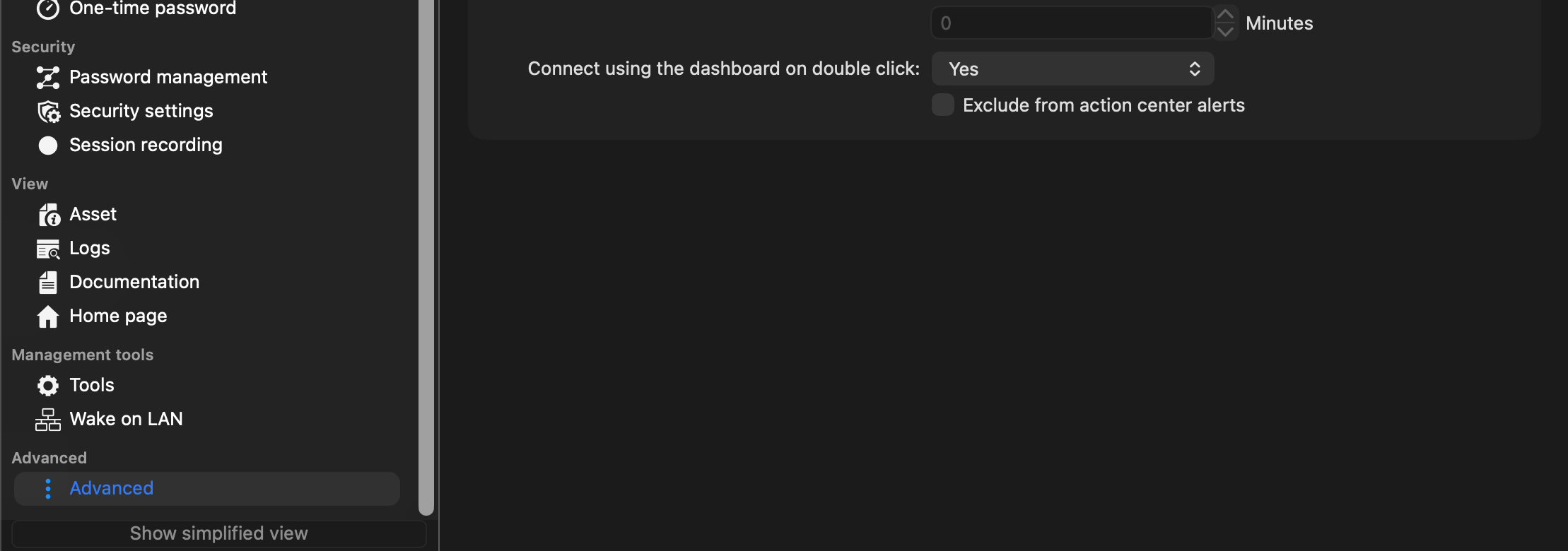
If you are not using the CyberArk integration, RDM's global settings should be set to false and entry's advanced settings should be either default or false.
Let me know if this helps.
Regards