Adoption of Delinea Platform authentication flow
3 votes

We are currently evaluating and migrating from Delinea Secret Server Cloud to the Delinea Platform.
Through testing, we identified that RDM works correctly for:
- Native Secret Server users
- Hybrid users that exist in both Secret Server and Delinea Platform and are properly mapped
- However, RDM does not work the same way for native Delinea Platform users.
For native Platform users, RDM is unable to obtain the Secret Server token required for Secret Server integration. Instead of adding the authentication token, RDM redirects the user to a web page, preventing the same seamless experience available to Secret Server and hybrid users.
As organizations migrate fully to the Delinea Platform, an increasing number of users will be created directly in the Platform and will no longer have corresponding Secret Server identities. These users currently cannot leverage the existing Delinea integration in RDM.
Requested Enhancement
Add native Delinea Platform authentication support to RDM so that users authenticated through the Delinea Platform can:
- Browse secrets
- Search secrets
- Retrieve secrets
- Authenticate without requiring a Secret Server identity
- Use Delinea Platform SSO directly within RDM
Business Impact
Organizations adopting the Delinea Platform are expected to transition away from traditional Secret Server-only identities. Without native Platform support, RDM functionality becomes limited for newly onboarded users and future Platform-first deployments.
Supporting Delinea Platform identities directly would ensure that RDM remains fully compatible with Delinea's strategic platform direction and provide a consistent user experience regardless of whether a user is:
- Secret Server native
- Hybrid
- Delinea Platform native
Additional Context
Testing confirmed that Platform-native users can successfully authenticate to the Delinea Platform, but RDM currently requires access to a Secret Server token that these users do not receive. As a result, the integration behaves differently than it does for Secret Server or hybrid accounts.
All Comments (16)
Hi,
Thank you for the detailed request. Before we go further, I want to make sure I understand the problem. From what you describe, your Platform-native users get the Delinea Platform login page inside RDM. Is your main concern that you don't want that login page? Or do users sign in successfully, but RDM then fails to browse, search, or retrieve secrets?
If it's the login flow itself, that's expected. Users created directly in the Delinea Platform have to sign in through the Platform's own login page, which is where your identity provider and MFA are handled. Delinea doesn't let an application like RDM sign these users in with just a username and password, the way Secret Server allows for its own accounts.
If you really need to avoid the login page, the only other option would be Delinea Platform service users. These are accounts that Delinea provides for integrations, and they can sign in without the embedded browser. RDM doesn't currently support that option, but it's something we could look at. Each user could have their own service user, saved in their RDM My Account Settings, so nobody shares an account and the Secret Server audit log still shows who did what.
Keep in mind that a service user isn't the person's own Platform account, though. Each person would need an extra account for your admins to create and maintain. Its permissions would need to be kept in sync with the person's own. It doesn't go through MFA or your identity provider's sign-in rules. And it has to be disabled separately when someone leaves.
Regards
Jonathan Lafontaine
Hi Jonathan,
>Thank you for the detailed request. Before we go further, I want to make sure I understand the problem. From what you describe, your Platform-native users get the Delinea Platform login page inside RDM. Is your main concern that you don't want that login page? Or do users sign in successfully, but RDM then fails to browse, search, or retrieve secrets?
That's right; RDM does not retrieve the session authentication token from our 100% finalized Delinea platform for this “native” regular platform user.
>If it's the login flow itself, that's expected. Users created directly in the Delinea Platform have to sign in through the Platform's own login page, which is where your identity provider and MFA are handled. Delinea doesn't let an application like RDM sign these users in with just a username and password, the way Secret Server allows for its own accounts.
That's right, authentication takes place via the platform's login page, but the bearer token couldn't be passed, and the RDM got stuck on the platform page and the login page itself, so no further RDM actions are working. It looks like the RDM can't handle native platform users.
> f you really need to avoid the login page, the only other option would be Delinea Platform service users. These are accounts that Delinea provides for integrations, and they can sign in without the embedded browser. RDM doesn't currently support that option, but it's something we could look at. Each user could have their own service user, saved in their RDM My Account Settings, so nobody shares an account and the Secret Server audit log still shows who did what.
We didn't want to bypass the login page; rather, we wanted to set up a functioning platform login and access to Secret Server secrets through the platform so that the platform would allow users to correctly retrieve the secrets from the platform (and the Secret Server contained within it) for normal RDM use. This is currently not working—despite the platform having been migrated to its final version and a Delinea platform user account having been 100% converted and recreated.
>Keep in mind that a service user isn't the person's own Platform account, though. Each person would need an extra account for your admins to create and maintain. Its permissions would need to be kept in sync with the person's own. It doesn't go through MFA or your identity provider's sign-in rules. And it has to be disabled separately when someone leaves.
In conclusion, we don't want to use service users; instead, real, 100% platform users should be able to log in and retrieve secrets from the platform via RDM, just as it previously worked natively with Secret Server users in conjunction with RDM.
Thank you, Jonathan, for your explanations. We’d be happy to work through this together in a short session using the latest RDM version and in our Delinea test tenant. Currently, we’re seeing an issue with the transfer of credentials from 100% Platform users to RDM and authentichation with Platform users.
Thank you & Best regards,
Thomas Balatka
Hi Thomas,
Thank you for clarifying the issue.
Now that I better understand what is going on, I'll be able to investigate. I'll assume everyone participating in this discussion has the same issue.
I'll open a ticket as a bug. We advertise Delinea support. Unless Delinea prevents us, it shouldn't matter how your users are created; it should work in RDM.
Regards,
Jonathan Lafontaine
Hello Thomas and pamadmin,
I have been working on reproducing this on our side and wanted to share what we found, along with a few questions so we can be sure we're testing the exact scenario you're hitting.
From what I have been able to see within our Delinea Platform, on a tenant where the Delinea Platform and Secret Server are integrated, we were not able to create a user that exists purely in identity platform with no Secret Server account.
Any user created directly in the Delinea Directory is automatically provisioned a linked Secret Server account - it shows up with Secret Server user type "Native" - and that linkage is created automatically with no option to skip it at creation.
That's worth flagging because of a terminology overlap: in Delinea's model, a "Native" user is one created on the Platform that still has a Secret Server account behind it — which is not the same as a user with no Secret Server identity at all.
We want to make sure we're reproducing the precise case where your users end up with no usable Secret Server token.
To get to the same setup, could you help confirm a few things about your environment?
- Is your Secret Server a Platform-integrated Secret Server Cloud instance, or a self-hosted/standalone Secret Server?
- For the users that fail, what directory source are they coming from — Delinea Directory (local), Entra ID, Active Directory, or a federated SAML/OIDC provider?
- On one of the failing accounts, what do the Secret Server details show — a linked account (user type Native or Hybrid), or none at all?
- Have the failing users ever signed into the Delinea Platform web UI directly, or is RDM their first/only entry point? (The Secret Server account appears to be provisioned on first Platform login, so a user who's only ever come in through RDM may never have had one created.)
- To confirm the failure point: RDM reaches the Platform login page, authentication succeeds, but the bearer token is never passed back, so it never progresses to retrieving secrets — is that accurate?
> Is your Secret Server a Platform-integrated Secret Server Cloud instance, or a self-hosted/standalone Secret Server?
The problem occurs when using the Pure Delinea Platform (Created as the Platform with a Secret Server created at the same time automatically (out test tenant)) or a new user created after our Secret Server Cloud instance (PROD) transitions to Platform Managed and we create a user on the platform that then gets mapped to the Secret Server Cloud as you can see in the attached pictures. We are available to give you access to our system to look at exactly what's going on or collect any logs needed to diagnose it.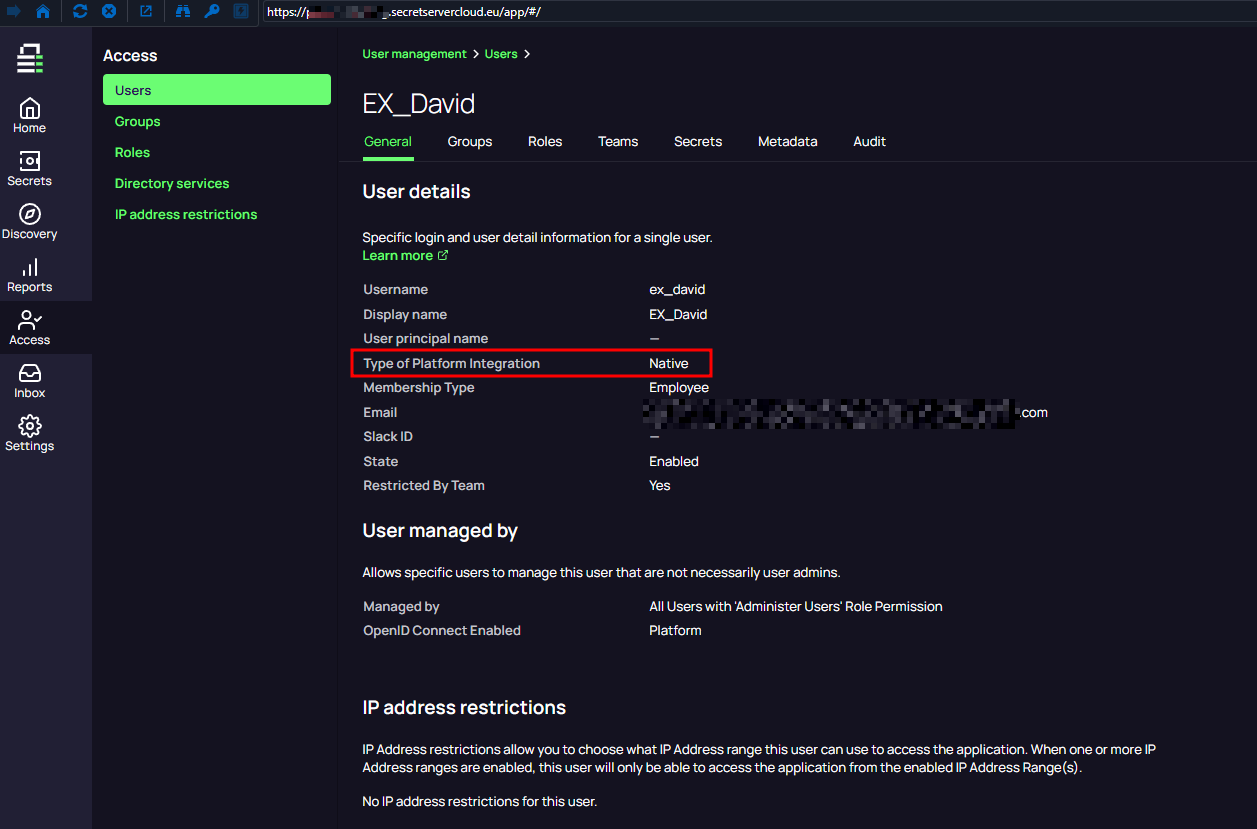
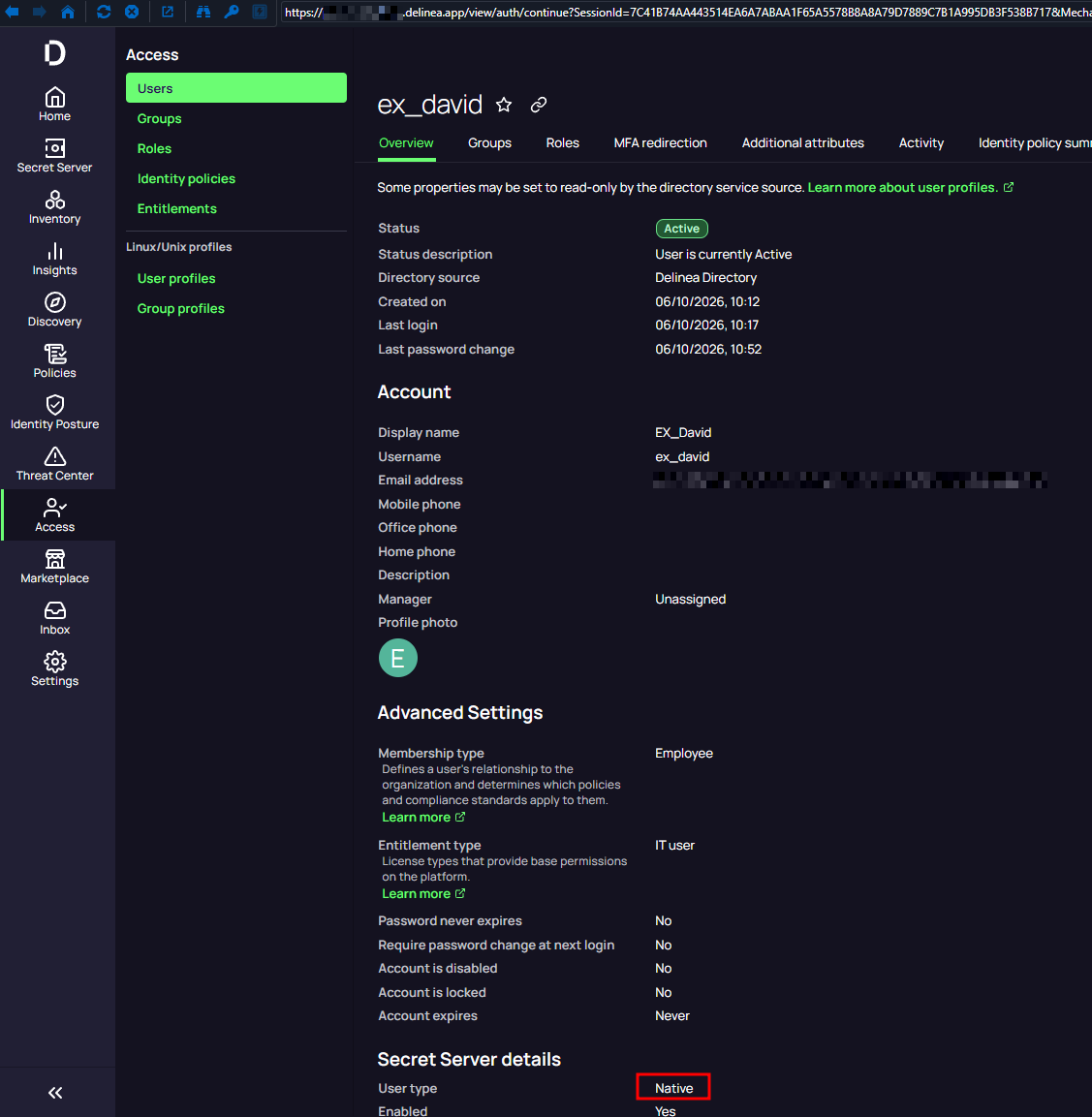
> For the users that fail, what directory source are they coming from — Delinea Directory (local), Entra ID, Active Directory, or a federated SAML/OIDC provider?
In this case we were working with a Delinea Directory User... Interestingly I forgot to test a newly provisioned Federated user frm Entra ID so I did it now and that seems to work fine. Sorry the main use case for us is Entra users and potentially different API users that should work outside RDM anyways. I will talk to the team to test this a bit more but sorry for potentially wasting your time :/
> On one of the failing accounts, what do the Secret Server details show — a linked account (user type Native or Hybrid), or none at all?
The native Delinea Directory user that doesn't work Shows Native on the Secret Server when created on the Platform.
> Have the failing users ever signed into the Delinea Platform web UI directly, or is RDM their first/only entry point? (The Secret Server account appears to be provisioned on first Platform login, so a user who's only ever come in through RDM may never have had one created.)
Login to Delinea Platform was made but not to Secret server. (Because after the Platform is adapted there should be no management or direct login to the Secret Server Clous except for API use.
> To confirm the failure point: RDM reaches the Platform login page, authentication succeeds, but the bearer token is never passed back, so it never progresses to retrieving secrets — is that accurate?
That Is exactly what happens.
ad1c14db-56a7-4611-9348-c5bd731710c3.png
68cd8455-2ebc-4768-b8cc-66224ede7483.png
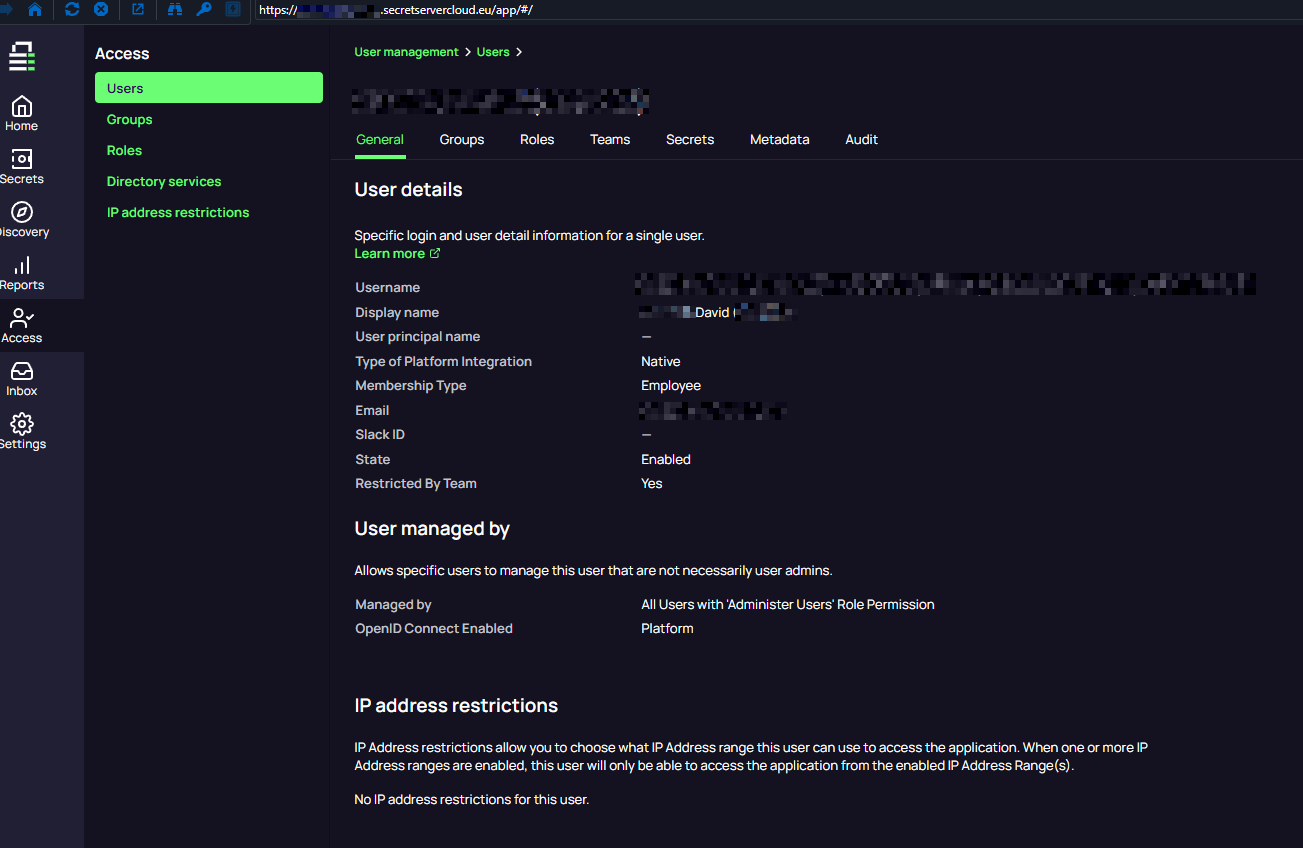
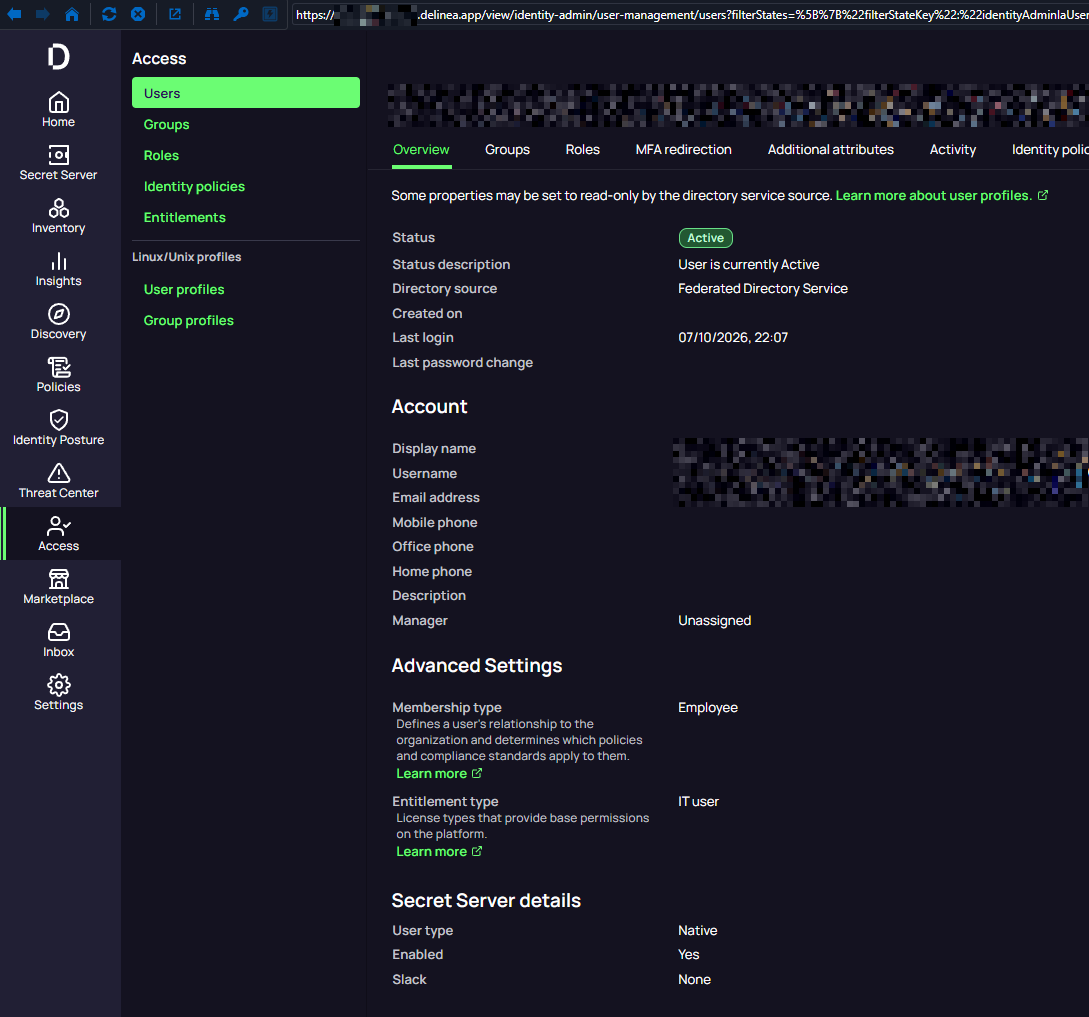 Example of a EntraID Federated user that works even after being provisioned from the Platform without the user ever logging into the Secret Server Cloud instance independently.
d6e6ad89-96cb-4986-9955-5b7691d8c27a.png
93b60324-90f3-4ad6-a847-3fb46310d0ef.png
Hello Thomas and pamadmin,
We have been able to re-create the issue in our lab, and we may have a workaround, assuming it's the same root cause we think it is.
When you sign in with the user and get the page below, can you right-click and refresh the page and let me know what happens.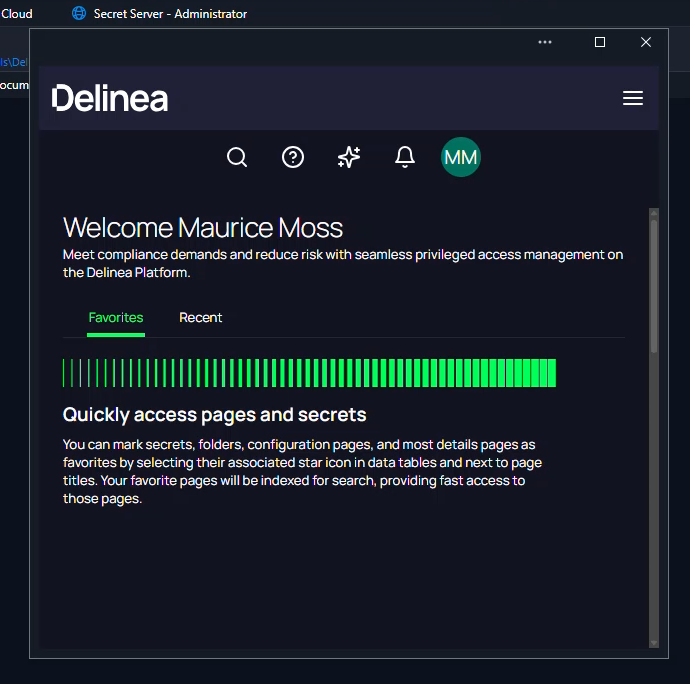 In testing with my Local user after the refresh this prompted the integrated Secret Server menu / Scret List.
627ab403-0e22-4add-ac0b-172dedf1a629.png
Hello Thomas and pamadmin,
We have been able to re-create the issue in our lab, and we may have a workaround, assuming it's the same root cause we think it is.
When you sign in with the user and get the page below, can you right-click and refresh the page and let me know what happens.
@Dylan Ferris
The site refreshes and I get a token and it starts the connection to the target.
Thanks @pamadmin
Great to hear it was the same issue!
We have identified the issue and are working on a fix.
Hello @Dylan Ferris
I'm trying to setup as well Delinea Platform integration with Devolutions RDM. Not sure if this is the correct place.
I was able to do SSO to Delinea Platform via Delinea Secret Server entry, with OTP and able to see the secret vault of Delinea, but not able to do "Method" -> "Prompt for list" in order to select, inject and open any connection entry like RDP/SSH for example.
We are talking of something that could be related?
I attached the entry of Delinea to an RDP, with the setting prompt for list 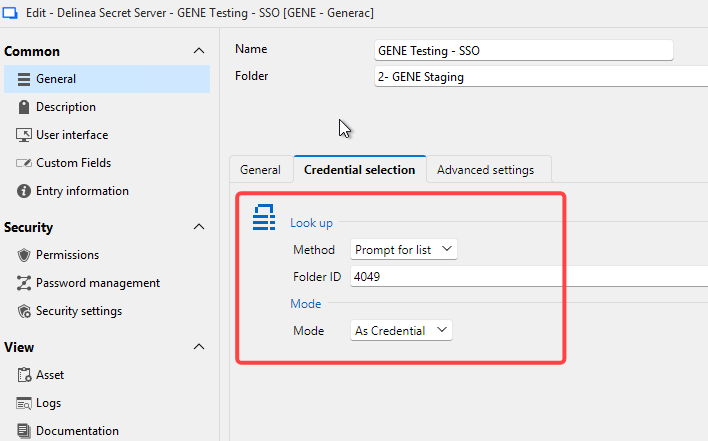
and is ending here, with nothing to inject: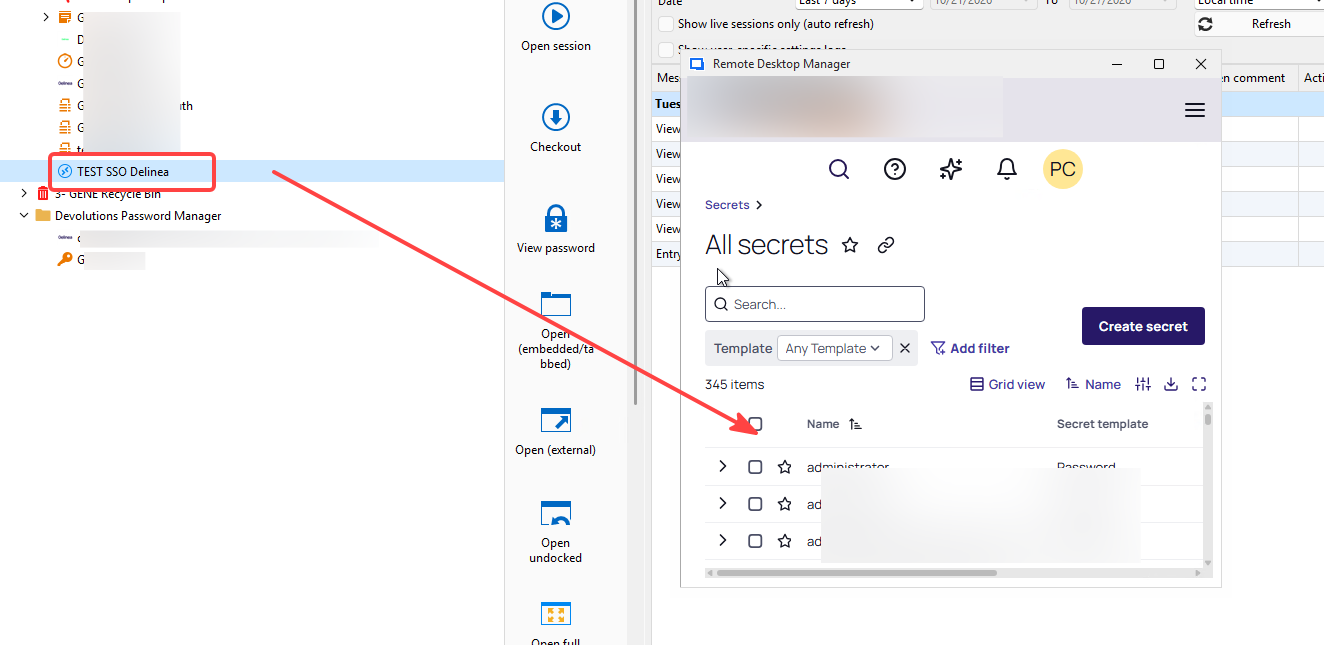
Thanks in advance
DVLS v2026.2.20.2
RDM v2026.2.20.0
Niko
8d232bb4-40de-42f0-984d-7620040f9aec.png
583546ef-d3bf-4bab-8a03-dc1f6880aa7b.png
Hi Niko,
Yes, you are facing the same issue.
In older versions of RDM, the SSO login process would fail to detect the session token and the embedded browser would remain open.
In a normal workflow, the embedded browser closes and RDM can then proceed with account retrieval.
I just checked, and RDM 2026.3.15 or newer should have the fix that allows the SSO flow to identify the token and correctly finish the login process.
Regards
Jonathan Lafontaine
Hi Niko,
Yes, you are facing the same issue.
In older versions of RDM, the SSO login process would fail to detect the session token and the embedded browser would remain open.
In a normal workflow, the embedded browser closes and RDM can then proceed with account retrieval.
I just checked, and RDM 2026.3.15 or newer should have the fix that allows the SSO flow to identify the token and correctly finish the login process.
Regards
@Jonathan Lafontaine
Thank you so much for your quick answer!
This can be tested with the portable version of latest RDM pointing to DVLS 2026.2.20 or will not work for testing and i need to update all my infra?
Best regards
Niko
Since we generally recommend matching versions between RDM and DVLS, before I answer, let me do some testing to make sure this is safe, and I'll get back to you as soon as possible.
Jonathan Lafontaine
@nciucci
It should be safe to use the RDM 2026.3 portable version with your DVLS instance to test this.
Jonathan Lafontaine
For a testing thing, with the portable latest one, pointing to a Datasource in 2026.2.20 was working fine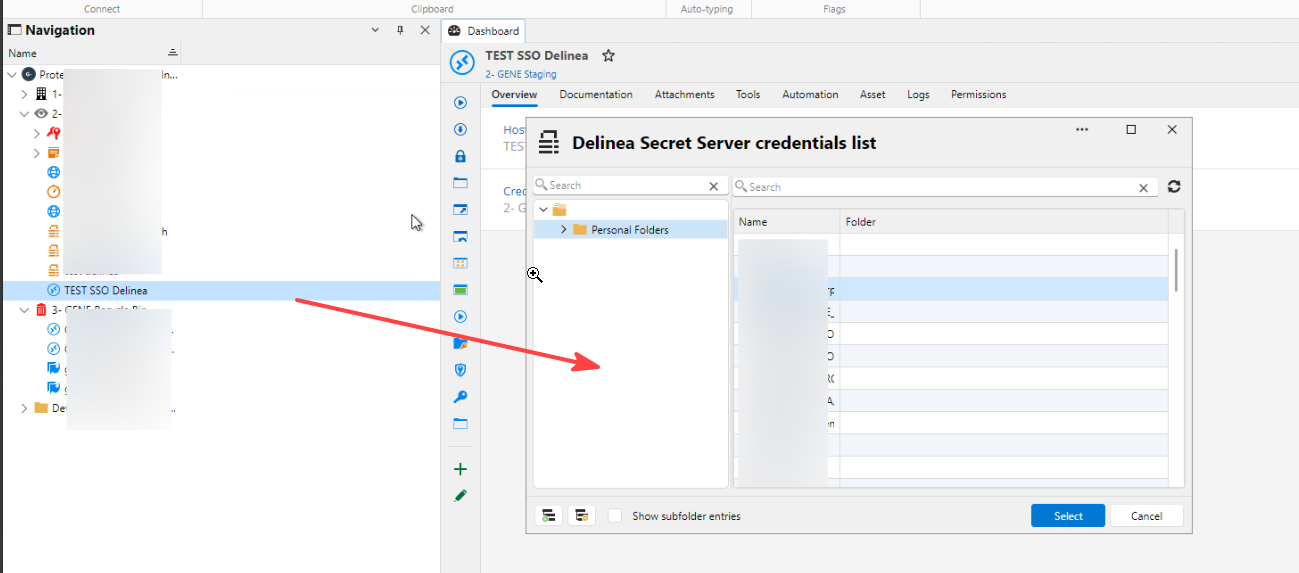
b6a700d4-42bc-4060-82bc-80576250bdfd.png
@nciucci
If you don't want to upgrade and are fine with a manual workaround, there's a way in your version.
When you get to this window, 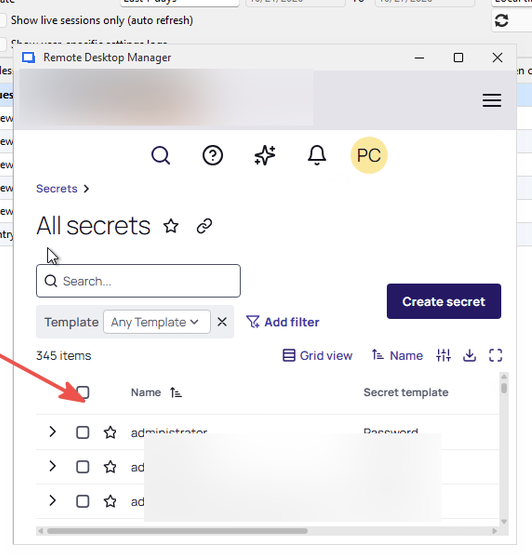
right click in the window and manually refresh the page.
The window should close and the account selection list should pop up.
Jonathan Lafontaine
639a3fff-275b-49e7-ba2d-7dcaf0f866cd.png