
DataTraveler
Connect your AI service to PowerShell Universal with MCP
You can connect an AI service to PSU, ask questions in plain English, and have it use the PowerShell tools you choose to expose. The connection uses MCP (Model Context Protocol), a standard way for AI applications to work with external tools and data. Through its MCP-capable client, the AI service calls a tool, PSU runs the PowerShell, and the AI service uses the returned result in its answer.
You’ll need an AI service with an MCP-capable client. That could be a commercial AI service, or an application connected to a large language model (LLM) your organization provides. In either case, you need a compatible application and model that can work with tools. Familiar MCP-capable options include GitHub Copilot in VS Code, Codex and Claude Code.
I built Incident Command Center (ICC) as a working example so you can try this connection and see how you might use it yourself. Version 0.1.3 is now available as a regular release.
ICC provides a small incident rehearsal at fictional Acme Inc. Once connected, try asking your AI service:
Use ICC_Demo_Incident. What needs attention in the current rehearsal? Acknowledge it, check that the response was saved, try acknowledging it again, and prepare a handoff. Stop if any tool call fails.
The AI service uses PSU tools to carry out that workflow. You can then check the same saved response in the dashboard. The warning is synthetic; the acknowledgment is a real record saved on the server, and it performs no service repair.
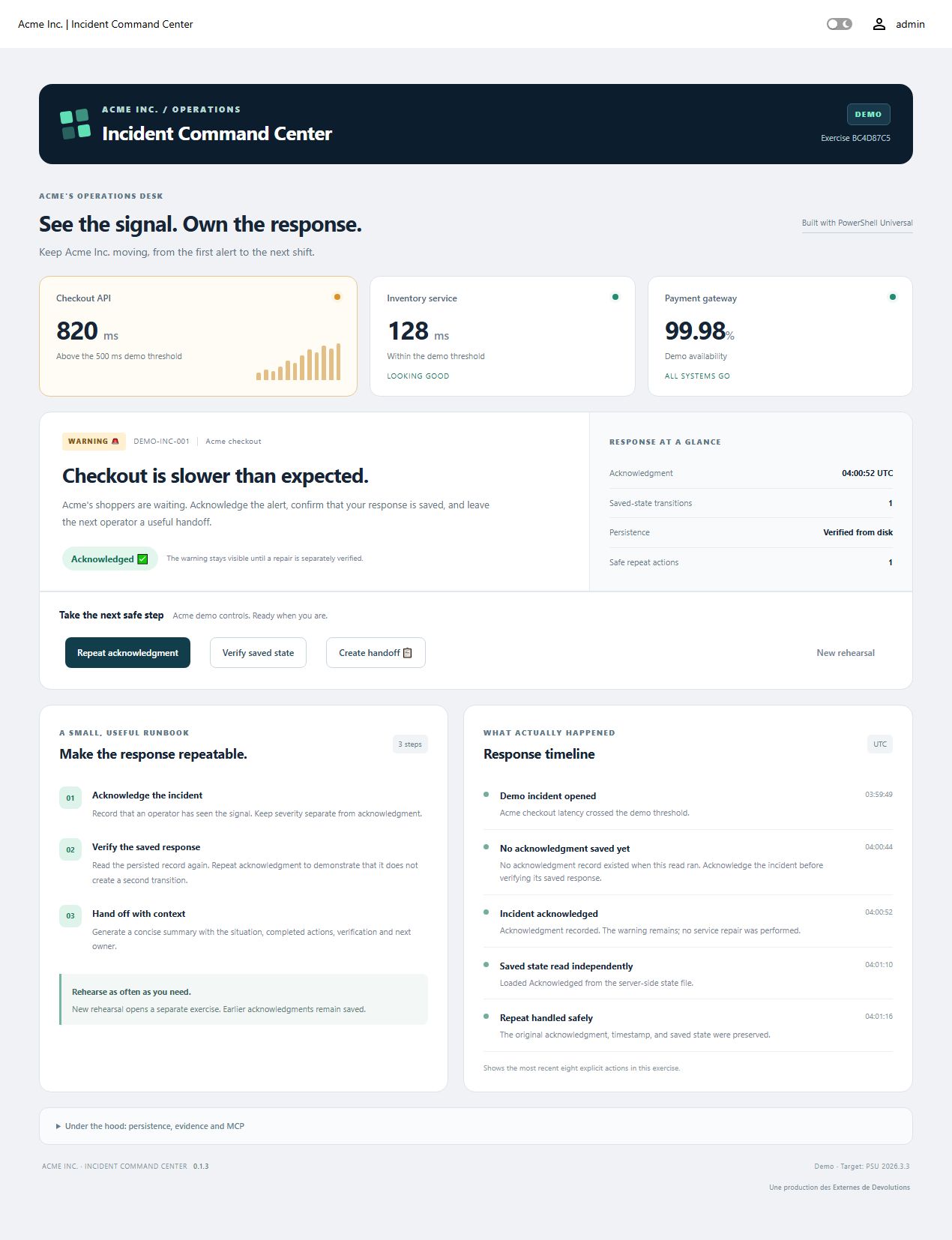
ICC is a starting point for learning the pattern. You could build other PSU tools to answer questions about your automation, retrieve application data or run selected administrative workflows.
Start with the 0.1.3 download, README and FAQ, and MCP connection guide. Existing installations should follow updating and recovery.
This example targets Windows, PSU and Devolutions.PowerShellUniversal 2026.3.3, and PowerShell 7.5.4 or later, with an app-capable PSU license and an Administrator app token. The documented AI walkthrough was tested with Codex; other clients and organization-provided model setups need separate validation. It remains a single-server learning example.
If you’ve been looking for a practical way to try AI with your existing PowerShell work, I hope this gives you a useful place to start.
error in vs code extension after upgrade to 2026.3.0
Reproduced on 2026.3.0 w vs code extension 2026.3.0 and current VS Code: Auto-discovery breaks but the manual connection works. Discovery is handing the extension the wrong listener. Not sure when this started. I will report this upwards for inclusion into a future release.
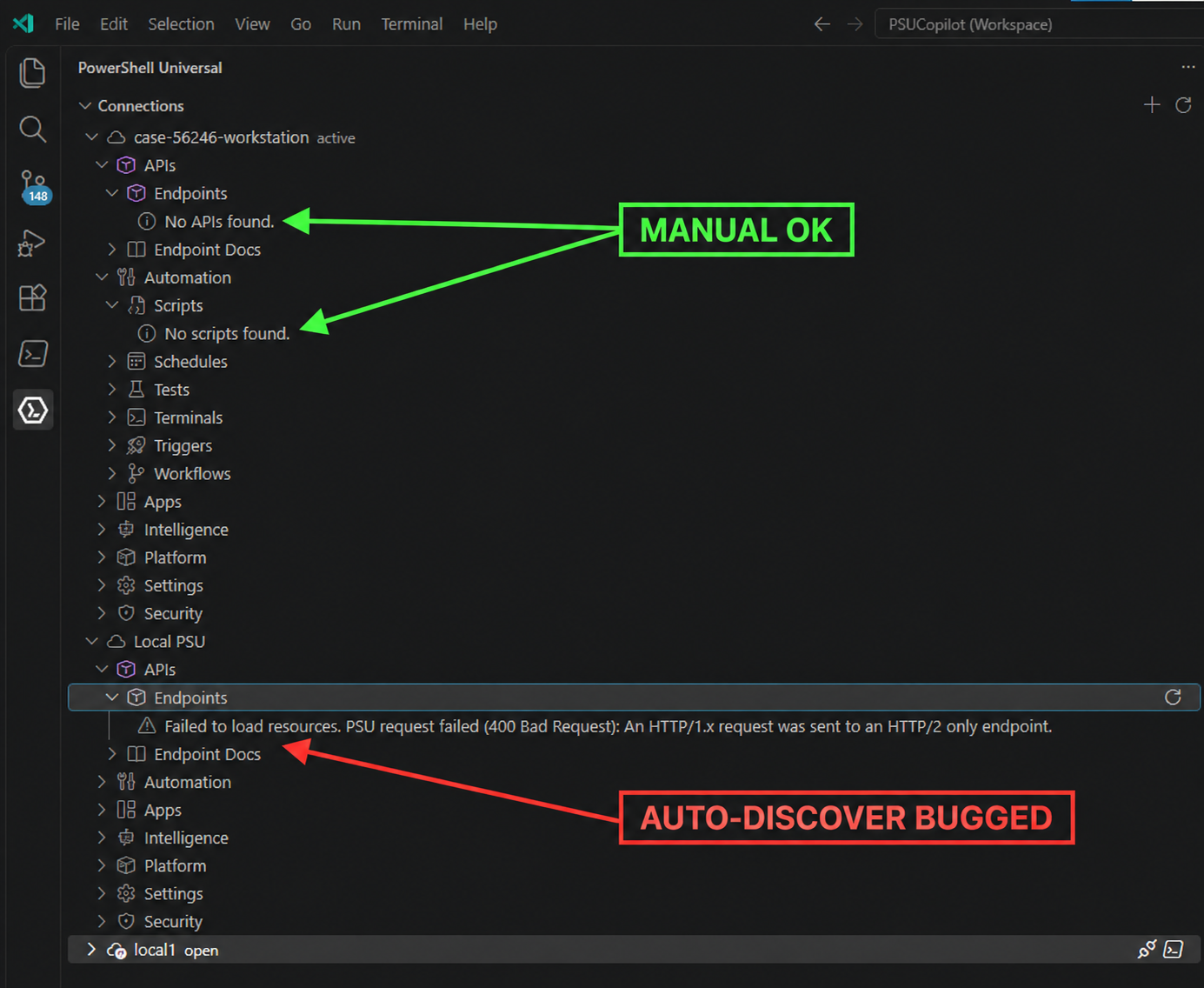
PSU request failed (400 Bad Request): An HTTP/1.x request was sent to an HTTP/2 only endpoint.
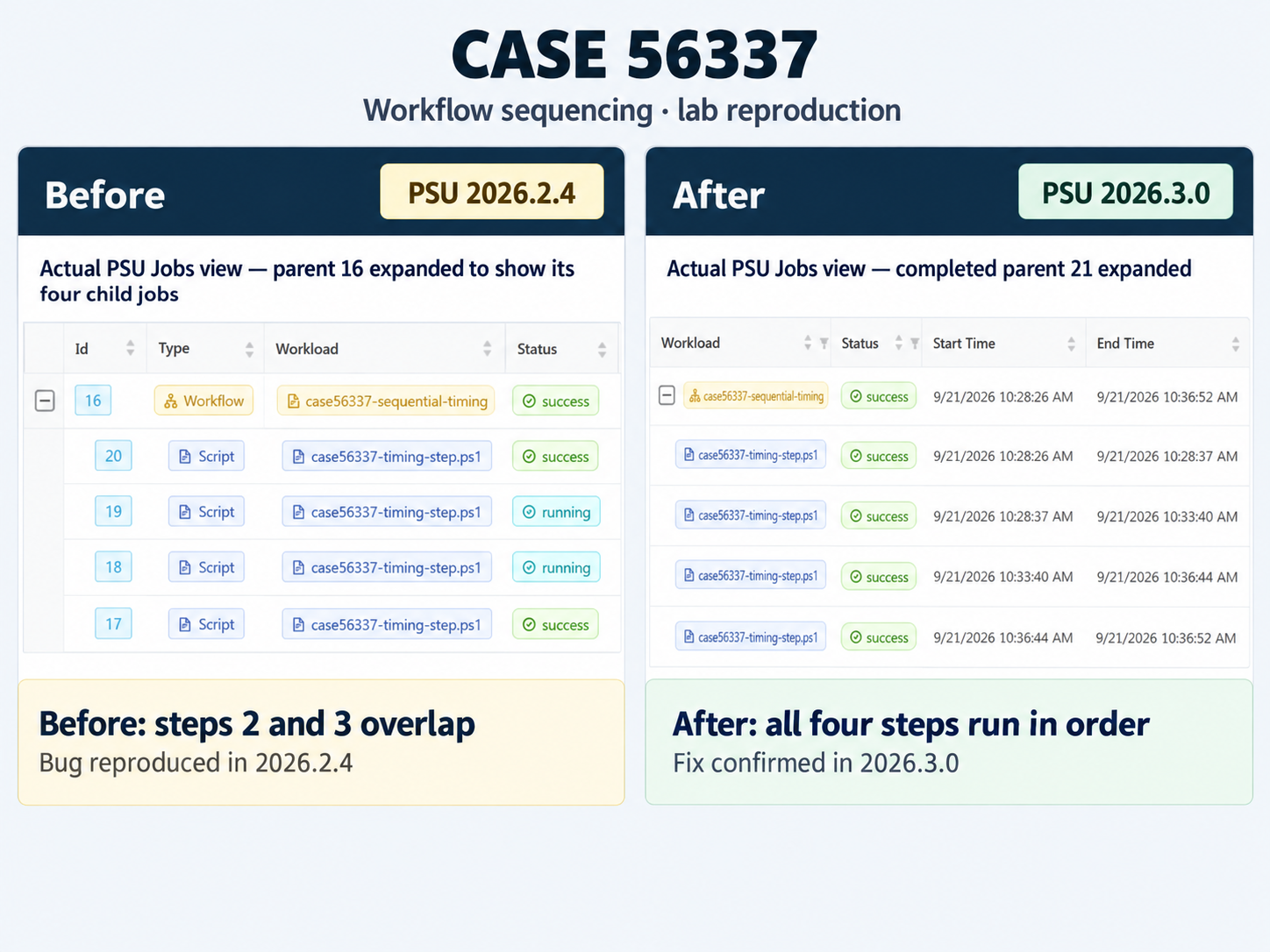
Continuous workflow runs steps at same time instead of step by step?
I was able to reproduce this precisely on 2026.2.4 and can confirm it is fixed in 2026.3.0 👍
Autocomplete but with more "loose" filtering
@Guenther Schmitz
We can still achieve what you are trying to do in 4.5.6, but it requires some custom code with New-UDDynamic rather than New-UDAutocomplete.
Please, let us know if the below helps while you are still on 4.5.6.
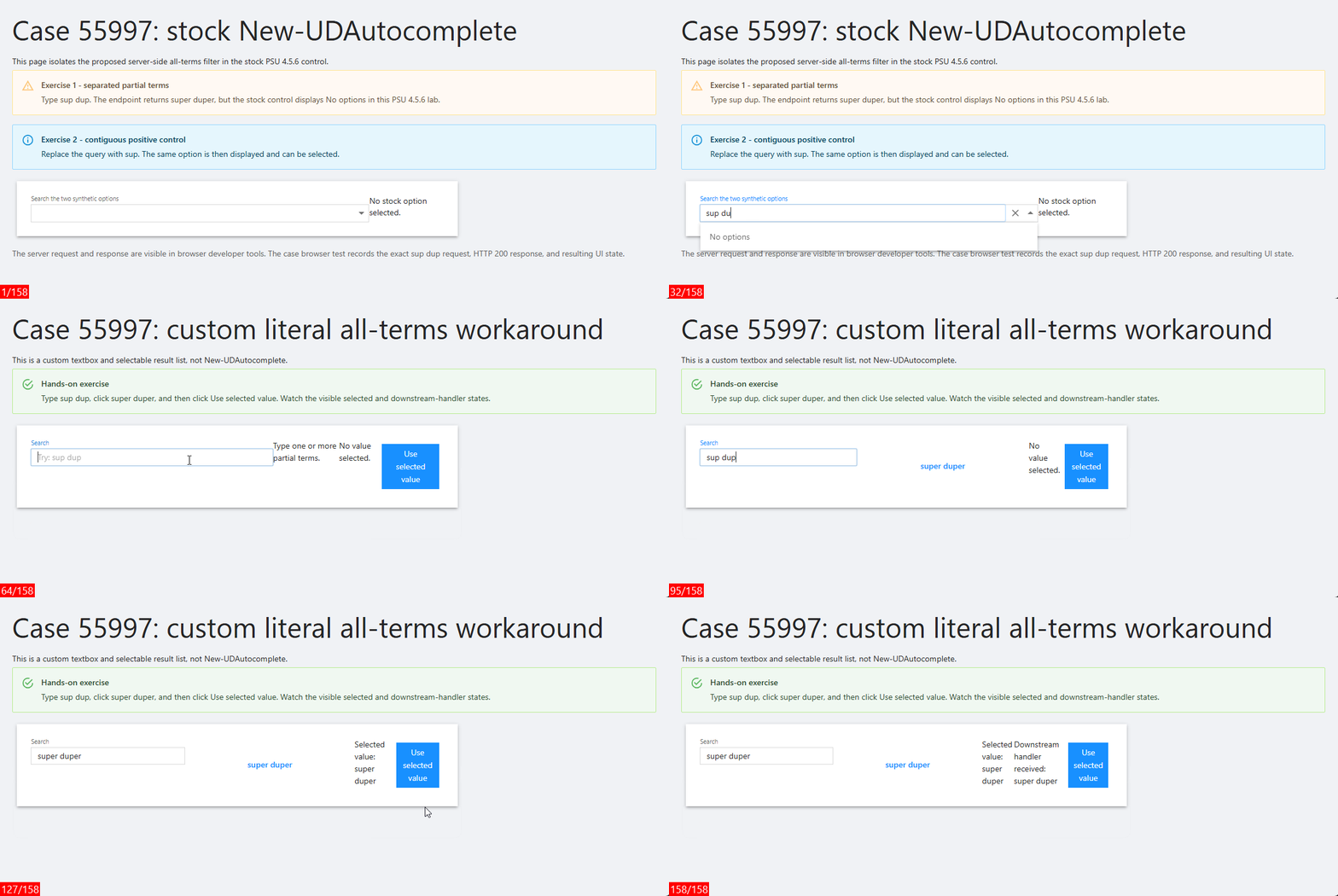
$looseOptions below is only example data. Replace it with your real list or lookup. This example uses the same text for the display and selected value; if yours are different, map both.
$looseOptions = @(
    'super duper'
    'mega giga'
)

$Session:LooseAutocompleteQuery = ''
$Session:LooseAutocompleteSelected = ''
$Session:LooseAutocompleteHandled = ''

New-UDTextbox -Id 'loose-autocomplete-query' `
    -Label 'Search' `
    -Placeholder 'Try: sup dup' `
    -FullWidth `
    -OnChange {
        $Session:LooseAutocompleteQuery = [string]$EventData
        $Session:LooseAutocompleteSelected = ''
        $Session:LooseAutocompleteHandled = ''
        Sync-UDElement -Id 'loose-autocomplete-results'
        Sync-UDElement -Id 'loose-autocomplete-state'
    }

New-UDDynamic -Id 'loose-autocomplete-results' -Content {
    # Keep the helper inside this dynamic endpoint so it is available in the
    # endpoint runspace on PSU 4.5.6.
    function Find-LooseAutocompleteOption {
        param(
            [AllowEmptyString()]
            [string]$Query,

            [Parameter(Mandatory)]
            [object[]]$Options,

            [ValidateRange(1, 100)]
            [int]$MaximumSuggestions = 8
        )

        if ([string]::IsNullOrWhiteSpace($Query)) {
            return @()
        }

        $terms = [System.Collections.Generic.List[string]]::new()
        $seen = [System.Collections.Generic.HashSet[string]]::new(
            [System.StringComparer]::OrdinalIgnoreCase
        )

        foreach ($term in @($Query -split '\s+' | Where-Object { $_ })) {
            if ($seen.Add([string]$term)) {
                $terms.Add([string]$term)
            }
        }

        @(
            $Options |
                Where-Object {
                    $candidate = [string]$_
                    foreach ($term in $terms) {
                        if ($candidate.IndexOf(
                            $term,
                            [System.StringComparison]::OrdinalIgnoreCase
                        ) -lt 0) {
                            return $false
                        }
                    }
                    return $true
                } |
                Select-Object -First $MaximumSuggestions
        )
    }

    $query = [string]$Session:LooseAutocompleteQuery
    $matches = @(
        Find-LooseAutocompleteOption `
            -Query $query `
            -Options $looseOptions `
            -MaximumSuggestions 8
    )

    if ([string]::IsNullOrWhiteSpace($query)) {
        New-UDTypography -Text 'Type one or more partial terms.'
        return
    }

    if ($matches.Count -eq 0) {
        New-UDAlert -Severity info -Text 'No loose matches.'
        return
    }

    foreach ($match in $matches) {
        $value = [string]$match
        $selectValue = {
            $Session:LooseAutocompleteQuery = $value
            $Session:LooseAutocompleteSelected = $value
            $Session:LooseAutocompleteHandled = ''
            Set-UDElement -Id 'loose-autocomplete-query' -Properties @{ value = $value }
            Sync-UDElement -Id 'loose-autocomplete-results'
            Sync-UDElement -Id 'loose-autocomplete-state'
        }.GetNewClosure()

        New-UDButton `
            -Text $value `
            -Variant text `
            -FullWidth `
            -OnClick $selectValue
    }
}

New-UDDynamic -Id 'loose-autocomplete-state' -Content {
    if ([string]::IsNullOrWhiteSpace([string]$Session:LooseAutocompleteSelected)) {
        New-UDTypography -Text 'No value selected.'
    }
    else {
        New-UDTypography -Text "Selected value: $Session:LooseAutocompleteSelected"
    }

    if (-not [string]::IsNullOrWhiteSpace([string]$Session:LooseAutocompleteHandled)) {
        New-UDTypography -Text "Downstream handler received: $Session:LooseAutocompleteHandled"
    }
}

New-UDButton -Text 'Use selected value' -OnClick {
    $Session:LooseAutocompleteHandled = [string]$Session:LooseAutocompleteSelected
    Sync-UDElement -Id 'loose-autocomplete-state'
}
Animation Key 🔑
Frame 25 (New-UDAutocomplete) sup shows super duper
Frame 58 (New-UDAutocomplete) sup dup shows No options
Frame 105 (custom control): sup dup shows super duper.
Frame 123 (custom control) super duper is selected.
Frame 136 handler receives super duper.
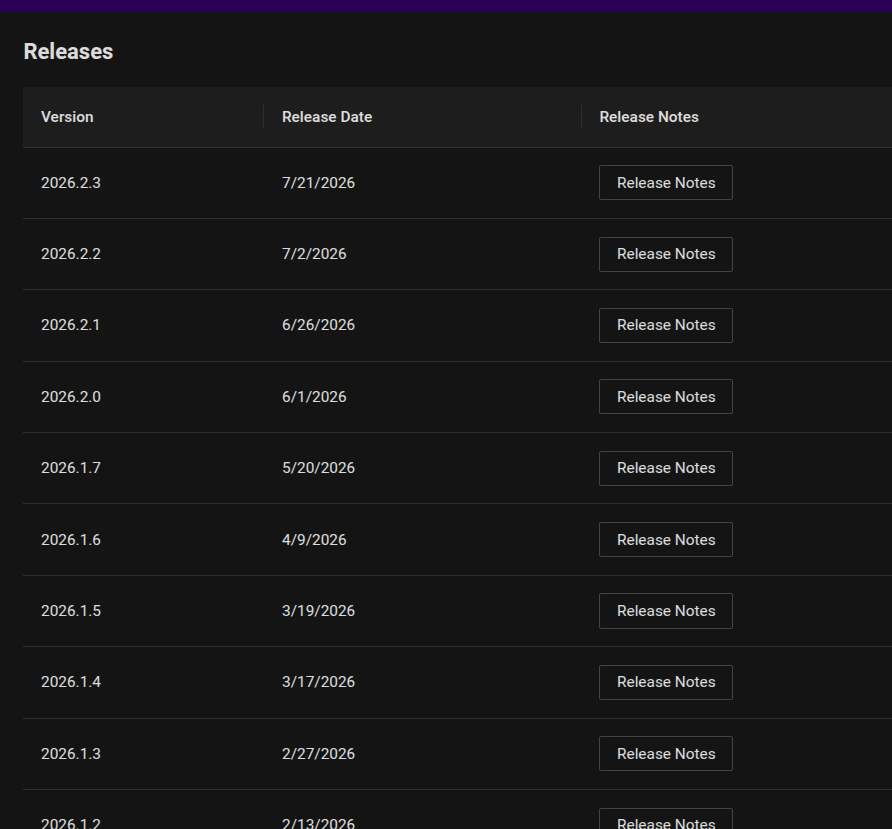
Releases incomplete
FYI, the last few releases are not listed in the Releases view.
Version 2026.2.5
@Dynamic66
Could you remind how to navigate to that list? I do know you can get the current change log (including 2026.2.5) at https://devolutions.net/powershell-universal/release-notes/
Get-PSUCache -Detail
Version 2026.2.4
I've got a cached variable, and am able to retrieve data from it. It's persisted in the DB as I'm running an HA pair.
However, if I try and pull the cache detail, I get no metadata back. i.e.:
AbsoluteExpiration :
AbsoluteExpirationRelativeToNow :
SlidingExpiration :
Persist : False
Roles :
SecurityContextId : 00000000-0000-0000-0000-000000000000
LastRead : 1/1/0001 12:00:00 AM
Created : 1/1/0001 12:00:00 AM
Updated : 1/1/0001 12:00:00 AM
Id : 0
However, I DO get the cached data in the Value property.
This is the same whether I try and get this detail via web console or add detail to a Card in an app.
But if I view the cache in the web ui, the information's there:

Any ideas?
@lloydmitchell
I was able to reproduce this. The bug is not related to HA. Get-PSUCache -Key <key> -Detail returns default metadata for a persisted entry, while the Admin Console and Get-PSUCache -List -Key <key> -Detail return populated metadata. Can you please let us know if that provides any relief? In the meantime, the bug reproduction has been reported upwards.

(figure shows case55872-8891cd4169824b62902d24d4dcc9c328-persist is rendered correctly in the UI)
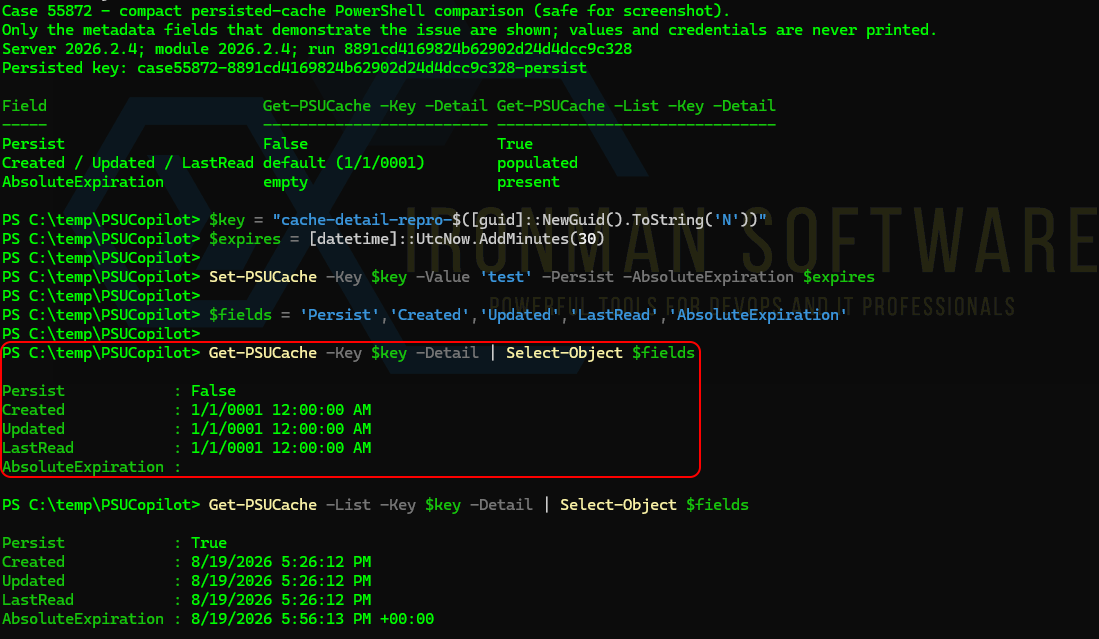
(figure shows case55872-8891cd4169824b62902d24d4dcc9c328-persist is not rendered correctly unless we include the -List parameter as a workaround)
Scheduled scripts failing
@jonathanwoods - This issue is resolved in the next upcoming release 2026.3.0 👍
Scheduled scripts failing
@jonathanwoods - Thank you for reporting this. I was able to reproduce it on current version 2026.2.4 and have reported it upwards 👆. I would estimate that this issue is likely to be addressed in the next release of PSU.
@Adam Driscoll - Awareness
Workflow documentation
@mshepard70 - Kindly following up on this. The documentation has been updated here.
More
The setting applies to a Script that returns exactly one hashtable. Example:
@{
Server = 'web01'
Port = 443
}

Then map the Script parameters:
Server = $PSUItem.Server
Port = $Output.Port
The next script can then receive the mapped values normally:
param($Server, $Port)
"Server=$Server; Port=$Port"
I still have more to follow-up on this regarding mappings. I will have another update on this but hopefully this helps in the meantime.
VSCode extension for PowerShell Universal, anybody using it?
@deroppi
The orphaned page bug has been reproduced and reported upstream 👍. I believe that this and the endpoint issue will be fixed in a subsequent release. I was not able to reproduce the error with script editing. Let's review again when 2026.3.0 is released to see if anything else remains.
VSCode extension for PowerShell Universal, anybody using it?
what is going on?
I was kind of happy meanwhile using the ironmansoftware.powershell-universal 2026.2.3
This morning vscode told me the extension is deprecated and I should "Migrate" to the Devolutions version.
So I tried, and got devolutionsinc.devolutions-powershell-universal 2026.1.1
And that version has the old 5.x look and feel again and is not any better.
So I installed the "deprecated" version again, that funny enough holds the highest version number.
code --install-extension ironmansoftware.powershell-universal
Sorry to hijack this support request but genuinely echoing @deroppi words here, what's going on here?
The extension to migrate to looks like it was last updated 6 months ago according to the marketplace and the new "Devolutions, Inc" publisher on the marketplace is unverified with just this extension.
Is this the genuine new extension and publisher or should we be avoiding this migration? There has not been any news of a migration ahead of time so this is out of the blue and highly suspicious.
@Michael Taylor and @deroppi
I will help to find out what's going on. The Devolutions PowerShell Universal marketplace entry is legitimate. But it appears that maybe the cut-over occurred prematurely or out-of-step. In the meantime, my advice for immediate relief is to download and install manually as needed the VSIX file. They can still be downloaded by way of URLs like:
@deroppi - The update on the original issue you reported is still forthcoming. I appreciate your patience.
@deroppi - We finally have progress on this. I have submitted bug reproduction steps upstream. I will update this thread again next week to confirm but I would expect the bugs you have found to be fixed in a subsequent release of PSU. Thank you for reporting this and for your patience. We're not finished quite yet but these bugs will be in the rearview mirror soon.
VSCode extension for PowerShell Universal, anybody using it?
what is going on?
I was kind of happy meanwhile using the ironmansoftware.powershell-universal 2026.2.3
This morning vscode told me the extension is deprecated and I should "Migrate" to the Devolutions version.
So I tried, and got devolutionsinc.devolutions-powershell-universal 2026.1.1
And that version has the old 5.x look and feel again and is not any better.
So I installed the "deprecated" version again, that funny enough holds the highest version number.
code --install-extension ironmansoftware.powershell-universal
Sorry to hijack this support request but genuinely echoing @deroppi words here, what's going on here?
The extension to migrate to looks like it was last updated 6 months ago according to the marketplace and the new "Devolutions, Inc" publisher on the marketplace is unverified with just this extension.
Is this the genuine new extension and publisher or should we be avoiding this migration? There has not been any news of a migration ahead of time so this is out of the blue and highly suspicious.
@Michael Taylor and @deroppi
I will help to find out what's going on. The Devolutions PowerShell Universal marketplace entry is legitimate. But it appears that maybe the cut-over occurred prematurely or out-of-step. In the meantime, my advice for immediate relief is to download and install manually as needed the VSIX file. They can still be downloaded by way of URLs like:
@deroppi - The update on the original issue you reported is still forthcoming. I appreciate your patience.
VSCode extension for PowerShell Universal, anybody using it?
I wrote that forum entry today, but it happened last week.
I meanwhile have recovered the page and switched back to the older extension.
Most pages most likely have been created through VScode with the old extension.
(I had other issues with creating pages through the web UI. The page would appear automatically in the menu, no matter what I did, and I could not remove it from being displayed. So I found, when creating via Vscode and extension I have no issues)
Git Sync is enabled, Two-Way. But I have to manually commit. Usually I control the changes and spilt into multiple commits, based on what has been changed.
The relative path for all pages is very simple. I don't use any special chars or blanks.
Typical would be a path like:
/dev/remotemtr
/common/netlookup
I will try to recreate that issue on the dev server.
@deroppi @scheived
We have reproduced part of this but not all of it. There will be another update to this thread within the next 24 hours either way but if you could provide more information it could help:
Did the page disappear immediately after saving, or only after a refresh, restart, commit, or sync?
Was the page label gone entirely, or did it remain without the Edit pencil when the row was hovered?
Was the page still visible in the PSU Web UI?
How did you recover the page?
Multiselect Autocomplete shows Values instead of Name if more are selected
Hello @simon ,
Apologies for my lack of clarify. I should have included more details and example code.
I'm not really sure how to achieve this.
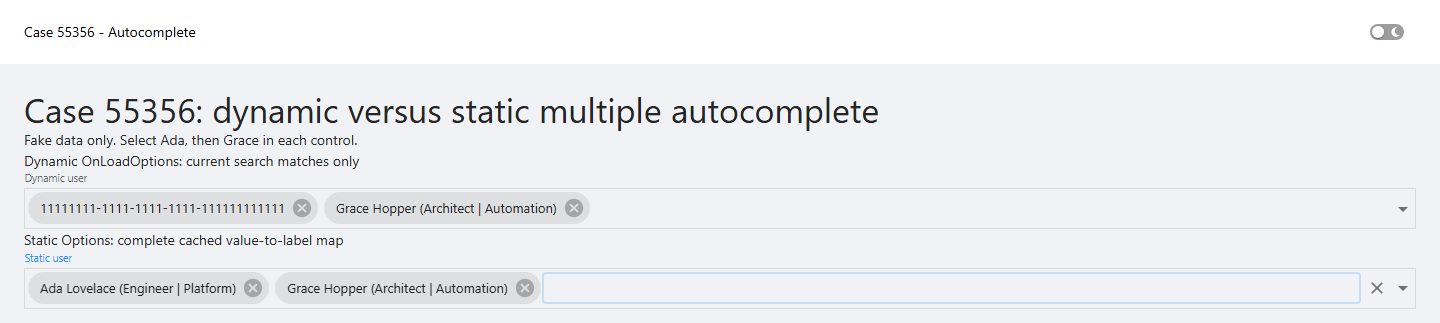
Here is how to achieve it for a reasonably sized cached directory: build the friendly Name / GUID Value options once, cast ObjectGuid to [string], and pass that complete collection to -Options. The autocomplete then filters locally while keeping the value and label for each selection:
$UserOptions = @(
    $ADUsers | ForEach-Object {
        New-UDAutocompleteOption `
            -Name "$($_.DisplayName) ($($_.Title) | $($_.Department))" `
            -Value ([string]$_.ObjectGuid)
    }
)

New-UDAutocomplete `
    -Id 'txtMailboxAccess' `
    -Label 'User' `
    -Multiple `
    -FullWidth `
    -Icon (New-UDIcon -Icon 'user' -Solid) `
    -Options $UserOptions
The List I give into the `-OnLoadOptions` is the `$ADUsers`, which gets filtered by the input you make to search for the specific users.
Yes. That filtering is exactly why the earlier friendly label can disappear. Once you type the second search, the callback can return Grace but no longer return Ada. The control still knows Ada's stored GUID value, but it no longer has Ada's matching Name / Value option object to display the friendly label.
That is why -Options is the simpler immediate recommendation for a reasonably sized cache. It is not a replacement for -OnLoadOptions. Dynamic loading remains the appropriate approach when preloading the entire directory would create browser-performance problems. In that case, the server-side search should return a limited set of matches per query rather than loading thousands of users.
But as far as I understand, the return value is always only ‘one entry’ as I can only select one from the list?
Not quite. -OnLoadOptions can return a JSON array of all users matching the text in $Body. The dropdown selection action chooses one option at a time, and -Multiple adds each chosen value to the selection. The GUID fallback is not because the callback can only return one item; it happens when a later dynamic result replaces the option list that supplied an earlier selected label.
I am flagging this reproducible behavior for product follow-up to confirm the expected if this is expected. I will update this post when I have that answer but it will probably not be until next month.
In the meantime, please let us know if the provided workaround is helpful.
Workflow documentation
I've played with workflows some and have a decent grasp of $PSUItem and $Workflow. I haven't managed to get the "Deconstruct hashtable output" to anything that I can discern.
Any chance you can add some documentation to show what that setting does?
@mshepard70
I'm having the same experience and conclusions. I will come back to this thread with an update by tomorrow.
Issue accessing variables.
@DataTraveler
I did find something reproducable:
this is at least related and might be the full cause of all of this, but I can‘t tell until variables without roles work as intended.
So it might not be related to updating at all.
@tools-sebi
In your case I would recommend upgrading to 2026.2.2 because I believe it will help your situation.
More
Thanks again for raising this and stick with it. I believe that the issue you reproduced in forum post 55432 was partially mitigated with the release of 2026.2.2 on July 2nd (yesterday). However, I found that when starting off with v4 PSU the error is not fully truly resolved in the database even with 2026.2.2. I contacted support and have a case number. I will update this thread again when there is more to report around this.
Issue accessing variables.
@tools-sebi - Just an FYI that I am still looking into this. The lead dev has seen 👀 as well. We are closing in on this. Any more info you have could be helpful for example in theory your event viewer app long might go back long enough (or other evidence) to show us exactly which versions of PSU you started with. Based on my current findings, it looks like you started with a version 4.
Any more you can share is great, otherwise I expect to have an update of substance by tomorrow.
Using Windows Authentication + Claims is super slow
Hey all, not sure if this is a bug or not.
Version 2026.2.0, browser Edge
I've set up my roles.ps1 file to have different claimvalues based on groupsid of different groups in active directory. So basically a PSU_Admins, PSU_Operators, PSU_Readers, and PSU_Users (basically authenticated users). All this works properly if looking at "My Identity" page and verifying roles.
My problem is that any time a user (or I'm using a different account) doesn't have an exact permissions binding, browsing is incredibly slow in apps or the admin page. I feel like it's checking the claim on each page instead of once on logon. Since my account is explicitly declared as Administrators, browsing is quite fast for me. Any account that I set up with explicit permissions is also fast, local accounts are also unaffected.
Is there anything else I can do to test or find logs?
@matthew
I built this scenario in my lab on 2026.2.0. I found that a Windows-auth user with no direct PSU role assignment, receiving their role through a group SID claim mapping, did not show a browsing speed difference compared with an admin user. More information is needed from you to help.
Could you please assemble and post (without sensitive information) a fresh PSU log set that shows both the admin user and the slower user browsing the same pages? Please clear cached claims in PSU under Security -> Roles -> Clear Cached Claims (it's a little brush icon 🧹) before doing the test.
If the results of this test are still inconclusive, the next step will be to ask for sanitized HAR files from both users.
Issue accessing variables.
What to do now?
Recreate all variables and hope for the best?
@DataTraveler
@tools-sebi
I can't answer those questions yet as the reality is not proven for me yet. There has not been enough information provided which means I am left to guess at the facts while trying to reproduce this. It didn't work. I can't reproduce this.
Could you provide the before/after version? You didn't actually clarify what version you were coming from. I am wondering if we need to actually see/inspect your database to find the missing information. What more information can you provide here?
Filter query made on API Management
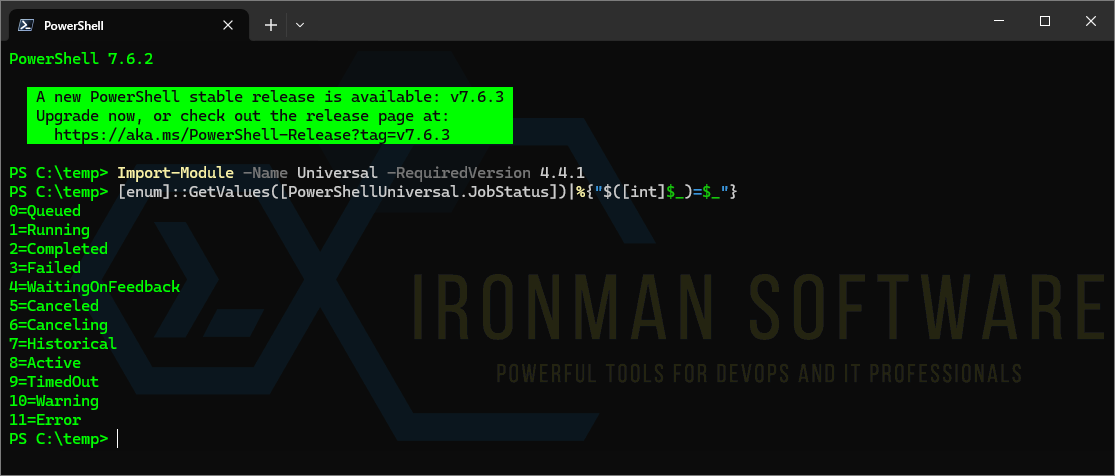
@DataTraveler, maybe another question on the filtering part. I didn't find anywhere the correspondence between status integer from jobs and the real status of the job in the GUI ?
Thanks !
@mr_curby
Yes, you can list them out from the module like this:
Import-Module -Name Universal -RequiredVersion 4.4.1
[enum]::GetValues([PowerShellUniversal.JobStatus])|%{"$([int]$_)=$_"}
👍
Send-MailMessage
@DataTraveler
Help with displaying an image inline would be extremely helpful! Much appreciated!
@bcaydelotte
If Send-MailMessage is not required, you could try like this:
$smtpServer = 'smtp.example.com'
$fromAddress = 'sender@example.com'
$toAddress = 'recipient@example.com'
$subject = 'Inline image test'
$bodyText = 'Your message text goes here.'
$imagePath = 'C:\Path\To\BSC_FADept.png'
$contentId = 'bsc-fadept-logo'

$message = [System.Net.Mail.MailMessage]::new()
$client = [System.Net.Mail.SmtpClient]::new($smtpServer)

try {
    $message.From = [System.Net.Mail.MailAddress]::new($fromAddress)
    $message.To.Add($toAddress)
    $message.Subject = $subject

    $plainView = [System.Net.Mail.AlternateView]::CreateAlternateViewFromString(
        $bodyText,
        $null,
        'text/plain'
    )

    $html = @"
<html>
  <body>
    <p>$bodyText</p>
    <img src="cid:$contentId" alt="BSC FA Dept" />
  </body>
</html>
"@

    $htmlView = [System.Net.Mail.AlternateView]::CreateAlternateViewFromString(
        $html,
        $null,
        'text/html'
    )

    $image = [System.Net.Mail.LinkedResource]::new($imagePath)
    $image.ContentId = $contentId
    $image.TransferEncoding = [System.Net.Mime.TransferEncoding]::Base64

    $htmlView.LinkedResources.Add($image)
    $message.AlternateViews.Add($plainView)
    $message.AlternateViews.Add($htmlView)

    # If your SMTP server requires these, configure them before Send().
    # $client.Port = 587
    # $client.EnableSsl = $true
    # $client.Credentials = [pscredential]

    $client.Send($message)
}
finally {
    if ($client) { $client.Dispose() }
    if ($message) { $message.Dispose() }
}Issue accessing variables.
Seems like the "system" User is not able to useGet-PSUVariable & Set-PSUVariablefor those variables:
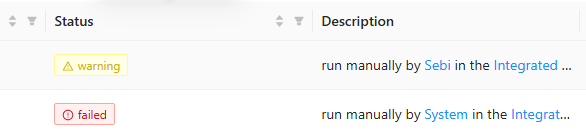
If I run it myself it does work (the warning is fine), but if the system user runs it (via Invoke-PSUScript -Integrated ...) it can not access the variables.
The variables however, are unrestricted:
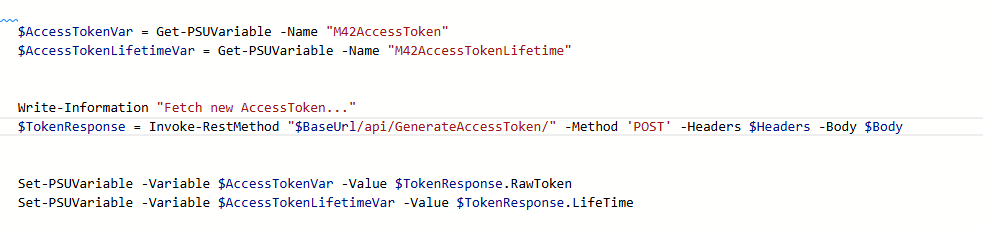

Is this a bug?
Could we try comparing json exports of known good variables vs. seemingly corrupted ones?
@DataTraveler
I can not find a way to export variables to compare them.
@tools-sebi
Can you confirm which version of PSU you had before and what version you upgraded to? Below is a metadata-only snippet to show us more. Could you run the below code from sebi context and share the results?
$names = 'M42AccessToken', 'M42AccessTokenLifetime'

$names | ForEach-Object {
    $variable = Get-PSUVariable -Name $_

    [pscustomobject]@{
        Name                 = $variable.Name
        Secret               = $variable.Secret
        Vault                = $variable.Vault
        Database             = $variable.Database
        Role                 = $variable.Role
        Roles                = @($variable.Roles) -join ','
        Scope                = $variable.Scope
        Module               = $variable.Module
        MissingSecret        = $variable.MissingSecret
        DisableRunAsSupport  = $variable.DisableRunAsSupport
        ReadOnly             = $variable.ReadOnly
    }
} | ConvertTo-Json -Depth 5Filter query made on API Management
Hello,
I'm trying to work with the Management API on Powershell Universal 4.4.1.
I'm trying to filter jobs run using the GET /api/v1/job endpoint.
However, parameters does not seem to have any effect ( Take / Total / OrderDirection / Scheduled etc... ) on the filtering of the query.
Goal would be to filter for instance x last jobs triggered via Scheduled.
What is the proper way to use the parameters ?
@mr_curby
I have to gently implore you to upgrade to current version.
➖➖➖➖➖➖➖➖➖➖➖➖➖➖➖➖➖➖➖➖➖➖➖➖➖➖
In 4.4.1, make sure you include OrderBy when using Take or Skipfor example:
GET /api/v1/job/schedule/1?Skip=0&Take=10&OrderBy=StartTime&OrderDirection=DescendingWhere 1 is the schedule id. You can get the list of schedule id's from /api/v1/schedule if needed. Total is a property that will be included in the result so there's no need for a parameter for it.
To get recent scheduled jobs across all schedules, use the job endpoint, then filter client-side where the scheduleId is > 0. If you need exactly X scheduled jobs, page through results until you have collected them:
GET /api/v1/job?Skip=0&Take=50&OrderBy=StartTime&OrderDirection=Descending&Scheduled=trueLet us know if this helps 👍
Issue accessing variables.
@tools-sebi
Issue1: the endpoint could not read all secrets and threw a security exception despite none of them had any role restrictions. Recreating the secrets worked, so some update must have corrupted the permission [...]
This is not the intended behavior. If recreating the secret worked then yes, the root cause is most likely that those permissions became corrupted somehow. It is unlikely the issue is related to a product update, but we can certainly keep drilling into this 🔎
Issue2: the endpoint needs to run an internal script [...]
Integrated scripts may use Get-PSUVariable & Set-PSUVariable.
Help would be much appreciated :)
Could we try comparing json exports of known good variables vs. seemingly corrupted ones?
Multiselect Autocomplete shows Values instead of Name if more are selected
Hi,
not sure if this a bug or i do something wrong.
Im using the Autocomplete Component to select one or more users from a list.
For the Name i build something out of Username and the Title / Position and the Value is the ObjectGuid for the script to use afterwards.
If i now select one entry it works without a problem, but as soon as i add another different entry, the one before transforms into the Value instead of showing the Name.
The code for the Autocomplete Component ist the following:
The $ADUsers is a cached list of our AD Users.
New-UDAutocomplete -Id "txtMailboxAccess" -Label "User" -Multiple -FullWidth -Icon (New-UDIcon -Icon "user" -Solid) -OnLoadOptions {
$ADUsers | Where-Object {$_.userprincipalname -like "*$Body*" -or $_.samaccountname -like "*$Body*"} | ForEach-Object {
New-UDAutoCompleteOption -Name "$($_.displayName) ($($_.title) | $($_.department))" -Value $_.ObjectGuid
} | ConvertTo-Json
}
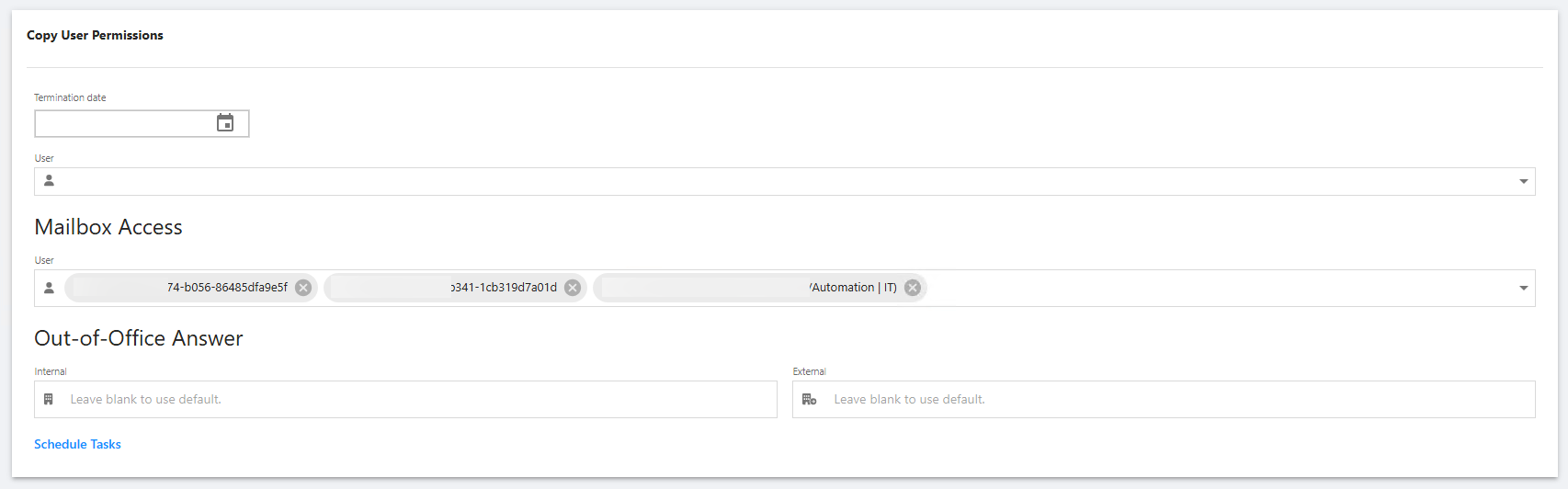
Does anybody know how to solve this?
Thank you!
@simon
Yes. To solve this, make sure already selected users are still included in the results returned by -OnLoadOptions. New-UDAutocomplete -Multiple stores the selected Value, then maps it back to Name from the current options list. If the previous user is no longer in that list, the control can only display the GUID.
Also cast the GUID to string:
New-UDAutoCompleteOption -Name "$($_.displayName) ($($_.title) | $($_.department))" -Value ([string]$_.ObjectGuid)