Get-PSUCache -Detail

Version 2026.2.4
I've got a cached variable, and am able to retrieve data from it. It's persisted in the DB as I'm running an HA pair.
However, if I try and pull the cache detail, I get no metadata back. i.e.:
AbsoluteExpiration              :
AbsoluteExpirationRelativeToNow :
SlidingExpiration               :
Persist                         : False
Roles                           :
SecurityContextId               : 00000000-0000-0000-0000-000000000000
LastRead                        : 1/1/0001 12:00:00 AM
Created                         : 1/1/0001 12:00:00 AM
Updated                         : 1/1/0001 12:00:00 AM
Id                              : 0
However, I DO get the cached data in the Value property.
This is the same whether I try and get this detail via web console or add detail to a Card in an app.
But if I view the cache in the web ui, the information's there:
Any ideas?
e38c4a2a-83d0-467e-8b06-09c3b0289080.png
All Comments (6)
Hello lloydmitchell,
Thank you for reporting this and for including the comparison with the Admin Console.
I can see the discrepancy you are describing in PowerShell Universal 2026.2.4. The cached `Value` is returned, but `Get-PSUCache -Detail` shows default or empty metadata values such as `Persist : False`, `Id : 0`, and the `1/1/0001` timestamps, while the Admin Console displays metadata for the same cache entry.
I would like to reproduce this under comparable conditions. Could you please confirm the following?
* Which database provider is being used by the HA pair?
* How are the PSU nodes hosted, for example Windows Service or IIS, and on which operating system?
* Can you provide a minimal sanitized example of the `Set-PSUCache` command used to create this entry, including the persistence and expiration parameters?
* Did `Get-PSUCache -Detail` return the expected metadata in an earlier PSU version? If so, what was the last version where you observed it working correctly?
At this point, I do not want to assume whether this is specific to the HA/database configuration or a product issue until we can reproduce it.
Best regards,
Ruben Tapia
Thanks for getting back. Here're the answers:
- We're using MS SQL server - not sure of the version, it's handled by another team.
- The nodes are the windows service, and I'm accessing one node directly during development, not the load-balanced address.
- The command I run is this (integrated flag due to ssl errors if I run it without from the app):
Get-PSUCache -Key "CacheName" -Integrated -Detail
- I don't know about prior versions; this is the first time I've tried getting the detail.
- Also, I've tried this in all available environments (PS 5.1 / 7 / Integrated).
If this was a database error, I'd have thought the metadata wouldn't be retrieved for display on the web UI, either?
I've further tested this within a script, without the '-Integrated' parameter, and same result.
HOWEVER.... In the app/script, I notice that I'm getting the SecurityContextId attribute populated with the GUID. This doesn't happen in the web console. Not sure if this is a key piece of information, or irrelevant!
Hello lloydmitchell,
Thank you for the additional details. This gives us enough information to move forward with an internal reproduction.
We will build the test around the environment and conditions you shared, including Windows Service hosting, SQL Server persistence, direct node access, and the different execution contexts you tested. We will specifically compare the metadata returned by `Get-PSUCache -Detail` with what is displayed in the Admin Console and will also review the `SecurityContextId` difference you identified.
I will update the thread once we have completed the reproduction and reviewed the results.
Best regards,
Ruben Tapia
Version 2026.2.4
I've got a cached variable, and am able to retrieve data from it. It's persisted in the DB as I'm running an HA pair.
However, if I try and pull the cache detail, I get no metadata back. i.e.:
AbsoluteExpiration :
AbsoluteExpirationRelativeToNow :
SlidingExpiration :
Persist : False
Roles :
SecurityContextId : 00000000-0000-0000-0000-000000000000
LastRead : 1/1/0001 12:00:00 AM
Created : 1/1/0001 12:00:00 AM
Updated : 1/1/0001 12:00:00 AM
Id : 0
However, I DO get the cached data in the Value property.
This is the same whether I try and get this detail via web console or add detail to a Card in an app.
But if I view the cache in the web ui, the information's there:
Any ideas?
@lloydmitchell
I was able to reproduce this. The bug is not related to HA. Get-PSUCache -Key <key> -Detail returns default metadata for a persisted entry, while the Admin Console and Get-PSUCache -List -Key <key> -Detail return populated metadata. Can you please let us know if that provides any relief? In the meantime, the bug reproduction has been reported upwards. (figure shows case55872-8891cd4169824b62902d24d4dcc9c328-persist is rendered correctly in the UI)
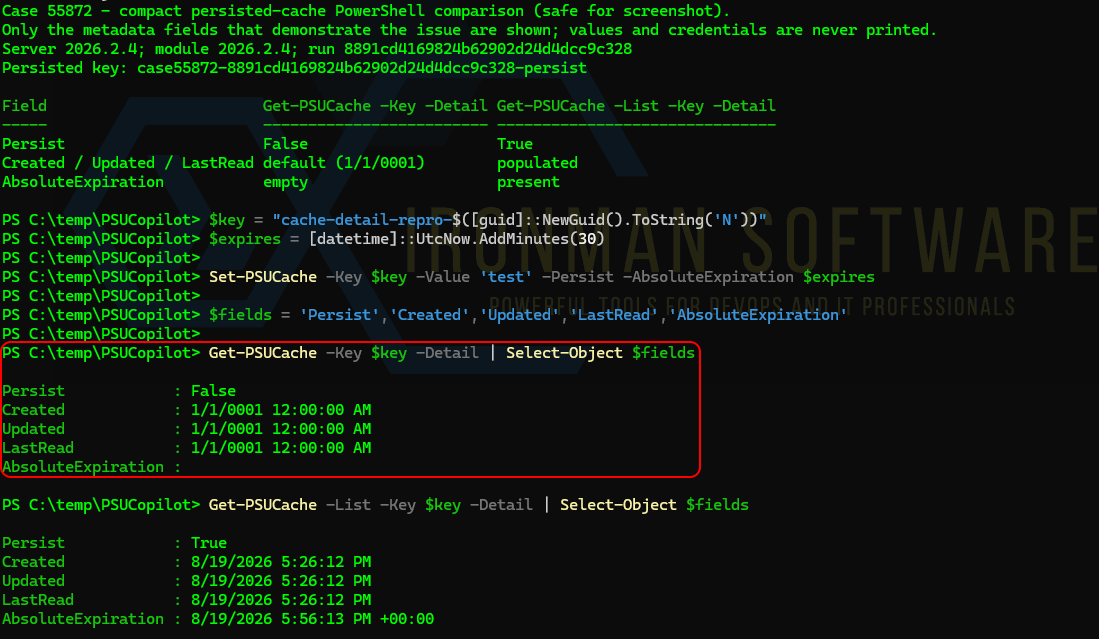 (figure shows case55872-8891cd4169824b62902d24d4dcc9c328-persist is not rendered correctly unless we include the -List parameter as a workaround)
a487bec6-cd6c-4bce-93f0-a97a252962a5.png
ee183b71-b84c-4177-8ebd-fcd2339d54b6.png
Hello lloydmitchell,
I can confirm that DataTraveler has already escalated it internally for further review.
Our independent lab findings are consistent with the same behavior. In PSU 2026.2.4, we reproduced the issue consistently: `Get-PSUCache -Key <key> -Detail` returned the cached value while metadata such as `Persist`, `Id`, `Created`, and expiration information remained at default or empty values.
For the same cache entry, `Get-PSUCache -List -Key <key> -Detail` returned the populated metadata correctly. We also reproduced this in a single-node environment, further supporting that the behavior is not specific to HA.
Best regards,
Ruben Tapia
Thank you both, I will use the '-list' flag for the time being if needed.