error in vs code extension after upgrade to 2026.3.0

I just updated my local developer instance to 2026.3.0 so i can use the updated vs code extension. the automatic instance discovery worked and it shows me the connection. but when i try to drill into the apps or settings i get an error:
"Failed to connect to http://localhost:5006. PSU request failed (400 Bad Request): An HTTP/1.x request was sent to an HTTP/2 only endpoint."
The remote connection to the instance on my jumpbox connects without error. That is also upgraded to 2026.3.0. So local connection errors but remote does not.
Not sure what this error means. i did a search on the net for this related to vs code but there are no settings in vs code for HTTP/1.x or HTTP/2. Any ideas on how to resolve?
All Comments (9)
Hello @russellreid1
Thank you for reporting this and for including the comparison with your remote 2026.3.0 instance.
The HTTP/1.x versus HTTP/2 message gives us a useful starting point. Since automatic discovery finds the local instance but operations against it fail, while the remote 2026.3.0 instance works, I would like to compare the local connection and hosting configuration before assuming this is an extension issue.
Could you please confirm the following?
• Exact version of the Devolutions PowerShell Universal VS Code extension currently installed.
• Operating system of the local development machine.
• How the local PSU instance is running, for example Windows service, executable, IIS, Docker, or another method.
• The URL and protocol you normally use to access the local PSU Admin Console, specifically whether it is HTTP or HTTPS.
• Whether you have any custom Kestrel, proxy, TLS, or HTTP protocol configuration on the local instance.
If possible, please also provide the relevant VS Code Output entries from the PowerShell Universal extension and the PSU log entries covering the same failed connection attempt.
Because this is a public forum, please sanitize all evidence before posting. Remove credentials, tokens, license keys, cookies, private keys, full connection strings, email addresses, usernames, customer data, tenant or account identifiers, internal domains, hostnames, IP addresses, and private URLs. Please do not upload unredacted HAR files, memory dumps, database backups, or complete configuration files to this public thread.
References:
https://forum.devolutions.net/topics/56197/devolutions-powershell-universal-version-2026300-september-15-2026
Best regards,
Ruben Tapia
Hello @russellreid1
Thank you for reporting this and for including the comparison with your remote 2026.3.0 instance.
The HTTP/1.x versus HTTP/2 message gives us a useful starting point. Since automatic discovery finds the local instance but operations against it fail, while the remote 2026.3.0 instance works, I would like to compare the local connection and hosting configuration before assuming this is an extension issue.
Could you please confirm the following?
• Exact version of the Devolutions PowerShell Universal VS Code extension currently installed.
• Operating system of the local development machine.
• How the local PSU instance is running, for example Windows service, executable, IIS, Docker, or another method.
• The URL and protocol you normally use to access the local PSU Admin Console, specifically whether it is HTTP or HTTPS.
• Whether you have any custom Kestrel, proxy, TLS, or HTTP protocol configuration on the local instance.
If possible, please also provide the relevant VS Code Output entries from the PowerShell Universal extension and the PSU log entries covering the same failed connection attempt.
Because this is a public forum, please sanitize all evidence before posting. Remove credentials, tokens, license keys, cookies, private keys, full connection strings, email addresses, usernames, customer data, tenant or account identifiers, internal domains, hostnames, IP addresses, and private URLs. Please do not upload unredacted HAR files, memory dumps, database backups, or complete configuration files to this public thread.
References:
https://forum.devolutions.net/topics/56197/devolutions-powershell-universal-version-2026300-september-15-2026
Best regards,
Ruben Tapia
@rubentapia
This was a PU upgrade of version 2026.1.3.0 which worked with the previous version of the PU VS code extension but did not work with the current 2026.3.0 version of the extension. Which is why i upgraded PU.
VS Code version: 1.137.0 user setup
Devolutions Powerhsell Universal extension: 2026.3.0
Operating system of dev machine: Windows 11 Enterprise 25H2
Local Powershell Universal is running as a windows service
URL: http://localhost:5006 This was the url auto discovered.
I have a xampp portable installation but it is not running. When i do have it running it is using port 80, 443.
I do have Cisco Umbrella and crowdstrike installed per company policy.
Extension error on connect: Failed to connect to http://localhost:5006. PSU request failed (400 Bad Request): An HTTP/1.x request was sent to an HTTP/2 only endpoint.
I found this set of lines in the system log for PU:
2026-09-17 07:00:39.101 -05:00 [INF] Loading configuration files...
2026-09-17 07:00:39.118 -05:00 [INF] Reading configuration for Vault
2026-09-17 07:00:39.235 -05:00 [WRN] HTTP/2 is not enabled for [::]:5000. The endpoint is configured to use HTTP/1.1 and HTTP/2, but TLS is not enabled. HTTP/2 requires TLS application protocol negotiation. Connections to this endpoint will use HTTP/1.1.
2026-09-17 07:00:39.263 -05:00 [INF] Reading configuration for LoggingTarget
2026-09-17 07:00:39.283 -05:00 [INF][UniversalAutomation.Services.UniversalConfigurationService] Reading configuration for Tag
2026-09-17 07:00:39.317 -05:00 [INF][UniversalAutomation.Services.UniversalConfigurationService] Reading configuration for Variable
2026-09-17 07:00:39.541 -05:00 [INF][Microsoft.Hosting.Lifetime] Now listening on: http://[::]:60458
2026-09-17 07:00:39.542 -05:00 [INF][Microsoft.Hosting.Lifetime] Now listening on: http://[::]:5006
2026-09-17 07:00:39.542 -05:00 [INF][Microsoft.Hosting.Lifetime] Now listening on: http://[::]:5000
2026-09-17 07:00:39.542 -05:00 [INF][Microsoft.Hosting.Lifetime] Now listening on: https://[::]:5001
Hello @russellreid1
Thank you for reporting this and for including the comparison with your remote 2026.3.0 instance.
The HTTP/1.x versus HTTP/2 message gives us a useful starting point. Since automatic discovery finds the local instance but operations against it fail, while the remote 2026.3.0 instance works, I would like to compare the local connection and hosting configuration before assuming this is an extension issue.
Could you please confirm the following?
• Exact version of the Devolutions PowerShell Universal VS Code extension currently installed.
• Operating system of the local development machine.
• How the local PSU instance is running, for example Windows service, executable, IIS, Docker, or another method.
• The URL and protocol you normally use to access the local PSU Admin Console, specifically whether it is HTTP or HTTPS.
• Whether you have any custom Kestrel, proxy, TLS, or HTTP protocol configuration on the local instance.
If possible, please also provide the relevant VS Code Output entries from the PowerShell Universal extension and the PSU log entries covering the same failed connection attempt.
Because this is a public forum, please sanitize all evidence before posting. Remove credentials, tokens, license keys, cookies, private keys, full connection strings, email addresses, usernames, customer data, tenant or account identifiers, internal domains, hostnames, IP addresses, and private URLs. Please do not upload unredacted HAR files, memory dumps, database backups, or complete configuration files to this public thread.
References:
https://forum.devolutions.net/topics/56197/devolutions-powershell-universal-version-2026300-september-15-2026
Best regards,
Ruben Tapia
@rubentapia
This was a PU upgrade of version 2026.1.3.0 which worked with the previous version of the PU VS code extension but did not work with the current 2026.3.0 version of the extension. Which is why i upgraded PU.
VS Code version: 1.137.0 user setup
Devolutions Powerhsell Universal extension: 2026.3.0
Operating system of dev machine: Windows 11 Enterprise 25H2
Local Powershell Universal is running as a windows service
URL: http://localhost:5006 This was the url auto discovered.
I have a xampp portable installation but it is not running. When i do have it running it is using port 80, 443.
I do have Cisco Umbrella and crowdstrike installed per company policy.
Extension error on connect: Failed to connect to http://localhost:5006. PSU request failed (400 Bad Request): An HTTP/1.x request was sent to an HTTP/2 only endpoint.
I found this set of lines in the system log for PU:
2026-09-17 07:00:39.101 -05:00 [INF] Loading configuration files...
2026-09-17 07:00:39.118 -05:00 [INF] Reading configuration for Vault
2026-09-17 07:00:39.235 -05:00 [WRN] HTTP/2 is not enabled for [::]:5000. The endpoint is configured to use HTTP/1.1 and HTTP/2, but TLS is not enabled. HTTP/2 requires TLS application protocol negotiation. Connections to this endpoint will use HTTP/1.1.
2026-09-17 07:00:39.263 -05:00 [INF] Reading configuration for LoggingTarget
2026-09-17 07:00:39.283 -05:00 [INF][UniversalAutomation.Services.UniversalConfigurationService] Reading configuration for Tag
2026-09-17 07:00:39.317 -05:00 [INF][UniversalAutomation.Services.UniversalConfigurationService] Reading configuration for Variable
2026-09-17 07:00:39.541 -05:00 [INF][Microsoft.Hosting.Lifetime] Now listening on: http://[::]:60458
2026-09-17 07:00:39.542 -05:00 [INF][Microsoft.Hosting.Lifetime] Now listening on: http://[::]:5006
2026-09-17 07:00:39.542 -05:00 [INF][Microsoft.Hosting.Lifetime] Now listening on: http://[::]:5000
2026-09-17 07:00:39.542 -05:00 [INF][Microsoft.Hosting.Lifetime] Now listening on: https://[::]:5001
@russellreid1
Thank you for the detailed information and the PSU log extract. This helps narrow the issue down considerably.
One important detail is that PSU is actually listening on port 5006, while the HTTP/2 warning in the log specifically references port 5000. The extension is failing against the automatically discovered http://localhost:5006 endpoint, so I do not want to change any HTTP, TLS, Kestrel, Cisco Umbrella, or CrowdStrike settings at this point.
Could you please confirm two additional details?
• What exact URL do you normally use in a browser to successfully access the local PSU Admin Console?
• If available, what was the exact version of the previous VS Code extension that worked with PSU 2026.1.3.0?
The Admin Console URL is particularly useful. If it differs from the automatically discovered http://localhost:5006 endpoint, that will give us a good comparison point and help determine whether the behavior is related to endpoint discovery rather than the PSU service itself.
Once we have that information, I can determine whether the next step should be a controlled local connection test or an internal reproduction against PSU 2026.3.0 and the 2026.3.0 extension.
Because this is a public forum, please continue to sanitize any additional logs or configuration before posting them.
References:
https://forum.devolutions.net/topics/56197/devolutions-powershell-universal-version-2026300-september-15-2026
Best regards,
Ruben Tapia
Hello @russellreid1
Thank you for reporting this and for including the comparison with your remote 2026.3.0 instance.
The HTTP/1.x versus HTTP/2 message gives us a useful starting point. Since automatic discovery finds the local instance but operations against it fail, while the remote 2026.3.0 instance works, I would like to compare the local connection and hosting configuration before assuming this is an extension issue.
Could you please confirm the following?
• Exact version of the Devolutions PowerShell Universal VS Code extension currently installed.
• Operating system of the local development machine.
• How the local PSU instance is running, for example Windows service, executable, IIS, Docker, or another method.
• The URL and protocol you normally use to access the local PSU Admin Console, specifically whether it is HTTP or HTTPS.
• Whether you have any custom Kestrel, proxy, TLS, or HTTP protocol configuration on the local instance.
If possible, please also provide the relevant VS Code Output entries from the PowerShell Universal extension and the PSU log entries covering the same failed connection attempt.
Because this is a public forum, please sanitize all evidence before posting. Remove credentials, tokens, license keys, cookies, private keys, full connection strings, email addresses, usernames, customer data, tenant or account identifiers, internal domains, hostnames, IP addresses, and private URLs. Please do not upload unredacted HAR files, memory dumps, database backups, or complete configuration files to this public thread.
References:
https://forum.devolutions.net/topics/56197/devolutions-powershell-universal-version-2026300-september-15-2026
Best regards,
Ruben Tapia
@rubentapia
This was a PU upgrade of version 2026.1.3.0 which worked with the previous version of the PU VS code extension but did not work with the current 2026.3.0 version of the extension. Which is why i upgraded PU.
VS Code version: 1.137.0 user setup
Devolutions Powerhsell Universal extension: 2026.3.0
Operating system of dev machine: Windows 11 Enterprise 25H2
Local Powershell Universal is running as a windows service
URL: http://localhost:5006 This was the url auto discovered.
I have a xampp portable installation but it is not running. When i do have it running it is using port 80, 443.
I do have Cisco Umbrella and crowdstrike installed per company policy.
Extension error on connect: Failed to connect to http://localhost:5006. PSU request failed (400 Bad Request): An HTTP/1.x request was sent to an HTTP/2 only endpoint.
I found this set of lines in the system log for PU:
2026-09-17 07:00:39.101 -05:00 [INF] Loading configuration files...
2026-09-17 07:00:39.118 -05:00 [INF] Reading configuration for Vault
2026-09-17 07:00:39.235 -05:00 [WRN] HTTP/2 is not enabled for [::]:5000. The endpoint is configured to use HTTP/1.1 and HTTP/2, but TLS is not enabled. HTTP/2 requires TLS application protocol negotiation. Connections to this endpoint will use HTTP/1.1.
2026-09-17 07:00:39.263 -05:00 [INF] Reading configuration for LoggingTarget
2026-09-17 07:00:39.283 -05:00 [INF][UniversalAutomation.Services.UniversalConfigurationService] Reading configuration for Tag
2026-09-17 07:00:39.317 -05:00 [INF][UniversalAutomation.Services.UniversalConfigurationService] Reading configuration for Variable
2026-09-17 07:00:39.541 -05:00 [INF][Microsoft.Hosting.Lifetime] Now listening on: http://[::]:60458
2026-09-17 07:00:39.542 -05:00 [INF][Microsoft.Hosting.Lifetime] Now listening on: http://[::]:5006
2026-09-17 07:00:39.542 -05:00 [INF][Microsoft.Hosting.Lifetime] Now listening on: http://[::]:5000
2026-09-17 07:00:39.542 -05:00 [INF][Microsoft.Hosting.Lifetime] Now listening on: https://[::]:5001
@russellreid1
Thank you for the detailed information and the PSU log extract. This helps narrow the issue down considerably.
One important detail is that PSU is actually listening on port 5006, while the HTTP/2 warning in the log specifically references port 5000. The extension is failing against the automatically discovered http://localhost:5006 endpoint, so I do not want to change any HTTP, TLS, Kestrel, Cisco Umbrella, or CrowdStrike settings at this point.
Could you please confirm two additional details?
• What exact URL do you normally use in a browser to successfully access the local PSU Admin Console?
• If available, what was the exact version of the previous VS Code extension that worked with PSU 2026.1.3.0?
The Admin Console URL is particularly useful. If it differs from the automatically discovered http://localhost:5006 endpoint, that will give us a good comparison point and help determine whether the behavior is related to endpoint discovery rather than the PSU service itself.
Once we have that information, I can determine whether the next step should be a controlled local connection test or an internal reproduction against PSU 2026.3.0 and the 2026.3.0 extension.
Because this is a public forum, please continue to sanitize any additional logs or configuration before posting them.
References:
https://forum.devolutions.net/topics/56197/devolutions-powershell-universal-version-2026300-september-15-2026
Best regards,
Ruben Tapia
@rubentapia
I use the following url to access the admin console on the local dev instance: https://localhost:5001/admin
The VS Code PU extension that worked with the previous version was Powershell Universal 2026.2.3 not Devolutions Powershell Universal.
@russellreid1
Thank you for confirming the local Admin Console URL and the previous extension version. That gives us a useful comparison point.
We will also be working on reproducing this behavior with PSU 2026.3.0 and the current Devolutions PowerShell Universal extension.
In the meantime, could you please try the following troubleshooting test?
1. Open the PowerShell Universal activity view in VS Code.
2. Run the `PSU: Add Connection` command.
3. Create a new manual connection.
4. For the PowerShell Universal base URL, use:
https://localhost:5001
Please use the base URL only, without `/admin`.
5. Use a valid App Token for the connection. Please do not post or share the token in this public thread.
6. Open the manually created connection and check whether you can access the PSU resources that were failing with the automatically discovered `http://localhost:5006` connection.
Please let us know whether the manual connection succeeds. If it fails, please provide only the exact sanitized error message.
This test will help us determine whether the behavior is specifically related to automatic instance discovery selecting port 5006, or whether the same issue also affects a manually configured connection using the working HTTPS endpoint.
Because this is a public forum, please continue to sanitize any diagnostic information before posting it.
Best regards,
Ruben Tapia
i attempted this procedure using both an existing app token and a newly created token. in both instances the error happened immediately:
Failed to connect to https://localhost:5001. fetch failed
no connection was saved.
I attempted to connect using the autodiscovered URL and recieved the same error as before: PSU request failed (400 Bad Request): An HTTP/1.x request was sent to an HTTP/2 only endpoint.
I have attached a copy of the system log for today. the only things i have done are startup and the attempts to connect using the vs code extension. i didnt find any sensitive data in the log file
systemLog20260921.txt
Hello @russellreid1
Thank you for completing the additional tests and for providing the latest system log.
At this point, we have enough information to move forward with an internal reproduction attempt. We will test the behavior using PSU 2026.3.0 with the current Devolutions PowerShell Universal VS Code extension and compare both automatic discovery and a manually configured connection.
We will specifically validate whether automatic discovery selects the same localhost:5006 endpoint and whether the same HTTP/1.x versus HTTP/2 error can be reproduced under a supported configuration.
No additional troubleshooting is required from your side at this moment.
If we are able to reproduce the behavior consistently in our environment, we will treat it as a potential product defect affecting the current version and prepare it for internal Development review.
Thank you again for the detailed testing and information you have provided. It has been very helpful in narrowing down the issue.
Best regards,
Ruben Tapia
Reproduced on 2026.3.0 w vs code extension 2026.3.0 and current VS Code: Auto-discovery breaks but the manual connection works. Discovery is handing the extension the wrong listener. Not sure when this started. I will report this upwards for inclusion into a future release.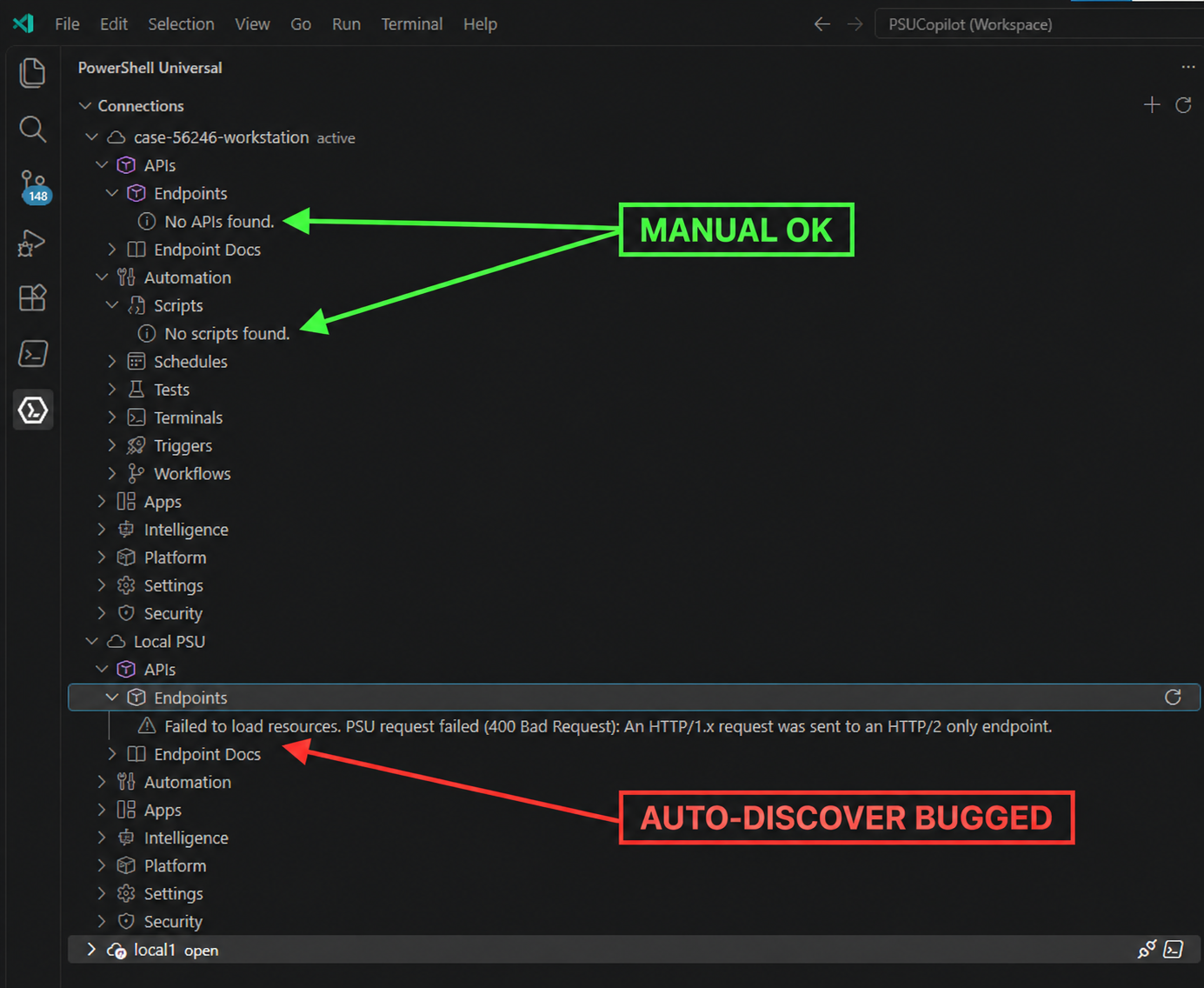
PSU request failed (400 Bad Request): An HTTP/1.x request was sent to an HTTP/2 only endpoint.
d4ab5d3f-2a63-4608-941e-2cd3ddcaa31c.png
i can confirm that 2026.3.1 fixed the issue. i had to remove the connection and rediscover, but the connection now works as expected.