Multiselect Autocomplete shows Values instead of Name if more are selected
Multiselect Autocomplete shows Values instead of Name if more are selected

Hi,
not sure if this a bug or i do something wrong.
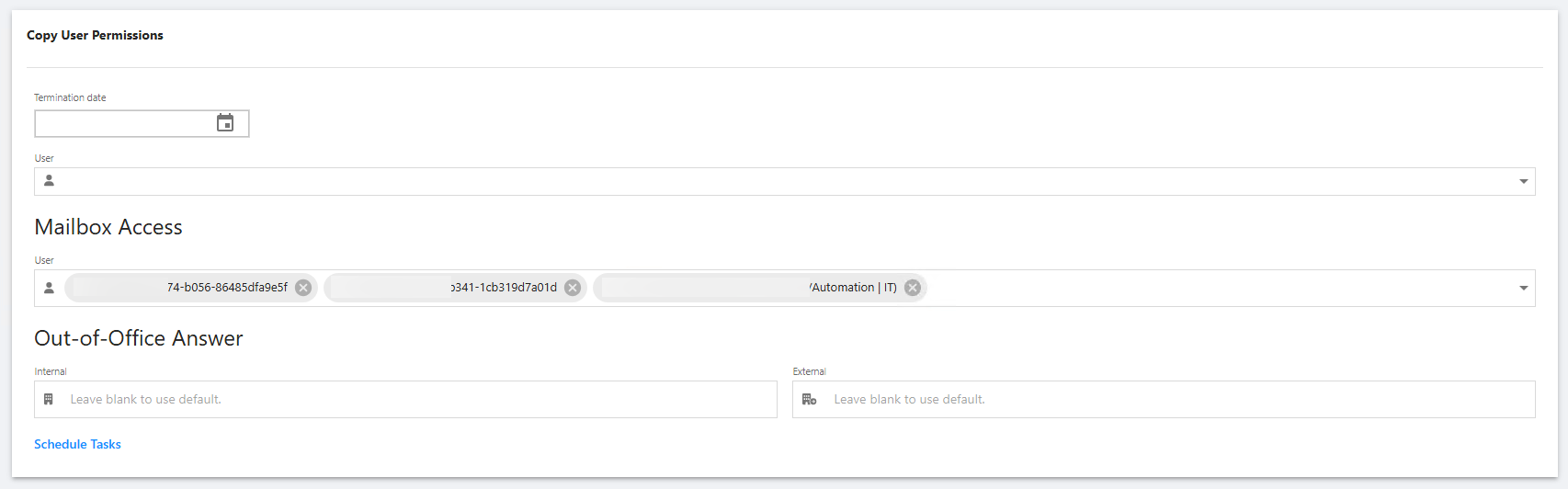
Im using the Autocomplete Component to select one or more users from a list.
For the Name i build something out of Username and the Title / Position and the Value is the ObjectGuid for the script to use afterwards.
If i now select one entry it works without a problem, but as soon as i add another different entry, the one before transforms into the Value instead of showing the Name.
The code for the Autocomplete Component ist the following:
The $ADUsers is a cached list of our AD Users.
New-UDAutocomplete -Id "txtMailboxAccess" -Label "User" -Multiple -FullWidth -Icon (New-UDIcon -Icon "user" -Solid) -OnLoadOptions {
    $ADUsers | Where-Object {$_.userprincipalname -like "*$Body*" -or $_.samaccountname -like "*$Body*"} | ForEach-Object {
        New-UDAutoCompleteOption -Name "$($_.displayName) ($($_.title) | $($_.department))" -Value $_.ObjectGuid
    } | ConvertTo-Json
}
Does anybody know how to solve this?
Thank you!
d38d64b4-5cc7-43ae-9102-cc5d2a70cb2a.png
All Comments (4)
Hi,
not sure if this a bug or i do something wrong.
Im using the Autocomplete Component to select one or more users from a list.
For the Name i build something out of Username and the Title / Position and the Value is the ObjectGuid for the script to use afterwards.
If i now select one entry it works without a problem, but as soon as i add another different entry, the one before transforms into the Value instead of showing the Name.
The code for the Autocomplete Component ist the following:
The $ADUsers is a cached list of our AD Users.
New-UDAutocomplete -Id "txtMailboxAccess" -Label "User" -Multiple -FullWidth -Icon (New-UDIcon -Icon "user" -Solid) -OnLoadOptions {
$ADUsers | Where-Object {$_.userprincipalname -like "*$Body*" -or $_.samaccountname -like "*$Body*"} | ForEach-Object {
New-UDAutoCompleteOption -Name "$($_.displayName) ($($_.title) | $($_.department))" -Value $_.ObjectGuid
} | ConvertTo-Json
}
Does anybody know how to solve this?
Thank you!
@simon
Yes. To solve this, make sure already selected users are still included in the results returned by -OnLoadOptions. New-UDAutocomplete -Multiple stores the selected Value, then maps it back to Name from the current options list. If the previous user is no longer in that list, the control can only display the GUID.
Also cast the GUID to string:
New-UDAutoCompleteOption -Name "$($_.displayName) ($($_.title) | $($_.department))" -Value ([string]$_.ObjectGuid)
Hi,
not sure if this a bug or i do something wrong.
Im using the Autocomplete Component to select one or more users from a list.
For the Name i build something out of Username and the Title / Position and the Value is the ObjectGuid for the script to use afterwards.
If i now select one entry it works without a problem, but as soon as i add another different entry, the one before transforms into the Value instead of showing the Name.
The code for the Autocomplete Component ist the following:
The $ADUsers is a cached list of our AD Users.
New-UDAutocomplete -Id "txtMailboxAccess" -Label "User" -Multiple -FullWidth -Icon (New-UDIcon -Icon "user" -Solid) -OnLoadOptions {
$ADUsers | Where-Object {$_.userprincipalname -like "*$Body*" -or $_.samaccountname -like "*$Body*"} | ForEach-Object {
New-UDAutoCompleteOption -Name "$($_.displayName) ($($_.title) | $($_.department))" -Value $_.ObjectGuid
} | ConvertTo-Json
}
Does anybody know how to solve this?
Thank you!
@simon
Yes. To solve this, make sure already selected users are still included in the results returned by -OnLoadOptions. New-UDAutocomplete -Multiple stores the selected Value, then maps it back to Name from the current options list. If the previous user is no longer in that list, the control can only display the GUID.
Also cast the GUID to string:
New-UDAutoCompleteOption -Name "$($_.displayName) ($($_.title) | $($_.department))" -Value ([string]$_.ObjectGuid)
Hi @DataTraveler,
thanks for the reply.
Im not really sure how to achieve this. The List i give into the -OnLoadOptions is the $ADUsers, which gets filtered by the input you make to search for the specific users. But as far as i understand, the return value is always only "one entry" as i can only select one from the list?
Hello @simon ,
Apologies for my lack of clarify. I should have included more details and example code.
I'm not really sure how to achieve this.
Here is how to achieve it for a reasonably sized cached directory: build the friendly Name / GUID Value options once, cast ObjectGuid to [string], and pass that complete collection to -Options. The autocomplete then filters locally while keeping the value and label for each selection:
$UserOptions = @(
    $ADUsers | ForEach-Object {
        New-UDAutocompleteOption `
            -Name "$($_.DisplayName) ($($_.Title) | $($_.Department))" `
            -Value ([string]$_.ObjectGuid)
    }
)

New-UDAutocomplete `
    -Id 'txtMailboxAccess' `
    -Label 'User' `
    -Multiple `
    -FullWidth `
    -Icon (New-UDIcon -Icon 'user' -Solid) `
    -Options $UserOptions
The List I give into the `-OnLoadOptions` is the `$ADUsers`, which gets filtered by the input you make to search for the specific users.
Yes. That filtering is exactly why the earlier friendly label can disappear. Once you type the second search, the callback can return Grace but no longer return Ada. The control still knows Ada's stored GUID value, but it no longer has Ada's matching Name / Value option object to display the friendly label.
That is why -Options is the simpler immediate recommendation for a reasonably sized cache. It is not a replacement for -OnLoadOptions. Dynamic loading remains the appropriate approach when preloading the entire directory would create browser-performance problems. In that case, the server-side search should return a limited set of matches per query rather than loading thousands of users.
But as far as I understand, the return value is always only ‘one entry’ as I can only select one from the list?
Not quite. -OnLoadOptions can return a JSON array of all users matching the text in $Body. The dropdown selection action chooses one option at a time, and -Multiple adds each chosen value to the selection. The GUID fallback is not because the callback can only return one item; it happens when a later dynamic result replaces the option list that supplied an earlier selected label.
I am flagging this reproducible behavior for product follow-up to confirm the expected if this is expected. I will update this post when I have that answer but it will probably not be until next month.
In the meantime, please let us know if the provided workaround is helpful.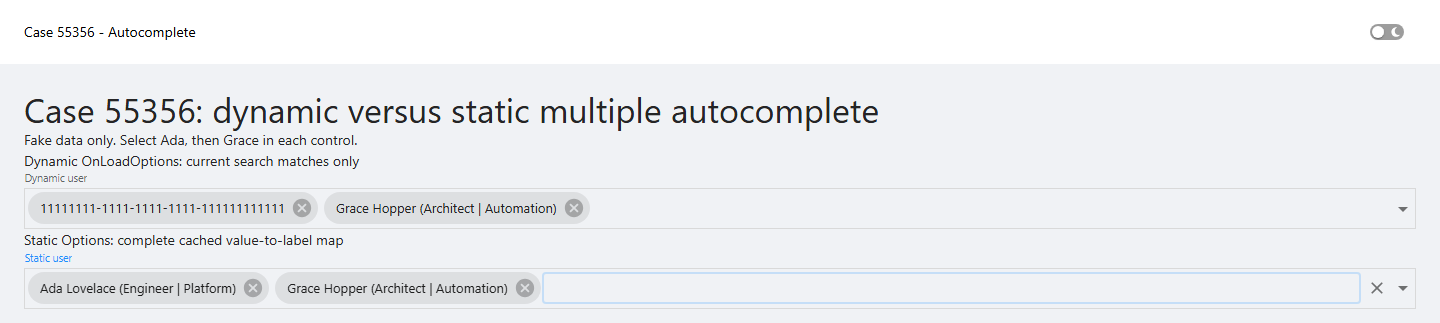
0a8f377a-221d-4698-ac92-937c8184ec0c.png
Hi @DataTraveler,
thank you for your answer again.
The workaround does work for us, as our AD does not have too many users. But as it grows, we could get performance problems, i guess.
Thanks also for taking the report back to your team!