Send-MailMessage

While I understand that Microsoft no longer supports Send-MailMessage (but doesn't have a replacement, yet)....I can do the following from PowerShell (on the server hosting PSU), but not within PSU itelself when I try to use Send-MailMessage and embedding an image in an e-mail.
$Attachment = New-Object System.Net.Mail.Attachment -FilePath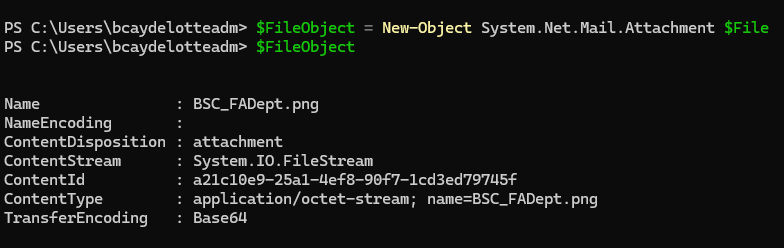
however, within PSU - when I hit that point in the Web App - I get a "could not find System.Net.Mail.Attachment". 
My understanding is that this isn't a module that I need to import, however I can't seem to get the app to load it.
0abd9f28-57c2-4af7-a836-7f7f7b8ca890.png
f7d0a786-d7f3-4337-acfa-b262478e90d8.png
All Comments (8)
@bcaydelotte That is a pretty weird error message. Can you be more explicit about the parameters to see if that helps?
New-Object -TypeName System.Net.Mail.Attachment -ArgumentList $File
What environment is your app running in?
Adam Driscoll
PowerShell Expert and Software Architect at Devolutions
Appreciate the quick response.
Looks like -ArgumentList is the only parameter available to me.
The environment is running via the default environment - I've also tried to specify PowerShell 7, but same error occurs.
I will verify this tomorrow. However, I have used New-Object System.Net.Mail.Attachment for a long time without any issues. Please note that I haven't tested it with the latest release yet.
Much appreciated. FYI - I'm on version 2026.1.5
this is my function
function Send-Mail {
    param($subject, $body, $to_mail, $bcc_mail, $cc_mail, $from_mail, $from_mail_name, $files, $smtpServer, $SmtpClientObject)
    if (! $smtpServer) {
        $smtpServer = "redacted"
    }
    $Message = New-Object System.Net.Mail.MailMessage
    $Message.Subject = "$subject"
    if ($from_mail_name) {
        $Message.From = New-Object System.Net.Mail.MailAddress ("$from_mail", "$from_mail_name")
    }
    else {
        $Message.From = New-Object System.Net.Mail.MailAddress "$from_mail"
    }
    if ($to_mail) {
        $Message.To.Add("$to_mail")
    }
    if ($bcc_mail) {
        $Message.Bcc.Add("$bcc_mail")
    }
    if ($cc_mail) {
        $Message.CC.Add("$cc_mail")
    }
    if ($files) {
        foreach ($file in $files) {
            $attachment = New-Object System.Net.Mail.Attachment($file)
            $Message.Attachments.Add($attachment)
        }
    }
    $Message.Body = "$body"
    $Message.IsBodyHtml = $true
    if (! $SmtpClientObject) {
        $SmtpClient = New-Object System.Net.Mail.SmtpClient $smtpServer
    }
    else {
        $SmtpClient = $SmtpClientObject
    }
    $SmtpClient.Send($Message)
    $Message.Dispose()
}
however, within PSU - when I hit that point in the Web App - I get a "could not find System.Net.Mail.Attachment".
@bcaydelotte
What happened is that the .NET type was found and the attachment constructor was called, but the value being passed as the file name was System.Net.Mail.Attachment rather than the image path. Since the app's working directory is the PSU repository, .NET was then looking for a filename literally called C:\ProgramData\UniversalAutomation\Repository\System.Net.Mail.Attachment and failed.
The example provided by @krisr is correct for normal attachments. If you need any assistance with displaying an image inline, as opposed to as an attachment, please let us know by updating this thread 👍
however, within PSU - when I hit that point in the Web App - I get a "could not find System.Net.Mail.Attachment".
@bcaydelotte
What happened is that the .NET type was found and the attachment constructor was called, but the value being passed as the file name was System.Net.Mail.Attachment rather than the image path. Since the app's working directory is the PSU repository, .NET was then looking for a filename literally called C:\ProgramData\UniversalAutomation\Repository\System.Net.Mail.Attachment and failed.
The example provided by @krisr is correct for normal attachments. If you need any assistance with displaying an image inline, as opposed to as an attachment, please let us know by updating this thread 👍
@DataTraveler
Help with displaying an image inline would be extremely helpful! Much appreciated!
@DataTraveler
Help with displaying an image inline would be extremely helpful! Much appreciated!
@bcaydelotte
If Send-MailMessage is not required, you could try like this:
$smtpServer = 'smtp.example.com'
$fromAddress = 'sender@example.com'
$toAddress = 'recipient@example.com'
$subject = 'Inline image test'
$bodyText = 'Your message text goes here.'
$imagePath = 'C:\Path\To\BSC_FADept.png'
$contentId = 'bsc-fadept-logo'

$message = [System.Net.Mail.MailMessage]::new()
$client = [System.Net.Mail.SmtpClient]::new($smtpServer)

try {
    $message.From = [System.Net.Mail.MailAddress]::new($fromAddress)
    $message.To.Add($toAddress)
    $message.Subject = $subject

    $plainView = [System.Net.Mail.AlternateView]::CreateAlternateViewFromString(
        $bodyText,
        $null,
        'text/plain'
    )

    $html = @"
<html>
  <body>
    <p>$bodyText</p>
    <img src="cid:$contentId" alt="BSC FA Dept" />
  </body>
</html>
"@

    $htmlView = [System.Net.Mail.AlternateView]::CreateAlternateViewFromString(
        $html,
        $null,
        'text/html'
    )

    $image = [System.Net.Mail.LinkedResource]::new($imagePath)
    $image.ContentId = $contentId
    $image.TransferEncoding = [System.Net.Mime.TransferEncoding]::Base64

    $htmlView.LinkedResources.Add($image)
    $message.AlternateViews.Add($plainView)
    $message.AlternateViews.Add($htmlView)

    # If your SMTP server requires these, configure them before Send().
    # $client.Port = 587
    # $client.EnableSsl = $true
    # $client.Credentials = [pscredential]

    $client.Send($message)
}
finally {
    if ($client) { $client.Dispose() }
    if ($message) { $message.Dispose() }
}