Autocomplete but with more "loose" filtering

hi,
I am trying to use Autocomplete so that users may also enter parts of an entry.
e.g. the Autocomplete options are "super duper" and "mega giga"
What I am looking for is that a user may enter "sup dup" and still get the option "super duper" displayed.
Is this possible at all?
KR
G.
All Comments (5)
Hello @Guenther Schmitz
Thank you for reaching out.
I understand what you are trying to achieve. You would like the Autocomplete search to match separate partial terms, so an input such as `sup dup` can still return `super duper`, rather than requiring the entered text to be a continuous substring.
This may be achievable by implementing custom filtering with `New-UDAutocomplete -OnLoadOptions`, where the entered value can be split into individual search terms and evaluated against the available options.
Before I provide a specific example, could you please confirm which PowerShell Universal version you are currently using? I would like to verify the behavior against the appropriate version first.
Best regards,
Ruben Tapia
hi Ruben
I am still on 4.5.6 (about to update to the latest version anytime soon - but until then stuck with it).
KR
G.
Hello @Guenther Schmitz
Thanks for confirming the version.
Since you are currently on PSU 4.5.6, you can handle this by using `New-UDAutocomplete -OnLoadOptions` and applying your own filtering logic. `OnLoadOptions` gives you access to what the user typed through `$Body`, so you can split the input into separate search terms.
For example:
$options = @(
'super duper'
'mega giga'
)
New-UDAutocomplete -OnLoadOptions {
$searchTerms = $Body -split '\s+' | Where-Object { $_ }
$options | Where-Object {
$option = $_
$matchesAll = $true
foreach ($term in $searchTerms) {
if ($option -notlike "*$term*") {
$matchesAll = $false
break
}
}
$matchesAll
} | ConvertTo-Json
}
With this approach, `sup dup` can match `super duper`, while something like `sup gig` would not.
This is custom filtering rather than a native fuzzy-search option in Autocomplete, but it should give you the looser matching behavior you described.
Best regards,
Ruben Tapia
hi Ruben,
thanks for you reply.
While the PowerShell code itself is working the UD Autocomplete item is not.
It seems to me that the $Body variable is only present after an item is selected so the list is not filtered while typing (using this parameter); also the list always shows "No options" when a user clicks on the Autocomplete element itself. Items are only shown when anything (matching) is entered (e.g. e will list both entries; a shows the second).
Do you know if this behaviour has changed with the latest version?
KR
G.
@Guenther Schmitz
We can still achieve what you are trying to do in 4.5.6, but it requires some custom code with New-UDDynamic rather than New-UDAutocomplete.
Please, let us know if the below helps while you are still on 4.5.6.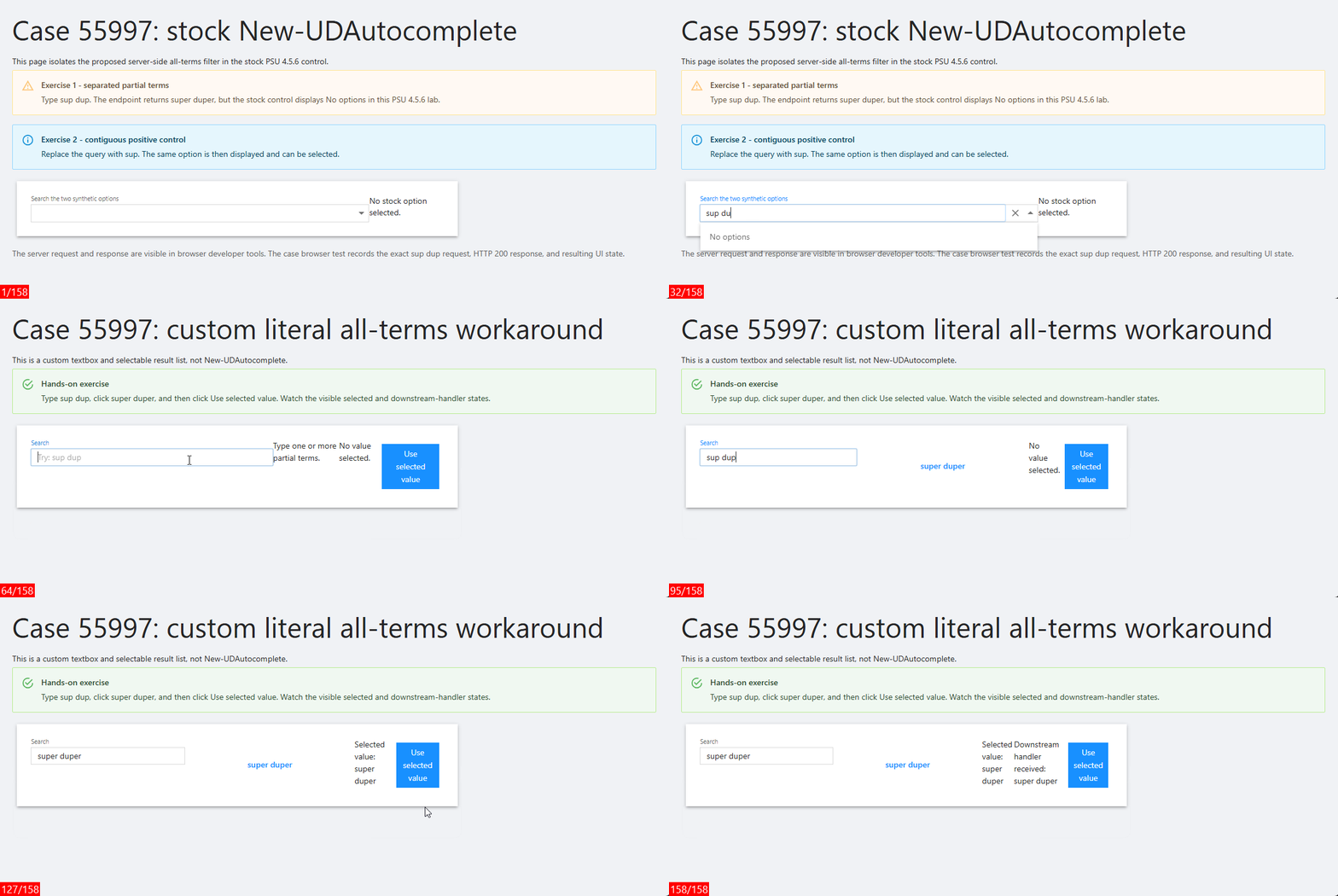
$looseOptions below is only example data. Replace it with your real list or lookup. This example uses the same text for the display and selected value; if yours are different, map both.
$looseOptions = @(
    'super duper'
    'mega giga'
)

$Session:LooseAutocompleteQuery = ''
$Session:LooseAutocompleteSelected = ''
$Session:LooseAutocompleteHandled = ''

New-UDTextbox -Id 'loose-autocomplete-query' `
    -Label 'Search' `
    -Placeholder 'Try: sup dup' `
    -FullWidth `
    -OnChange {
        $Session:LooseAutocompleteQuery = [string]$EventData
        $Session:LooseAutocompleteSelected = ''
        $Session:LooseAutocompleteHandled = ''
        Sync-UDElement -Id 'loose-autocomplete-results'
        Sync-UDElement -Id 'loose-autocomplete-state'
    }

New-UDDynamic -Id 'loose-autocomplete-results' -Content {
    # Keep the helper inside this dynamic endpoint so it is available in the
    # endpoint runspace on PSU 4.5.6.
    function Find-LooseAutocompleteOption {
        param(
            [AllowEmptyString()]
            [string]$Query,

            [Parameter(Mandatory)]
            [object[]]$Options,

            [ValidateRange(1, 100)]
            [int]$MaximumSuggestions = 8
        )

        if ([string]::IsNullOrWhiteSpace($Query)) {
            return @()
        }

        $terms = [System.Collections.Generic.List[string]]::new()
        $seen = [System.Collections.Generic.HashSet[string]]::new(
            [System.StringComparer]::OrdinalIgnoreCase
        )

        foreach ($term in @($Query -split '\s+' | Where-Object { $_ })) {
            if ($seen.Add([string]$term)) {
                $terms.Add([string]$term)
            }
        }

        @(
            $Options |
                Where-Object {
                    $candidate = [string]$_
                    foreach ($term in $terms) {
                        if ($candidate.IndexOf(
                            $term,
                            [System.StringComparison]::OrdinalIgnoreCase
                        ) -lt 0) {
                            return $false
                        }
                    }
                    return $true
                } |
                Select-Object -First $MaximumSuggestions
        )
    }

    $query = [string]$Session:LooseAutocompleteQuery
    $matches = @(
        Find-LooseAutocompleteOption `
            -Query $query `
            -Options $looseOptions `
            -MaximumSuggestions 8
    )

    if ([string]::IsNullOrWhiteSpace($query)) {
        New-UDTypography -Text 'Type one or more partial terms.'
        return
    }

    if ($matches.Count -eq 0) {
        New-UDAlert -Severity info -Text 'No loose matches.'
        return
    }

    foreach ($match in $matches) {
        $value = [string]$match
        $selectValue = {
            $Session:LooseAutocompleteQuery = $value
            $Session:LooseAutocompleteSelected = $value
            $Session:LooseAutocompleteHandled = ''
            Set-UDElement -Id 'loose-autocomplete-query' -Properties @{ value = $value }
            Sync-UDElement -Id 'loose-autocomplete-results'
            Sync-UDElement -Id 'loose-autocomplete-state'
        }.GetNewClosure()

        New-UDButton `
            -Text $value `
            -Variant text `
            -FullWidth `
            -OnClick $selectValue
    }
}

New-UDDynamic -Id 'loose-autocomplete-state' -Content {
    if ([string]::IsNullOrWhiteSpace([string]$Session:LooseAutocompleteSelected)) {
        New-UDTypography -Text 'No value selected.'
    }
    else {
        New-UDTypography -Text "Selected value: $Session:LooseAutocompleteSelected"
    }

    if (-not [string]::IsNullOrWhiteSpace([string]$Session:LooseAutocompleteHandled)) {
        New-UDTypography -Text "Downstream handler received: $Session:LooseAutocompleteHandled"
    }
}

New-UDButton -Text 'Use selected value' -OnClick {
    $Session:LooseAutocompleteHandled = [string]$Session:LooseAutocompleteSelected
    Sync-UDElement -Id 'loose-autocomplete-state'
}
Animation Key 🔑
- Frame 25 (New-UDAutocomplete) sup shows super duper
- Frame 58 (New-UDAutocomplete) sup dup shows No options
- Frame 105 (custom control): sup dup shows super duper.
- Frame 123 (custom control) super duper is selected.
- Frame 136 handler receives super duper.
forum-post-55957c.gif