Issue accessing variables.

I created an unauthenticated API Endpoint "/getData" which uses variables and the $Secret scope to connect to other APIs and return aggregated data.
Issue1: the endpoint could not read all secrets and threw a security exception despite none of them had any role restrictions. Recreating the secrets worked, so some update must have corrupted the permission requirements of the secrets. Not sure if this is worth looking into.
Issue2: the endpoint needs to run an internal script viaInvoke-PSUScript -Integrated -Script 'AuthorizeToAPI.ps1' -Wait that handles the authentication to that external API. That script is able to be run unauthenticated, but needs update variables/secrets. This is what I used:
    $AccessTokenVar = Get-PSUVariable -Name "AccessToken"
    $AccessTokenLifetimeVar = Get-PSUVariable -Name "AccessTokenLifetime"

    $TokenResponse = Invoke-RestMethod "<externalAPIauthentication>" -Method 'POST' -Headers $Headers -Body $Body

    Set-PSUVariable -Variable $AccessTokenVar -Value $TokenResponse.Token
    Set-PSUVariable -Variable $AccessTokenLifetimeVar -Value $TokenResponse.LifeTime
which worked fine until the last update and suddenly returns an error:Permission denied. The role specified does not have access to this resource.
Since Issue1 clearly pointed to some update corrupting role requirements to variables, I m at a loss on what is intended behavior and what is not. Are integrated scripts not able to use Get/Set-PSUVariable or did more permissions get corrupted?
Help would be much appreciated :)
All Comments (11)
Issue1: the endpoint could not read all secrets and threw a security exception despite none of them had any role restrictions. Recreating the secrets worked, so some update must have corrupted the permission [...]
This is not the intended behavior. If recreating the secret worked then yes, the root cause is most likely that those permissions became corrupted somehow. It is unlikely the issue is related to a product update, but we can certainly keep drilling into this 🔎
Issue2: the endpoint needs to run an internal script [...]
Integrated scripts may use Get-PSUVariable & Set-PSUVariable.
Help would be much appreciated :)
Could we try comparing json exports of known good variables vs. seemingly corrupted ones?
Seems like the "system" User is not able to useGet-PSUVariable & Set-PSUVariablefor those variables: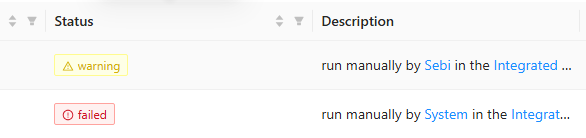
If I run it myself it does work (the warning is fine), but if the system user runs it (via Invoke-PSUScript -Integrated ...) it can not access the variables.
The variables however, are unrestricted: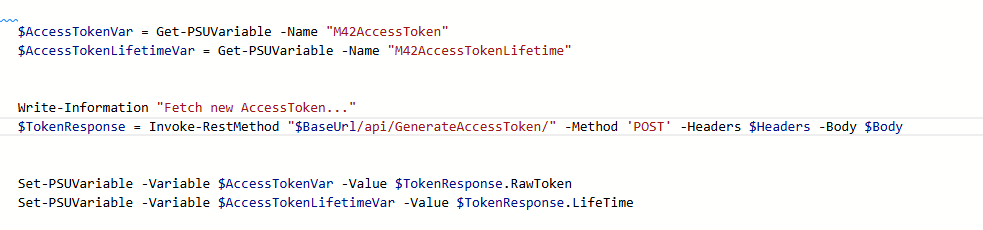

Is this a bug?
Could we try comparing json exports of known good variables vs. seemingly corrupted ones?
@DataTraveler
I can not find a way to export variables to compare them.
8ca0afb2-3a9e-491e-891f-ae35fe171c49.png
2970fa66-f89c-466c-b977-9b089d0ea63d.png
8f2b7ce4-4551-45f7-971e-f012b1b70b9c.png
Seems like the "system" User is not able to useGet-PSUVariable & Set-PSUVariablefor those variables:
If I run it myself it does work (the warning is fine), but if the system user runs it (via Invoke-PSUScript -Integrated ...) it can not access the variables.
The variables however, are unrestricted:
Is this a bug?
Could we try comparing json exports of known good variables vs. seemingly corrupted ones?
@DataTraveler
I can not find a way to export variables to compare them.
@tools-sebi
Can you confirm which version of PSU you had before and what version you upgraded to? Below is a metadata-only snippet to show us more. Could you run the below code from sebi context and share the results?
$names = 'M42AccessToken', 'M42AccessTokenLifetime'

$names | ForEach-Object {
    $variable = Get-PSUVariable -Name $_

    [pscustomobject]@{
        Name                 = $variable.Name
        Secret               = $variable.Secret
        Vault                = $variable.Vault
        Database             = $variable.Database
        Role                 = $variable.Role
        Roles                = @($variable.Roles) -join ','
        Scope                = $variable.Scope
        Module               = $variable.Module
        MissingSecret        = $variable.MissingSecret
        DisableRunAsSupport  = $variable.DisableRunAsSupport
        ReadOnly             = $variable.ReadOnly
    }
} | ConvertTo-Json -Depth 5
Can you confirm which version of PSU you had before and what version you upgraded to? Below is a metadata-only snippet to show us more. Could you run the below code from sebi context and share the results?
$names = 'M42AccessToken', 'M42AccessTokenLifetime'
$names | ForEach-Object {
$variable = Get-PSUVariable -Name $_
[pscustomobject]@{
Name = $variable.Name
Secret = $variable.Secret
Vault = $variable.Vault
Database = $variable.Database
Role = $variable.Role
Roles = @($variable.Roles) -join ','
Scope = $variable.Scope
Module = $variable.Module
MissingSecret = $variable.MissingSecret
DisableRunAsSupport = $variable.DisableRunAsSupport
ReadOnly = $variable.ReadOnly
}
} | ConvertTo-Json -Depth 5
@DataTraveler
For Issue1:
Turns out, you automatically overwrite the secret value if you edit the variable settings!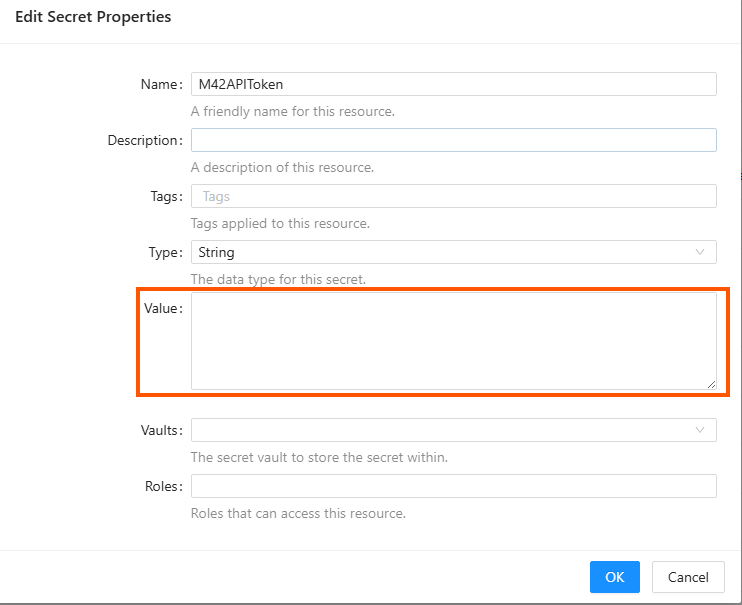 My expectation was, if i do not touch the "value" field, it will not overwrite the existing value of that variable.
But it does! So changing or editing any setting will cause the variable to be blank if you not set the value again.
That must have happened with the Update to 5.0 where the permission system changed. I edited some of the secrets to change the role and cleared them by accident as I saved the new setting.
You might wanna think about this design choice again. Imo changing a setting of a variable should not fore you to clear or reapply the value.
_______________________________
For Issue 2:
Scripts that a run from unauthenticated endpoint via $Result = Invoke-PSUScript -Integrated -Script 'M42\Testy.ps1' -Wait
will be run as:
"run manually by System in the Integrated environment"
Using Get-PSUVariable or Set-PSUVariableduring that script will cause an Error:Permission denied. The role specified does not have access to this resource.
This is also the case if you apply any role to the endpoint: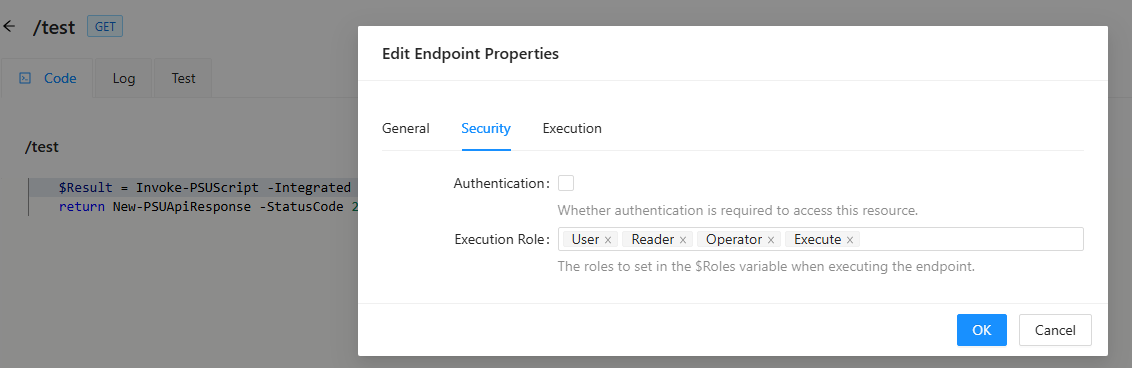
5246276a-dbc8-47ac-898a-9fceeee4a957.png
fd384f3f-721c-45bf-8fcb-40fbc3d8b9ac.png
My assumption that changing the variable setting would clear the variable is not correct.
However there is an issue with accessing variables.
I can access the AWX Token from a script run by me just fine, when I set the Role on the variable to "Administrator".
But if I omit the role/do not set one on the secret, i can no longer access the secret. Which is odd, since I am "Administartor" why would I loose access to a variable with no restriction?
Especially if I can access other variables, that are configured the exact same way:
Following script run by me:
Write-Information "AWXAPIToken: $($Secret:AWXAPIToken)"
Write-Information "M42AccessToken: $($Secret:M42AccessToken)"

$names = @("AWXAPIToken", "M42AccessToken")


$result = $names | ForEach-Object {
    $variable = Get-PSUVariable -Name $_

    [pscustomobject]@{
        Name                 = $variable.Name
        Secret               = $variable.Secret
        Vault                = $variable.Vault
        Database             = $variable.Database
        Role                 = $variable.Role
        Roles                = @($variable.Roles) -join ','
        Scope                = $variable.Scope
        Module               = $variable.Module
        MissingSecret        = $variable.MissingSecret
        DisableRunAsSupport  = $variable.DisableRunAsSupport
        ReadOnly             = $variable.ReadOnly
    }
} | ConvertTo-Json -Depth 5

return $result
Result:
AWXAPIToken: 1234TestAWX
M42AccessToken: 1234TestM42
[
  {
    "Name": "AWXAPIToken",
    "Secret": true,
    "Vault": "Database",
    "Database": false,
    "Role": [
      "Administrator"
    ],
    "Roles": "Administrator",
    "Scope": 0,
    "Module": null,
    "MissingSecret": false,
    "DisableRunAsSupport": false,
    "ReadOnly": false
  },
  {
    "Name": "M42AccessToken",
    "Secret": true,
    "Vault": "Database",
    "Database": false,
    "Role": null,
    "Roles": "",
    "Scope": 0,
    "Module": null,
    "MissingSecret": false,
    "DisableRunAsSupport": false,
    "ReadOnly": false
  }
]
Now I remove the role from "AWXAPIToken" and run it again:
AWXAPIToken:
M42AccessToken: 1234TestM42
[
  {
    "Name": "AWXAPIToken",
    "Secret": true,
    "Vault": "Database",
    "Database": false,
    "Role": null,
    "Roles": "",
    "Scope": 0,
    "Module": null,
    "MissingSecret": false,
    "DisableRunAsSupport": false,
    "ReadOnly": false
  },
  {
    "Name": "M42AccessToken",
    "Secret": true,
    "Vault": "Database",
    "Database": false,
    "Role": null,
    "Roles": "",
    "Scope": 0,
    "Module": null,
    "MissingSecret": false,
    "DisableRunAsSupport": false,
    "ReadOnly": false
  }
]
The AWXAPIToken is now empty and returns null despite exactly configured like the M42AccessToken.
The M42AccessToken, that worked, was recreated since the issues.
The AWXAPIToken is one of the variables created way back in an older version of psu.
So somewhere old variables might got corrupted and cannot be accessed in certain scenarios.
What to do now?
Recreate all variables and hope for the best?
@DataTraveler
What to do now?
Recreate all variables and hope for the best?
@DataTraveler
@tools-sebi
I can't answer those questions yet as the reality is not proven for me yet. There has not been enough information provided which means I am left to guess at the facts while trying to reproduce this. It didn't work. I can't reproduce this.
Could you provide the before/after version? You didn't actually clarify what version you were coming from. I am wondering if we need to actually see/inspect your database to find the missing information. What more information can you provide here?
I can't answer those questions yet as the reality is not proven for me yet. There has not been enough information provided which means I am left to guess at the facts while trying to reproduce this. It didn't work. I can't reproduce this.
Could you provide the before/after version? You didn't actually clarify what version you were coming from. I am wondering if we need to actually see/inspect your database to find the missing information. What more information can you provide here?
@DataTraveler
I can't tell which version introduced those Issues. We recently migrated from a prior v5 version in multiple steps to 2026.2.0
We can have a look at the Database, if you can tell me, what to look for.
Here is the variable Table: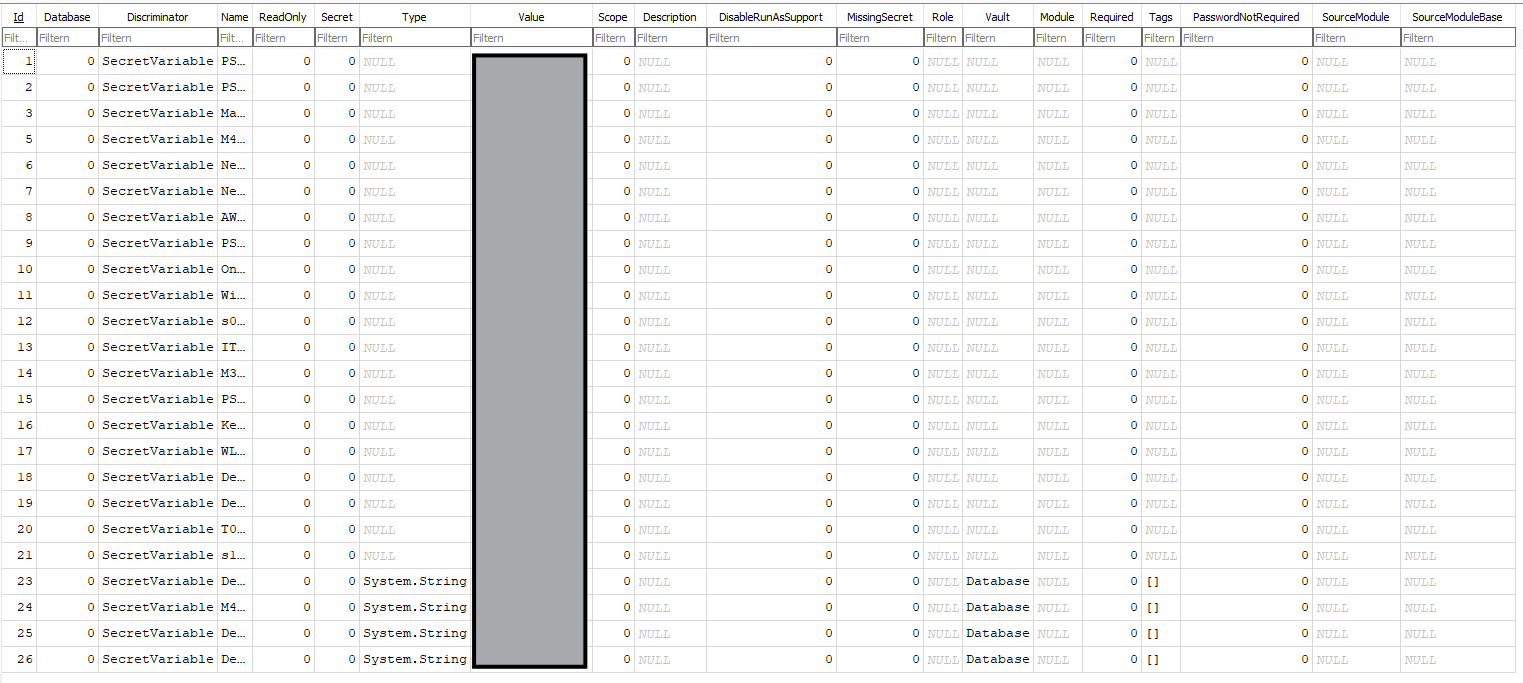
There is a clear difference between old and new variables.
Even variables with roles do not have the role set in the Database: But maybe "role" is not the correct column to look for this.
Also Get-PSUVariable still seems odd:
"Value" never has the value, but sometimes it it is $null and sometimes it is empty "".
Could also be related to the difference in old vs new variables. Still odd none of them shows a value, but that might be a different issue ...
{
  "Id": 9,
  "Name": "OldAccessToken",
  "Value": null,
  "UserName": null,
  "Password": null,
  "Secret": true,
  "Vault": "Database",
  "Type": "System.String",
  "Description": null,
  "MissingSecret": false,
  "DisableRunAsSupport": false,
  "DeleteSecret": false,
  "ReadOnly": false,
  "Database": false,
  "Role": null,
  "Scope": 0,
  "Tags": [],
  "Tag": [],
  "Roles": null,
  "Force": false,
  "Module": null,
  "Required": false,
  "PasswordNotRequired": false,
  "SourceModule": null,
  "SourceModuleBase": null,
  "DisplayValue": ""
}
DeskbirdAPIToken existing
{
  "Id": 5,
  "Name": "NewAPIToken",
  "Value": "",
  "UserName": null,
  "Password": null,
  "Secret": true,
  "Vault": "Database",
  "Type": "System.String",
  "Description": null,
  "MissingSecret": false,
  "DisableRunAsSupport": false,
  "DeleteSecret": false,
  "ReadOnly": false,
  "Database": false,
  "Role": null,
  "Scope": 0,
  "Tags": [],
  "Tag": [],
  "Roles": null,
  "Force": false,
  "Module": null,
  "Required": false,
  "PasswordNotRequired": false,
  "SourceModule": null,
  "SourceModuleBase": null,
  "DisplayValue": ""
}
64160c34-5c9a-4551-b57f-03f596fe09f8.png
5262c953-6f22-4b36-b7f2-00b7320b9b99.png
@tools-sebi - Just an FYI that I am still looking into this. The lead dev has seen 👀 as well. We are closing in on this. Any more info you have could be helpful for example in theory your event viewer app long might go back long enough (or other evidence) to show us exactly which versions of PSU you started with. Based on my current findings, it looks like you started with a version 4.
Any more you can share is great, otherwise I expect to have an update of substance by tomorrow.
@DataTraveler
I did find something reproducable:
https://forum.devolutions.net/topics/55432/removing-all-roles-from-secretvariable-makes-it-unusable-and-getpsuvar
this is at least related and might be the full cause of all of this, but I can‘t tell until variables without roles work as intended.
So it might not be related to updating at all.
@DataTraveler
I did find something reproducable:
https://forum.devolutions.net/topics/55432/removing-all-roles-from-secretvariable-makes-it-unusable-and-getpsuvar
this is at least related and might be the full cause of all of this, but I can‘t tell until variables without roles work as intended.
So it might not be related to updating at all.
@tools-sebi
In your case I would recommend upgrading to 2026.2.2 because I believe it will help your situation.
More
Thanks again for raising this and stick with it. I believe that the issue you reproduced in forum post 55432 was partially mitigated with the release of 2026.2.2 on July 2nd (yesterday). However, I found that when starting off with v4 PSU the error is not fully truly resolved in the database even with 2026.2.2. I contacted support and have a case number. I will update this thread again when there is more to report around this.
Hi tools-sebi,
Thanks for the very clean reproducer on the sister thread (55432) —
The dev team confirmed on 2026-06-30 that removing all Roles from a Secret variable, breaking Secret:<Name>, is a real bug, and it is now tracked internally and slated for an upcoming release.
While the fix ships, here is what unblocks the affected secrets today.
Workaround:
Recreate each affected secret variable from scratch:
- Copy the value out of your source of truth (or reset it if it's a token/password you rotate anyway).
- Delete the broken variable in Platform → Variables.
- Create a new variable with the same Name and the same Vault (Database), paste the value, and save.
That restores access via $Secret:<Name> and Get-ChildItem "Secret:<Name>" immediately — no service restart needed. It matches what you observed in your first thread ("Recreating the secrets worked").
To avoid re-hitting the bug until the fix ships:
Apply Roles on a Secret once and leave them in place. Do not remove the last Role from a live production secret — that is the specific transition that leaves the variable in the broken state. If you need to widen access instead, add the extra roles to the existing list rather than clearing and re-adding.
A note on Get-PSUVariable on secrets:
The behavior you saw — Value: null in the JSON — is intentional. Get-PSUVariable deliberately does not return the secret value; the supported way to consume a secret inside a script is $Secret:<Name> (or the Secret: PSDrive). There is a separate backlog item to make value retrieval an opt-in feature, but as of 2026.2.2 the Value: null in Get-PSUVariable output is by design, not a symptom of the roles bug.
I'll update this thread as soon as the roles fix ships, so you know when the recreate workaround is no longer needed.
Best regards,
Patrick Ouimet