Filter query made on API Management

Hello,
I'm trying to work with the Management API on Powershell Universal 4.4.1.
I'm trying to filter jobs run using the GET /api/v1/job endpoint.
However, parameters does not seem to have any effect ( Take / Total / OrderDirection / Scheduled etc... ) on the filtering of the query.
Goal would be to filter for instance x last jobs triggered via Scheduled.
What is the proper way to use the parameters ?
All Comments (4)
Hello,
I'm trying to work with the Management API on Powershell Universal 4.4.1.
I'm trying to filter jobs run using the GET /api/v1/job endpoint.
However, parameters does not seem to have any effect ( Take / Total / OrderDirection / Scheduled etc... ) on the filtering of the query.
Goal would be to filter for instance x last jobs triggered via Scheduled.
What is the proper way to use the parameters ?
@mr_curby
I have to gently implore you to upgrade to current version.
➖➖➖➖➖➖➖➖➖➖➖➖➖➖➖➖➖➖➖➖➖➖➖➖➖➖
In 4.4.1, make sure you include OrderBy when using Take or Skipfor example:
GET /api/v1/job/schedule/1?Skip=0&Take=10&OrderBy=StartTime&OrderDirection=Descending
Where 1 is the schedule id. You can get the list of schedule id's from /api/v1/schedule if needed. Total is a property that will be included in the result so there's no need for a parameter for it.
To get recent scheduled jobs across all schedules, use the job endpoint, then filter client-side where the scheduleId is > 0. If you need exactly X scheduled jobs, page through results until you have collected them:
GET /api/v1/job?Skip=0&Take=50&OrderBy=StartTime&OrderDirection=Descending&Scheduled=true
Let us know if this helps 👍
@DataTraveler it totally helps ! I was indeed missing the OrderBy parameter in my query.
Thanks for the help
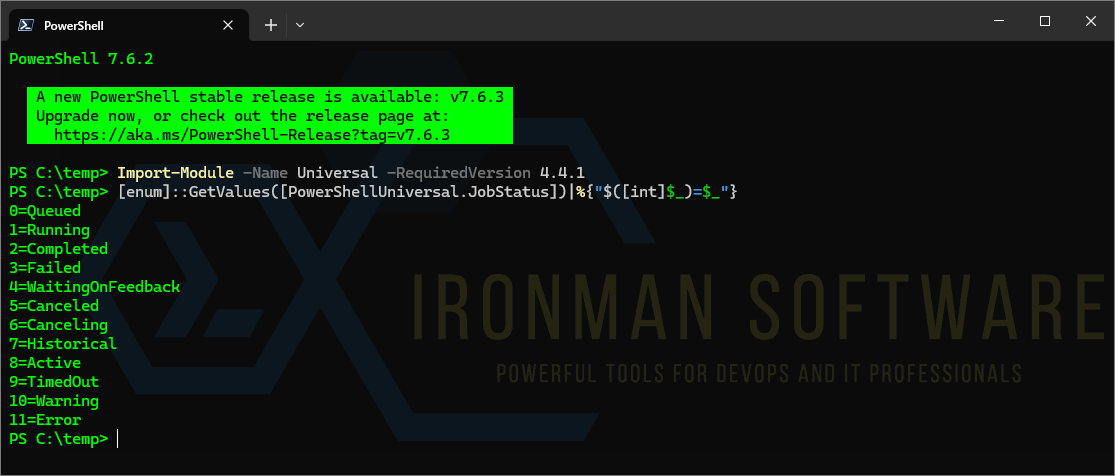
@DataTraveler, maybe another question on the filtering part. I didn't find anywhere the correspondence between status integer from jobs and the real status of the job in the GUI ?
Thanks !
@DataTraveler, maybe another question on the filtering part. I didn't find anywhere the correspondence between status integer from jobs and the real status of the job in the GUI ?
Thanks !
@mr_curby
Yes, you can list them out from the module like this:
Import-Module -Name Universal -RequiredVersion 4.4.1
[enum]::GetValues([PowerShellUniversal.JobStatus])|%{"$([int]$_)=$_"}
👍
dd3d099b-b9fc-43cc-8844-77e9449827a1.png