
markusburkhardt
Assigning JIT-permission sets to PAM credentials from PAM vault context, if you have permissions on the corresponding PAM provider
Hello @markusburkhardt,
thanks for the reply. I ll take look into the new system once it is available. I ll let you know if the planned approach will improve QoL and leave feedback in this threads.
Cheers,
Markus
Assigning JIT-permission sets to PAM credentials from PAM vault context, if you have permissions on the corresponding PAM provider
Good morning Devolutions community,
i am currently in the process of integrating the PAM module in our DVLS/RDM structure and i belive the current way of assiging JIT-permissions sets to PAM credentials cound use some improvement - QoL-wise.
Currently you have to switch from the PAM vault to the PAM provider configuration to assign the a PAM privilege set to the account and then switch back to the PAM vault to set the default groups of the PAM privilege set on the specific account. It whould be more comfortable if you can do that directly from PAM credentials, of course only if you of sufficient permissions within the PAM provider to do so.
I am currently running RDM 2026.3.16.0 with DVLS 2026.3.13.0.
Please take a look at this an let me know if you need further information.
Best regards,
Markus
bulk edit for PAM credentials in DVLS/RDM
Good morning Devolutions community,
i am currently in the process of integrating the PAM module in our DVLS/RDM structure and currenty i have to create a lot of PAM credentials, because our concept requires one PAM credential per role per user. So i am ending up with 120+ PAM credentials total devided into three categories. As the PAM admin it whould help me a lot if you can get the bulk edit feature like on regular entries for those entry types. Most repetative is currently setting the account lifecycle policy, checkout policy and the basic entry setting (picture, tags, ...), since i am unable to work with inheritance due to the permission constraints within the PAM vault.
I am currently running RDM 2026.3.16.0 with DVLS 2026.3.13.0.
Please take a look at this an let me know if you need further information.
Best regards,
Markus
PAM logs - Within RDM you cant see checkout comment and ticket number
Good morning Devolutions community,
i am currently in the process of integrating the PAM module in our DVLS/RDM structure and i am missing the ability to show the checkout comment and/or ticketnumber in the logs of the PAM credentials within RDM.
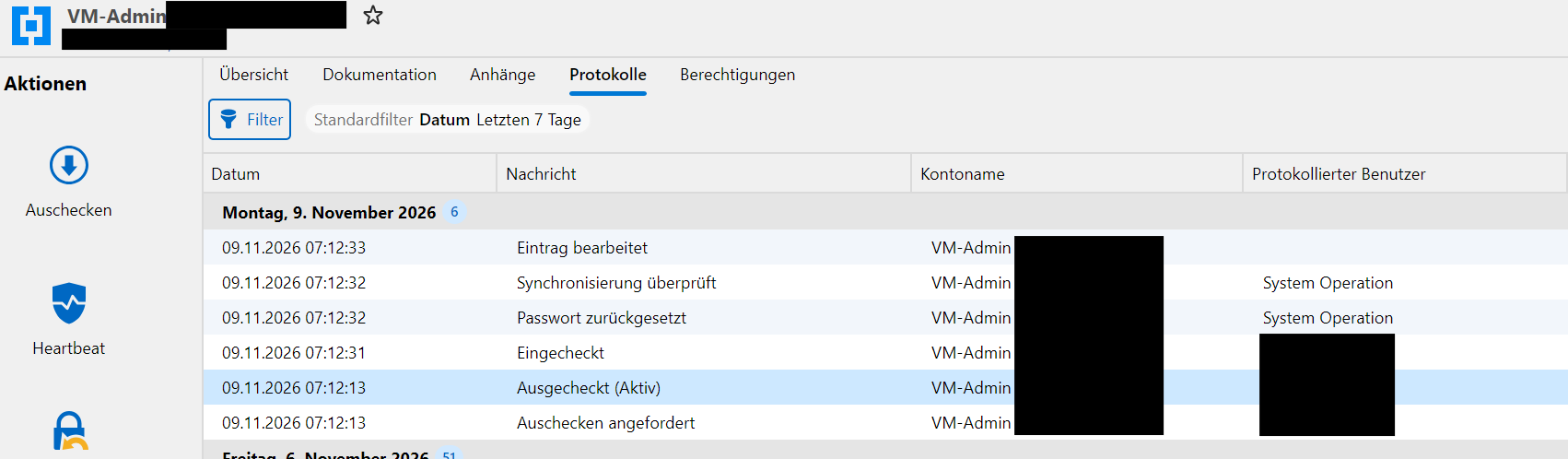
The logs are available in the DVLS web UI so this is a low priority feature request for a bit more QoL.
I am currently running RDM 2026.3.16.0 with DVLS 2026.3.13.0.
Please take a look at this an let me know if you need further information.
Best regards,
Markus
RDM/DVLS wating for replication, with an already checked out credential which is used in another session
Good morning Devolutions community,
i am currently in the process of integrating the PAM module in our DVLS/RDM structure and found a small bug, which is a little bit annoying but has no negativ impact while working.
After i checked out a PAM credential and already used it in session, when i open a another session without checking it in between, RDM/DVLS are waiting again for the domain controller replication for the configured timespan. This does not make any sense to me, which makes me assume this is a bug.
The PAM provider is a normal Microsoft Active Directory and am currently running RDM 2026.3.16.0 with DVLS 2026.3.13.0.
Please take a look at this an let me know if you need further information.
Best regards,
Markus
"Proxmox (Beta)"-session - issues with autotyping credentials into embedded VNC-sessions
Hallo @Alexis Geller Peiro,
all my test were done while using "FreeVNC", because in the meantime i had issues with the auto-type within the integrated VMware console.
Best regards,
Markus
"Proxmox (Beta)"-session - issues with autotyping credentials into embedded VNC-sessions
Hello @Alexis Geller Peiro,
today i was able to test the recommended settings and we have an improvement. We no longer have switched letters (Z/Y) within the VNC-Session but the issue is still not fully resolved. I still have the upper/lower issues.
Here are a few test strings with the results from the vm with the configuration changes from your post.
Abc4ef!ky -> aBC$EF!KY
aBc4ef!ky -> AbC$EF!KY
abc4ef!kY -> ABC4EF!Ky
ABc4ef!ky -> abC$EF!Ky
Since the upper/lower characters are switch i just wanted to mention the capslock was disabled when beginning to type.
I also testet the web console and the issue was still there as well.
Abc4ef!ky -> abc4ef1ky
aBc4ef!ky -> abc4ef1ky
abc4ef!kY -> abc4ef1kY
ABc4ef!ky -> abc4ef1ky
Since i had time today i also looked into the my rdm settings, found and enabled the following checkbox:
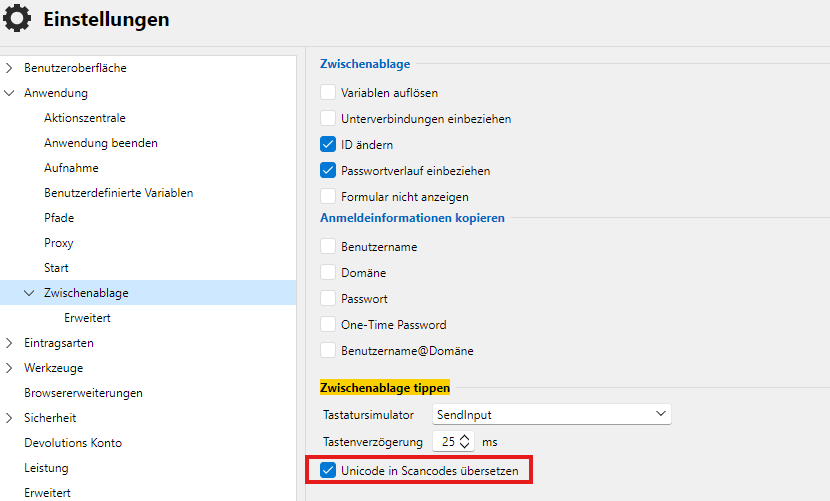
I did my test strings again over the web console now it is working.
Abc4ef!ky -> Abc4ef!ky
aBc4ef!ky -> aBc4ef!ky
abc4ef!kY -> abc4ef!kY
ABc4ef!ky -> ABc4ef!ky
The issue within the VNC-session still persists, unfortunaly.
Best regards,
Markus
"Proxmox (Beta)"-session - issues with autotyping credentials into embedded VNC-sessions
Hello @Alexis Geller Peiro,
thanks for the informations.
I asked my infrastructure colleague for the output of your command and here is the result:
root@<proxmoxhost>:~# qm showcmd <vmid> --pretty | grep -E -- '^ *-(k|vnc)( |$)'
  -vnc 'unix:/var/run/qemu-server/<vmid>.vnc,password=on' \
Best regards,
Markus
"Proxmox (Beta)"-session - issues with autotyping credentials into embedded VNC-sessions
Hello @Alexis Geller Peiro,
i switched the VNC engine within my RDM options vom FreeVNC to IronVNC and retried the autotyping. The issue still persits and the wrong characters (e.g. "z/y") apear to be the same.
I also asked my colleague from the infrastucture team for the consoleoutput you asked for. Here is the output from one of the affected vms, but i had to redecate some information for security reasons.
root@<proxmox-host>:~# qm config <VM-ID>
bios: ovmf
boot: order=sata0;sata1;sata2
cores: 2
cpu: x86-64-v2-AES
description: <vm description>
efidisk0: <Storage>:<VM-ID>/vm-<VM-ID>-disk-0.qcow2,efitype=4m,size=528K
machine: pc-i440fx-11.0+pve2
memory: 6144
meta: creation-qemu=11.0.3,ctime=1793172819
name: <vm name>
net0: virtio=<mac address>,bridge=<vlanX>
ostype: win11
sata0: none,media=cdrom
sata1: <Storage>:<VM-ID>/vm-<VM-ID>-disk-1.qcow2,size=60G
sata2: <Storage>:<VM-ID>/vm-<VM-ID>-disk-2.qcow2,size=100G
scsihw: virtio-scsi-single
smbios1: uuid=<uuid>
sockets: 2
tags: <tag1;tag2;..>
tpmstate0: <Storage>:<VM-ID>/vm-<VM-ID>-disk-3.qcow2,size=4M,version=v2.0
vmgenid: <some id>
The keyboard layout was set before the affected vm were even on proxmox, because we just startet migrating from our old virtualization enviroment. So they were turned of, sort of.
Best regards,
Markus
2026.3.2 - Unable to delete a file in files tab
Hello @Adam Driscoll and @Maxim Robert
unfortunally this issue seams not to be completely fixed in the verison 2026.3.4.0 (i am using this version on Windows Server 2025 with the current updates from october) Today my colleague created a new custom module and tried to move additional files into an subfolder withhin the file tab under the specific module. In the end the whole web ui stops responding, after you click on the "move"-button. Till you restart the whole PSU-Server you cant view any files unter the file tab in any module. Here are the steps which i had to take to reproduce this issue:
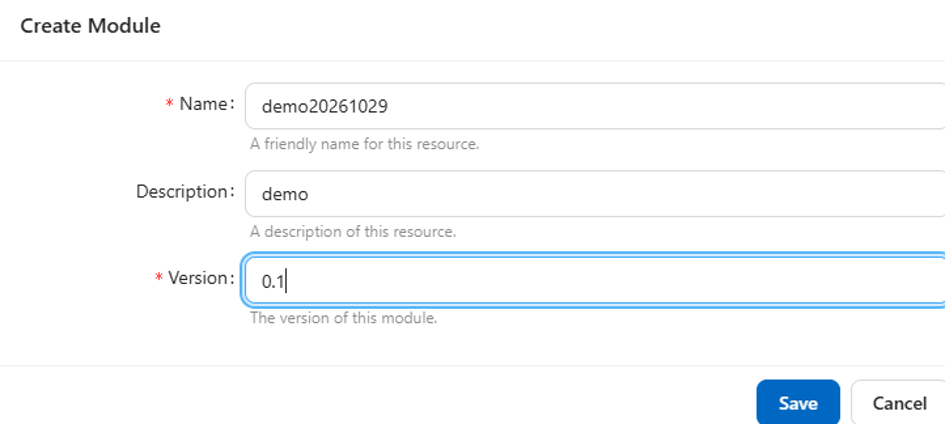
created a demo module
create a subfolder ("db") and testfile ("ddl.sql") within the files tab
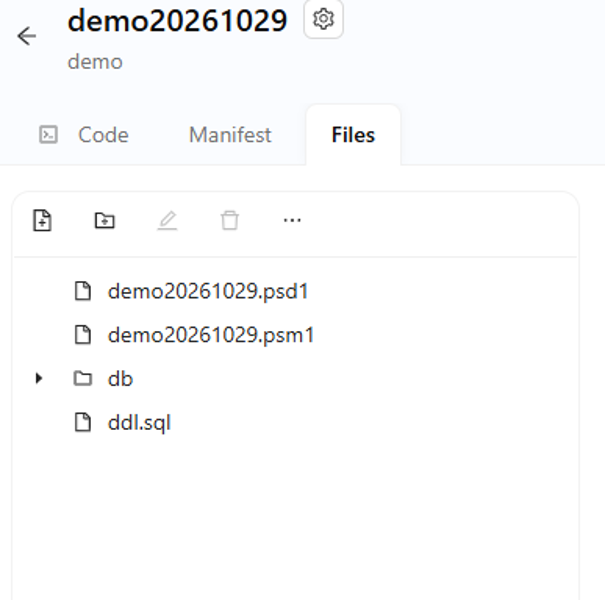
trying to move "ddl.sql" into the subfolder "db"
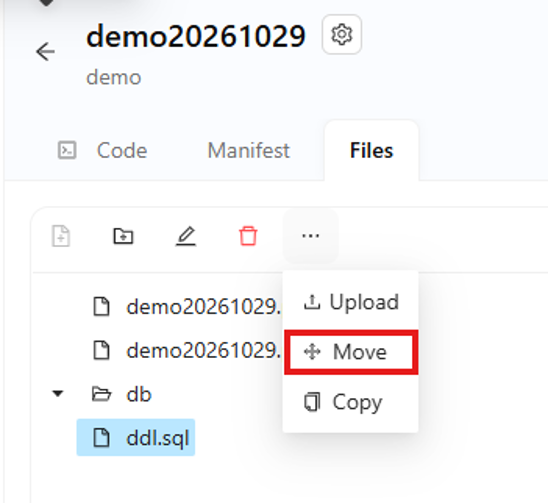
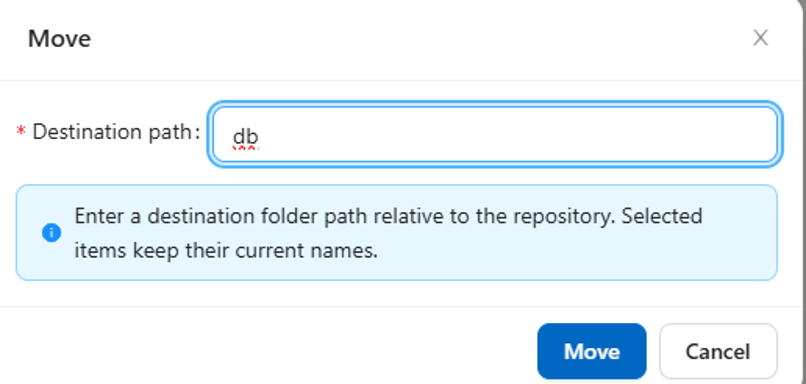
I also checked the server log on the verbose log level, but unfortunally i was only able to find the following two entries regarding the file i tried to move.
2026-10-29 12:03:04.202 +01:00 [DBG][Universal.Server.Services.Configuration.ConfigurationSystemWatcher] File Modules/demo20261029/0.1/ddl.sql changed. Recording configuration change.
2026-10-29 12:03:04.236 +01:00 [DBG][PowerShellUniversal.Git.GitService] Committing with message 'Added: Modules\demo20261029\0.1\ddl.sql' by ‘<redecated>‘
Please take a look at this issue a let me know if you need further information. Thanks in advance for your afforts.
Best regard,
Markus
"Proxmox (Beta)"-session - issues with autotyping credentials into embedded VNC-sessions
Hello @Alexis Geller Peiro,
first of all, sorry for my delayed answer, i had a lot going on the last few days an wansn`t able to respond.
I created the video you asked for and i ll send it to you as a DM.
Here are also the answers to your questions:
Proxmox VE Version 9.2.21
All of the affected VMs are running Windows Server 2025, 2022 und 2019 using the german keyboard layout, which is also the only layout on that machines.
The keyboard layout used in Proxmox is "German DE"
The characters who are affected are "z","y" and "?". I belive that all characters that are different between the QWERTZ and QWERTY keyboard layout are affected
When i type directly into the console everthing is fine. I issue only persists when using the autotype feature.
Like I already mentioned i have the same issue on different VMs with Windows Server as OS and german keyboard layout.
Thank you for looking into this issue.
Best regards,
Markus
Devolutions Gateway support for "Proxmox (Beta)"-session
Hello @Benoit Cortier
thanks for your response. We are already using your mentioned workaround and it works as in intended, but the integrated console within RDM is more confortable and simpler compared to the webinterface and i gave it a try.
To your questions:
we are currently using noVNC as console
we are running a proxmox cluster and connect to different hosts within the cluster under some circumstances.
Right now this "Proxmox (Beta)"-Session is a nice-to-have-feature for us. My intention was to find a way to paste/autotype credentials into VNC-consols, but i ran into the same other issue as the websession. I left a bugreport under this post.
Best regards,
Markus
Devolutions Gateway support for "Proxmox (Beta)"-session
Hello Devolutions community,
currently i am testing the integrated "Proxmox (Beta)"-session within RDM (Version 2026.3.15.0) and currently its not possible to connect to the Proxmox-server through the Devolutions Gateways. For improved security it would be great if you could add the support to use the Devolutions Gateways as Jump-Hosts for this session-type.
Let me know if you need further information and thanks in advance.
Best regards,
Markus
"Proxmox (Beta)"-session - issues with autotyping credentials into embedded VNC-sessions
Hello Devolutions community,
i am currently testing the "Proxmox (Beta)"-session in RDM (Version 2026.3.15.0) and encountered an bug when auto-typing credentials into the embedded VNC-session. The characters pasted into the VNC-Session do not match the password/username. I assume it has to be some issue with the keyboard layout. I already tried switching to the QWERTY-layout on my notebook and the remote machine without any success.
My Notebook ist running a German Windows installation with the QWERTZ-keyboard layout. RDM is also in German.
Unfortunaly i am running out of ideas what i can test und hope you can help me. If you need further information, let me know.
Thanks in advance for your help.
Best regards,
Markus
Remote Dsktop Manager support for additional Realms with Proxmox
Hi @Jonathan Lafontaine
i just tested the "Proxmox console"-session in the current release of RDM (2026.3.15) with our ActiveDirectory integration and it works perfectly.
Thanks for the feature, maybe you wanne close this thread.
Best regards,
Markus
Use same 2FA in RDM from DVLS datasource - QoL
Hi @Luc Fauvel
thanks for the quick response.
Your approach also sounds not to bad and whould help me actually. Closing the session thought is quite hard in my use case, because i need to ask for the 2FA on every lock of windows, after 15 minutes of inactivity or closing RDM. What in my opinion wouhld be better is to "lock" the sessions from the corresponding datasources, so the user get´s the chance just to start working of where he left off. I don´t know how much affort that takes on your end.
Either way opened sessions on a disconnected datasource should be protected someone so the dont become a potential attack vector.
Cheers,
Markus
Use same 2FA in RDM from DVLS datasource - QoL
Hello Devolutions community,
my company is currently using RDM (V2026.2.16.0) and an DVLS (V2026.2.14.0) as the datasource. For security reasons we also have 2FA in the DVLS (DVLS settings) and the RDM (GPO-template for ActiveDirectory) enabled separately. It is necessary to do it in both components, because opened session would be unprotected, if i whould is use the automatic "datasource disconnect"-feature for RDM from the DVLS-settings.
Due to this constellation we have to separete TOTP-Entries in our Microsoft Authententicator.
My question/request now is to simplify that, so that i only have one TOTP-Entry for both components, if that is possible. What i would like to see if you could choose "use TOTP from DVLS-datasource" in the security settings from the RDM.
Is ths possible or is there a better solution that i dont know?
If further information is needed, let me know.
Thanks i advance for your afforts and feedback.
Cheers,
Markus
QoL-issue on DVLS-Updates when using sql logins with restriction on the
Hi @Marc-Andre Bouchard,
thanks for the feedback.
I forgot to mention the reason why i cant just use the current solution. The policy for the restricted permissions on the "management tools"-sql login is due to isolation reasons on the used Microsoft SQL Server, more specifically an AlwaysON - availability group with mulitiple databases from different applications.
Best regards,
Markus
QoL-issue on DVLS-Updates when using sql logins with restriction on the
Good morning Devolutions community,
today i updated my DVLS test enviroment for my upcomung update on our production enviroment and i ran into a little quality of life (QoL) issue which i wanted to share. The update went smooth till the DVLS Console started updating the database and wanted to set the permissions on the sql logins for the webapp and scheduler. The reason for this issue is also known and it comes from my end. Due to internal security policys i am not allowed to give permissons higher the default db role "db_owner" in sql server to an app login and since the scritps for setting the least privileges tries to use some sys-views i will run into an error.
As workaround right now i always have to run the scripts for settings the permissions manually. This is no big deal, but i little bit anoying. Its also not possible to use domain credentials, because our DVLS is running on an isolated network without domain membership.
Since i have a bunch of expirence with sql server i was wondering if it wouldn`t be better to use static database roles? I whould create specific roles for the management tools, scheduler and webapp and bind the permissions on database objects onto them. Then the database admin can add the users into those roles. This would solve this issue and is also more transparent to the database admin. Maybe this will also simplify the internal update process.
I am looking forward to the feedback and let me know if further information is needed.
Cheers,
Markus
Clearification on usage of SSL certificates in Devolutions Gateways from Windows Certificate Store
Hello @Richard Markiewicz
thanks for the feedback.
Great to know that my use-case is documented and sorry that i overlooked it.
I like the idea for fixing this via PowerShell also and maybe you can provide a script for that in the mentioned documentation. What i personally whould prefere is to see is that the Console adding the user, used by the Gateway, automatically to the used certificate with read permission on the private key. If this is technically not possible a warning whould also be nice when installing/editing the Gateway via the Console.
This suboptimal feedback to the user is no issue at all if you know about this circumstance. For me its just little QoL-thing which could use some improement and i wanted to let you know.
Cheers,
Markus
Clearification on usage of SSL certificates in Devolutions Gateways from Windows Certificate Store
Hello Devolutions community,
today i chagend my SSL certificates on my Gateways and discoverd you can now load SSL certificates from the Windows Certificate Store. I had a little bit of an issue getting it working, but i figuerd it out in the end. After the selection of the SSL certificate in the Console i got an SSL error on the Gateway and no details regarding the used SSL certificcate where shown. I checked my settings via the console again and everthing was correct. After that i checked, if the used service account is allowed to read the private key of the ceritifcate and the required permission was missing. In my case the "network service"-account had no read permission the used certifcate. I added the required permission afterwards in the mmc for computer certificates.
I thought i share this scenario, because unfortunaly this use case right now is not in the documentation yet. Maybe this thread will help someone.
I alse would recommend setting the required permission via the console on the ssl certifiacte automatically, if it is technical possible.
If you have further questions, let me know.
Cheers,
Markus
Extend check out and see when automatic check in will happen
Hello @Luc Fauvel
i also agree on this feature request. What i also would like to see how much time you have left (preset it more dominant in the UI) when using JIT-privileges and getting an warning a couple minutes before the time is up with the option to extend it. Maybe also make it configurable if a extention is allowed at all in the account checkout policy.
My company will switch to you PAM-solution end of this year/start of next year and our current PAM-system has those features already implementent. I am looking forward to working with your PAM-solution.
Cheers,
Markus
Make managed accounts with JIT-priviledge elevation able to get disabled in Active Directory when unused
Hi @Luc Fauvel,
thanks for the feedback. I am happy that you guys are already working on that.
Regards,
Markus
Remote Dsktop Manager support for additional Realms with Proxmox
Hi @Jonathan Lafontaine
thanks for the feedback. Sounds good to me and looking forward to the 2026.3 version.
Regards,
Markus
Make managed accounts with JIT-priviledge elevation able to get disabled in Active Directory when unused
Hello Devolution-community,
my company is currently testing the PAM-module of the DVLS and the experience so far was great. In an discussuion about the implementation we came up with the question if it wouldn`t be better to keep currently unused (checked-in PAM-credentials in form of persistant AD-accounts) also deactivated in Active Directory?
Whould it be possible to add an configuration option within the Account lifecycle policies of the PAM-module in DVLS?
Our currently used PAM-system from an competitor is able to do just that and i belive securitywise that this would be good improvement for your product.
Let me know how you think about that,
Best regards,
Markus