RDM/DVLS not waiting for DC replication when using website sessions

Good afternoon Devolutions community,
i am currently in the process of integrating the PAM module in our DVLS/RDM structure and found a small bug, which has a smallnegativ impact while working.
Since i week i am wokring with PAM credentials on different session types. When i am using a website session which requires login with PAM credentials from an ActiveDirectory, RDM/DVLS will not wait for credential replication on session startup. The result can be that it works or that the login fails, because the credentials is not fully replicated.
I am currently running RDM 2026.3.18.0 with DVLS 2026.3.14.0.
Please take a look at this an let me know if you need further information.
Best regards,
Markus
All Comments (7)
Hello Markus,
Thank you for the detailed report.
I reviewed the source code for RDM 2026.3.18.0 and DVLS 2026.3.14.0. When DVLS asks for a pause after a checkout, RDM shows "Waiting for replication" and waits at the step where it gets the PAM credential. Whether your website session goes through that step depends on how you open it. DVLS asks for the pause only for a Just-In-Time (JIT) account, or right after a checkout that grants Just-in-time elevation groups. Its length is the Replication latency in the Just-in-time elevation settings of the PAM provider (RDM shows it as Propagation latency).
https://docs.devolutions.net/pam/pam-with-devolutions-server/just-in-time-jit-elevation/
I need four answers from you.
1. Is the PAM account a Just-In-Time (JIT) account, does it request Just-in-time elevation groups at checkout, or neither?
2. What value is set in Replication latency on that PAM provider?
3. When the website login fails, did "Waiting for replication" show at any point while the session was launching or the credentials were being filled in? And does it show for an RDP entry with the same PAM account right after a new checkout?
4. Do you open the website inside RDM, in an external browser, or from the DVLS web interface?
This tells me whether the website skips a pause it should take, the pause is too short for your domain, or your account type gets no pause at all.
Best regards,
Michel
Michel Audi
Hello @Michel Audi ,
thanks for the quick reply. Here are the missing information you asked for:
The account used is a persistent account with permanent group membership, which is disabled in ActiveDirectory when checked in. On checkout the account gets enabled und then used.
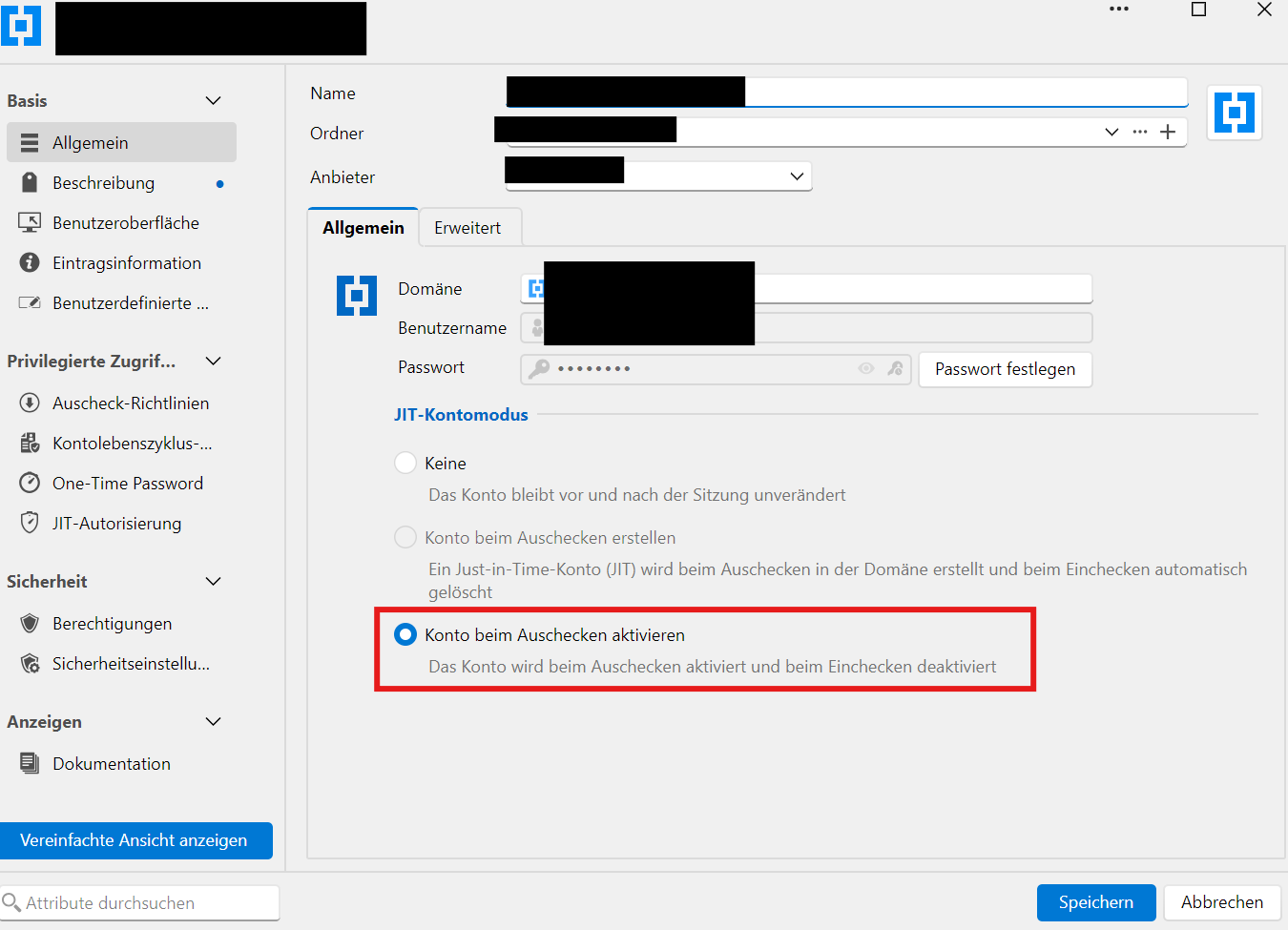
Right now we set the replication latency to 8 seconds.
The small window with the messeage "Waiting for replication" when opening the website session doesn`t appear at all when using the PAM credential. With a simular account on an RDP-session the window for the replication delay shows up as expected. The differece between the two accounts is that the other account is also using JIT-privilege elevation.
I am opening the website session within RDM using the default webbrowser (Microsoft Edge). I don`t know if its relevant, bot the session gets tunneled through a Devolutions Gateway into another network.
If you have additional followup questions while debugging just let me know.
Best regard,
Markus
Hello Markus,
Thank you for the answers and the screenshot.
Your account uses the JIT account mode "Enable account on checkout" (Konto beim Auschecken aktivieren) and requests no Just-in-time elevation groups.
In DVLS 2026.3.14.0, that combination never gets a replication pause, and I reproduced this in our lab. DVLS asks RDM to wait only for an account in "Create the account on checkout" mode, or right after a checkout that grants Just-in-time elevation groups. Enabling the account at checkout is not part of that check, so RDM opens the session straight away and never shows "Waiting for replication" (Warten auf Replikation), whatever the session type.
Your RDP entry fits this, since its account uses Just-in-time elevation. For an account not created at checkout, that pause comes only when the checkout requested elevation groups and the session opens right after it.
Microsoft Edge and the Gateway tunnel play no part in whether RDM pauses, which DVLS decides before the session opens.
I am passing this to our QA team so they can look at whether the pause should also cover accounts that are enabled at checkout, and I will let you know what comes of it.
We have not measured what makes the login fail. Could you check the account out first, wait a little before opening the website, and tell me whether the login still fails?
Best regards,
Michel
Michel Audi
Hello @Michel Audi.
thanks for the reply and your afforts.
if i wait for a few seconds before pressing "Enter" to login, it works like intendet. If you login to quickly, you will get error messages that the account is invalid oder inactive, depending on the application which is used. I am pretty sure that its the missing replication delay, since i had the same behavior with the JIT-accounts when we were testing differnt replication delays.
Best regards,
Markus
Hello Markus,
Thank you for testing this. A login that works after a short wait and fails when you are too quick fits the missing replication pause I described in my last message.
For now, the workaround is the one you found, checking the account out and waiting a few seconds before you log in.
Our QA team has the report with your details and the reproduction from our lab, and I will let you know what comes of it.
Best regards,
Michel
Michel Audi
Hello,
Thank you for being so patient!
I am pleased to inform you that the issue has been resolved in version 2027.1.1.0 of Devolutions Server.
As of now, the latest version 2027.1.1.0 is only available in Beta. We strongly recommend upgrading your Staging environment before installing this version in the production environment.
https://docs.devolutions.net/server/kb/how-to-articles/create-server-staging-instance
Here are the steps for the upgrade:
https://docs.devolutions.net/server/getting-started/installation/upgrade-server
The full 2027.1 release (non-beta version) will be available in December.
We also offer free upgrade sessions, during which we will update your Devolutions Server instance together. If you are interested in this, please send an email to service@devolutions.net
If the problem persists after the update, please let us know so we can inform our development team.
Best regards,
Maxim Robert
Good morning @Maxim Robert ,
thanks for offering me the beta access, support for the upgrade and the fix. Unfortunaly i have to wait for the production release of version 2027.1, since my staging instance currently doesn`t have an ActiveDirectory test enviroment where i can test this paticular fix and i am not allowed to test this in the production ActiveDirectory. I also don`t feel comfortable testing a beta version in an production enviroment, especially with 60+ users and your statement regarding the update procedure.
If it´s ok for you i`ll leave you feedback in December, when i installed the 2027.1 version on my production enviroment.
Thanks for the superb support and communication for you and your team!
Best regards,
Markus