"Proxmox (Beta)"-session - issues with autotyping credentials into embedded VNC-sessions
"Proxmox (Beta)"-session - issues with autotyping credentials into embedded VNC-sessions

Hello Devolutions community,
i am currently testing the "Proxmox (Beta)"-session in RDM (Version 2026.3.15.0) and encountered an bug when auto-typing credentials into the embedded VNC-session. The characters pasted into the VNC-Session do not match the password/username. I assume it has to be some issue with the keyboard layout. I already tried switching to the QWERTY-layout on my notebook and the remote machine without any success.
My Notebook ist running a German Windows installation with the QWERTZ-keyboard layout. RDM is also in German.
Unfortunaly i am running out of ideas what i can test und hope you can help me. If you need further information, let me know.
Thanks in advance for your help.
Best regards,
Markus
All Comments (11)
Hello Markus,
Thank you for your report and for the details about your setup.
To understand what is going wrong, it would help us a lot to see it. Could you please record a short screen video that shows the whole RDM window while you:
1. Open the Proxmox console session.
2. Trigger the auto-typing of the credentials, and tell us which action you use (for example a macro, "Type clipboard" or the credentials entry in the tab menu).
3. Show the characters that arrive in the console. If possible, do this in a field where the text stays visible (a username field, Notepad or a terminal) and use a harmless test text that contains the characters that go wrong, for example: yz-@ß#, instead of your real password.
4. Type the same test text by hand with the keyboard in the same console, so we can compare both results.
You can send me the video via DM.
It would also help if you could send us the following:
- The Proxmox VE version (visible in the Proxmox web interface under Help > About, or with the command pveversion).
- The operating system of the virtual machine and its keyboard layout, including the one used on the login screen.
- The keyboard layout set in Proxmox under Datacenter > Options > Keyboard Layout, and whether the virtual machine has its own keyboard setting (the output of the command qm config <VMID>, line "keyboard", if present). Please do not post any other sensitive values from that output.
- Which characters are wrong, and what appears instead (for example "z" shows up as "y").
- Whether the same text typed by hand in the Proxmox web console in your browser arrives correctly.
- Whether the problem happens in every Proxmox virtual machine you open or only in some.
Thank you very much, we will take a look as soon as we have this information.
Best regards,
Alexis Geller Peiro
Hello @Alexis Geller Peiro,
first of all, sorry for my delayed answer, i had a lot going on the last few days an wansn`t able to respond.
I created the video you asked for and i ll send it to you as a DM.
Here are also the answers to your questions:
Proxmox VE Version 9.2.21
All of the affected VMs are running Windows Server 2025, 2022 und 2019 using the german keyboard layout, which is also the only layout on that machines.
The keyboard layout used in Proxmox is "German DE"
The characters who are affected are "z","y" and "?". I belive that all characters that are different between the QWERTZ and QWERTY keyboard layout are affected
When i type directly into the console everthing is fine. I issue only persists when using the autotype feature.
Like I already mentioned i have the same issue on different VMs with Windows Server as OS and german keyboard layout.
Thank you for looking into this issue.
Best regards,
Markus
Hello Markus,
Thank you for the detailed answers and for the video, and no problem about the delay.
Your answers were very useful. With the Proxmox keyboard already set to German and typing by hand working correctly, the problem is in how the autotype feature sends the text, not in your keyboard settings. In the video, 8 of the 30 characters were different: z and Z came out as y and Y, a digit typed right after an uppercase letter came out as its shifted symbol (for example 5 became %), and the @ came out as 2. This fits what you describe with z, y and ?, characters whose position differs between QWERTZ and QWERTY.
In our lab we reproduced similar wrong characters against a QEMU console, but with the German keyboard set on the QEMU side the letters z and y were correct there, and only symbols such as ! and @ lost their Shift or AltGr. So your case behaves differently from what we saw, and I have reported it to our development team with your video and our lab results.
To narrow it down, could you please check two things?
1. Which embedded engine your RDM uses for VNC. In File > Options, on the Apple Remote Desktop / VNC page, look at Embedded application (in German: Eingebettete Anwendung). If it says FreeVNC, please switch it to IronVNC, open the Proxmox console again, run the autotype once more and tell me whether the result changes. If it already says IronVNC, please try FreeVNC instead.
2. For one of the affected VMs, the keyboard line from qm config <vmid> (no line at all is also a valid answer), and whether the VM was fully stopped and started after the layout was set to German.
Typing by hand in the console remains the safe option for now, as you already noticed.
Best regards,
Alexis Geller Peiro
Hello @Alexis Geller Peiro,
i switched the VNC engine within my RDM options vom FreeVNC to IronVNC and retried the autotyping. The issue still persits and the wrong characters (e.g. "z/y") apear to be the same.
I also asked my colleague from the infrastucture team for the consoleoutput you asked for. Here is the output from one of the affected vms, but i had to redecate some information for security reasons.
root@<proxmox-host>:~# qm config <VM-ID>
bios: ovmf
boot: order=sata0;sata1;sata2
cores: 2
cpu: x86-64-v2-AES
description: <vm description>
efidisk0: <Storage>:<VM-ID>/vm-<VM-ID>-disk-0.qcow2,efitype=4m,size=528K
machine: pc-i440fx-11.0+pve2
memory: 6144
meta: creation-qemu=11.0.3,ctime=1793172819
name: <vm name>
net0: virtio=<mac address>,bridge=<vlanX>
ostype: win11
sata0: none,media=cdrom
sata1: <Storage>:<VM-ID>/vm-<VM-ID>-disk-1.qcow2,size=60G
sata2: <Storage>:<VM-ID>/vm-<VM-ID>-disk-2.qcow2,size=100G
scsihw: virtio-scsi-single
smbios1: uuid=<uuid>
sockets: 2
tags: <tag1;tag2;..>
tpmstate0: <Storage>:<VM-ID>/vm-<VM-ID>-disk-3.qcow2,size=4M,version=v2.0
vmgenid: <some id>
The keyboard layout was set before the affected vm were even on proxmox, because we just startet migrating from our old virtualization enviroment. So they were turned of, sort of.
Best regards,
Markus
Hello Markus,
Thank you for testing with IronVNC and for the qm config output, that was very helpful.
Your result tells us the engine does not matter: FreeVNC and IronVNC both send the text the same way, and we saw exactly that in our lab as well. I have added your result to the report we already have open with our development team.
There is one more thing we would like to check, and it only takes a minute for your infrastructure colleague. The VM config has no keyboard line, so the VM uses the Datacenter setting. We would like to see what the QEMU process of that VM actually receives for the keyboard layout. On the Proxmox node, for the same affected VM, please run:
qm showcmd <vmid> --pretty | grep -E -- '^ *-(k|vnc)( |$)'
This only prints the lines that start with -k and -vnc, so no other values of the VM are shown. It is also a valid answer if nothing is printed at all. Please send me the output exactly as it appears (you can replace the VM ID if you prefer).
Typing by hand in the console remains the safe option for now.
Best regards,
Alexis Geller Peiro
Hello @Alexis Geller Peiro,
thanks for the informations.
I asked my infrastructure colleague for the output of your command and here is the result:
root@<proxmoxhost>:~# qm showcmd <vmid> --pretty | grep -E -- '^ *-(k|vnc)( |$)'
  -vnc 'unix:/var/run/qemu-server/<vmid>.vnc,password=on' \
Best regards,
Markus
Hello Markus,
Thank you, this output answers the question.
The command shows only the -vnc line and no -k line. That means the QEMU process of this VM runs without any keyboard layout, so its VNC server falls back to its default US layout. This matches the z/y swap: RDM sends each character of the password as a plain key, and QEMU turns it into a key press using its own layout, which here is US while the guest is German.
The reason is that Proxmox only passes the keyboard layout to QEMU when it is set on the VM itself (VM > Options > Keyboard Layout, the "keyboard:" line in the VM config). The cluster-wide setting from the datacenter options is not passed on to QEMU, and your VM config does not have a keyboard line.
Could you please test this on one affected VM:
1. In Proxmox, open the VM > Options > Keyboard Layout and set it to German (de).
2. Fully stop the VM and start it again (a reboot from inside the guest is not enough, the QEMU process has to be restarted).
3. Run the same command again. It should now show "-k de".
4. Open the console from RDM and try Auto-typing > Type password again.
I expect the z/y swap and the wrong upper/lower case to disappear. Please be aware that special characters such as ! or @ may still come out wrong, because RDM does not send the Shift or AltGr key with the typed text. This is the part that is already reported to our development team, and I will tell you as soon as I have news.
Please also check that the Proxmox web console of that VM still behaves as before after the change, since Proxmox notes that this setting is often not needed there. If it does not, you can simply remove the setting again.
Please let me know the result.
Best regards,
Alexis Geller Peiro
Hello @Alexis Geller Peiro,
today i was able to test the recommended settings and we have an improvement. We no longer have switched letters (Z/Y) within the VNC-Session but the issue is still not fully resolved. I still have the upper/lower issues.
Here are a few test strings with the results from the vm with the configuration changes from your post.
Abc4ef!ky -> aBC$EF!KY
aBc4ef!ky -> AbC$EF!KY
abc4ef!kY -> ABC4EF!Ky
ABc4ef!ky -> abC$EF!Ky
Since the upper/lower characters are switch i just wanted to mention the capslock was disabled when beginning to type.
I also testet the web console and the issue was still there as well.
Abc4ef!ky -> abc4ef1ky
aBc4ef!ky -> abc4ef1ky
abc4ef!kY -> abc4ef1kY
ABc4ef!ky -> abc4ef1ky
Since i had time today i also looked into the my rdm settings, found and enabled the following checkbox:
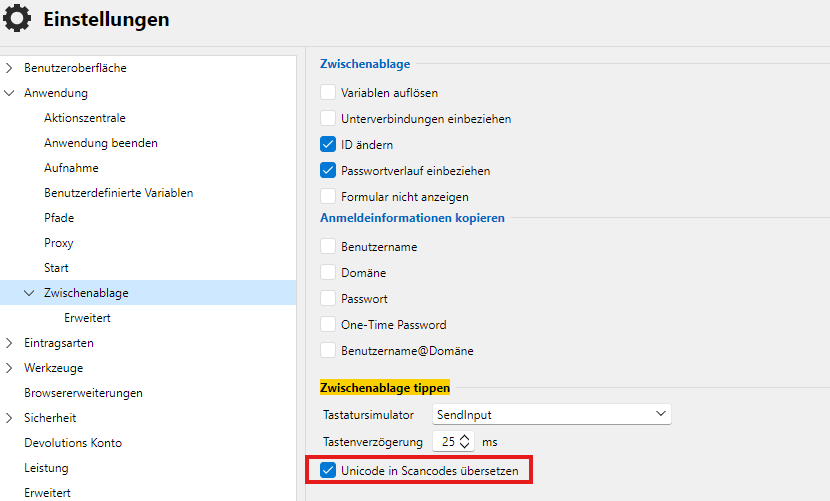
I did my test strings again over the web console now it is working.
Abc4ef!ky -> Abc4ef!ky
aBc4ef!ky -> aBc4ef!ky
abc4ef!kY -> abc4ef!kY
ABc4ef!ky -> ABc4ef!ky
The issue within the VNC-session still persists, unfortunaly.
Best regards,
Markus
Hello Markus,
Thank you for the detailed tests, they are very helpful.
Good news first: since the z/y swap is gone, the keyboard layout set on the VM was the missing part on the Proxmox side. Please keep this setting on the affected VMs.
The remaining problem in the embedded console (upper and lower case inverted, and a digit after an uppercase letter typed as its shifted symbol, for example 4 as $) is on the RDM side. Our development team has reproduced it and a correction is currently being tested. I will let you know as soon as a version with the fix is available.
About the "Translate Unicode to scan codes" option you found: it only applies when RDM types into a regular window, such as the Proxmox web console. The embedded console sends the keys through the VNC connection itself, so this option has no effect there, which matches what you saw. Until the fix is available, the web console with this option enabled is a good way to use Auto-typing.
One question: which "Embedded application" (FreeVNC or IronVNC) was selected for these tests? On 29 October you switched to IronVNC, and the correction is being made for FreeVNC, the default engine, so this helps us make sure it covers your setup.
Best regards,
Alexis Geller Peiro
Hallo @Alexis Geller Peiro,
all my test were done while using "FreeVNC", because in the meantime i had issues with the auto-type within the integrated VMware console.
Best regards,
Markus
Hello Markus,
Thank you for confirming. The correction is made for FreeVNC, so it covers your setup. I will let you know as soon as a version with the fix is available.
Best regards,
Alexis Geller Peiro