
tfabo
SSH tunnel closes when any session in the VPN group is disconnected
Hi Tommy,
I just tested it, and it appears to be related to the VPN group counter (if that's really the culprit here), not to inheritance. I opened two SSH sessions, then closed one, and the tunnel was closed immediately, causing the other SSH session to disconnect as well.
unfortunately, I can't see any logs available under Help -> Application Logs. Perhaps I need to increase the debug level?
I'm running macOS 26.7.1
I'm sorry, but I don't remember the last RDM version in which this worked as expected. I think the first time I discovered this was around June or July this year. I should have written this down, because I now realize that it would make troubleshooting this issue much easier.
RDM 2026.3.1.2 - search everywhere
Hi, I support davisoncaleb's statement. If reverting to the original Enter-only behavior is not possible, then having the possibility to choose would be highly appreciated.
RDM 2026.3.1.2 - search everywhere
Btw - essentially the same thing was already discussed in this thread - https://forum.devolutions.net/topics/45052/keyboard-shortcut-to-quick-find-and-connect-directly#242009. A new option "Launch on Enter" was added as a result of that discussion, but I can't see it there any longer.
SSH tunnel closes when any session in the VPN group is disconnected
Hello,
first of all, I would like to mention that this is not a newly discovered issue. It's been present for quite some time, but I decided not to report it immediately because I thought it would be fixed in a newer version. Currently, I'm running RDM in version 2026.3.1.2.
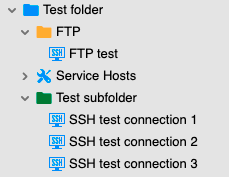
I have a folder containing several SSH connections. The folder structure is as follows (for reference)":
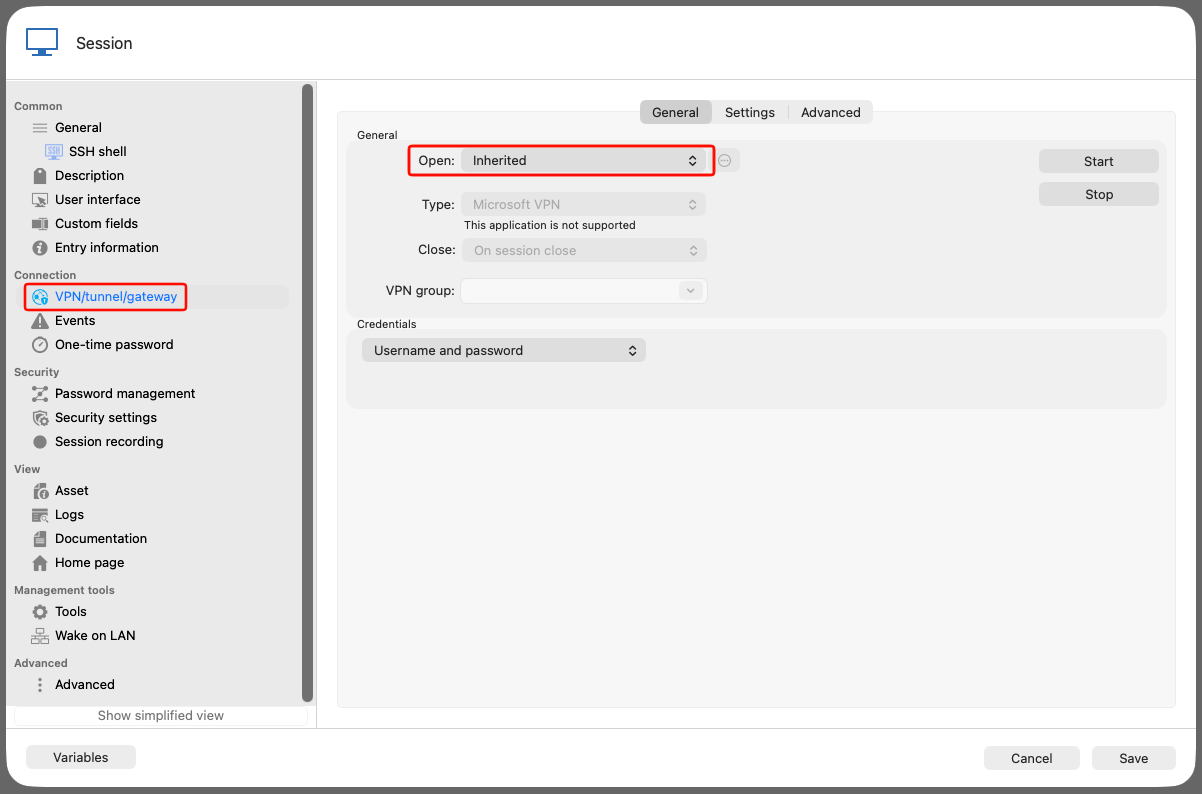
To connect to any of these connections, an SSH tunnel must first be established. To simplify the configuration, all connections and subfolders are set to "Inherited" in the "VPN/tunnel/Gateway" settings:
The parent folder (Test folder) is then configured as follows:
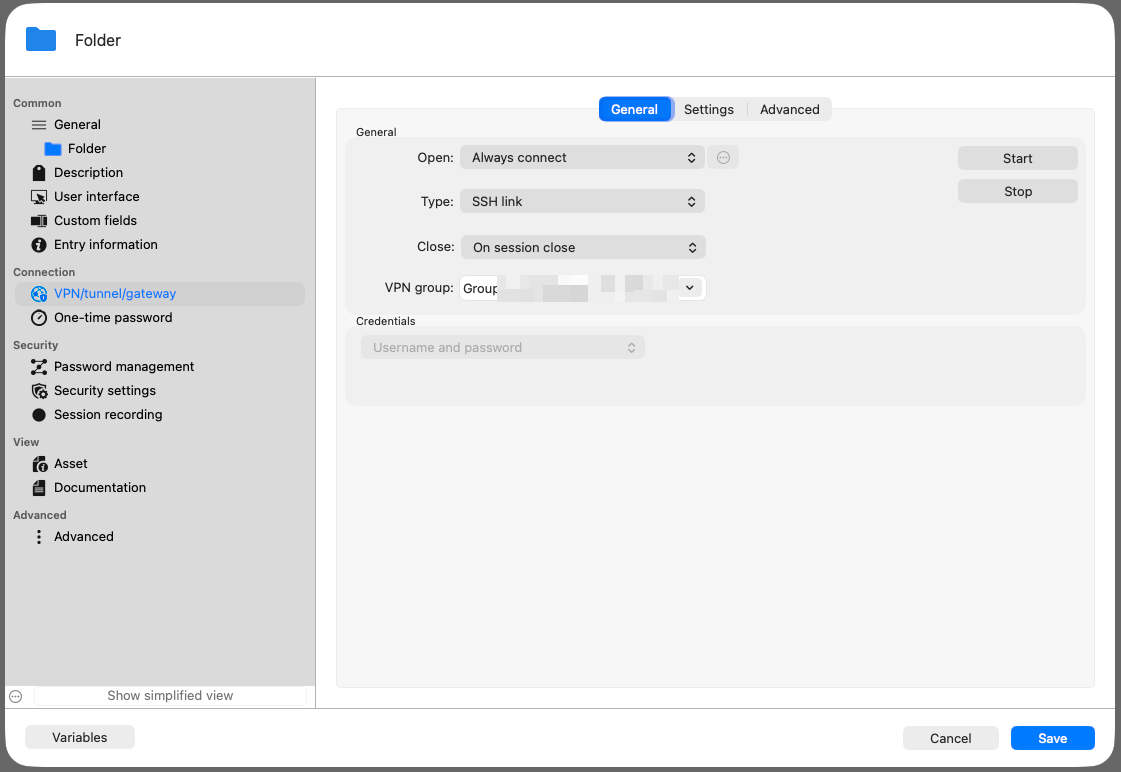
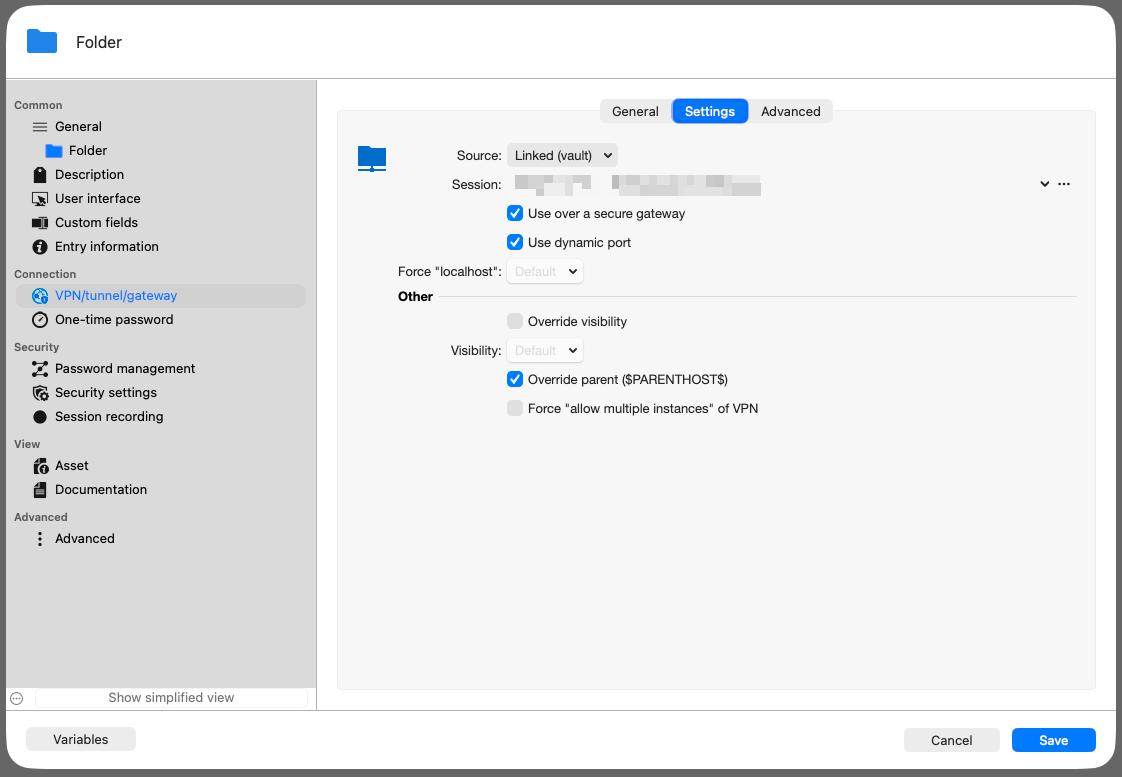
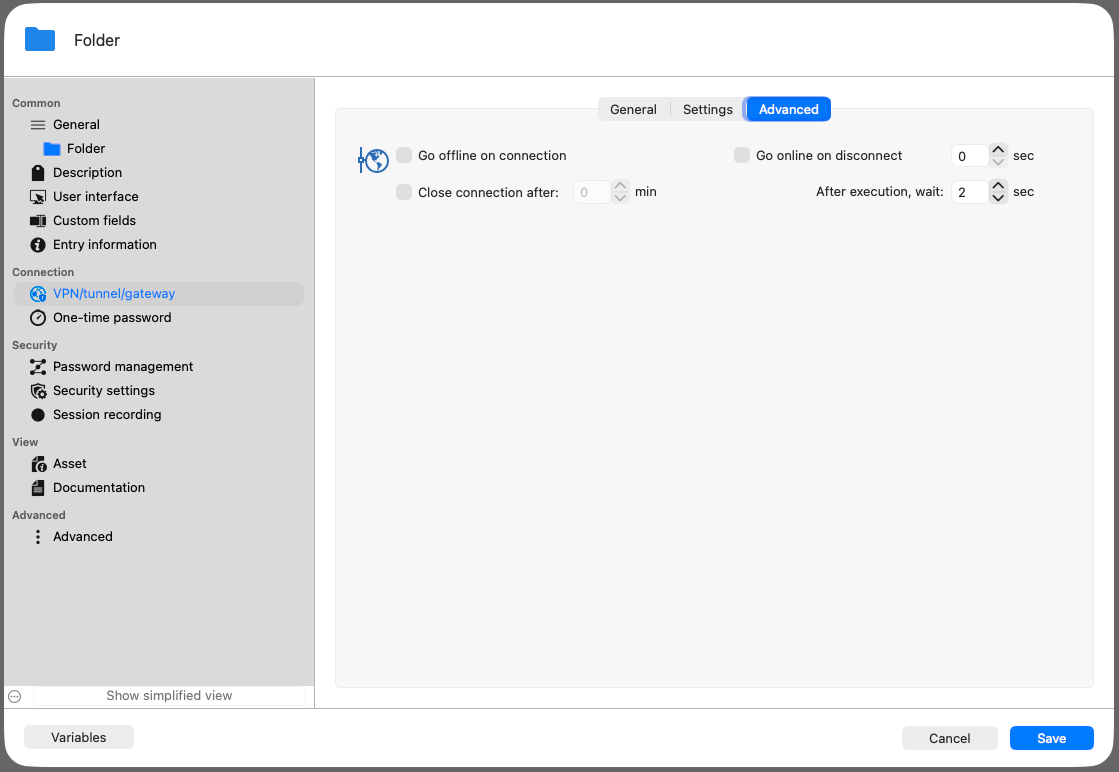
Previously, this worked as expected. If I had three SSH connections open that belonged to the same VPN group, the required SSH tunnel remained active and was closed only after the last SSH connection from the group was disconnected.
What happens now is that if I have 3 SSH connections open and close just one of them, it closes the SSH tunnel connection right away, which obviously kills the other 2 SSH connections, because they depend on that tunnel.
I'm not sure if this is intended or if I'm missing something in the configuration. If this is expected, could you please advise how to configure it so that the SSH tunnel remains active until the last SSH session within the defined VPN group is closed?
Otherwise, could you please look into this and if you also find this behavior wrong, fix it?
Thank you.
Best regards,
Tomas
RDM 2026.3.1.2 - search everywhere
Hi, I'd also like to share my findings regarding the Search everywhere function. It seems that this RDM version has broken the ability to open the searched/found connection(s) by pressing Enter. When I open Search everywhere, start typing and then try to open the found connection by pressing Enter, nothing happens.
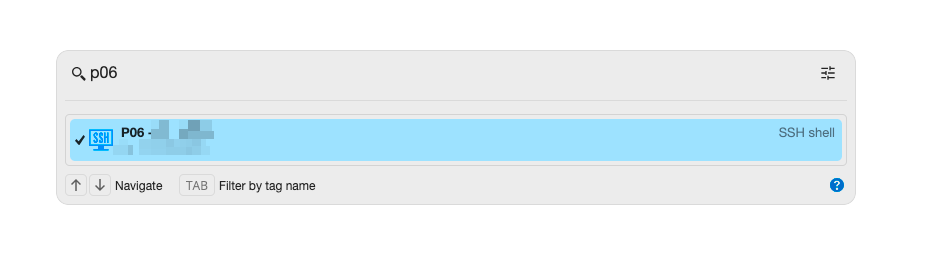
This functionality worked correctly before the update.
I also checked the settings to see if there was an option to allow/disable this behavior, but I didn't find anything like that:
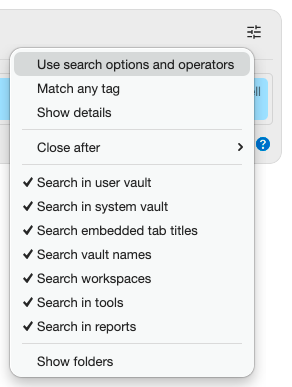
Could you please also look into this?
Thank you.
Best regards,
Tomas
Keyboard shortcut to quick find and connect directly
Hi Jesse,
I was just wondering if there has been any update regarding the two points you've created an improvement ticket for?
Thanks.
Best regards,
Tomas
Keyboard shortcut to quick find and connect directly
Hi Jesse,
ah, you're right, the "Launch on Enter" option is there, I just didn't know that it's been moved to the menu in the search bar. Now it works fine, thanks.
And thanks for the improvement tickets, appreciate it.
Best regards,
Tomas
Keyboard shortcut to quick find and connect directly
Actually, one more thing to mention / ask about. When the search criteria match the name of a folder, that folder is displayed in the list of found entries. Would it be possible to provide users with the ability to select which types of entries should be displayed when searching connection entries using the Find quickly feature? Or to at least to add an option to disable displaying folders?
Best regards,
Tomas
Keyboard shortcut to quick find and connect directly
Hello,
I'm replying to this thread to bring this topic back up due to changes made to the "Find quickly" option in recent versions of RDM for Mac. Yesterday I found out that, for some reason, the automatic check for updates did not work for me for quite some time. Consequently, I manually downloaded and upgraded to the most recent version - 2026.1.11.4. Unfortunately, I'm no longer able to quickly connect to a connection entry using Find quickly, as the behavior appears to have changed. When I press the shortcut to open Find quickly and type in the desired connection name, it finds it, but pressing the Enter button thereafter does nothing. It used to work in a way that after pressing Enter, a connection to the found entry was established. Would it be possible to revert this functionality back please?
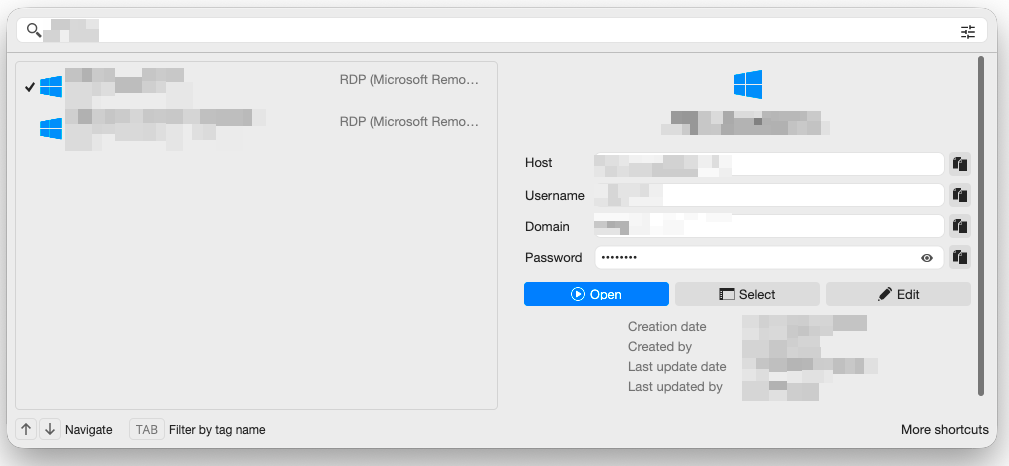
Additionally, I observed two more changes.
1) The selected connection in the Find quickly pop-up window is highlighted only with the small tick symbol right next to it, which at least to me seems a bit confusing, and it's not immediately clear which connection from the list is selected. Would it make sense to highlight the entire selected row with a different background color for example?
2) The Find quickly pop-up window is now centered within the screen, ignoring the actual position of the RDM window:
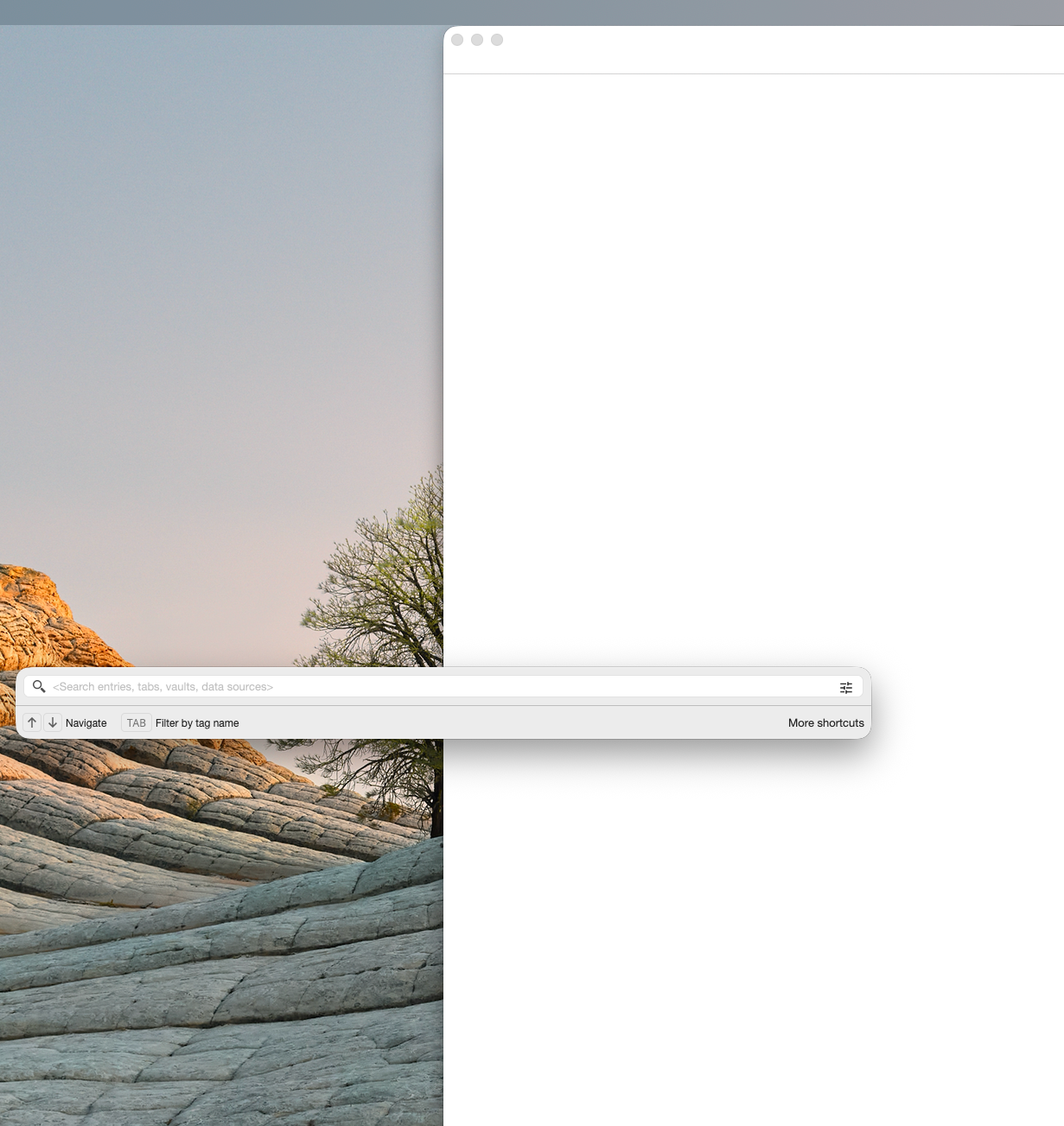
As far as I remember, this also used to work in a way that the pop-up window was centered within the RDM window rather than the entire screen. Could this be fixed please?
Thank you.
Best regards,
Tomas
screenshot functionality inside RDM for MacOS
Hello,
I just wanted to express my gratitude for making this feature available for free users as well. I believe it's been a great move that makes your product even better.
So, thanks again.
Best regards,
Tomas
Keyboard shortcut to quick find and connect directly
Hello,
although I have already replied to Xavier Fortin by direct message (the reply function did not work for me for a few days), I'm replying here as well in case someone else finds this and is interested in more details.
Double pressing the Enter key works, but only in cases where I'm connected to an SSH session (or not connected to any session at all). What I struggle with is when I'm connected to an RDP session, I press my key combination for Quick find (^ + Space), look up a connection and confirm it with Enter, it only highlights the entry in the tree, but a second press of Enter forwards the key press to the RDP session instead of connecting to the one that was highlighted. That's essentially why I started looking for a way to connect to the found session right away, instead of just highlighting it in the navigation pane (which is something I was used to in Windows anyway). A possible workaround for this behavior could be to put the Enter key among the key combinations to be ignored by embedded sessions, but then I guess I would not be able to use Enter in RDP sessions at all.
In the meantime, I have discovered something. When I hide the navigation pane and repeat the same steps, pressing Enter actually opens the found connection right away! Regardless of whether I've got any RDP connections open or there is no open/active connection whatsoever. So there is obviously some difference between when the navigation pane is shown and when it's hidden - which kind of makes sense, because when it's hidden, there is no place to highlight the found connection after pressing Enter right?
Anyway, thank you very much for adding this option to a future release, it's highly appreciated. So is your hard work and excellent support.
Best regards,
Tomas
Keyboard shortcut to quick find and connect directly
Hello Jacob,
I just reset all shortcuts to default and checked all entries to make sure that there is nothing else with the Enter key. Unfortunately, the behavior is still the same - I'm able to find an entry, but after pressing Enter it only highlights it in the navigation pane, without opening it directly, which is what I'm aiming for.
Any idea what else could be wrong here? Does it work on your end?
I do have "Open session" set to Enter:
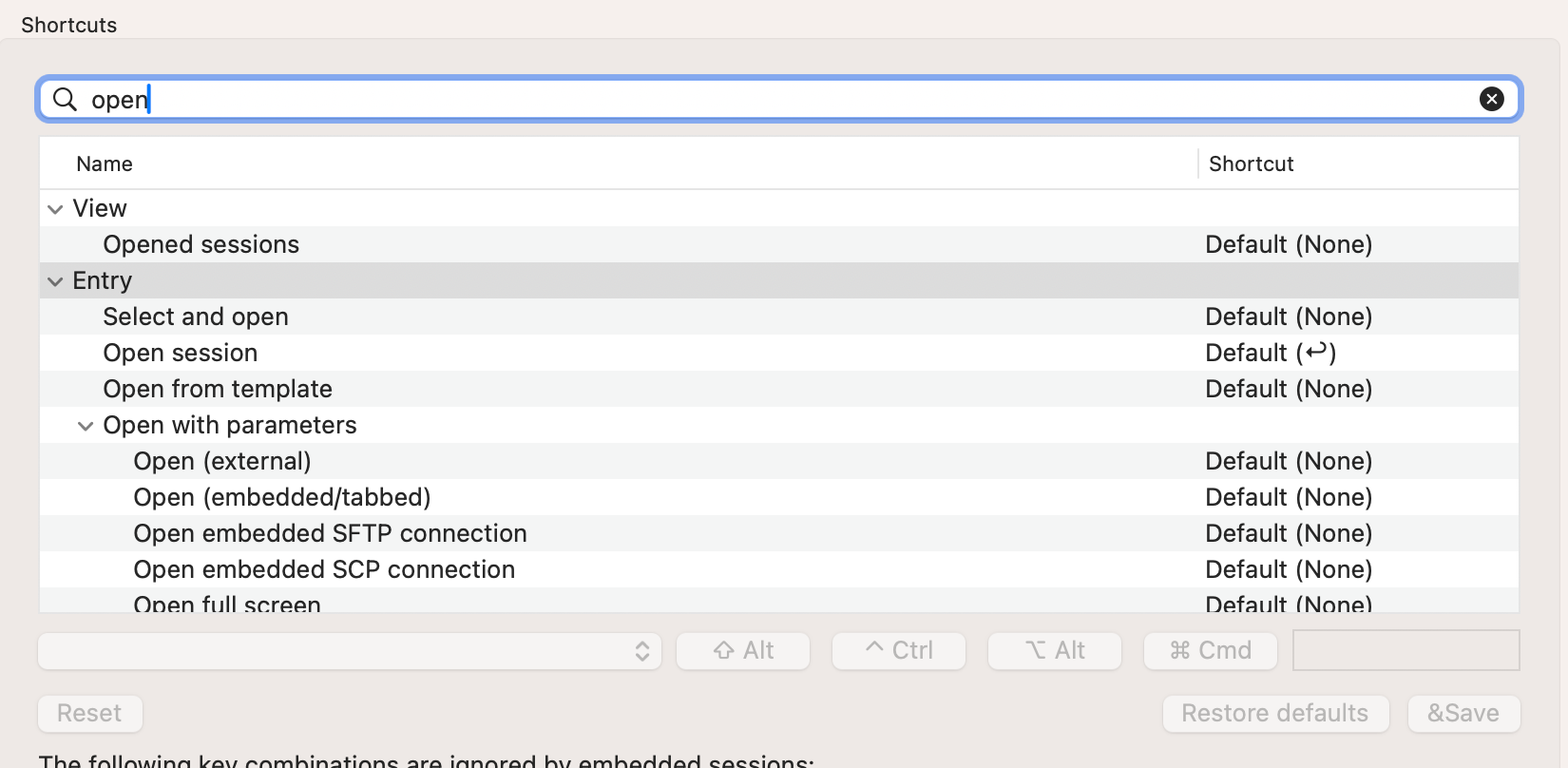
Best regards,
Tomas
Keyboard shortcut to quick find and connect directly
Hello, I recently switched from a Windows PC to a Macbook and since then I have struggled to find a way to quickly find a connection and connect directly to it, without having to search the navigation pane and press Enter / double-click to connect. In Windows, I had a keyboard shortcut for the "Quick search" function, so all I had to do was press the preset key combination, type in the name of the connection, press Enter, and then it connected. Unfortunately, I can't get it to work the same way on my Macbook. I'm running RDM in version 2025.2.6.8. I was able to set my own key combinator for the "Find quickly" function and I am actually able to find a connection with it, but what it does after I press Enter is it just looks up the connection in the navigation pane, selects it and that's it. Could you please help me set it up so that I only press Enter and it connects directly to the found connection?
Thank you very much in advance.
Best regards,
Tomas
Batch edit does not work for session type entries (SSH key) on Mac OS X Sequoia 15.5 and RDM 2025.2.6.8
Hello Jacob,
please accept my apologies, I totally overlooked the override checkbox. When I checked that checkbox, it worked just fine. Thanks for your prompt reply and help.
Best regards,
Tomas
Batch edit does not work for session type entries (SSH key) on Mac OS X Sequoia 15.5 and RDM 2025.2.6.8
Hi, when I try to change an SSH key location (or any other value on the SSH key screen) for multiple SSH connections using Batch edit -> Edit entries (session type settings) -> SSH key:
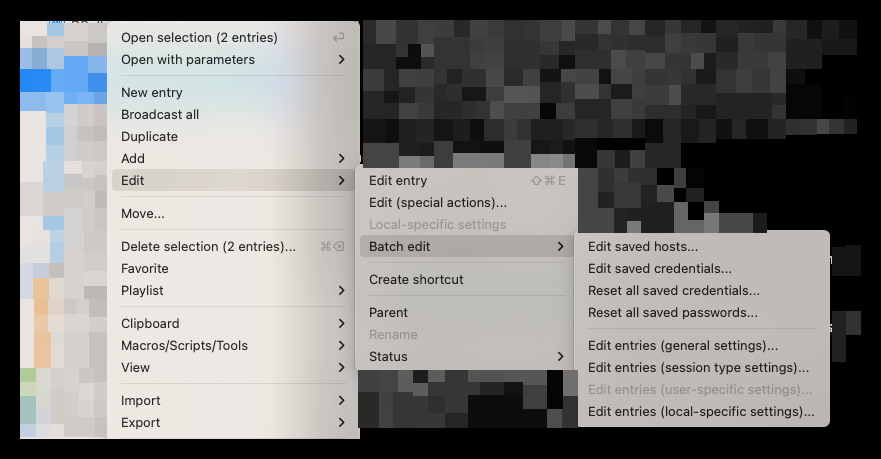
nothing happens. Am I doing something wrong or is it a bug?
Thanks.
Best regards,
Tomas