Batch edit does not work for session type entries (SSH key) on Mac OS X Sequoia 15.5 and RDM 2025.2.6.8
Batch edit does not work for session type entries (SSH key) on Mac OS X Sequoia 15.5 and RDM 2025.2.6.8

Hi, when I try to change an SSH key location (or any other value on the SSH key screen) for multiple SSH connections using Batch edit -> Edit entries (session type settings) -> SSH key: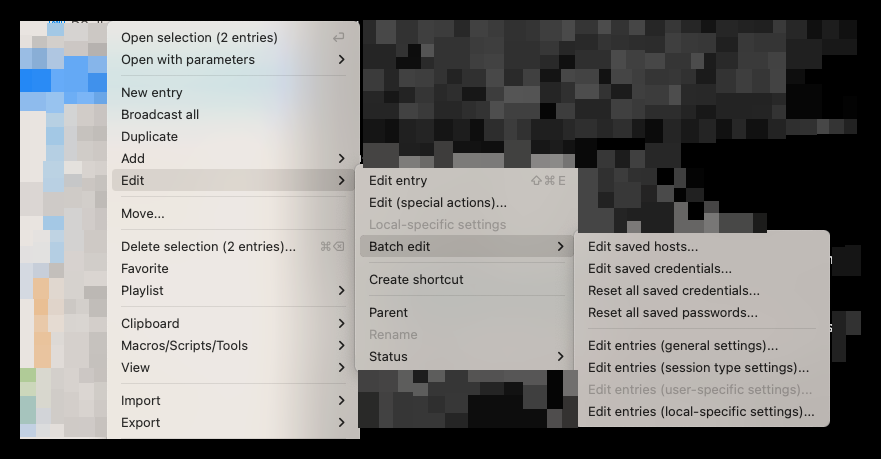 nothing happens. Am I doing something wrong or is it a bug?
Thanks.
Best regards,
Tomas
792972c6-997f-4357-9d8a-160a8fa44bf6.png
All Comments (3)
Hello,
Thank you for reaching out to Devolutions support.
I tested the batch edit functionality on my end, and it appears to be working as expected. In the other tab, the override checkbox must be selected in order to make modifications, but this requirement does not apply to the current tab. If the override checkbox is not checked, any changes will not be saved.
You can try enabling the checkbox and let me know if this resolves the issue on your side.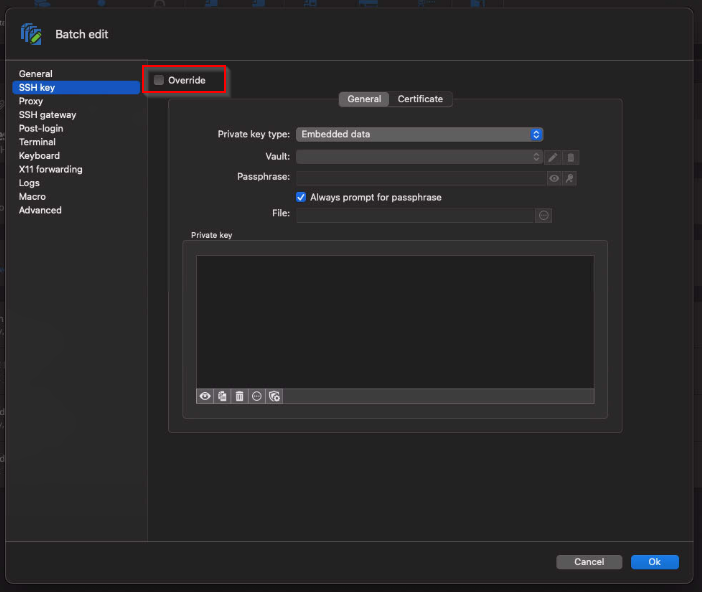
That said, I will report this as a potential bug, as it seems inconsistent that modifications can be made without the override checkbox being selected.
Please let me know how it goes.
Best regards,
Jacob Lafrenière
135cd700-4ba3-4929-9215-904fe9ad07e7.png
Hello Jacob,
please accept my apologies, I totally overlooked the override checkbox. When I checked that checkbox, it worked just fine. Thanks for your prompt reply and help.
Best regards,
Tomas
Hello,
Thank you for the follow-up.
No worries, as mentioned, you shouldn't have been able to make any changes without checking the override checkbox in a regular batch edit menu. Unfortunately, this is due to incorrect behavior in that menu, which led to the confusion and the resulting mistake.
I have reported the issue to the development team, and an internal case has been opened to address it.
Thank you again for bringing this to our attention.
Best regards,
Jacob Lafrenière