
ylecouedic
Favorite menu option missing for sub entries
Hi jm2,
Your fix should be out now in the latest version,
Could you check if your issue still occurs and let us know?
Best regards,
Unable to retrieve 1Password credentials
Hi IvanMarshall,
I just want to make a follow up with you,
Did you have time to update your RDM and see if the issue still persists?
It might be a caching issue, I'll keep it in mind. but let's try upgrading first.
Please let us know,
Best regards,
Favorites - Expand/Collapse All Not Working
Hi,
Thanks for posting in the forum,
Could you tell me which data source you are using?
I am currently attempting to reproduce the issue you are experiencing.
Please let me know,
Best regards,
Download new version about search for updates are wrong linked
Hello,
To better assist you, we require the following information:
1- What version of RDM are you presently running?
2- What type of data source are you currently using? If it’s Devolutions Server (DVLS), please indicate to us the version that you are using.
3- Could you confirm the path of your RDM?
Best regards,
Subdirectory collapase automatically to root directory after making a change
Hello,
I was unable to replicate the problem you described.
To better assist you, could you kindly provide us with the following information:
A screenshot of your RDM dashboard.
Did you update RDM recently? If yes, do you recall which version you were on?
Your current RDM version.
The data source you are utilizing.
Any additional information you believe might be relevant.
Once we have this information, we will be better equipped to diagnose and resolve the issue.
Best regards,
Avoid Alt+TAB in remote session
Thank you, Tobi, for stepping in! We really appreciate it!
Avoid Alt+TAB in remote session
Hi,
Could you please try installing the latest update, version 2024.1.12.0, and check if it resolves the issue?
Let me know,
Best regards,
Documentation issues
Hi,
Thanks for getting in touch with us,
Could you please send us a screenshot of the issue? Make sure to hide any confidential information.
Let us know,
Best regards,
Two-tier credentials
Hi,
Certain websites may have security measures in place to prevent automatic form filling. In such cases, your best option would be to create a macro/script/tool that can automatically select your VPN and enter your login credentials when you access the website. I can provide you with some documentation on how to do this, However, you will need to manually configure it by using your keyboard to select the specific VPN you want.
Here's the documentation about Website Authentication:
https://docs.devolutions.net/kb/workspace-browser-extension/how-to-articles/website-authentication/
And here's the documentation about how to configure your macro:
https://docs.devolutions.net/kb/remote-desktop-manager/how-to-articles/entry-types-events-settings/
Let us know if you have further questions,
Best regards,
Two-tier credentials
Hi,
Sorry for the delay.
Could you please send us the link to the website, if it's not private? This will help us assist you better.
Let us know,
Best regards,
rdm free backup and attachments
Hello,
Thank you for your response.
I tested your issue on my end and was able to create the
backup.
Could you please try starting RDM as an administrator?
Also, could you attempt to export your data source to the
same path where you are trying to have your backup be created and check if the
export is working as expected?
Here’s a link that can help you through this process:
https://docs.devolutions.net/rdm/windows/commands/file/export/
Please keep us updated.
Best regards,
Question - If a session times out and locks, is there a quick way to sign back in?
Hi rossmuron,
I have some questions about the issue:
1- What version of RDM are you running?
2- What type of data source are you using?
3- What type of session are you launching?
4- Are you launching the session in embedded or external mode?
5- Do you receive an error message?
6- If possible, send some screenshots that will help us to have a better understanding of the issue.
Best regards,
Cloud Backup - Have to login every time I start RDM
Hi Marc,
It seems like your main header is in menu mode you can change it in File>Options>User Interface>Main Header.
By changing it to Ribbon mode. These options should appear.
Let me know if it works.
Best regards,
Cloud Backup - Have to login every time I start RDM
Hi Marc,
thanks for reaching us,
Can you check if those settings are the same go to File>Devolutions Account.
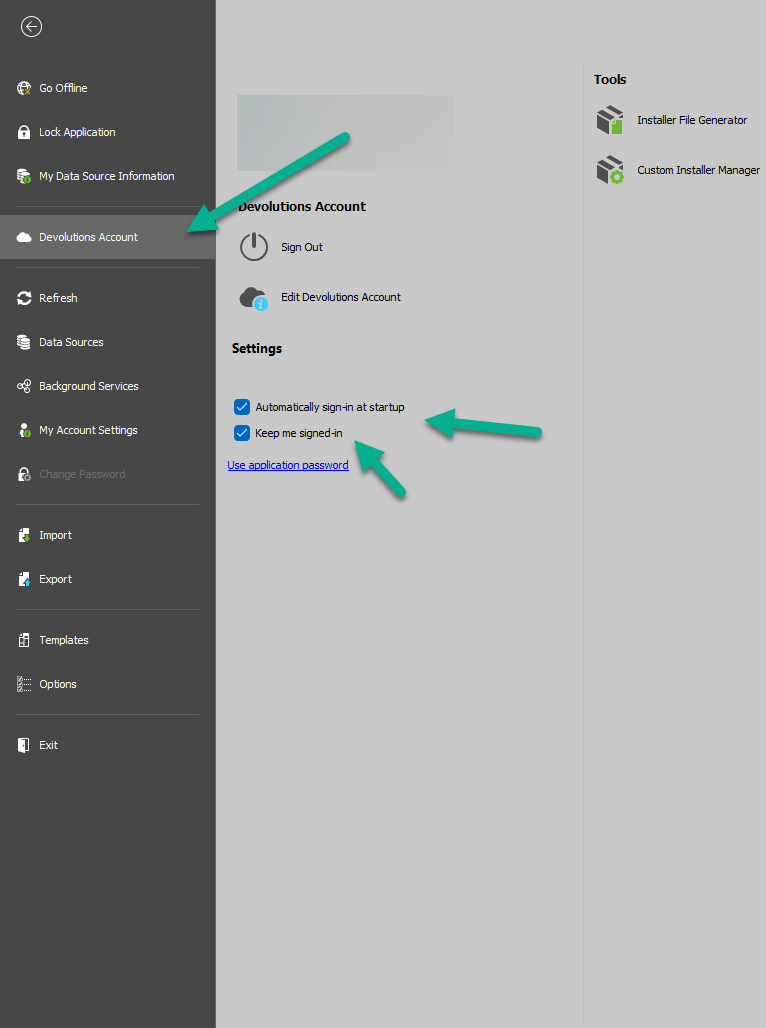
Let us know if it works.
Best regards,