rdm free backup and attachments
hi
in rdm free, i've configured backup to a file. but how do i do the actual backup?
i can't find a button or a schedule of some sort
also, i can't find the attachments tab for each entry. how can i enable it?
All Comments (11)
Hello,
What data source type do you use?
Regards
David Hervieux
free, xml
Hello,
The backup are saved automatically after each changes but it would be more efficient to switch to Devolutions Hub Personal. You will get access to the deleted history and entry history. This is free and available everywhere.
Regards
David Hervieux
i didn't see any file crated in the backup destination
Hello,
What version of RDM are you using?
Could you post a screenshot of your backup configuration tab so that we can try to reproduce your issue please?
Best regards,
Jeff Dagenais
version is latest, installed just a few days ago.
and backup is very straight forward
what's the behavior of this? is there a schedule? is it on startup? on close? another?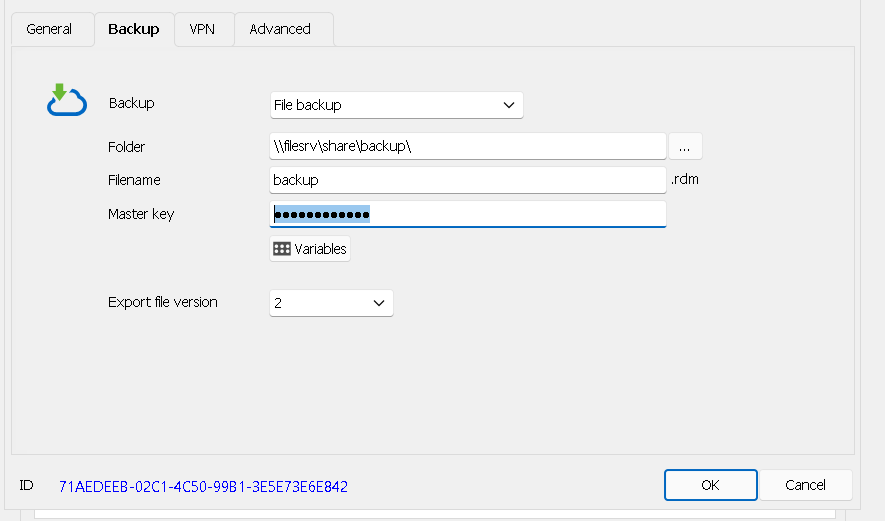
b6d24c2f-c19d-4a38-b6dd-7072c0d3d1e0.png
Hello,
Thank you for your reply,
The backup should be saved automatically after you've performed a change, for example, creating a new entry or Editing an existing entry.
Can you confirm that the backup is still not created after performing a change?
Let me know,
Best regards,
Samuel Dery
it seems not, i don't see an rdm file on the destination

Disabled
Hello,
Thank you for your response.
I tested your issue on my end and was able to create the
backup.
Could you please try starting RDM as an administrator?
Also, could you attempt to export your data source to the
same path where you are trying to have your backup be created and check if the
export is working as expected?
Here’s a link that can help you through this process:
https://docs.devolutions.net/rdm/windows/commands/file/export/
Please keep us updated.
Best regards,
i will check
also, about the attachments. is it possible to have attachments in xml free mode?
because i don't see this tab
Hello,
You could use a SQLite data source to support attachment even in the free version. It would be a better idea to schedule a copy task of the connection.db file instead of using our own backup system for SQLite. This is something we want to rework soon but it was designed a long time ago when the attachment were not supported.
Regards
David Hervieux