Two-tier credentials
Hi guys,
I desperately tried to look this up in the knowledge base before writing in the forum, but my problem is, that I do not even know what this is called what I am looking for.
So, I would like to simply add a website session to the navigation, but this site has first a drop-down, to select where would I like to authenticate myself: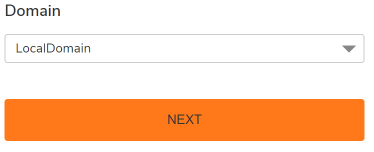
So I am already managing with stored credentials for websites, that directly lands with the e.g. username and password field. This information is stored in the session settings, however, for this "two-tiered" authentication it doesn't pull the information from the session.
When I select the desired domain, and click on next, the username and password fields aren't filled out automatically, despite the field ID being correct in the session settings.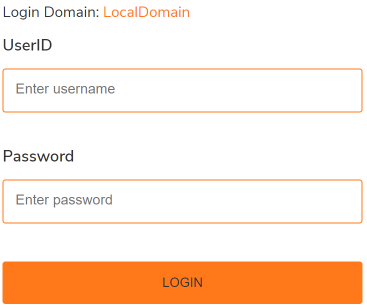
Is there a way to configure a session with stored credentials, in a way:
IF
xxx domain is selected (on the first page)
THEN
use <these credentials> (on the next page)
Any advice would be much appreciated.
Thank you guys!
Cheers,
Csaba
4874589b-da56-4105-aef4-8c73fcc2e68b.png
df158c7b-24e1-4194-b9b8-95783d118845.png
All Comments (5)
Hello Csaba,
Thank you for reaching out to us regarding this,
- Could you please specify the version of RDM you are currently using?
- What type of data source are you using?
That being said, in your case, would the credentials used depend on the selected domain on the first page?
Let me know
Best regards,
Samuel Dery
Dear Samuel,
Thank you for your response.
- The version of RDM is 2023.1.23.0 64-bit.
- Data source for the authentication is a text saved in the properties:
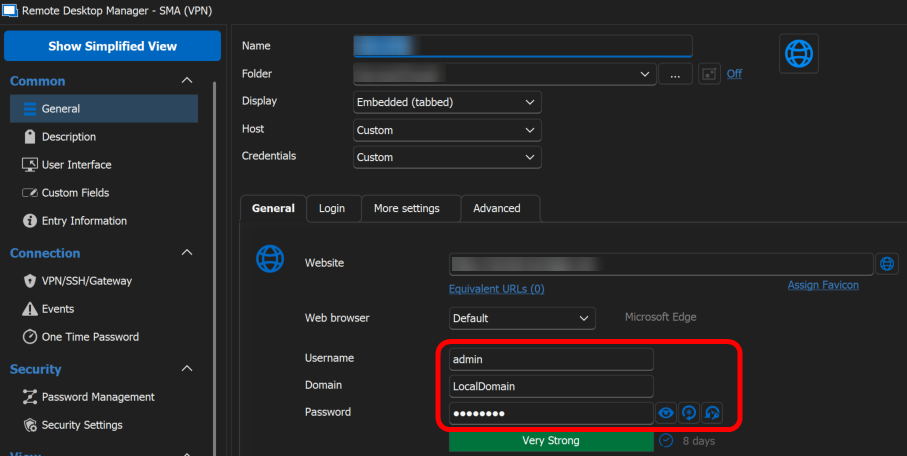
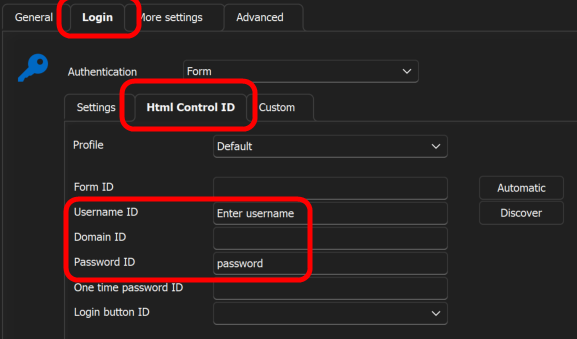
The answer to your last question would be yes, the credentials depend on the selection of the domain.
Thank you
Best Regards,
Csaba Budai
59d67b32-9df3-4254-9f5b-853251696352.png
1a4b1f07-2bcb-4c4b-bc32-62fd46a28d81.png

Disabled
Hi,
Sorry for the delay.
Could you please send us the link to the website, if it's not private? This will help us assist you better.
Let us know,
Best regards,
Dear Yan,
It is a VPN portal that I would like to add, so I guess it is rather a local access.
It is from SonicWall, the secure mobile access system.
The link is generated in this way : https://remote.<company_name>.com/cgi-bin/login
Once I load it, it asks me to select something from the dropdown list.
To modify user accesses, I need to select the LocalDomain from this list: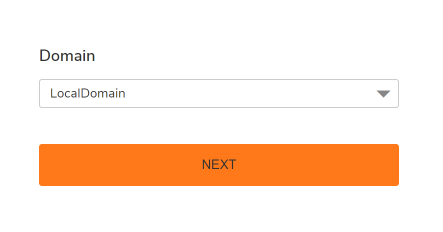
Once I click next, then does it ask me to enter the actual credentials to access the admin portal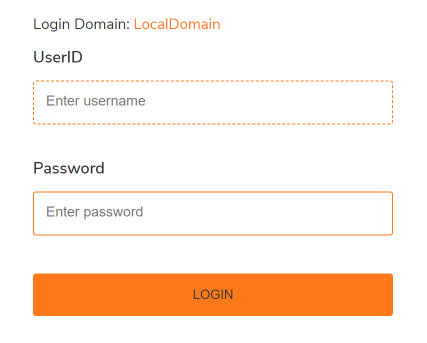
I hope this explains more detailed how the authentication process goes.
Cheers,
Csaba
1ccf5564-898a-41ca-85c8-7a31f227b69c.png
870f1e4e-8f92-4f07-9635-a58fce80701d.png
Disabled
Hi,
Certain websites may have security measures in place to prevent automatic form filling. In such cases, your best option would be to create a macro/script/tool that can automatically select your VPN and enter your login credentials when you access the website. I can provide you with some documentation on how to do this, However, you will need to manually configure it by using your keyboard to select the specific VPN you want.
Here's the documentation about Website Authentication:
https://docs.devolutions.net/kb/workspace-browser-extension/how-to-articles/website-authentication/
And here's the documentation about how to configure your macro:
https://docs.devolutions.net/kb/remote-desktop-manager/how-to-articles/entry-types-events-settings/
https://docs.devolutions.net/kb/remote-desktop-manager/how-to-articles/entry-types-events-settings/event-auto-typing-macro/
Let us know if you have further questions,
Best regards,