Subdirectory collapase automatically to root directory after making a change
Subdirectory collapase automatically to root directory after making a change
I have something annoying when I make a change in my user vault. After making a change in a entry that exists in a subdirectory this directory collapse automatically to the root directory. Is it possible to turn this off?
RDM version 2023.3.35.0
All Comments (3)
Hello,
Thank you for reaching out to us regarding this,
- What type of data source are you using?
- Is this occurring with a specific entry type?
Could you provide us with a screenshot of your Navigation Pane so that we can reproduce the configuration? I've not been able to reproduce the behavior so far on the latest version of RDM.
I'm also wondering if you could provide us with a screenshot of your configuration under "File" -> "Options" -> "User Interface" -> "Tree View".
Let me know,
Best regards,
Samuel Dery
My colleague experienced this in his User Vault with a username/password entry.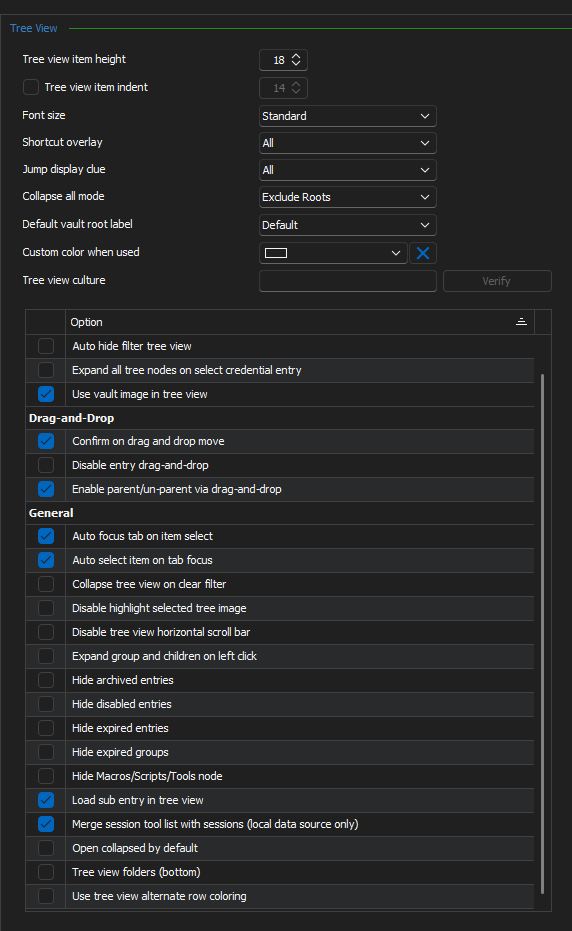
982f78a2-f894-42d7-ad62-36eca7e07870.png

Hello,
I was unable to replicate the problem you described.
To better assist you, could you kindly provide us with the following information:
- A screenshot of your RDM dashboard.
- Did you update RDM recently? If yes, do you recall which version you were on?
- Your current RDM version.
- The data source you are utilizing.
- Any additional information you believe might be relevant.
Once we have this information, we will be better equipped to diagnose and resolve the issue.
Best regards,