
NeilSmith2025
key shortcut to close a tab
Hi
I tested in version 2026.3.17, the switch tab key shortcut it works now, but the close tab key shortcut still not working properly.
ssh terminal command result different
Hi
I am use 2026.3.16
select relavent folder when I select sessions
Hi, Sam
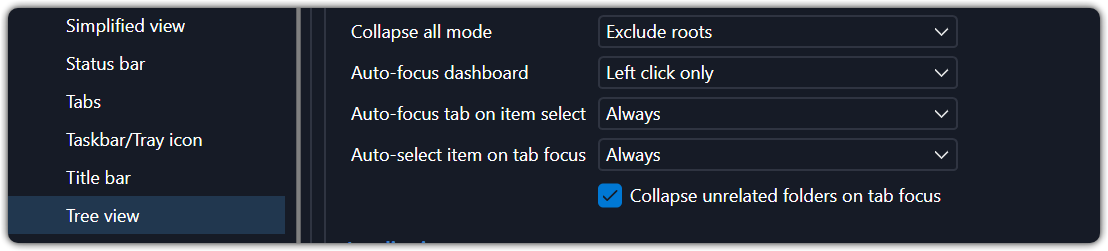
Here is my setting. The selection working correct, but the display in navigation panel is not visible, either above or below of navigation panel.
ssh terminal command result different
Hi,
Any adivse on this? Thank you.
ssh terminal command result different
Hi,
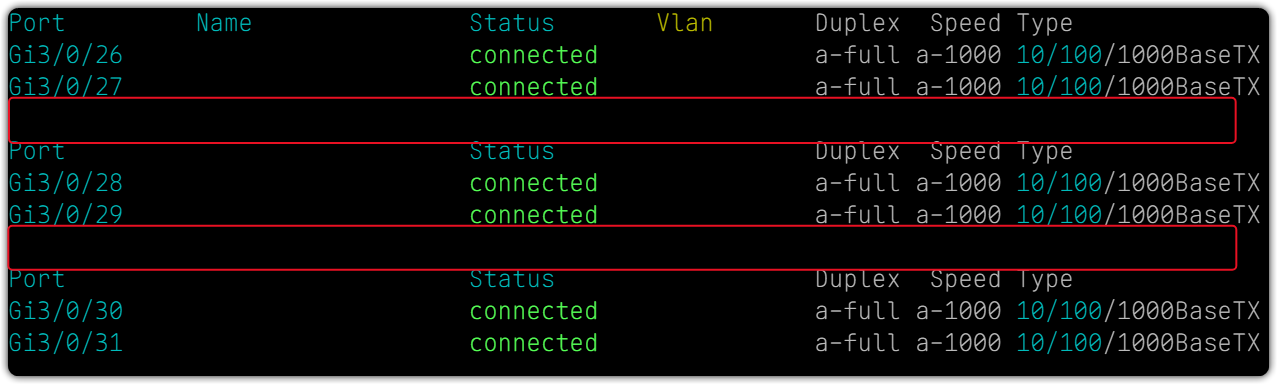
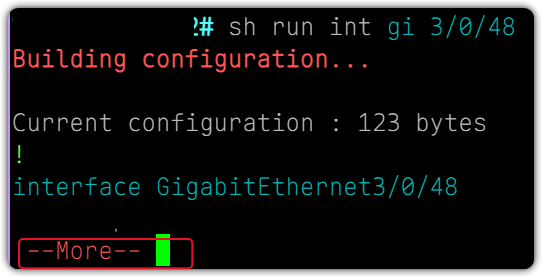
I open multiple SSH terminal to manage cisco switch, but I got different display of result when I open multi entries at same time for same command:
First window shows everything correct
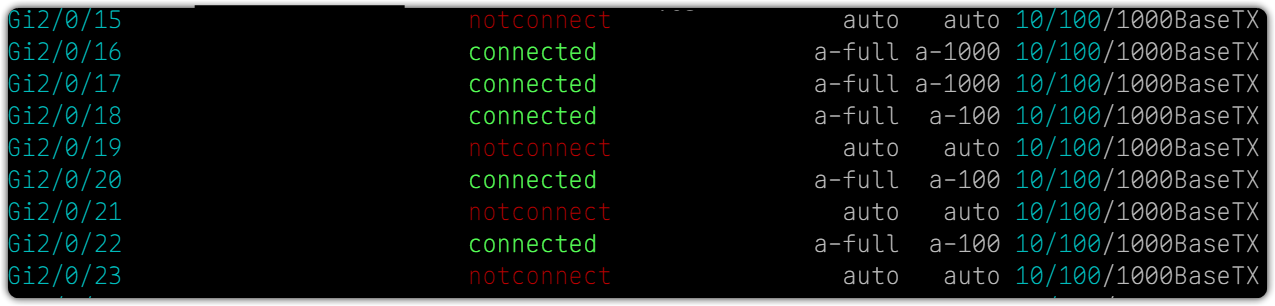
But 2nd tab of window, it has extra space line compare with first window for same command, the command stop display only for 2 lines, then I need press enter to get more info, this is something abnormal compare with normal cisco command output. Can you advise on this?
If open sessions one by one seems have no this issue, only happened with open multi session at one time.

Is it possible add IP address in quick search result?
Hi, Hubert
Just check any update on this? Thank you.
display tags like status
Thank you, that what I am looking for. Just a suggestion on this, can we made UI close to status, currently just a plan text, not very nice.
select relavent folder when I select sessions
Hi
I updated to lastest version, but problem still same as before. The entry will be selected correctly but not list in the view of navigation pannel can see, same as video I sent before.
More like the scroll bar of navigation panel not relate with entry what was select and scroll to correct location.
By the way: my navigation panel set as auto-hide.
terminal input focus
Hi
Just did this testing open multi entries at same time. If you only one by one looks working fine.
terminal input focus
Hi
I tested the latest version 2026.3.16, the problem getting better, but problem still there when you swap between two or multi tabs, you need use mouse to click to get input at first time, you no need click mouse to get input focus again when you swap tabs after you did once.
But it seems not totally fix it yet.
terminal input focus
Hi
Any update on this?
terminal input focus
Hi
I opened multi ssh terminal sessions, I need click mouse first to get input focus when I use shortcut key to swap between multi tabs, is possible save this one mouse click to getting more smoother keyboard operation without mouse.
Thank you.
Feature request - SNMP Walker or SNMP Tester
Hi
I agree with you the SNMP report not good enought, it doesn't support SNMP ver3 and lots of other function missing. Do you have estimate time for new SNMP tools?
show navigation panel when application startup not work
Hi
This worked, thanks.
Feature request - SNMP Walker or SNMP Tester
Hi
Is possible add SNMP Walker or SNMP Tester or something similar into network diagnostic tool box?
Thanks.
key shortcut to close a tab
Hi,
Just check any update on this one?
add Tools and auotmation icon when menu in Toolbar mode
Hi
Do you mind help move this to feature request? Thank you.
If we can add some of specific tool in tool bar mode will be handy.
select relavent folder when I select sessions
Hi
The file has been uploaded. Please check.
expand all and collapse all key shortcut
Thank you, great.
expand all and collapse all key shortcut
Hi
I am referring to when change the focus from one opened session to another. I am asking for all folders but the one containing the currently focused (and opened) entry all automatically collapse at all times.
expand all and collapse all key shortcut
Hi
Thank you for your response on this. This has been fixed in latest version. Would be nice if we can have shortcut key to expand only one folder.
Also I noticed when you have multi session opened, all those folders will be expaned, is possible have one option only expand the session currently focused.
add Tools and auotmation icon when menu in Toolbar mode
Hi
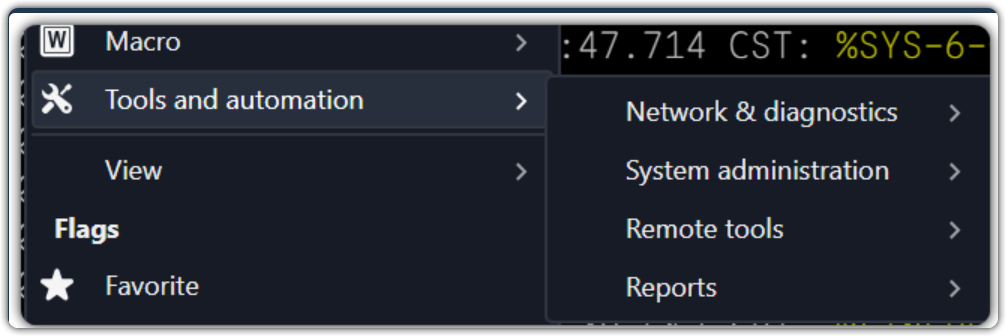
Do you know how to add Tools and auotmation icon when menu in Toolbar mode, I didn't find relavent button for this menu function. Instead I found another one which not really I want.
select relavent folder when I select sessions
Hi
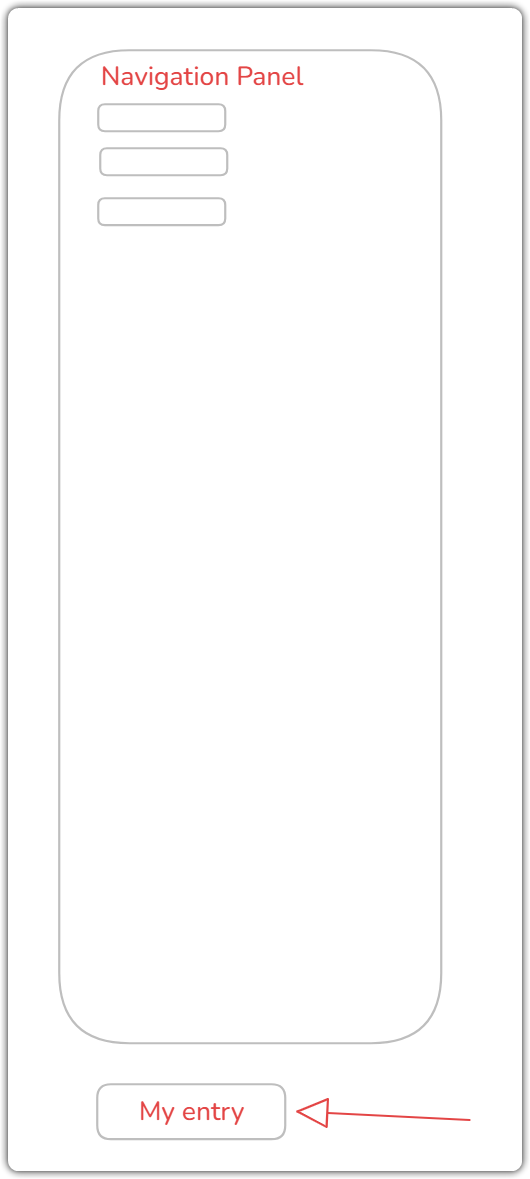
I upgraded to lastest version and tested a bit more detail on this, the correct entry on Navigation panel was selected/focused when I switch between multi session tabs, but it will not display in the center of Navigation panel (or visiable in Navigation panel) as I had long list of entries. Here is the drawing may can help you understanding. More like the scroll bar of navigation panel didn't working correctly during you change between session tabs.
show navigation panel when application startup not work
Hi, Tommy
Yes, it has this function before. But seems we lost this in new version.
add cascade/ tile horizon or virtical options in session context menu
Hi,
Any one can provide some advice on this? Thanks.