add Tools and auotmation icon when menu in Toolbar mode
add Tools and auotmation icon when menu in Toolbar mode
1 vote

Hi
Do you know how to add Tools and auotmation icon when menu in Toolbar mode, I didn't find relavent button for this menu function. Instead I found another one which not really I want.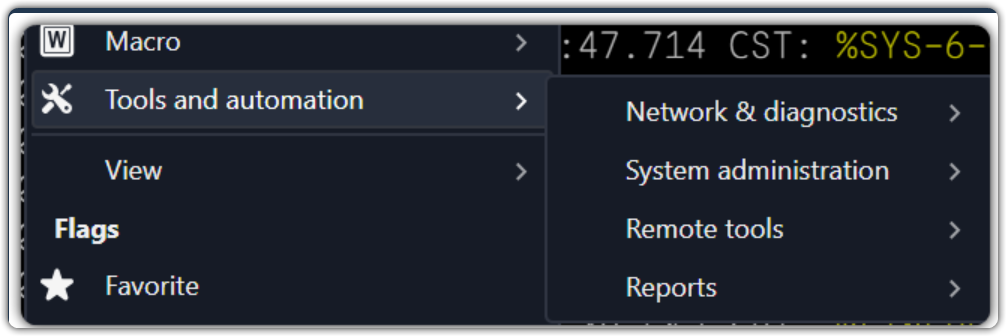
5e39df4a-39c8-43a4-85da-edee14d7021a.png
All Comments (3)
Hello,
Thank you for contacting Devolutions Support.
In Toolbar mode, the "Tools and automation" menu you see when you right-click an entry cannot be added to the toolbar as a button. The toolbar only offers the commands and sections that exist in the ribbon, and that menu, with its Network & diagnostics, System administration, Remote tools and Reports submenus, is not one of them. It remains available from the right-click menu of an entry.
What you can add to the toolbar is the "Automation and scripting" section, which is the closest match:
1. Right-click an empty area of the toolbar and select Customize. The "Toolbar layout customization" window opens.
2. In the Available pane, search for "automation".
3. Add "Automation and scripting". It is placed on the toolbar as a dropdown menu with two commands: Execute, and Execute tool or automation.
4. If you prefer a single button, add "Execute tool or automation" instead. It opens a window listing the tools and automations (macros and scripts) stored in your workspace, so you can run them from there.
5. Select the item in the Toolbar pane and choose its Display (Icon, Text or Both) at the bottom of the window, then click Save.
Please note that these commands run the tools and automations you have saved as entries. They do not include the built-in Network & diagnostics, System administration, Remote tools and Reports submenus.
If you would like a dedicated "Tools and automation" button on the toolbar, you can submit it as a feature request in our forum, where our product team and other users can see and vote for it:
https://forum.devolutions.net/forums/17/remote-desktop-manager--feature-request
Please let us know if this works for you, or if you were looking for something different.
Best regards,
Alexis Geller Peiro
Hi
Do you mind help move this to feature request? Thank you.
If we can add some of specific tool in tool bar mode will be handy.
Hello,
Absolutely, no problem at all, and thank you for the suggestion! I have moved this thread to a feature request, so your idea of a dedicated "Tools and automation" button in Toolbar mode is now recorded as such.
In the meantime, you can get close to what you need by adding the "Automation and scripting" section or the "Execute tool or automation" button to your toolbar (right-click an empty area of the toolbar > Customize). I hope this helps in the meantime.
Please don't hesitate to let me know if there is anything else I can help you with.
Best regards,
Alexis Geller Peiro