
Nick
Disable AI Assistant
Thank you!
Disable AI Assistant
Hi Michael
We are currently on a SQL Server.
Kind regards,
Nick
Undesired opening of SSH connection
Hi
Some of our users have the issue that after launching RDM and entering their TOTP token, RDM is prompting the following screen:
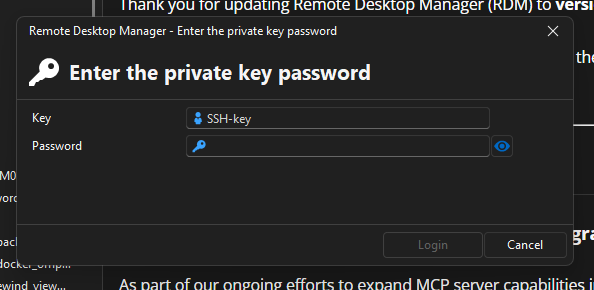
We haven't been able to identify the cause of this issue.
Multiple clicks on "Cancel" will allow them access to RDM.
At first, we thought it was related to the auto-submit of the TOTP token and users hitting the enter key, resulting in opening all available connections.
This does not seem the case. Users that have auto-submit disabled are also reporting this issue.
Does someone has an idea what could trigger this behaviour?
Thanks in advance!
Kind regards,
Nick
Disable AI Assistant
Hi Min
Thanks for your reply.
It's inconvenient that it must be done via GPO. I notice it are registry keys that need to be changed.
Since not all our users are domain joined Windows users (but also Linux & Mac users), how can we disable the AI assistant?
Kind regards,
Nick
Disable AI Assistant
Hello
I've been looking into how I could disable the AI Assistant in RDM.
Unfortunately, the closest I got are release notes mentioning that it is possible but I cannot find the system (?) setting.
Could someone please help locating the setting?
Thanks in advance!
Kind regards,
Nick
RDM 2025.1.1.5 – 100% CPU for 30 min on Linux startup
Hi Gabriel
I've asked the Linux users for the information. I'll let you know when I've received the information.
Kind regards,
Nick
RDM 2025.1.1.5 – 100% CPU for 30 min on Linux startup
Hi Gabriel
I don't know if Lukas has still performance issues, but the Linux user in my organisation are complaining of said performance issues in the 2025.2.0.8 and 2025.2.0.9 versions of RDM.
What information can I provide in order to further investigate the issue?
Kind regards,
Nick
Offline Mode - No license found
Hi Stephan
I did not see in the release notes of the latest release (.20) that it solved this issue.
We are currently running a mix of the .17 and .20 release. On both we are having this issue. Most reports are of the people running the .17 version.
I could not reproduce the issue with the portable version. I'll push the .20 version and see if it is resolved for most people and look further into the issues on those that are already on the .20 release. Maybe those are just a user issue.
Kind regards,
Nick
Offline Mode - No license found
Hello
We noticed that since the 2025.2.x going offline is cause some headache.
When going offline, the process start as expected, but when one should be offline and happily using RDM, we get the notification that no license is found.

Restarting RDM works most of the time.
Is there a way to solve this issue please?
Kind regards,
Nick
Integrated Security - Anonymous Logon
Found the issue.
It was a combination of an issue with DNS and Kerberos Klist.
Integrated Security - Anonymous Logon
Hello
One of our users is experiencing the following strange issue whenever he tries to launch RDM and connect to our datasource.

This behaviour occurred randomly. Normally, it should connect with their domain user.
Any suggestions to what could have caused the issue and how to resolve the issue?
Thanks in advance!
Kind regards,
Nick
Drag to Move not working
Hello
One of my colleagues, and one of the few that is using Mac, has the issue when he tries to move an entry by drag and dropping the entry, he gets the error he has no permission to delete the entry (that is right, he is not allowed to delete, but is allowed to move).
When right clicking the entry, and choosing move, he can move it to the right spot.
Furthermore, I've noticed that in the pop-up, he is able to see all entries, even those where he has no access to.
Kind regards,
Nick
UX feedback
Thank you!
Offline Security
Hi
Thank you, I appreciate the submission!
Kind regards,
Nick
Offline Security
Hi
Thank you.
The goal I was trying to achieve is to enforce as a company policy to the users that have offline access that their local cache has additional encryption via the authentication.
At this moment it seems that it would not be possible.
Kind regards,
Nick
Offline Security
Hello
I saw in the Devolutions Academy and in the general documentation that you can set a password for Offline Security.
Unfortunately, I could not find what the enforced policy is for the password.
It would be great if a certain policy can be enforced and even better if one could require a user with the privilege of Offline Mode that a form of authentication can be used (for example Windows Hello).
Thanks in advance.
Kind regards,
Nick
UX feedback
Thank you.
"Created by" and "Modified by" is no longer showing usernames
Hello
I've received reports of our Linux users that in the latest version (2023.3.0.8) the username is absent in the fields regarding "Created by" and "Modified by".

Apparently, all entries are effected.
Is this a known issue or is it known what causes the usernames to no longer show?
Thanks in advance.
With kind regards,
Nick
RDM not saving entries in Offline mode
Hi Erica
Hi Stéfane
Sorry for the late response (time zone difference).
To answer Erica, Offline read/write is configured as provided by you in the documentation.
Thanks Stéfane. Unfortunately, we have no possibility to retrieve the lost information, which is an issue. I hope it can be resolved swiftly.
Have a nice weekend!
With kind regards,
Nick
RDM not saving entries in Offline mode
Hello
A few users have reported an issue that when they try to save an entry when RDM is in offline mode (the users have write permissions when offline), that RDM doesn't save the entry.
The most detailed case I received was of a user that was working online, but when creating the entry, the network connectivity dropped and was no longer connected to the data source. Up-on saving the entry, RDM notified the user that it went in offline mode and the entry was visible in his application. He was able to use the entry multiple times (copy password etc.) in offline mode without any issues.
When he restarted his application and connected to the data source (RDM in online mode), the entry is nowhere to be found.
RDM didn't give the pop-up asking to synchronize settings when connecting online.
I don't think that this was suppose to happen.
What additional information do I need to provide to remediate and to avoid that this happens again?
With kind regards,
Nick
UX feedback
Thanks
UX feedback
Hello
We found that navigation with arrow keys is not fully implemented in the navigation tree in Linux.
To be specific, arrow to the left is not behaving as it does in Windows navigation.
With kind regards,
Nick
RDM crashes after 2FA key entry (Ubuntu 22.04)
Hi Gabriel
I'm sorry for the late response, I was in holiday.
I've tested it with the custom version I received (2023.1.0.99) and I don't experience any improvements. Ubuntu is still saying that RDM has crashed but just wait some time (I timed it this time, it is just under one and a half minutes best case, worst case it took just under 5 minutes when switching vaults).
Launching RDM to that vault, the fastest I could record is just over 6 minutes.
With kind regards,
Nick
RDM crashes after 2FA key entry (Ubuntu 22.04)
Hello Gabriel
I've send you the information in Windows in a direct message.
The caching mode is set to intelligent.
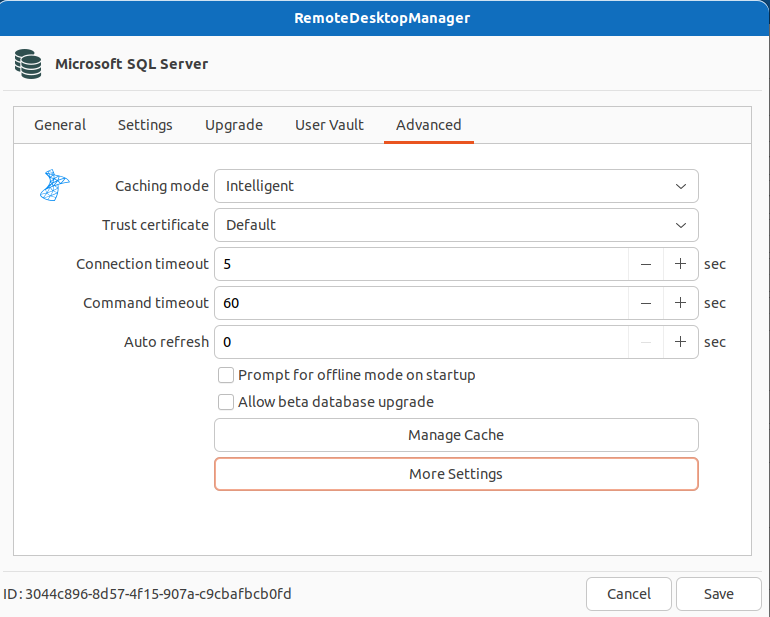
Security provider is set to default.
We I started RDM om my Linux test system, I got disturbed and it took almost half an hour before I could get back to my system. When I then clicked cancel on the pop-up, I could use RDM in the large vault on the Linux system... I'm going to test this a bit further if I can find some more information, but this makes me believe that due to the abcance of a loading screen that even the OS thinks that RDM has crashed while it is in fact still loading...
With kind regards,
Nick
----------------------------------------------------------------------------------------------------------------------------------------------------------------------------------------------------------------------------------------
Update:
I did some testing and requested a few of our linux users to test my hypothesis and we found that when to notification is showing, you just have to wait some time.
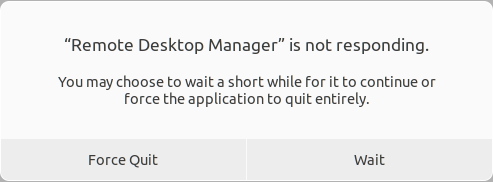
This can be anywhere between a few minutes to half an hour. At this moment I have no clue what is the reason of the time difference is between the different systems.
After that, RDM can be used, but is slow, to say the least, and often the pop-up will show and one has to wait a few moments to continue working. Not ideal, to say the least. It's hardly workable.
I guess that to the operation systems, it is not clear that RDM is busy, and that this is causing the issues.
RDM crashes after 2FA key entry (Ubuntu 22.04)
Hello Gabriel
The data source file was in fact created on Windows around August of 2021.
I've checked the file, and I have send it to you in DM to reference.
The mentioned line is not present.
With kind regards,
Nick