Undesired opening of SSH connection

Hi
Some of our users have the issue that after launching RDM and entering their TOTP token, RDM is prompting the following screen: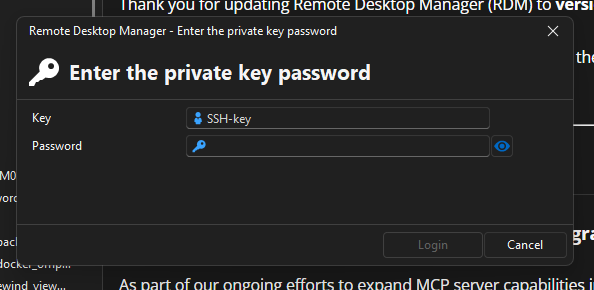 We haven't been able to identify the cause of this issue.
Multiple clicks on "Cancel" will allow them access to RDM.
At first, we thought it was related to the auto-submit of the TOTP token and users hitting the enter key, resulting in opening all available connections.
This does not seem the case. Users that have auto-submit disabled are also reporting this issue.
Does someone has an idea what could trigger this behaviour?
Thanks in advance!
Kind regards,
Nick
fdaaf9a7-b096-4fdd-b20d-f47e3e4a3cfb.png
All Comments (1)
Hello Nick,
Thank you for reaching out and for the detailed description of the issue.
From what you’re describing, this prompt commonly appears when the SSH Key Agent is enabled and has a key configured to load automatically that requires a passphrase. In this situation, RDM may display this window during startup or after authentication.
To resolve this, you can try one of the following:
- Disable the automatic start of the SSH Key Agent, if it’s not needed
- Or review the keys configured in the agent and remove any that require a passphrase from being loaded automatically
You can find more details on how to manage this here:
https://docs.devolutions.net/rdm/commands/tools/key-agent-manager/
If the issue persists after these adjustments, please let us know—we’ll be happy to investigate further with you.
Kind regards,
Stephan