
it-support3
local PowershellScript no elevated rights, even with checkbox marked
Hello RDM Team
Since the last Update we're facing troubles with executing local PowerShell Scripts from RDM.
Even with the checkbox "run as admininistrator" marked the Script isn't executing in Admin-Mode.

Is there any known Issue / Bug about this?
in Case you need more information i'm happy to provide those.
Thanks
Tobias
Please support IKEv2 VPN (VPN Type "Microsoft VPN")
Thanks for the feedback. We'll be adding this to our 2025.2 roadmap. The other Microsoft VPN modes were relatively easy to support, and we're hopeful this one will be as well.
Regards,
Hello Hubert
I'd like to know if the feature already is in implementetion? or how long it will take until it is available?
For us it would be necessary to comply with security standards.
Best regards,
Tobias
Adding OTP to an entry
Hello Tobias,
As of version 2025.1.1 of the module, the Set-RDMEntryOTP cmdlet now supports modifying entries in a Password List. You can use the PasswordListItemID parameter to specify which item should be updated.
Please let us know if this meets your requirements, or if there’s anything else we can assist with.
Best regards,
Maxime
Hello Maxime,
Thanks for your feedback! I will test it as soon as we next update our RDM Server.
Best regards
Tobias
Adding OTP to an entry
Hello Tobias,
It is possible now to set the OTP key on OTP credential entries using the following method.
$entry.Credentials.OTPKey = "YourOTPKey"
Set-RDMSession -Session $entry -Refresh Or we can use the Set-RDMSessionOTP or Set-RDMPrivateSessionOTP cmdlets to set OTP parameters directly on the object like the Key, Account, Application, TimeStep, CodeSize or HashAlgorithm.
Set-RDMSessionOTP -ID $entry.ID -Key "YourOTPKey" -RefreshPlease note that there is no validation on the key. You must ensure it's the right one.
In your scenario, the OTP is stored in a Password List entry type. You get this error because it is not the same object in RDM as an OTP credential entry.
We will have to check if the developer team can solve this issue.
Best regards,
Hello Érica
Thanks, thats what i figured out and implemented a temporary solution fur us.
Would you be able to give me an update on the topic as soon as it's implemented?
Best regards,
Tobias
Adding OTP to an entry
Hello,
A ticket has been submitted to our engineering team to have new cmdlets to be able to get/set the OTP key of a session entry.
Once a new version of the Devolutions.PowerShell module will contains these cmdlets, we will post it here.
Thank you for your patience.
Best regards,
Hello Érica
i stumbled upon this topic since we're facing a similar situation where we try to set the OTP-config on a PasswortListItem.
I'd like to know if these cmdlets in the meantime were implemented an if there is a solution to setting the OTP settings to a user entry in a passwordlist?
the code i'm currently trying:
PS  $pwsec = ConvertTo-SecureString "test" -AsPlainText -force
PS  $list.Credentials.PasswordList[0]

CustomProperties         : {}
Description              :
Domain                   :
ExpirationDateTimeString :
Expire                   : False
Host                     :
Id                       : 90510a8b-adf7-4a63-924b-7d68cc5381af
Password                 :
Roles                    : {}
SafePassword             :
SortPriority             : 0
User                     : test

PS  $ent = $list.Credentials.PasswordList[0]
PS  Set-RDMentryOTP $ent -Key $pwsec -Account "test@zzz.ch" -Application "testApp"
Set-RDMEntryOTP: Cannot bind parameter 'InputObject'. Cannot convert the "RemoteDesktopManager.PowerShellModule.PSOutputObject.PSPasswordListItem" value of type "RemoteDesktopManager.PowerShellModule.PSOutputObject.PSPasswordListItem" to type "RemoteDesktopManager.PowerShellModule.PSOutputObject.PSConnection".
best regards
Tobias
Sync all vaults in offline mode
Every client unfortunately.
Thats truely unfortunate, we then have to wait until the feature is available and have to do it manaualy for the users who need it.
Sync all vaults in offline mode
This should do the trick.
Make sure RDM is closed when you run this as closing RDM could cause the change to be reverted.
$dsName = "somename"
$ds = Get-RDMDataSource -Name $dsName
Set-RDMDatasourceProperty -DataSource $ds -Property VaultSyncMode -Value ([Devolutions.RemoteDesktopManager.VaultSyncMode]::FirstLoad)
Set-RDMDatasource -DataSource $ds
Does this have to be configured on every client or the DB-Server?
Sync all vaults in offline mode
Hi Stéfane,
Thanks for Your reply.
I allready checked the ADMX Files for Configuration options on this and also enrolled the background vault synchronization via Intune configuration GPO.
But i'd like to set the Sync Options across all our users to "on first load".
I would be happy if you could ask the PS-Team to help on this, we are already using a lot of PowerShell to create every entry in RDM. If it would be possible to change the Sync settings via PowerShell it would be ideal.
I will check the PowerShell Module myself for an option to change this setting.
Best regards,
Tobias
Sync all vaults in offline mode
The On first load option while allowing manual sync also adds the benefit of an automatically vault sync when the data source is first opened. Start RDM, connect to the data source, vault sync will initiate.
At this time, we've chosen not to implement a timed or event-based trigger (other than on first load) for vault sync. This decision is based on the potential cost in terms of time, bandwidth,
and processing resources required for frequent synchronizations.
However, we are considering adding an option for a refresh that occurs once every 24 hours.
I'll ask the documentation team to update the how-to guide to include clearer definitions of these sync options.
Hi Stéfane
is there a possibility to set the sync option to "on first load" for all users as the default?
or could i change this in the RemoteDesktopManager.cfg in the %localAppdata%?
I haven't found a possibility to set this for all our users, yet.
Best Regards,
Tobias
Setting the embedded script in a PowerShell Session
Just perfect. Thanks for the effort and sharing this information.
Problem with Offline mode
Hi Stéfane,
Thanks for the Update!
We tested it internally and it works again like expected.
Best regards
Tobias
Problem with Offline mode
Hi Stéfane
Thanks for your feedback, if I can assist with additional information please let me know.
I'm eagerly awaiting your feedback on a possible solution
Best regards
Tobias
Problem with Offline mode
We're having issues with getting the offline mode back to work after updateing our RDM from 2023.1.28.0 to 2024.1.15.
In online mode everything works without problems, but when I'm not in the company and try to open RDM, it always tries to connect to the data source.
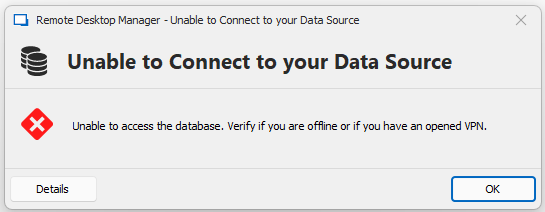
This gets stuck in an endless loop. Before, after a short while, I got a popup to switch to offline mode, but this no longer appears. it just reports "unable to access the database. Verify if you are offline or if you have an opened VPN.".
there I can only confirm with OK or click on details, when I press OK it tries to establish a connection with the data source again and after a certain time it comes to the same result.
Our Configuration:
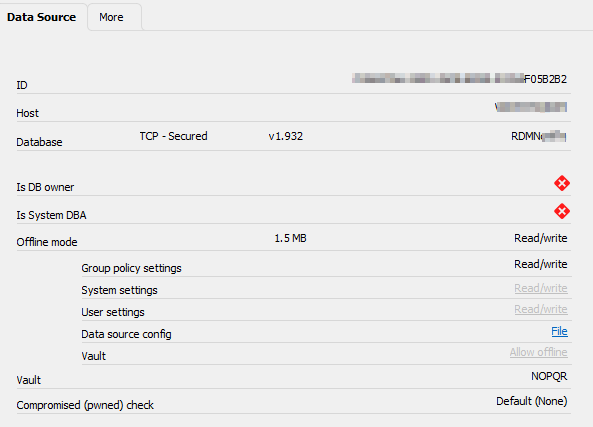
MS SQL Server with the Database
Application Server with RDM installed ( Version 2024.1.15 )
Clients with RDM installed ( Version 2024.1.15 )
Offline Mode read/write allowed
Offline Cache File
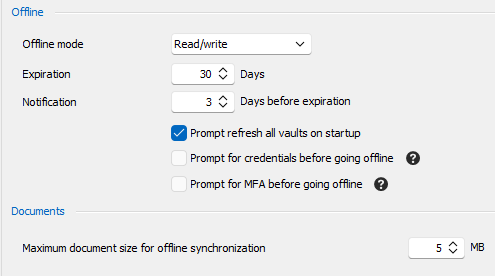
Can I change the settings somewhere for how many connection attempts are made before offline mode is available for selection?
As a temporary solution, I configured “always prompt for offline mode” for the users.
However, this cannot be the solution because the offline mode should only be available when someone is not present in the company.
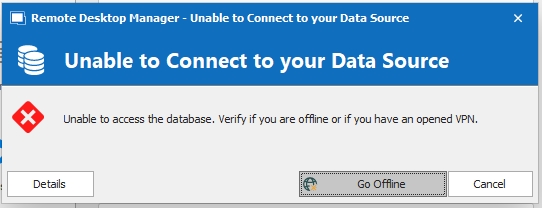
The message bevor the RDM update looked something like this:
Deletion of a session does not delete the subconnections (Powershell)
Hello
Our update window is scheduled for january 2024. I will provide feedback after.
Best regards
Rolf
Deletion of a session does not delete the subconnections (Powershell)
Hello
Thanks for the update and the fix. We have a fixed schedule for patching so I'll provide feedback as soon as possible.
Best regards
Rolf
Deletion of a session does not delete the subconnections (Powershell)
Hello all
Okay, I wasn't aware of that. I thought that if I remove the parent, the child connections will also be deleted because they disappear in RDM. Now I am running a cleanup script that has already deleted more than 3000 lost child sessions.
Could you please at least update the PowerShell documentation for the Remove-RDMSession function with a warning that the subconnections will not be deleted when the parent is removed?
Thank you for your response and I will update my script accordingly.
Best regards
Rolf
Deletion of a session does not delete the subconnections (Powershell)
Hello
I don't know if this behavior is intended or not but look at the code below:

If there is an element A with a subconnection B and the parent A gets deleted, the child B is still "somewhere". B is not visible in RDMUI. It still has the parentID of its old parent and if i try to delete the old parent, B is still not visible.
I don't think this is intended, because the old subconnection still occupies memory and can not be accessed in RDM anymore.
Version of RDM: 2023.1.28.0
Version of PS-Module: 2023.1.0.9
Have a nice day :)
Best regards
Rolf
RDM Invoke Document to parent Session
Hello RDM Team
I tried to invoke a "Document" to a "Host"-element in RDM.
Code:
$system = Get-RDMSession | Where-Object { $_.ID -match $systemID)
sub = Get-RDMSession | Where-Object { $_.ID -match $subID }
Invoke-RDMParentSession -ParentSession $system -Session $sub -Refresh
It works for "RDP", "Explorer", "Webbrowser" and other connection types of the subconnection. Just "Document" doesnt work at all.
As a workaround we use "Command Line" Element and open the document via cmd.
RDM Version: 2022.3.30.0
PowerShell Version: 2022.3.1.2
Best regards
Rolf
Remove-RDMUser ID Parameter - Value cannot be null. Parameter name: collection
Hello
I tried to delete a user and used
Remove-RDMUser -ID $user.ID
But everytime I try it it gives me:
Remove-RDMUser : Value cannot be null.
Parameter name: collection
But there is no "collection" parameter in $user nor in the cmdlet.
As a workaround I use the Remove-RDMUser -User $user command and this works fine.
I don't know if its me or a problem with the cmdlet.
PS Version: 2022.3.1.2
RDM Version: 2022.3.30.0
Best regards
Rolf
Handle Subconnections with PowerShell
Hello
You changed the internal structure of how parent-connections are connected with there subconnection.
The field "$parent.SubConnections" is just empty, because new all subconnection just have a field named "ParentID".
So to access all subconnections in PS you have to use:
$subcons = Get-RDMSession | Where-Object { $_.ParentID -eq $parent.ID}
Is this right? And if yes can you please update your git-repo:
Best regards
Rolf
Powersehll add Pre-Shared Key to Microsoft L2TP VPN
Hello
I tried to add the pre-shared key to a Microsoft VPN RDM-Session.

It should be there
$session.VPN.MicrosoftVPNSafePresharedKey
but it does not work with:
$system.vpn.MicrosoftVPNSafePresharedKey = "XXXXX".
I found the following with "write the PSK to a custom field":
https://forum.devolutions.net/topics/33404/store-microsoft-vpn-configuration-profile-in-rdm#138180
Is it possible to write it in the psk-field?
RDM Version: 2021.2.29.0
DB Version: v1.750
Best regards
Rolf
Add FileExplorer and FtpNative to New-RDMSession cmdlet (PowerShell)
Hi Jonathan
Are there any updates on this?
Best regards
Rolf
Add FileExplorer and FtpNative to New-RDMSession cmdlet (PowerShell)
Hello RDM Team
I just wanted to asked if it is possible to add "FileExplorer" and "FtpNative" to the New-RDMSession type-list?
Best regards
Rolf
Script is stuck the the first Update-RDMUI
Ah ok thanks.
No, its fine. Thank you very much :)
My code is a total mess and I need to clean it up anyways. I just wanted to say that this may take a while to replace the Update-RDMUI commands, time that I dont have now.
In short:
I cant remove it now. I will remove it sooner or later. You dont have to make a special version for me. And thank you very much for your time and clarification about the use of the commands and how they work.
Best regards
Rolf
Script is stuck the the first Update-RDMUI
Hi
I think i dont care. The main point is that it works.
So if I get you right, the "-Refresh" command after a "Set-RDMSession" does the same and is better?
You have any best pratice guide for using the PS Module?
I will remove the Update-RDMUI commands in future but we have like 12 script with a few hundred lines of code each and 5 cmdlets for daily updates and all of them are using the Update-RDMUI command. My boss have to give me time for that. I also need to reorganize the scripts from scratch of.
Rolf