Adding OTP to an entry

Is it possible to set up the OTP on an entry, by using the PowerShell Module? Adding Key
setting Code size ………….
All Comments (18)
Hello,
Most of the OTP properties can be set using PowerShell except of the OTP Key property.
$session.OTP.QRCodeAccountName = "MyAccount"
$session.OTP.CodeSize = "Eight"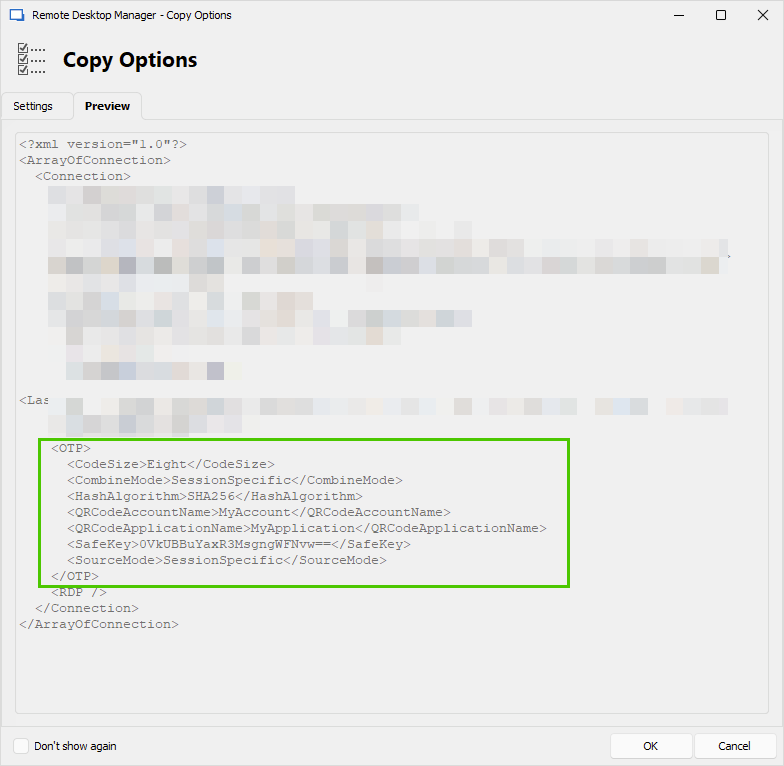
I will ask the engineering team what we can do about this and I will get back to you.
Best regards,
Érica Poirier
22000082-ddd5-4c8e-8faa-2e6cffa7c291.png
Hello,
A ticket has been submitted to our engineering team to have new cmdlets to be able to get/set the OTP key of a session entry.
Once a new version of the Devolutions.PowerShell module will contains these cmdlets, we will post it here.
Thank you for your patience.
Best regards,
Érica Poirier
Hello,
A ticket has been submitted to our engineering team to have new cmdlets to be able to get/set the OTP key of a session entry.
Once a new version of the Devolutions.PowerShell module will contains these cmdlets, we will post it here.
Thank you for your patience.
Best regards,
Hello Érica
i stumbled upon this topic since we're facing a similar situation where we try to set the OTP-config on a PasswortListItem.
I'd like to know if these cmdlets in the meantime were implemented an if there is a solution to setting the OTP settings to a user entry in a passwordlist?
the code i'm currently trying:
PS  $pwsec = ConvertTo-SecureString "test" -AsPlainText -force
PS  $list.Credentials.PasswordList[0]

CustomProperties         : {}
Description              :
Domain                   :
ExpirationDateTimeString :
Expire                   : False
Host                     :
Id                       : 90510a8b-adf7-4a63-924b-7d68cc5381af
Password                 :
Roles                    : {}
SafePassword             :
SortPriority             : 0
User                     : test

PS  $ent = $list.Credentials.PasswordList[0]
PS  Set-RDMentryOTP $ent -Key $pwsec -Account "test@zzz.ch" -Application "testApp"
Set-RDMEntryOTP: Cannot bind parameter 'InputObject'. Cannot convert the "RemoteDesktopManager.PowerShellModule.PSOutputObject.PSPasswordListItem" value of type "RemoteDesktopManager.PowerShellModule.PSOutputObject.PSPasswordListItem" to type "RemoteDesktopManager.PowerShellModule.PSOutputObject.PSConnection".
best regards
Tobias
Hello Tobias,
It is possible now to set the OTP key on OTP credential entries using the following method.
$entry.Credentials.OTPKey = "YourOTPKey"
Set-RDMSession -Session $entry -Refresh
Or we can use the Set-RDMSessionOTP or Set-RDMPrivateSessionOTP cmdlets to set OTP parameters directly on the object like the Key, Account, Application, TimeStep, CodeSize or HashAlgorithm.
Set-RDMSessionOTP -ID $entry.ID -Key "YourOTPKey" -Refresh
Please note that there is no validation on the key. You must ensure it's the right one.
In your scenario, the OTP is stored in a Password List entry type. You get this error because it is not the same object in RDM as an OTP credential entry.
We will have to check if the developer team can solve this issue.
Best regards,
Érica Poirier
Hello Tobias,
It is possible now to set the OTP key on OTP credential entries using the following method.
$entry.Credentials.OTPKey = "YourOTPKey"
Set-RDMSession -Session $entry -Refresh Or we can use the Set-RDMSessionOTP or Set-RDMPrivateSessionOTP cmdlets to set OTP parameters directly on the object like the Key, Account, Application, TimeStep, CodeSize or HashAlgorithm.
Set-RDMSessionOTP -ID $entry.ID -Key "YourOTPKey" -RefreshPlease note that there is no validation on the key. You must ensure it's the right one.
In your scenario, the OTP is stored in a Password List entry type. You get this error because it is not the same object in RDM as an OTP credential entry.
We will have to check if the developer team can solve this issue.
Best regards,
Hello Érica
Thanks, thats what i figured out and implemented a temporary solution fur us.
Would you be able to give me an update on the topic as soon as it's implemented?
Best regards,
Tobias
Bonjour Erica Poirier,
J'utilise le module Devolutions.PowerShell pour mon automatisation et j'aimerais savoir comment faire pour ajouter un OTP à un entré crendential?
Actuellement pour créer mon entré j'utilise ce template:
$t = [Devolutions.Hub.PowerShell.Entities.Hub.PSDecryptedEntry]@{PsMetadata = [Devolutions.Hub.PowerShell.Entities.Hub.PSEntryMetadata]@{ Name = "Test Cred"; ParentId = $hubFolderID; ConnectionType = [Devolutions.RemoteDesktopManager.ConnectionType]::Credential }; Connection = [Devolutions.RemoteDesktopManager.Business.Connection]@{Credentials = [Devolutions.RemoteDesktopManager.Business.CredentialsConnection]@{CredentialType = [Devolutions.RemoteDesktopManager.CredentialResolverConnectionType]::Default; Password = "passworddepowershell"}}}
Merci,
Bonjour, je crois avoir trouvé la façon de faire:
[Devolutions.Hub.PowerShell.Entities.Hub.PSDecryptedEntry]@{ PsMetadata = [Devolutions.Hub.PowerShell.Entities.Hub.PSEntryMetadata]@{ Name = $Credname; ParentId = $DevolutionParentId; ConnectionType = [Devolutions.RemoteDesktopManager.ConnectionType]::Credential }; Connection = [Devolutions.RemoteDesktopManager.Business.Connection]@{ Credentials = [Devolutions.RemoteDesktopManager.Business.CredentialsConnection]@{ CredentialType = [Devolutions.RemoteDesktopManager.CredentialResolverConnectionType]::ApiKey; APIID = $APIid; APIKey = $APISecret} } }
Maintenant je cherche comment récupérer le code du token OTP si je veux l'utiliser pour une connexion.
Merci,
Hello Tobias,
Thank you for your feedback.
A ticket has been submitted to our developer team to improve the possibility of managing OTP on Password List entries from PowerShell.
Best regards,
Érica Poirier
Bonjour @asimard,
Je n'ai pas encore trouvé de méthode pour récupérer le OTP Token d'une entrée Credential dont le OTP a été configuré.
Je vous reviens aussitôt qu'une solution est disponible.
Cordialement,
Érica Poirier
Bonjour @asimard,
Je n'ai pas encore trouvé de méthode pour récupérer le OTP Token d'une entrée Credential dont le OTP a été configuré.
Je vous reviens aussitôt qu'une solution est disponible.
Cordialement,
Merci!
Bonjour @asimard,
Je n'ai pas encore trouvé de méthode pour récupérer le OTP Token d'une entrée Credential dont le OTP a été configuré.
Je vous reviens aussitôt qu'une solution est disponible.
Cordialement,
Bonjour Érica,
Est-ce que vous avez trouvé la méthode pour récupéré le OTP?
MErci,
Bonjour,
Vous pouvez utiliser la méthode suivante.
$entry = Get-RDMEntry -Name "Nom de votre entrée OTP"
Get-RDMEntryOTPKey -InputObject $entry -AsPlainText
Dites-nous si cela fonctionne.
Cordialement,
Érica Poirier
Bonjour,
est-ce que cette commande fonctionne même si nous n'avons pas RDM sur le serveur ou sera exécuter le script? Pour le reste du script, nous, nous utilisons les requetes devolution hub.
Merci,
Bonjour,
C'est mon erreur. Je vous ai remis le code avec les cmdlets pour une source de connées DVLS.
Je vais voir ce que je peux obtenir pour une source de données Hub et je vous reviens.
Encore désolée!
Cordialement,
Érica Poirier
Hello Tobias,
As of version 2025.1.1 of the module, the Set-RDMEntryOTP cmdlet now supports modifying entries in a Password List. You can use the PasswordListItemID parameter to specify which item should be updated.
Please let us know if this meets your requirements, or if there’s anything else we can assist with.
Best regards,
Maxime
Bonjour M. Simard,
Finalement, il n'y a pas de méthode pour récupérer le token OTP d'une entrée credential d'une source de données Hub Business.
Je viens de créer cette demande d'amélioration sur le forum pour vous. Je vous suggère d'ajouter votre vote et de vous abonner aux notifications. C'est aussi l'occasion pour notre communauté de montrer l'intérêt qu'elle porte à votre idée. Nous utilisons cet intérêt pour prioriser les fonctionnalités que nous implémentons.
Cordialement,
Érica Poirier
Bonjour M. Simard,
Finalement, il n'y a pas de méthode pour récupérer le token OTP d'une entrée credential d'une source de données Hub Business.
Je viens de créer cette demande d'amélioration sur le forum pour vous. Je vous suggère d'ajouter votre vote et de vous abonner aux notifications. C'est aussi l'occasion pour notre communauté de montrer l'intérêt qu'elle porte à votre idée. Nous utilisons cet intérêt pour prioriser les fonctionnalités que nous implémentons.
Cordialement,
Merci, je vais définitivement ajouté mon vote.
Hello Tobias,
As of version 2025.1.1 of the module, the Set-RDMEntryOTP cmdlet now supports modifying entries in a Password List. You can use the PasswordListItemID parameter to specify which item should be updated.
Please let us know if this meets your requirements, or if there’s anything else we can assist with.
Best regards,
Maxime
Hello Maxime,
Thanks for your feedback! I will test it as soon as we next update our RDM Server.
Best regards
Tobias