
jellehillen
RDM 2026.3.0.5 ignores UI sort priority and other glitches
Hi Jesse,
I only checked folders in different vaults, so you could be right that it is limited to folders only.
Best regards,
Jelle Hillen
RDM 2026.3.0.5 ignores UI sort priority and other glitches
Hi,
Running RDM 2026.3.0.5 on macOS 15.7.9 and encountered several glitches.
The sort order (from the UI section when editing a session) seems to be ignored in the navigation tree. It just sorts alphabetically.
And the folder editing is basically unreadable/unusable:
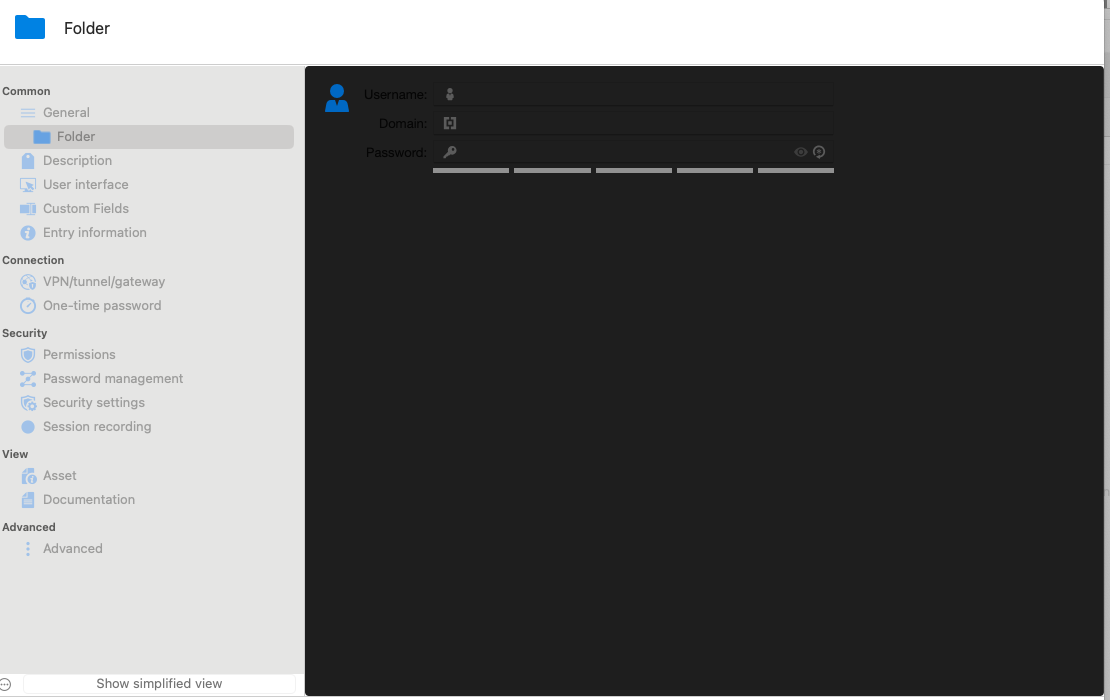
I haven't tried all other session types but editing RDP does seem to work normally at least.
Best regards,
Jelle Hillen
Not every button is clickable when using Simplified Ribbon in RDM 2026.3.0.5
Hi,
With the new layout (with the very large ribbon), I decided to try out the Simplified Ribbon to maximize the workspace. I did notice that buttons behind the ellipse (...) aren't always clickable. An example from the File tab, where Preferences and Exit aren't clickable (they also don't highlight when hovering over it).
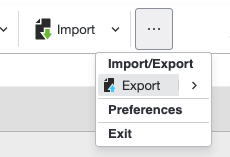
Best regards,
Jelle Hillen
Predefined Statuses (Expired, Warning, Broken, etc.) missing in the context menu in RDM 2026.2.5.1
Hi,
I can confirm this is now working again.
Best regards,
Jelle Hillen
Predefined Statuses (Expired, Warning, Broken, etc.) missing in the context menu in RDM 2026.2.5.1
Hi,
Running RDM for macOS 2026.2.5.1 on macOS 15.7.9, I seem to be missing the predefined statuses on an entry in the context menu. It now only shows "Edit status message":
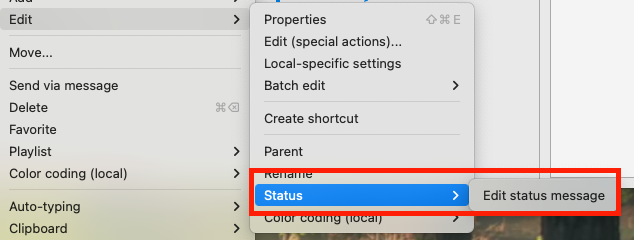
Best regards,
Jelle Hillen
User-specific override for credentials on session entry resets the UI and selects first available vault
Hi,
Running RDM for macOS 2026.2.4.4 on macOS 15.7.8, I encountered an issue where when configuring a user-specific override to select a credential object from my user vault, trying to select the session entry in the tree after editing it, results in the UI resetting to the first available (in alphabetic order) vault in the list and related dashboard. If I remove the user-specific override, the behaviour returns to normal. The issue only seems to be with session entries, not with folders (there it works as expected).
I can also trigger the issue when the browser plug-in (using Edge for macOS with integration configured to RDM) tries to access the same session type to fill in the login info. In the background, I see RDM switching to the first vault too.
When attempting to set the user-specific override in Windows, the macOS version again exhibits the problem so it doesn't seem to be related to which client version is making the change.
If debug information is needed, please let me know, and I'll provide what I can.
Best regards,
Jelle Hillen
RDM 2026.2 tab close buttons on right side
Hi,
Thanks for replying. I would certainly be interested in such an option but it doesn't get added, I'm sure I'll get used to the new position of the close button.
Best regards,
Jelle Hillen
RDM 2026.2 tab close buttons on right side
Hi,
Not really a bug report but with the new UI changes in RDM 2026.2 on macOS, the close buttons for tabs are now on the right side of the tab instead of the left side, which is rather counter-intuitive for Mac users. Just saying.

Best regards,
Jelle Hillen
User with view-sensitive permission cannot read license information in web
Hi,
A user who has been assigned the Contributor role (view-sensitive permission) through a group, is not able to view license information:

He can do this in RDM though, just not in the web version.
Best regards,
Jelle Hillen
Icon issues since RDM macOS version 2026.1
Hi,
I'm currently running RDM 2026.1.14.4 on macOS Sequoia.
Ever since the 2026.1 branch, I regularly encounter issues where icons get "replaced", usually after editing an entry:

In the screenshot above, the green ones are actually RDP sessions (with their default icon). The two blue with the transparent arrow should be the default SSH icon.
If I click on an entry, that specific entry and those next to it get reverted back to their normal state. This was not an issue in versions before 2026.1. In the screenshot below I clicked on an entry, reverting its icon but also the entry right above it:

To me it looks like there's some corruption going on in the icon cache or something like that when saving changes to an entry. I did not notice it yet with folders, and it usually doesn't happen with credential entries, more with session entries.
If there's anything you need from me (logs, etc.), please let me know.
Best regards,
Jelle Hillen
Embedded RDP sessions are not working on MacOS
Hello
Yes indeed we are dealing with two separate issues here.
@jellehillen Let's continue by PM for now; if you're able to .zip that file it should be attachable. If it still doesn't work, poke me in PM and I'll give you an upload link.
@omatasas This is really strange. The current release of RDM Mac carries FreeRDP 3.18.0. Not the latest, but not old either. The next release will carry 3.24.1. What is really strange is that we've done the TCP handshake ok, but not got to the point of actually sending any data yet. This is simply continuing to configure the socket before actually starting the protocol.
Let me check on my side what possible reasons there could be for this. As I said, it's a new one for me. I'm looking into it and will get back to you.
Kind regards,
@Richard Markiewicz
Hi,
I've sent you a PM with the zipped log.
Best regards,
Jelle Hillen
Embedded RDP sessions are not working on MacOS
Hello @jellehillen
Thank you for the update. There is something really strange here, as I observed in the logs you sent me:
[15:11:21:204] [4768:6e36b001] [ERROR][com.freerdp.core.nla] - [nla_recv_pdu]: SPNEGO failed with NTSTATUS: (null) [0x80090308]
It's really odd that we get a null error back from the SSPI module. While you have a workaround, I would really like to get to the bottom of this issue and I'd appreciate your help.
First to confirm:
SSPI Module "System" -> connection works with both IP and FQDN
SSPI Module "Portable" -> Authentication Package "Negotiate" -> connection works with FQDN but fails with IP
That it works with "System" implies that your server allows NTLM. With "Portable" and connecting by IP address, it should still be NTLM; so I don't understand the failure mode.
It would really help me if you can try this:
Close RDM
Open Terminal.app and run the following commands (pressing "Enter" after each)
export SSPI_LOG_LEVEL=trace
export SSPI_LOG_PATH=/Users/rmarkiewicz/Desktop/rdm-sspi.lognote that here we need a complete path to create a log file, you'll need to adjust this to at least swap out your username
/Applications/Remote\ Desktop\ Manager.app/Contents/MacOS/RemoteDesktopManagerThis assumes you have RDM installed in the regular /Applications path
RDM will launch
Configure your session to use SSPI Module "Portable" and Authentication Package "Negotiate"
Try to connect by FQDN
Try to connect by IP Address
Then, please send me the rdm-sspi.log that should be created in the path we specified. You can send to me by PM.
Thanks for your involvement, and don't hesitate with any questions or comments
Kind regards,
@Richard Markiewicz
Hi,
I have created a SSPI debug file, but am unable to send it via PM as the attachment doesn't seem to accept .log or .txt. The file is sizeable so pasting its contents doesn't seem like a good idea. :-)
Do you have any other way that I can send you the file, perhaps via e-mail?
Best regards,
Jelle Hillen
Embedded RDP sessions are not working on MacOS
Hi,
By setting SSPI Module to System and changing the authentication method back to NEGO, I can use both IP and FQDN to connect. Setting SSPI back to Portable and leaving the method on NEGO breaks connecting via IP while FQDN continues to work.
Let me know if you need system logs.
Best regards,
Jelle Hillen
Embedded RDP sessions are not working on MacOS
Hi Richard,
I've sent you a PM with the logs.
Setting the Authentication Package manually to NTLM helps: I can connect using the IP.
Best regards,
Jelle Hillen
Setting session icon missing default (e.g. to change it to another color)
Hi,
Since the 2026.1 update on macOS, the Default icon selection seems to have disappeared when trying to change a session's icon:

It is no longer possible to keep the icon but change it to a different color (on the Windows-version, this still works).
Best regards,
Jelle Hillen
Embedded RDP sessions are not working on MacOS
Hi,
I have the same issue and noticed that if you connect via FQDN instead of IP it does seem to work. Perhaps something about authentication has changed in the underlying RDP components?
Best regards,
Jelle Hillen
Deny access to folder in a vault for a group with access to the rest of the vault
Hi,
With our local SQL datasource we are able to allow groups of users access to a vault but deny them access to a specific set of folders in a vault (i.e. for privileges information that should be accessible to a subset of users instead of all users with access to the vault).
I'm attempting to do the same on a vault in Password Hub Business but there's no clear way of removing the inheritance on a folder. I can define the groups as readers (not exactly what I want but at least the privileged info is not visible) but users still seem to have access to the information. It looks like the permissions are maintained from the inheritance.
Is there a way to achieve this without having to create a new vault just for the privileged info?
Best regards,
Jelle Hillen
No valid license on RDM macOS 2024.2.7.4 (but Windows works)
Hi,
On RDM for macOS 2024.2.7.4, when connecting to a MS SQL datasource, I get an error the license is invalid or expired, even though the user has a license assigned:
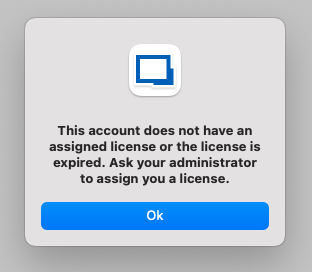
While it is correct the license will expire in a few days (06/30/2024), using the same datasource and user on Windows does not result in the same error. Connecting to Devolutions Hub (where the same RDM license was added) also works without problems.
Best regards,
Jelle Hillen
HTTP 403 when logging in on Devolutions Cloud with RDM
Hello Etienne,
Thanks. It seems to work now, using RDM 2024.2.7.4 on Mac and 2024.2.10.0 on Windows.
Best regards,
Jelle Hillen
HTTP 403 when logging in on Devolutions Cloud with RDM
Hi,
When attempting to access our Hub Business via RDM, we get the following error:
HTTP Response:
<!DOCTYPE html>
<!--[if lt IE 7]> <html class="no-js ie6 oldie" lang="en-US"> <![endif]-->
<!--[if IE 7]> <html class="no-js ie7 oldie" lang="en-US"> <![endif]-->
<!--[if IE 8]> <html class="no-js ie8 oldie" lang="en-US"> <![endif]-->
<!--[if gt IE 8]><!--> <html class="no-js" lang="en-US"> <!--<![endif]-->
<head>
<title>Attention Required! | Cloudflare</title>
<meta charset="UTF-8" />
<meta http-equiv="Content-Type" content="text/html; charset=UTF-8" />
<meta http-equiv="X-UA-Compatible" content="IE=Edge" />
<meta name="robots" content="noindex, nofollow" />
<meta name="viewport" content="width=device-width,initial-scale=1" />
<link rel="stylesheet" id="cf_styles-css" href="/cdn-cgi/styles/cf.errors.css" />
<!--[if lt IE 9]><link rel="stylesheet" id='cf_styles-ie-css' href="/cdn-cgi/styles/cf.errors.ie.css" /><![endif]-->
<style>body{margin:0;padding:0}</style>
<!--[if gte IE 10]><!-->
<script>
if (!navigator.cookieEnabled) {
window.addEventListener('DOMContentLoaded', function () {
var cookieEl = document.getElementById('cookie-alert');
cookieEl.style.display = 'block';
})
}
</script>
<!--<![endif]-->
</head>
<body>
<div id="cf-wrapper">
<div class="cf-alert cf-alert-error cf-cookie-error" id="cookie-alert" data-translate="enable_cookies">Please enable cookies.</div>
<div id="cf-error-details" class="cf-error-details-wrapper">
<div class="cf-wrapper cf-header cf-error-overview">
<h1 data-translate="block_headline">Sorry, you have been blocked</h1>
<h2 class="cf-subheadline"><span data-translate="unable_to_access">You are unable to access</span> devolutions.app</h2>
</div><!-- /.header -->
<div class="cf-section cf-highlight">
<div class="cf-wrapper">
<div class="cf-screenshot-container cf-screenshot-full">
<span class="cf-no-screenshot error"></span>
</div>
</div>
</div><!-- /.captcha-container -->
<div class="cf-section cf-wrapper">
<div class="cf-columns two">
<div class="cf-column">
<h2 data-translate="blocked_why_headline">Why have I been blocked?</h2>
<p data-translate="blocked_why_detail">This website is using a security service to protect itself from online attacks. The action you just performed triggered the security solution. There are several actions that could trigger this block including submitting a certain word or phrase, a SQL command or malformed data.</p>
</div>
<div class="cf-column">
<h2 data-translate="blocked_resolve_headline">What can I do to resolve this?</h2>
<p data-translate="blocked_resolve_detail">You can email the site owner to let them know you were blocked. Please include what you were doing when this page came up and the Cloudflare Ray ID found at the bottom of this page.</p>
</div>
</div>
</div><!-- /.section -->
<div class="cf-error-footer cf-wrapper w-240 lg:w-full py-10 sm:py-4 sm:px-8 mx-auto text-center sm:text-left border-solid border-0 border-t border-gray-300">
<p class="text-13">
<span class="cf-footer-item sm:block sm:mb-1">Cloudflare Ray ID: <strong class="font-semibold">896d1b7abc4bb705</strong></span>
<span class="cf-footer-separator sm:hidden">•</span>
<span id="cf-footer-item-ip" class="cf-footer-item hidden sm:block sm:mb-1">
Your IP:
<button type="button" id="cf-footer-ip-reveal" class="cf-footer-ip-reveal-btn">Click to reveal</button>
<span class="hidden" id="cf-footer-ip"></span>
<span class="cf-footer-separator sm:hidden">•</span>
</span>
<span class="cf-footer-item sm:block sm:mb-1"><span>Performance & security by</span> <a rel="noopener noreferrer" href="https://www.cloudflare.com/5xx-error-landing" id="brand_link" target="_blank">Cloudflare</a></span>
</p>
<script>(function(){function d(){var b=a.getElementById("cf-footer-item-ip"),c=a.getElementById("cf-footer-ip-reveal");b&&"classList"in b&&(b.classList.remove("hidden"),c.addEventListener("click",function(){c.classList.add("hidden");a.getElementById("cf-footer-ip").classList.remove("hidden")}))}var a=document;document.addEventListener&&a.addEventListener("DOMContentLoaded",d)})();</script>
</div><!-- /.error-footer -->
</div><!-- /#cf-error-details -->
</div><!-- /#cf-wrapper -->
<script>
window._cf_translation = {};
</script>
</body>
</html>
Devolutions.Hub.Clients.ApiException: The HTTP status code of the response was not expected (403).
Status: 403
Response:
<!DOCTYPE html>
<!--[if lt IE 7]> <html class="no-js ie6 oldie" lang="en-US"> <![endif]-->
<!--[if IE 7]> <html class="no-js ie7 oldie" lang="en-US"> <![endif]-->
<!--[if IE 8]> <html class="no-js ie8 oldie" lang="en-US"> <![endif]-->
<!--[if gt IE 8]><!--> <html class="no-js" lang="en-US"> <!--<![endif]-->
<head>
<title>Attention Required! | Cloudflare</title>
<meta charset="UTF-8" />
<meta http-equiv="Content-Type" content="text/html; charset=UTF-8" />
<meta http-equiv="X-UA-Compatible" content="IE=
at Devolutions.Hub.Clients.HubClient.GetServerConfigurationAsync(CancellationToken cancellationToken)
at Devolutions.Hub.Clients.HubClient.<GetServerConfiguration>b__440_0()
at Devolutions.Hub.Clients.HubClient.GetServerConfiguration()
at Devolutions.RemoteDesktopManager.Business.DataSources.HubConnectionDataSource.Login()
I tried different versions of RDM but both 2024.2 and 2024.1 seem to have this problem. The issue started a few hours ago, and does not seem to be related to any type of firewall or internet connection (tried with different ones and without firewalling).
Best regards,
Jelle Hillen
Migrating shortcuts from MySQL to Devolutions Cloud
Hi,
Thank you for looking into this. Could you tell whether a possible fix will be implemented in the 2023.2 branch (to be able to export from MySQL to Hub)?
Best regards,
Jelle Hillen
Migrating shortcuts from MySQL to Devolutions Cloud
Hi,
While I understand there are significant differences in how they work, I noticed that currently importing entries which are shortcuts have rather unpredictable results. It's never clear in which folder the entry is kept and which ones are considered "shortcuts" and removed during import. So I was wondering if there's a better way other than actually removing all shortcuts of an entry and leaving only the entry in its original place, then performing the export and import and recreating the shortcuts once they have been imported in Hub...
Best regards,
Jelle Hillen
Migrating shortcuts from MySQL to Devolutions Cloud
Hi,
We are currently in the process of migrating our last (and largest) vault from MySQL to Hub Business. In our vault we make extensive use of shortcuts. I've noticed when importing an exported RDM file (where shortcuts are enabled) in Hub, the shortcuts are not properly maintained. Is there a way around it so that we can migrate the vault while maintaining the shortcuts as well, or do we have to recreate them manually once an import is completed?
Best regards,
Jelle Hillen
Session-specific tabs are missing in User and Local Specific Settings on an entry
Hi,
In RDM version 2022.3.16.1 (and earlier), when editing an entries user or local specific settings (right-click and then selecting either of the options) no longer shows the session type specific tabs:


Oddly enough, when using the Batch Edit > Edit Entry menu items, the tabs do show up again:


I tested this with Remote Desktop (RDP) and Website session types and they exhibit the same behaviour.
As I can work around this using Batch Edit, this is of course a low priority bug.
Best regards,
Jelle Hillen
Variables not resolved in shortcuts in RDM with Devolutions Cloud datasource
Hi,
Here's the properties of one of the entries (redacted the domain name because of privacy):

Note that the IP address used to be $IP$ but changed that to have some difference between the shortcut entries.
Custom field:

This results in the shortcut below. The original entry resolves correctly, as shown in the original post.

Best regards,
Jelle Hillen