
NoAgenda
1Password : Web : Stopped Working
I'm having the same problem on Mac RDM.
1Password - new DB format
I get error "Unable to retrieve 1Password credentials!"
Bomgar Representative Console Add-on - Issue
Did you ever get this working? Instructions are extremely vague here. My questions are
1. Why create a subfolder for the Bomber site when it is already created when you install Bomgar console? When selecting the site in RDM I get 3 folders to choose from. (PIXALMAPS, PLUGINS, AND TRANSLATIONS)
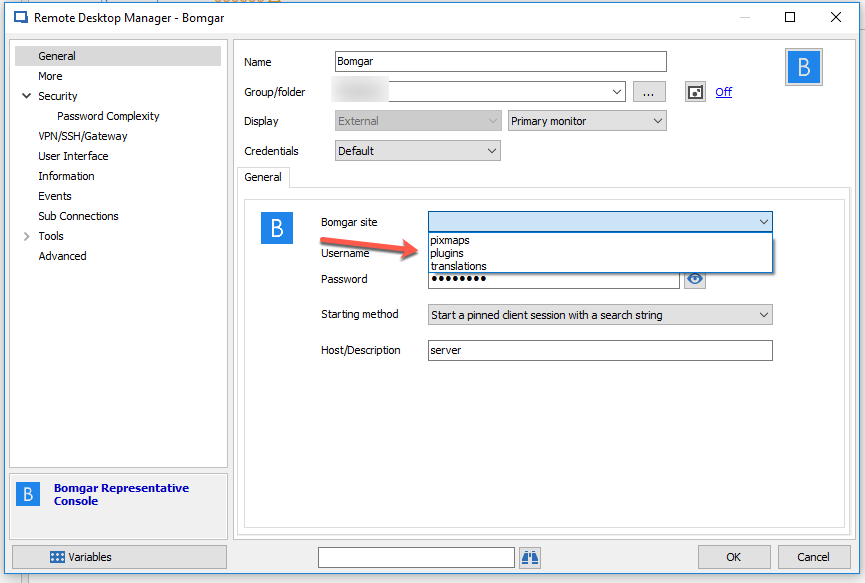
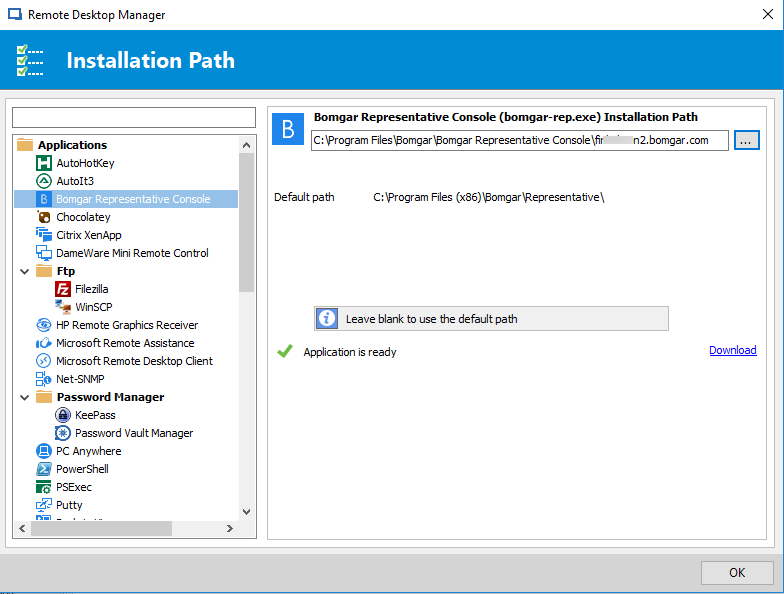
2. Why would I have more than one site? When I purchased a subscription I have one site? (company_name.bomgar.com)
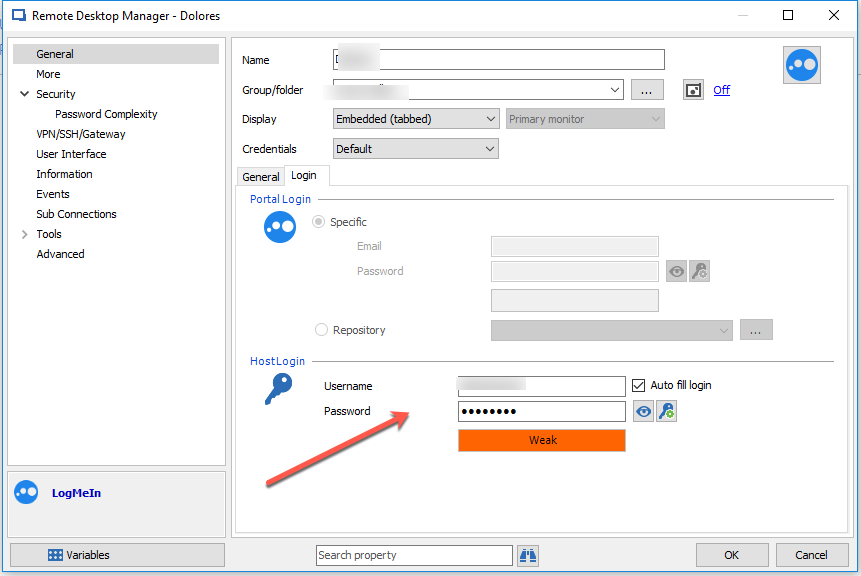
3. Finally where do you specify host credentials like when configuring RDP or Logmein so that I am logged into the machine as a specific user?
Thank you,
Sam
Multiple sessions visible
I have a super wide Dell display. Would be nice to have multiple RDM sessions visible instead of clicking a session tab to view. For now I have two instances of RDM running.
Logmein Support
Still no Logmein support? This was the only reason I started using RDM on Windows back in version 7. It seems RDM for Mac has such a long way to go to even match the basics of the Windows version.
Sort Group Entries empty
I sent you the screen video privately.
edited by NoAgenda on 10/1/2014
Sort Group Entries empty
The tree I suppose. I right click on an object in the tree.
Sort Group Entries empty
This seems like a bug. When I select "sort group entries" on a folder the box is completely empty even though there are many items with in it.
Re-Arranging Objecting - More control
I would like to have more power over rearranging objects. For example
1. Move objects around with the mouse instead of and addition to the "Sort Entries" feature.
2. Move multiple objects up or down by selecting them using CNTR or SHIFT key inside of "Sort Entries"
3. Insert a separator line between objects in the Session Tree. Helps to keep different types of objects visually in order.
Thank you. RDM Kicks A:):)
In-Private / Incognito Browser Sessions
Yes but there's various Chrome extensions that solve this like MultiLogin. It's like incognito mode where each new tab can be separate login session. I use it on Office 365.
https://chrome.google.com/webstore/detail/multilogin/nccllfnllopfpcbjdgjdlfmomnfgnnbk
In-Private / Incognito Browser Sessions
I followed your instructions and they did work. Office 365 auto logs in under private browsing. I thank you for this but I have to add a but. Why does private browsing and incognito mode have to be an external window? Why not tabbed. Tabbed seems so much more the way to go. I manage about 20 Office 365 tenant accounts. I'm sure other RDM users manage a lot more. Wouldn't tabbed be easier to work in?
edited by NoAgenda on 9/17/2014
In-Private / Incognito Browser Sessions
Office 365 portal always fails. Logmein only fills in password. Is this normal? Guess I'm used to the reliability of 1Password and Lastpass?
In-Private / Incognito Browser Sessions
Update: I got it to work under one site. https://dashboard.systemmonitor.us/default.php
The sites that have failed but are the most important are "portal.office.com" and "central.logmein.com"
In-Private / Incognito Browser Sessions
I can't for the life of me get incognito mode to work under any browser. What am I missing here? I've installed the RDM browser plugins. Messed around with the various credential options. I'm looking for a solution that launches the browser and fills in my desired creds within incognito mode. Is this possible? Also should work in tabbed mode. This seems ideal.
edited by NoAgenda on 9/16/2014
edited by NoAgenda on 9/16/2014
Recommended Database to use?
If 32bit provides the best performance why use 64bit at all?
Recommended Database to use?
Is there an optimal database and source location to use in RDM? I have tried XML, SQlite, and Dropbox. Dropbox being the slowest by a wide margin. I was curious about MS SQL. I'm a single user with about 600 entries. Would I notice any stability and speed improvements?
Thank you.
Export Logmein connections
tried that but the exported CSV file does not contact the URL for the logmein host. It's blank.
Export Logmein connections
From RDM
Export Logmein connections
Hi,
Is there a not too complicated way to export Logmein connections to a CSV file?
Thanks you.
2006 iTunes UI
Is this a just a place holder of sorts or is this the actual UI you're going with? Seems a bit too hipster ironic retro. :(
Unable to launch application
Mine crashed too. Just adding an an online source did it. Feels more like an alpha than a beta.
TypeInitializationException - An exception was thrown by the type initializer for System.Drawing.GDIPlus
at System.Drawing.Image.InitFromStream (System.IO.Stream) <0x000e7>
at System.Drawing.Bitmap..ctor (System.IO.Stream,bool) <0x00023>
at System.Drawing.Bitmap..ctor (System.IO.Stream) <0x00017>
at (wrapper remoting-invoke-with-check) System.Drawing.Bitmap..ctor (System.IO.Stream) <0x0002f>
at A.c0d1d6a0ccc68b7167a6c617a9750406e..ctor (System.IO.Stream) <0x00027>
at A.c7fe1115b8a77617c0b4aded453f0c5e1.cf075d2faaa6fc61cc42b2d0409895932 (System.IO.Stream) <0x00027>
at A.cd43801fdeca5f94bae9badf2ac9c883d.c58875457162a711e89c9765f0f3be2bc (Devolutions.RemoteDesktopManager.Business.Connection[]) <0x00a7d>
at A.cbbb560bfd0154564f3a0626f8038689f.c077dd37237eaa481d92c8d5146b3a4df () <0x00087>
at A.cf12721740c707aafa3fd9d2d7dd6e7a0.c077dd37237eaa481d92c8d5146b3a4df () <0x0000b>
at A.cf85889627cc16d8c6aa16a6ba6f72f68.c30df0c3c041b3f873986da0d50525d49 () <0x00019>
at A.cf85889627cc16d8c6aa16a6ba6f72f68.AwakeFromNib () <0x00103>
at (wrapper native-to-managed) object.[A.cf85889627cc16d8c6aa16a6ba6f72f68.Void AwakeFromNib()] (MonoMac.Foundation.NSObject,MonoMac.ObjCRuntime.Selector) <0x000ef>
at (wrapper managed-to-native) MonoMac.ObjCRuntime.Messaging.IntPtr_objc_msgSendSuper (intptr,intptr) <0x00003>
at MonoMac.AppKit.NSViewController.get_View () <0x0007f>
at A.cd17e878ba163fc0d364c4c593153fc1b.get_c278192ef0a1cecc72cd8c02e2bad9b86 () <0x00013>
at A.c38222ca4c7726912417aaf2b844619a2.LoadWindow () <0x0075b>
at (wrapper native-to-managed) object.[A.c38222ca4c7726912417aaf2b844619a2.Void LoadWindow()] (MonoMac.Foundation.NSObject,MonoMac.ObjCRuntime.Selector) <0x000ef>
at (wrapper managed-to-native) MonoMac.ObjCRuntime.Messaging.IntPtr_objc_msgSendSuper (intptr,intptr) <0x00003>
at MonoMac.AppKit.NSWindowController.get_Window () <0x0007f>
at A.c767bf040d1696960d3472c59917a5c9d.FinishedLaunching (MonoMac.Foundation.NSObject) <0x000c8>
at (wrapper dynamic-method) object.[A.c767bf040d1696960d3472c59917a5c9d.Void FinishedLaunching(MonoMac.Foundation.NSObject)] (MonoMac.Foundation.NSObject,MonoMac.ObjCRuntime.Selector,MonoMac.Foundation.NSObject) <0x0002f>
at (wrapper native-to-managed) object.[A.c767bf040d1696960d3472c59917a5c9d.Void FinishedLaunching(MonoMac.Foundation.NSObject)] (MonoMac.Foundation.NSObject,MonoMac.ObjCRuntime.Selector,MonoMac.Foundation.NSObject) <0x0011b>
at (wrapper managed-to-native) MonoMac.AppKit.NSApplication.NSApplicationMain (int,string[]) <0x00003>
at MonoMac.AppKit.NSApplication.Main (string[]) <0x00097>
at A.c9915ca121469087426fd2a6ac5dcb6b1.cf0dc1cfd9b511309d6fbd24be6ac2187 () <0x00027>
at A.c9915ca121469087426fd2a6ac5dcb6b1.cf80ac4075cce562eb8254151c47d3e24 () <0x0003e>
at A.c9915ca121469087426fd2a6ac5dcb6b1.cf80ac4075cce562eb8254151c47d3e24<A.cdd520c65dd8e922550634a1652d62e71> () <0x00073>
at A.c9915ca121469087426fd2a6ac5dcb6b1.cf80ac4075cce562eb8254151c47d3e24<A.cdd520c65dd8e922550634a1652d62e71> (string[]) <0x0002b>
at A.cdd520c65dd8e922550634a1652d62e71.cd00ca868e3a2e07e1a60509ada71b4d9 (string[]) <0x0011f>
------------------------------------------
DllNotFoundException - gdiplus.dll
at (wrapper managed-to-native) System.Drawing.GDIPlus:GdiplusStartup (ulong&,System.Drawing.GdiplusStartupInput&,System.Drawing.GdiplusStartupOutput&)
at System.Drawing.GDIPlus..cctor () [0x00000] in <filename unknown>:0
Importing connections.xml
I'm lost. How on Earth do i import the connections.xml file into an existing data source? I've switched to online data source but can't get my original xml file imported.
Can't Create Additional Folders in Credentials
Unfortunately I don't follow. I'm having the same problem and can't figure out how to simply create sub folders.