In-Private / Incognito Browser Sessions
0 vote
We manage a number of Office 365 accounts for our clients. When logging in we find it's best to open a new in-private browsing session so it doesn't cache the credentials, or mess with our own company login for those services.
Is it possible from RDM when creating a Browser session to have an option to automatically open in that mode?
Hope that makes sense. Thanks!
All Comments (43)
Hi,
I think that you can open the web session in external mode and use the No merge setting. Unfortunately this does not work in embedded mode.
David Hervieux
Thanks - I didn't even know that option was there but unfortunately after testing it doesn't do what we need. For example if I open a browser session from RDM using that option and log in user@domain.com two things happen:
1: Next time we open up the login page that user will be remembered (which we don't want)
2: The way the MS Live ID etc. stuff works is that username will be presented on the login page rather than the username / password fields (which we can auto populate using RDM).
When using the in-private / incognito - the site acts as if you have never been there before and will always open up a blank login page prompting for the username and password. Also we can then open a regular browser and not have any of those credentials remembered.
Thanks
Hi,
I see what you mean. Unfortunately I don't have an idea for now.
David Hervieux
I need this capability as well.
This is easy to do, when you launch the child iexplorer.exe process, include the command line option -private
Perhaps add a check box to the General tab of the Web session entry settings for Internet Explorer type browser. I assume the existing "Open new browser session (no merge)" setting is already being used to decide if the -noframemerging command line option is being used.
See http://msdn.microsoft.com/en-us/library/hh826025(v=vs.85).aspx
With both of these options turned on, it would vastly improve the usability of getting into multiple different Office 365, Windows Intune accounts at the same time.
Thanks,
swregs
This does not exist in embedded mode.
David Hervieux
Yes, I see that it will only be applicable for "external" type web sessions. I still advocate having an option of "Open as private browser session" is a needed feature. So you are not using this http://msdn.microsoft.com/en-us/library/h6ak8zt5.aspx method to launch the browser in the case of "external" type session?
Yes we use the Process.Start in external mode.
David Hervieux
The capability of most interest to me is for a session entry being able to be set to open IE externally with the -noframemerging and -private command line options. This will make it so that such a session set in this way will cause IE to use a private cache of browser cookies, thus the cookies in the private session will not conflict with other sessions.
On a side note, it is also possible to launch Chrome in a private session if you start it with the -incognito command line option. This may be moderately useful, as I don't know if Chrome has a way to establish separate Incognito sessions. Instead, Chrome solves the issue of using multiple accounts at the same time from the same service through its profiles concept. I have not found a way that Firefox supports starting directly in private browsing mode from the command line.
Hi,
I will try to add the other switches in a future build.
Thank you
David Hervieux
Perhaps you can add in the ability for us to add our on optional command line parameters when a web session is set to launch the browser externally. This would provide the flexibility for me to address the issue of this topic. I see you have added a similar notion of "Open with Custom Parameters" menu for Team Viewer and Radmin sessions.
Thanks,
swregs
Hi,
This is very simple to add and André is back from vacation. I will put this on his toto list.
David Hervieux
HI,
What is the status of this change request?
I really need the in-privat feature.
Hi drift,
I am running 9.1.4.0 and see no evidence it has been implemented as of yet. Would love to have it.
Regards,
swregs

HI,
I am also running 9.1.4.0 and have the same experience as Swregs and Drift.
I see the possibility to run IE in a New session, but this does not work. At least together with IE 10.
We are looking in to buying this program for our Company, but this may be a show stopper.
David Hervieux, any updates for us?
The incognito mode was added for Chrome in external mode yesterday by André. This is now included in the beta release:
http://remotedesktopmanager.com/Home/Download#beta
David Hervieux
Thanks for having this added. I am now running 9.1.7.0 and see that both external Internet Explorer and external Chrome now do indeed have options that can be enabled which does cause them to launch with InPrivate/Incognito sessions. Much thanks. FYI, the Change History page http://remotedesktopmanager.com/Home/ChangeHistory implies it only works for Chrome, but indeed it has been added for both Internet Explorer and Chrome.
Regards,
swregs
IE Isn't working for me. Chrome is working and opening an Incognito window but it doesn't give you the option to auto-fill the form fields with credentials from RDM. IE does give you that option but it isn't opening an InPrivate window when it's launched. Ive tried the no merge option as well but it results in a regular IE session opening.
As mentioned in the notes this was for Chrome so maybe IE is still being implemented?
I can get IE to open InPrivate from RDM, but it only happens if all of the Form Login fields are blank. I suspect that IE falls back to normal session because IE implementation considers permitting external entity (aka RDM) access to the DOM to violate intent of private session. The Remote Desktop Manager IE extension may be a way to get the ability for RDM to auto-fill when InPrivate browser is in use. May require telling IE add-on manager to permit the extension to run with InPrivate browser. I want to test this, but will not get a chance until tomorrow.
Regards,
swregs
Experimented with IE some more and it does work, but it does have compromises. It only works if you have a standard username and password; no forms with non-standard named fields work.
Here is what I got working:
- Installed RDM extension for IE (http://remotedesktopmanager.com/Home/ExternalAddOns#rdmie)
- Went into IE "Internet options" privacy tab and unchecked box so that extensions could load InPrivate mode
- Made web browser type session entry in RDM
- Changed display mode to External
- Put in URL
- Picked Internet Explorer for browser
- Checked box to enable web browser extension link
- Checked box to enable private session
- On "Login" tab filled in username and password and also unchecked "Auto fill login"
The above works for me on plain vanilla form based website logins.
Now that RDM supports launching InPrivate/incognito sessions, what is working best for me is I prefer LastPass to keep all my passwords, so I just have IE and Chrome configed to allow the LastPass extension to load in InPrivate/incognito modes... and LastPass generally matches and form fills more reliably for more websites.
Regards,
swregs
I can't for the life of me get incognito mode to work under any browser. What am I missing here? I've installed the RDM browser plugins. Messed around with the various credential options. I'm looking for a solution that launches the browser and fills in my desired creds within incognito mode. Is this possible? Also should work in tabbed mode. This seems ideal.
edited by NoAgenda on 9/16/2014
edited by NoAgenda on 9/16/2014
Update: I got it to work under one site. https://dashboard.systemmonitor.us/default.php
The sites that have failed but are the most important are "portal.office.com" and "central.logmein.com"
Is it only when you are incognito mode that it fails?
David Hervieux
Office 365 portal always fails. Logmein only fills in password. Is this normal? Guess I'm used to the reliability of 1Password and Lastpass?
I will log a bug for that.
David Hervieux
Hi guys, lets start with EMBEDDED, for office365
Office365 automatic log-in issues
URL : https://outlook.office365.com/owa/ OR https://portal.microsoftonline.com
enable web browser extension link : checked
Hide script errors : checked
Went in login tab, hit discover
Form ID was detected
Password ID was detected
Looked at the html code, identified the Username ID as : cred_userid_inputtext
Looked at the submit button : well, its a SPAN not a button, this will not work for auto-login, not yet anyway because we rely on finding an input control. We'll look at providing better support for an atypical scenario such as this.
So in summary, with the current version and a tweak for the username field, automatic fill-in is performed but not the actual submit.
next post for incognito...
EDIT: Tried both our [ENTER] and [SUBMIT] meta tags for the login button ID, no luck with those as well. We can make it work with a typing macro though,
1- uncheck "auto fill login"
2- in the events section, after connect tab
a-increase the initial wait to 3 secs
b-set the typing macro to : $USERNAME${TAB}$PASSWORD${TAB}{TAB}{ENTER}
c-in the advanced section, check the "allow password in variable" setting
edited by mcote on 9/17/2014
Maurice
now on to INCOGNITO
In fact, I took my original IE session that I had brought to the point of automatic fill-in in previous post, used the Duplicate Session feature, and set to external. This showed the "Private session (incognito)" which I checked.
After ensuring my RDM IE extension was communicating with RDM and closing IE, I Launched the session, which opened IE, and my credentials were filled in, just as with the embedded. Simply had to click sign-in.. BUT THEN I noticed that the "inPrivate" indicator was not there, hmmm... Digged in the code, and saw that the "Disable IE automation" setting must be turned on for the InPrivate parameter to be sent, did that, but auto fill-in did NOT occur anymore. Found out that add-ons are disabled while inPrivate, in the security settings of IE you must uncheck that option... (do not do it, keep reading...)
Next attempt, username is left blank while password is filled in, hmmm..., well Its time to go to our tried and true, using a macro
same steps as above, but I found that I had to add a {DELAY} before the {ENTER}, so the final macro is
$USERNAME${TAB}$PASSWORD${TAB}{TAB}{DELAY}{ENTER}
So there, made it work. I think I have a draft blog somewhere about automatic fill-in and automatic login in web sites, time to dust it off and publish it.
TLDR : macros work for inPrivate browsing and automatic login
edited by mcote on 9/17/2014
Maurice
I followed your instructions and they did work. Office 365 auto logs in under private browsing. I thank you for this but I have to add a but. Why does private browsing and incognito mode have to be an external window? Why not tabbed. Tabbed seems so much more the way to go. I manage about 20 Office 365 tenant accounts. I'm sure other RDM users manage a lot more. Wouldn't tabbed be easier to work in?
edited by NoAgenda on 9/17/2014
How can I setup the macro. $USERNAME${TAB}$PASSWORD${TAB}{TAB}{DELAY}{ENTER}
I have never done this before.
Hi
Session properties / Events / After Connect /After connect - Macro
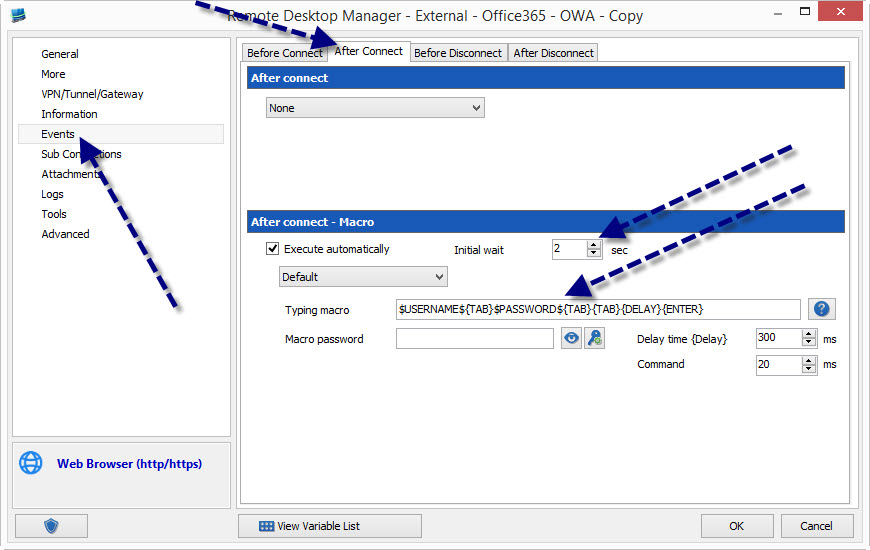
When you use typing macros, after you've launched the session, its best to let go of the mouse/keyboard and wait until the macro completes, we send key presses to the foreground window so you do not want to change the focus while it runs.
edited by mcote on 9/18/2014
Maurice
2014-09-18 08-49-26.jpg
@noagenda, believe me if we could we would
embedded IE uses the Microsoft ActiveX which doesn't support this
embedded chrome doesn't offer that capability either
sorry about that
Maurice
Yes but there's various Chrome extensions that solve this like MultiLogin. It's like incognito mode where each new tab can be separate login session. I use it on Office 365.
https://chrome.google.com/webstore/detail/multilogin/nccllfnllopfpcbjdgjdlfmomnfgnnbk
Embedded chrome is not a google browser, its a library that provides the same engine.
It does not support add-ons.
Maurice
I know this thread may be a little old but it is exactly the topic I was looking for. It seems that this functionality, accessing multiple accounts at once, would be exactly what you would use RDM for.
I am trying the previous description but the Private Session box is greyed out, any idea why?
Hi,
Could you post a print screen of the Private Session box you are talking about? I can't find it.
David Hervieux
I second Robert.
I wanted to use the "Private session (incognito)" with the External Chrome but the check box is grayed out.
Here is the screenshot you asked... last year:
It's grayed out because the third party we use in embedded mode does not support it. We will add this for sure if they manage to get this working. It's based on the Chromium open source and the private mode is not included in it. Chrome add this feature over the Chromium engine.
Sorry about that.
David Hervieux
David,
You are lightning fast !!! I'm always surprized by the support of your company.
Well. I must be missing something.
My Display is set to External. It fires a Chrome tab.
Am I in embedded mode ???
Thanks,
Pierre
Note: I'll do a refresh before posting my question. You may have replied already before I asked ;-D
Hello Pierre,
I looked at the code and there is an issue with the state of the checkbox. I believe it should always be enabled in Chrome. I'll do some testing to make sure the feature works and get back to you on that. Thanks for pointing it out!
Regards,
Hubert Mireault
This should be fixed in the next version of RDM.
Regards,
Hubert Mireault
We will have private session (incognito) mode available in beta version 11.1.3.0 of RDM for embedded Chrome web browser sessions. Feedback is appreciated.
Regards,
Hubert Mireault
I'll provide feedback asap.
Thanks.
YOU ROCK !!!!!!! :) :) :) :) :) :) :) :)
Incognito now works both in external mode (bug correction) and in embedded mode (improvement).
THANKS A LOT !!!
It's our pleasure Pierre! If you encounter any other issue, be sure to notify us.
Regards,
Hubert Mireault