Clemens Schittenberger
'show password window' issues
Hi David,
thank you for the quick response! We are looking forward to the next version ;)
Best regards,
Clemens
'show password window' issues
Since 2026.3.x (I can't say exactely since when, because we just started with 2026.3.12.0 this week) we had to remark that there are really a lot of UI changes ... among others the 'show password window' minimize button is missing?!
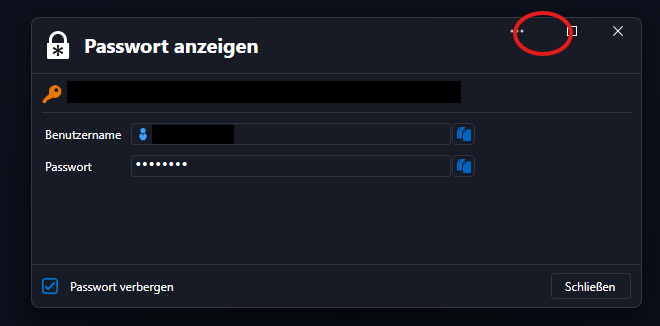
This was somehow comfortable it you have some of them opened and also a litte more secure than show them all on the desktop ...
What leads to the next finding: the 'show password' option in this window is valid for ALL same windows and FOREVER (even closed RDM and opened it again) until one manually change it back?!! This is surely no security improvement!
Can you please tell me, if these 'features' were meant this way? We'd really like to get back the former behaviour! ;)
Thank you!
Clemens
missing column content in export from user and security management
in 2024.3.26.0 it's fixed now! :)
'Fixed an export user missing MFA column'
Thank you!
Best regards,
Clemens
missing column content in export from user and security management
Hello,
I have made a fix and this will be in the next minor update.
Regards
Hi! Thanks for that! :)
Best regards,
Clemens
missing column content in export from user and security management
Hi!
I just exported the user list to compare it with my excel sheet and found out, that the 'has MFA configured' column still isn't there! Can you please boost a fix for that again?
Thank you!
Best regard,
Clemens
In RDM, is there any way to manually sort/rearrange folders located under other folders?
Hi!
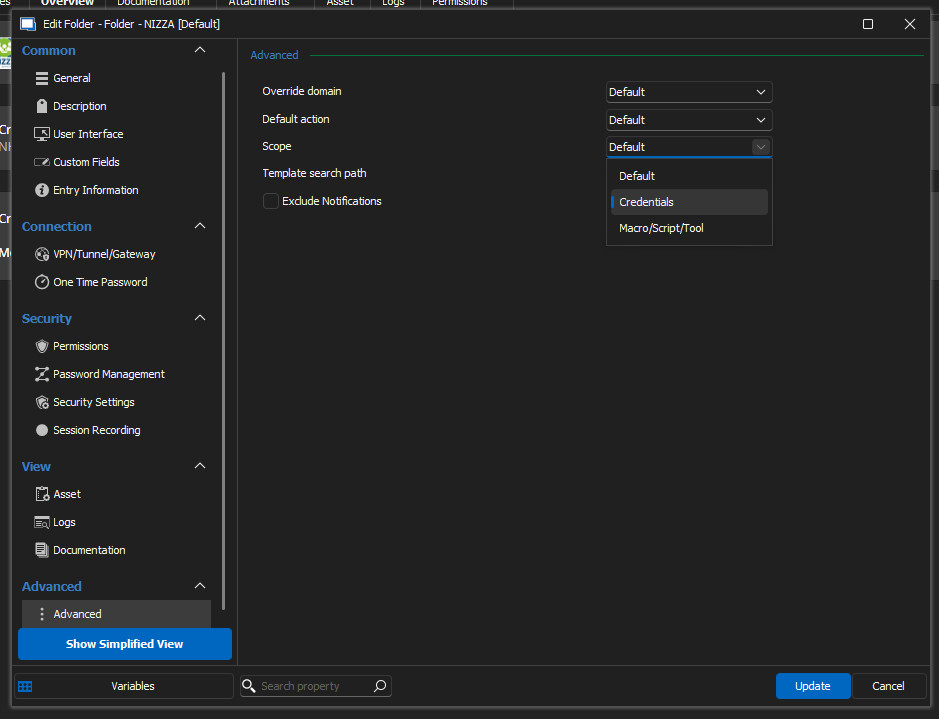
My colleague found it accidentally: in advanced properties the Scope was as 'Credentials' set. No idea who, when and why this was set and why it only got a problem after the upgrade to 2024 version. He changed it to Default and the sorting order was right again ...
Best regards,
Clemens
In RDM, is there any way to manually sort/rearrange folders located under other folders?
Hi David,
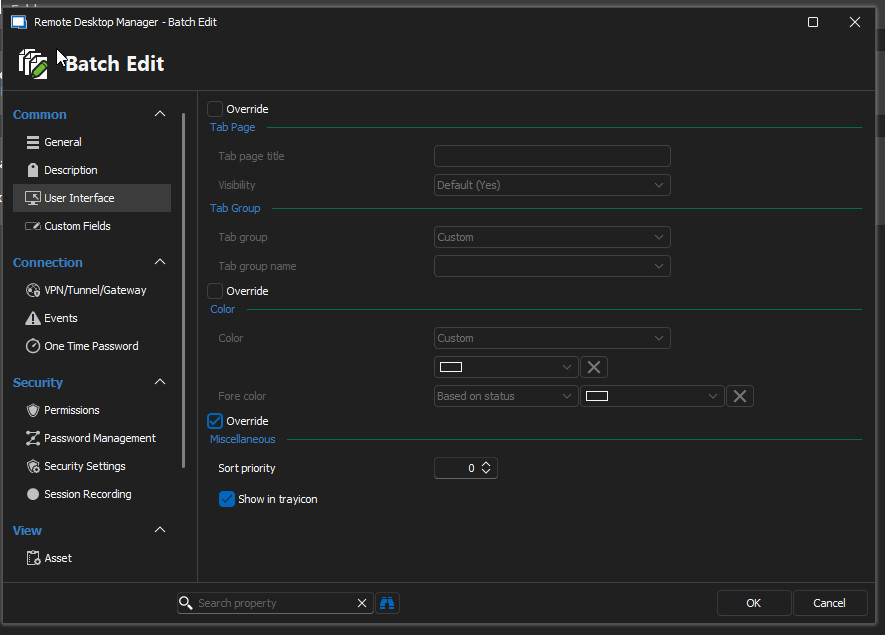
I just checked the several dozens of folders and some connections and found some with sort priority set. I changed them and to be sure, I used Batch Edit to override all the connection sort priority and then Batch Edit Sort Priority (-> screenshots). But nothing changed! The folder still stays at the end of the list. 🤷♂️
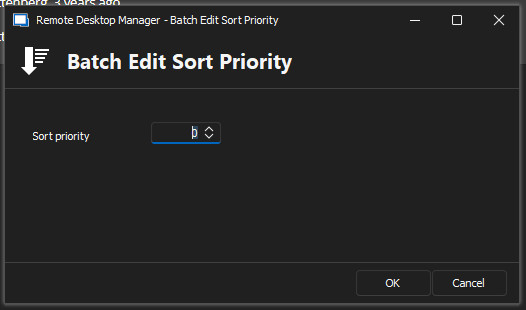
Best regards,
Clemens
In RDM, is there any way to manually sort/rearrange folders located under other folders?
Hi James,
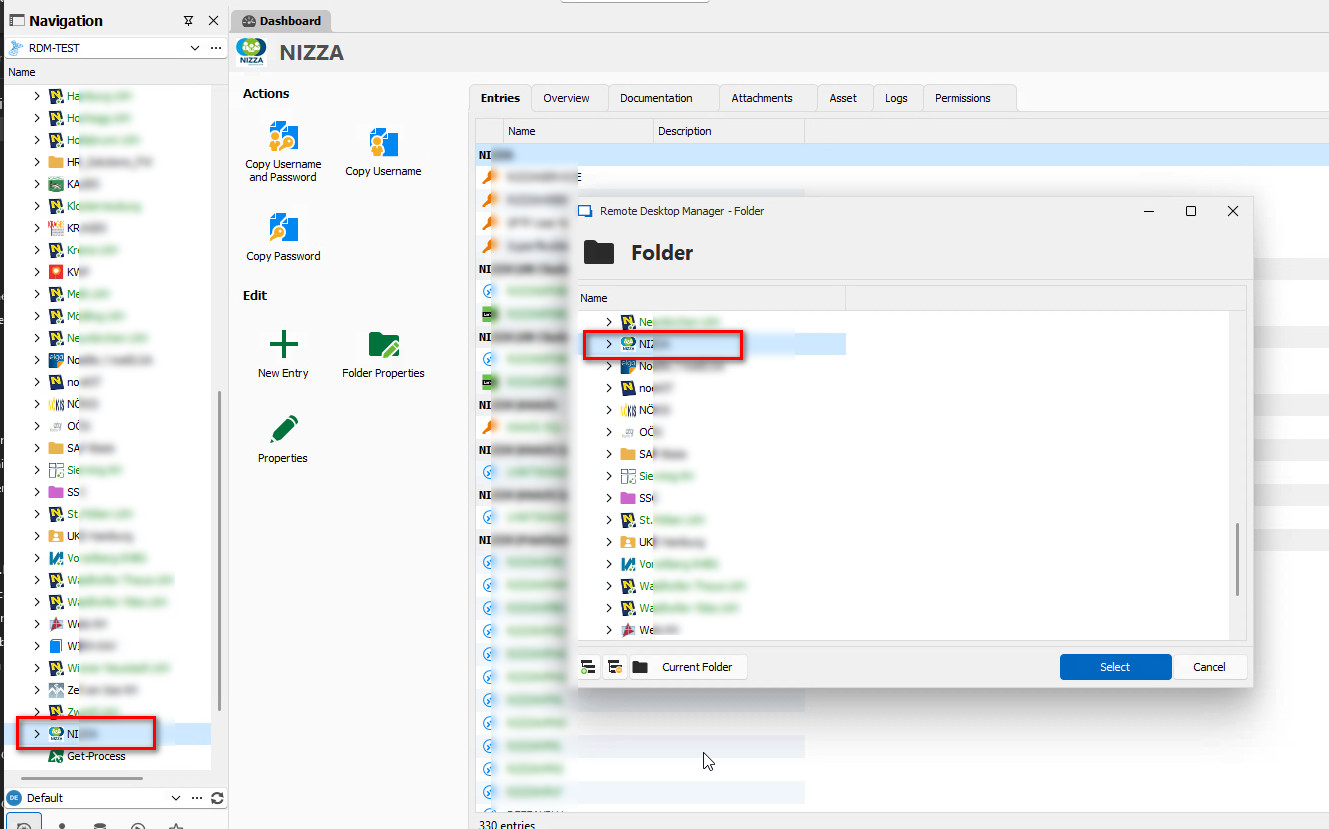
I just found this post as I looked for a solution for our actual problem: since the upgrade to 2024.x (actually we use the recent version 2024.1.20.0) one of our folders is shown at the lower end of the navigation pane. By alphabetical order it should be about in the middle of the list - it has NO sort priority and if you set a sort priority this doesn't work! But for example in the 'Move' dialog it is shown right -> please have a look at the screenshot attached.
Is there anything I've overseen? I compared the user interface settings of this folder with some others and there are some with a sort priority (shown at the tip of the list) and most with no (0) sort priority (shown alphabetically) ...
Database MFA with fixed seed/security-key with TOTP
I just had another idea: we have a handfull of users that have such a hardware token ... is it possible to use the free Devolutions Server to authenticate these against our RDM SQL database? I mean technically and legally?
thx!
Best regards,
Clemens
missing column content in export from user and security management
Thank you very much, David! :)
Best regards,
Clemens
custom icons collection lost
Hi!
No problem! ;)
Oh, completely overseen! thx!
Best regards,
Clemens
custom icons collection lost
Hi Hubert,
are there any news on this topic? I didn't find anything about it in the release notes and in RDM itself.
Thx!
Best regards,
Clemens
missing column content in export from user and security management


Hi!
In export (no matter which format) from the user and security management, the content of the 'has MFA configured' column is missing!
The columns 'is administrator', 'has specific settings' and 'has user vault' have 'checked' or 'unchecked' (in xlsx export) or 'yes' or 'no' (in html export). In xml export MFA is complete missing, in every other format only the content of the column - only the headline exists.
Screenshots attached.
Please include it in the export! ;)
Thank you!
Best regards,
Clemens
copy of SQL database for testing purposes?
Hi!
Is it possible to just make a copy of our existing RDM-SQL database (backup and restore with new name - in SQL management studio) for testing e.g. database upgrade to 2024-version and so on? Or are there any considerations? Do you have any experiences with that?
We've just done it and so far no issues. MFA is the same as for the 'original' database. Private Vault is there, admin rights too ...
Thanks!
Best regards,
Clemens
The MFA to connect to the DB is eliminated for our users and requires reconfiguration
Hi Jeff,
where to find the RDM version, I knew - I wrote our actual version (2023.3.39.0) in my post. But Patrick wanted to know our SQL server version.
Sorry, my fault - I just saw that my answer was ambiguous ;)
Best regards,
Clemens
The MFA to connect to the DB is eliminated for our users and requires reconfiguration
Hi!
We are using SQL Server. Where can I find the version in RDM?
thx!
Best regards,
Clemens
The MFA to connect to the DB is eliminated for our users and requires reconfiguration
Hi Patrick,
we have a similar problem: during the last 2 weeks we activated Data Source MFA in the users My Account Settings in RDM. Users who had a problem with a missing certificate and installing the update to the then latest version 2023.3.39.0, I had to uninstall the existing version (most 2022.x.x.x) and install RDM again. Then we activated MFA. Today some users called and told me and my colleague that MFA is'nt active any more. No query for the code came after starting RDM. The users said, that they just did an update to 2023.3.39.0 (as our database is not yet upgraded to 2024) and lost the MFA settings. They have to set it register it again. I can't say from witch version they all did the update, but I know, that one user upgraded from 2023.3.36.0 to 2023.3.39.0 and lost his MFA. He authenticated today in the morning, worked with RDM and later he updated and after the start no more MFA query.
I tried to cancel the MFA multiple times but could not reproduce the issue you mentioned above.
Can you try and tell me, if the MFA setting stays after the upgrade to the 2024 version?
Thank you!
Best regards,
Clemens
Database MFA with fixed seed/security-key with TOTP
we'd need that feature too! ;)
Thanks!
Best regards,
Clemens
MFA improvements
Hi Hubert,
sorry for the delay! Thanks for the info and the hint to the other post with the feature request! And especially the raise of the priority for that request! :)
Best regards,
Clemens
MFA improvements
Hi!
Thanks for the Mac issue!
For the next two topics: we use SQL Server as datasource ...
Best regards,
Clemens
MFA improvements
Hello Hubert,
I just got an issue with MFA reported by another colleague: he is working with RDM on his Mac (MacOS 14.3.0 and latest RDM version 2023.3.13.4). When he mistypes the authentication code, he gets the error that he has entered a wrong code and after confirmation the authentication window isn't there any more. An empty RDM is shown and when he hits refresh the connection to the database is established (WITHOUT another demand for an authentication code) and all entries are shown! I think this could be a bug?! ;)
Another question that just came up: is there a counter for failed authentication attempts and a lockout for a special amount of time or something?
And one more question concerning tokens: is there any chance to use these tokens to authenticate in RDM: https://www.token2.com/shop/product/token2-c202-hardware-token ?
Thank you!
Best regards,
Clemens
MFA improvements
Hello Hubert,
thank you for the quick answer! We'll try this out, when we change the option on MFA requirement for the database.
Best regards,
Clemens
MFA improvements
Hi!
We're just be doing MFA activation in our enterprise. One thing the I found out today morning was, that I could'nt connect to the database (this happens sometimes, I don't know why) and RDM suggested starting offline mode. As I did, no MFA was required, only later as I switched to online mode. My colleague told me, that he observe this for a longer time and the behavior as different in different versions of RDM ... I have to mention, that he only changed the settings on the user side (for each user separatly) yet, to solve several problems (like older versions, missing certificates, support at installing/updating/configuration and so on) one by one.
I hope the standard behavior at changing the online/offline state is a re-authentication with the MFA?
Thank you!
Clemens
is there a need to upgrade from 2022.2.33.0 to version 2023.3.24.0 first, then finally to 2023.3.25.0?
ok, I'll give it a try, next time I get the error! thank you!
is there a need to upgrade from 2022.2.33.0 to version 2023.3.24.0 first, then finally to 2023.3.25.0?
Hi Stéfane,
today I got the same error message at the start of RDM, I went offline and tried it again after several minutes. Then I could enter der MFA and it worked again. In the logs (which I sent to you 2 minutes ago) I can't see anything about this ...
Best regards,
Clemens