The MFA to connect to the DB is eliminated for our users and requires reconfiguration
The MFA to connect to the DB is eliminated for our users and requires reconfiguration

Good morning,
Since August 2023, we have been detecting that our users are being asked to reconfigure the previously configured 2FA TOTP.
This error happens to all our users randomly, we don't know where the problem comes from
We have been investigating and it does not seem like a version error, because in the latest version it also happens
The image shows the message that appears when 2FA reconfiguration is required. This message appears when connecting to the database in "online" mode
Greetings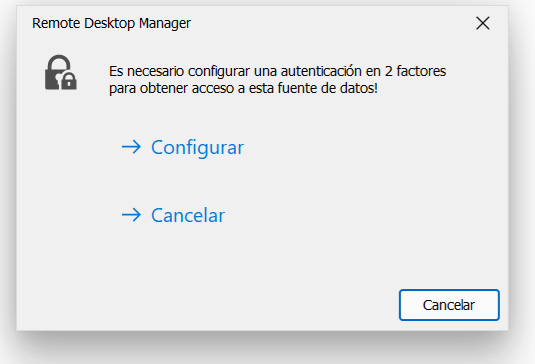
problema rdm.png
All Comments (13)
Hello jexpositom,
Thank you for contacting us on that matter.
Could you tell me if this MFA is configured directly in RDM?
Or is this related to your data source?
Is it related to their Devolutions account?
Which version of RDM and what type of data sources are you currently using?
Best regards,
Patrick Ouimet
Hello,
The configuration is as follows:
- The MFA is required to enter the Database, configured through Google Authenticator
- It is not related to the Returns account, it happens with all users
- The version is 2023.3.24
Greetings
Thank you jexpositom,
I will run some tests for the next couple of days.
Could you tell me if you are on the latest version of RDM 2023.3.25.0?
Could you tell me if this issue occurs on a specific day?
Best regards,
Patrick Ouimet
Thank you
Today we updated to that version and it happened to us again
It happens randomly, not necessarily on a specific day.
We have also carried out tests in case there was a problem with the time on the user's computer, but in the tests we were never asked to reconfigure the MFA
Greetings
Hello jexpositom,
Just a quick follow-up on my test.
I tested the MFA on RDM and the database for a week without issues.
I will run another week with the force MFA on the database.
In the meantime, could you tell me if some users are using Workspace or only RDM?
Best regards,
Patrick Ouimet
Hello
Only RDM
Hello,
We appreciate your patience.
After multiple tests with the administrator and user's account, I could reproduce this issue only when I cancelled the operation multiple times.
Could you tell me if your users tried to cancel this operation or failed to enter their MFA multiple times?
Best regards,
Patrick Ouimet
Hi Patrick,
we have a similar problem: during the last 2 weeks we activated Data Source MFA in the users My Account Settings in RDM. Users who had a problem with a missing certificate and installing the update to the then latest version 2023.3.39.0, I had to uninstall the existing version (most 2022.x.x.x) and install RDM again. Then we activated MFA. Today some users called and told me and my colleague that MFA is'nt active any more. No query for the code came after starting RDM. The users said, that they just did an update to 2023.3.39.0 (as our database is not yet upgraded to 2024) and lost the MFA settings. They have to set it register it again. I can't say from witch version they all did the update, but I know, that one user upgraded from 2023.3.36.0 to 2023.3.39.0 and lost his MFA. He authenticated today in the morning, worked with RDM and later he updated and after the start no more MFA query.
I tried to cancel the MFA multiple times but could not reproduce the issue you mentioned above.
Can you try and tell me, if the MFA setting stays after the upgrade to the 2024 version?
Thank you!
Best regards,
Clemens
Hello Clemens,
I hope you're doing well. I wanted to follow up on our previous conversation regarding the MFA settings in your SQL Server. Depending on the data source you're using and the version of RDM you're working with, it's possible that the behaviour you're experiencing is normal.
I wanted to let you know that with SQL Server version 2022.2, the MFA settings were saved in the configuration file. However, when you upgrade to version 2022.3 or any version thereafter, the MFA settings are saved directly in the database.
So, could you please confirm which data source you're using so that we can further investigate this issue?
Please let me know if you have any questions or concerns.
Best regards,
Patrick Ouimet
Hi!
We are using SQL Server. Where can I find the version in RDM?
thx!
Best regards,
Clemens
Hello,
The RDM version could be found in the Help -> About section in the ribbon.
Best regards,
Jeff Dagenais
Hi Jeff,
where to find the RDM version, I knew - I wrote our actual version (2023.3.39.0) in my post. But Patrick wanted to know our SQL server version.
Sorry, my fault - I just saw that my answer was ambiguous ;)
Best regards,
Clemens
Hello Clemens,
Since this is an SQL server, the version of RDM used to configure the MFA on the database could be faulty here.
I will need to do some tests between both versions to know the exact behaviour and provide an accurate answer to what happened with your MFA configuration.
2022.2 to 2023.3.
In the meantime, since you have reconfigured the MFA, could you tell me if you are still having this issue?
Best regards,
Patrick Ouimet